
A modern all-in-one EPOS terminal typically draws 40 to 60 watts, so one till running all day costs roughly £50 to £150 a year in electricity at current UK business rates. The printer, cash drawer, scanner and card reader add a little more, but they are small next to the screen and the computer inside it. Below you will find typical figures for each part of a till, worked running costs you can adapt to your own opening hours, a simple way to measure your own kit and practical ways to trim the bill without slowing service.
TL;DR
- An all-in-one EPOS terminal is typically 40 to 60 W. A whole checkout lane is often planned at about 230 VA, but that is a wiring figure, not what the till uses on average.
- At a micro-business rate of about 28p per kWh, a 60 W terminal left on 24 hours a day costs about £149 a year. Switched off outside a 14-hour trading day, it costs about £87.
- Measure rather than guess: a plug-in energy monitor shows real kWh, including standby.
- Adding RFID to an EPOS setup adds a reader and connectivity, and newer readers are designed to use less power.
- Power is a small cost per till. Reliability and fast service matter far more to your profit, so never cut energy at the expense of uptime.
Table of Contents
- How much power does an EPOS system actually use?
- What does it cost to run an EPOS system in the UK?
- How to measure your own tills
- What makes an EPOS system use more or less power?
- Cutting EPOS energy use without slowing service
- EPOS and RFID: what changes for power and setup?
- Our perspective: power is the wrong thing to worry about first
- Looking for an EPOS system for your shop or restaurant?
- FAQ
- Sources
How much power does an EPOS system actually use?
An EPOS system is not one box. It is a terminal plus whatever is plugged into it. Here are typical figures for each part, taken from an electrical-load guide aimed at retail checkouts. It is written for the US, but watt ratings for this kind of hardware are much the same in the UK.
| Part of the till | Typical load |
|---|---|
| All-in-one terminal | 40 to 60 W (60 to 90 VA) |
| Cash drawer | 5 to 10 VA |
| Barcode scanner | 3 to 5 VA |
| Card reader | 5 to 10 VA |
| Whole checkout lane | About 230 VA, up to 260 VA if peripherals have separate power supplies |
Source for all rows: electrical load guide for retail POS lanes.
Watts and VA are close cousins but not identical. VA is the figure electricians use to size circuits. Watts is what you pay for. For a till, think of VA as the ceiling and watts as the everyday reality.
Receipt printers: high peak, low average
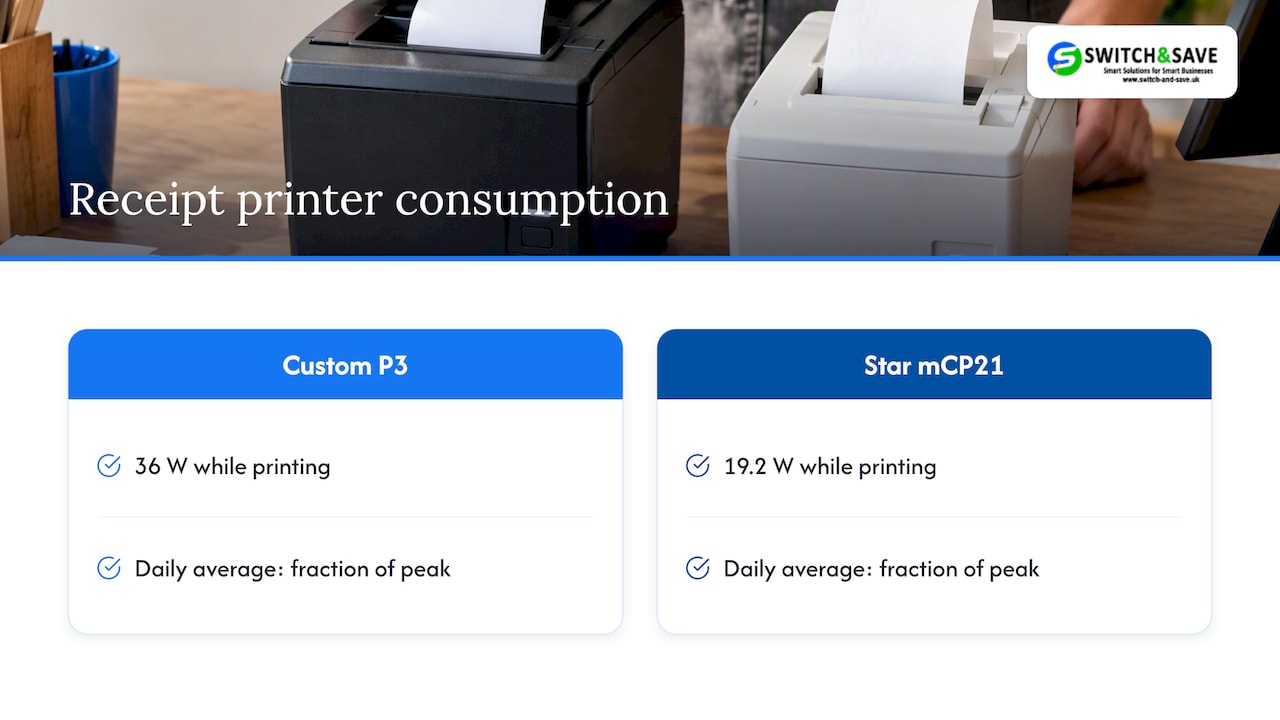
Printers are the one part with a noticeable spike. A thermal printer such as the Custom P3 is listed at a medium consumption of 1.5 A at 24 V DC, which is around 36 W while it is working. Another compact model, the Star mCP21, is listed at about 19.2 W while printing. The key phrase is “while printing”. A receipt takes a couple of seconds, so across a day the printer’s average draw is a fraction of its peak.
That peak still matters for wiring. Electrical contractors point out that connected load is a floor, not a ceiling, for circuit planning, because printer heat cycles and compressor start-ups can cause nuisance tripping if circuits are shared carelessly. In a café or restaurant, that often means a till plugged into the same socket run as a fridge or coffee machine.
The terminal is the main cost
In most shops the screen and processor account for the bulk of the draw. Compare that with a traditional desktop PC setup. One ranking guide on POS electricity costs puts a standard desktop computer at 100 to 400 watts, depending on how it is built. A purpose-built all-in-one EPOS terminal sits well below that, which is one reason many businesses in Birmingham and Coventry have moved off old PC-and-monitor tills.
What does it cost to run an EPOS system in the UK?
The sum is simple:
watts ÷ 1,000 × hours used × unit rate = cost
For the unit rate, one business energy price comparison lists an average of 28.3p per kWh excluding the Climate Change Levy for micro businesses (5,000 to 15,000 kWh a year) as of October 2026. Your own contract will differ, and VAT and standing charges sit on top, so check your latest bill. Use 28p as a working figure.
Worked examples
All examples assume a 60 W terminal, the top of the typical range, and ignore the small peripherals.
| Scenario | Hours per year | kWh per year | Approx. cost at 28.3p |
|---|---|---|---|
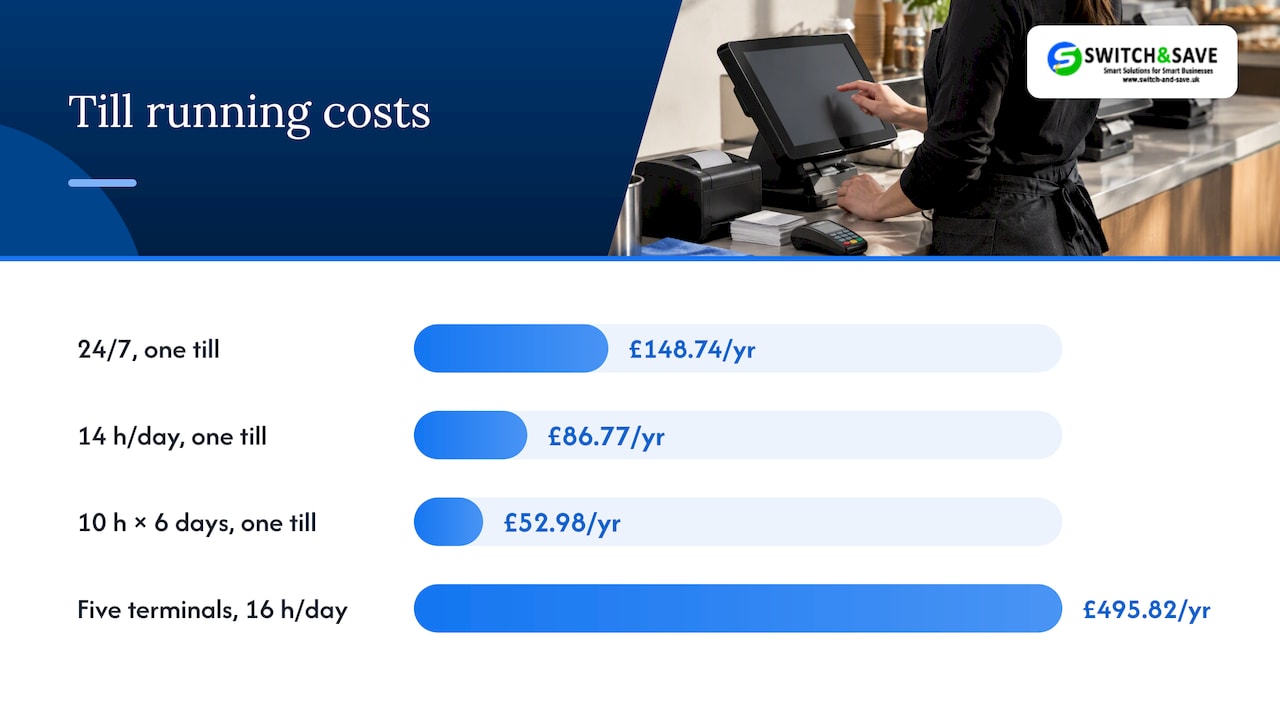
| One till, on 24/7 | 8,760 | 525.6 | £148.74 |
| One till, 14 hours a day, 7 days | 5,110 | 306.6 | £86.77 |
| One till, 10 hours a day, 6 days (a typical shop) | 3,120 | 187.2 | £52.98 |
| Five terminals in a restaurant, 16 hours a day, 365 days | 29,200 (combined) | 1,752 | £495.82 |
These are our own calculations from the formula above, not measured figures, so treat them as a guide. For comparison, a US national laboratory assessment of retail plug loads put the energy cost of point-of-sale equipment at around $100 per year per POS if powered continuously, noting that it varies with local rates and usage. That is in the same ballpark as our 24/7 figure.
The takeaway: a single till costs less to power than most businesses spend on receipt rolls. Even a busy five-terminal restaurant is looking at hundreds of pounds a year, not thousands.
Does standby count?
Yes, but it is small. A terminal that is asleep draws far less than one with the screen lit. The simplest way to know is to measure it, which brings us to the next section.
How to measure your own tills
Spec sheets give maximums. Your real use depends on screen brightness, what is plugged in and how often the printer fires. Measuring takes ten minutes of effort and a few days of waiting.
- Buy a plug-in energy monitor. Consumer guidance explains that these measure electricity use through a socket, and that for devices left on continuously you should take readings regularly, such as daily, and average them.
- Plug the till’s power strip into it, so you capture terminal, printer and drawer together.
- Read it at closing time for a full trading week, including your busiest day.
- Do one weekend or quiet-day reading with the system left in standby to see your overnight load.
- Multiply the average daily kWh by 365 and by your unit rate.
One caution. Plug-in monitors suit plug-in appliances within the product’s rating and should not be used on hard-wired appliances. If a till or kitchen screen is wired in, ask a qualified electrician to check the load instead.
If you run more than one site, compare stores on a fair basis. Energy-management specialists suggest that consumption per checkout and per operating hour shows inefficiency better than comparing total store usage. A till that uses twice the energy of its twin is worth investigating.
What makes an EPOS system use more or less power?
The main factors are the ones you can mostly control:
- Number of terminals. Every extra screen adds load. Do you need a second till in the quiet part of the day?
- Hours on. Overnight idling is the biggest avoidable cost for most small businesses.
- Separately powered peripherals. Guidance notes that load depends on equipment ratings and on whether peripherals have their own power supplies. Printers and scanners that draw power from the terminal can simplify cabling.
- Screen brightness and sleep settings. A dimmer screen and a sensible sleep timer cost nothing.
- Old hardware. Older PC-based tills with a separate monitor draw more than a current all-in-one unit.
- Shared circuits. This is about safety rather than cost. Electrical contractors recommend dedicated circuits for POS equipment to avoid overload from shared devices and make faults easier to trace.
Cutting EPOS energy use without slowing service
Savings here are modest, so keep the fixes cheap and low-risk.
- Switch off at close. Shut the terminal down properly and cut power at the socket if your system allows it. Do not do this if your software runs overnight updates or stock syncs; check your settings first.
- Set sleep and screen-dim timers to a few minutes.
- Use one power strip per lane with a switch, so peripherals do not sit in standby.
- Replace very old PC tills with an all-in-one terminal. The hardware in our range is built around that format, such as the 15.6-inch all-in-one EPOS touch terminal with printer and scanner and the dual-screen EPOS with built-in printer. Fewer separate boxes means fewer power bricks.
- Look at the whole premises. Till power is one small line in the bill. Lighting, refrigeration and heating are usually bigger, and a simple approach of low-cost fixes and energy audits shows where the real savings sit.
- Never trade uptime for pennies. A till that crashes in the lunch rush costs far more than it saves. Our guide to stopping POS downtime covers the habits that matter more than any watt count.
A word on safety. If you are adding sockets, moving circuits or noticing breakers tripping when the printer fires, that is a job for a qualified electrician, not a DIY fix.
EPOS and RFID: what changes for power and setup?
Some retailers, especially in fashion and general merchandise, ask about RFID integration. In plain terms, RFID lets tagged items be read without scanning each barcode, so a basket can be recognised faster and stock counts become quicker.
Integration generally involves three things:
- A reader at the till, at self-checkout or in a handheld form.
- Software that links tag reads to your product and stock records in the EPOS.
- Connectivity, usually a network connection or Bluetooth, so reads reach the system.
On the hardware side, one self-checkout reader from Nedap has integrated internet connectivity for remote maintenance, firmware updates and system-health monitoring, and the maker says it has up to 50% lower chip power consumption. That suggests the reader itself is not a big energy burden, though you should check the rated draw of any model you consider and add it to your lane total.
For mobile stocktakes, a portable Bluetooth reader such as the Unitech RP902 is listed as capable of 75,000 scans over 12 hours on one battery charge. Battery devices charge off the mains, so the cost is tiny.
Before you commit to RFID, ask whether your EPOS software can accept reader input and match tags to stock items. Speak to us first if you are unsure; we can talk through what your current setup supports.
Our perspective: power is the wrong thing to worry about first
We get asked about power use now and then, usually from owners who have just seen a high energy bill and want to know if the till is to blame. Almost always, it is not. A single terminal costs less to run each year than a few good lunches. What really drains a shop or restaurant is slow checkouts, system crashes, stock errors and staff time spent on workarounds.
That is why we steer people to a few simple priorities. Choose an all-in-one terminal rather than a tower, monitor and loose peripherals. Keep hardware on a tidy, dedicated circuit. Switch things off sensibly at close. Then spend your attention on what actually moves profit: faster service, accurate stock and fewer errors. Our posts on how EPOS systems reduce human errors and how a POS system increases sales in UK retail cover that side.
If you run several tills or sites, a cloud dashboard helps too. You can see what is going on across locations without being there. Our piece on remote POS management explains how.
— Amir
Looking for an EPOS system for your shop or restaurant?
If you are replacing an ageing till in Birmingham, Coventry or anywhere else in the UK, we can help you pick a setup that fits your trading hours and budget.
- 👉 Hospitality: our Hospitality EPOS Bundle is from £349 + VAT upfront, with a monthly service plan on a 12-month minimum term (see EPOS pricing).
- 👉 Payments and EPOS together: every package includes a card machine, subject to provider approval; card processing fees are separate.
- 👉 Retail: see our EPOS bundles for UK retail.
We offer UK-based support and can help you move across from your current provider.
FAQ
How many watts does an EPOS terminal use?
Most all-in-one EPOS terminals are typically 40 to 60 W, according to a retail electrical load guide. Peripherals such as the cash drawer, scanner and card reader add a few more VA each. The exact figure depends on the model, so check the rating label or measure it with a plug-in monitor.
How much does it cost to run a till for a year?
At about 28p per kWh, a 60 W terminal on 24 hours a day costs around £149 a year. If it is on for 10 hours a day, six days a week, that falls to about £53. Your own rate, VAT and contract will change the result slightly.
Should I leave my EPOS on overnight?
Usually not, unless your software needs to run updates or syncs after close. Shutting down saves a small amount and reduces wear on the screen. Check your software’s update schedule first so you do not miss a stock sync.
Does RFID make an EPOS system use a lot more power?
No. A reader adds a modest load, and some makers design readers specifically to cut it, such as Nedap’s self-checkout reader with lower chip power consumption. Add the reader’s rated draw to your lane total and you will have the answer. The bigger question is whether your EPOS software can use the reads.
Sources
- How to Calculate Electrical Load for Retail POS Systems
- Custom P3 POS printer
- Star Micronics mCP21 printer listing
- Business electricity rates, October 2026
- Assessing and Reducing Plug and Process Loads in Retail
- Are energy monitors the best way to measure your power usage? (Which?)
- Smart plugs and energy monitors guide
- Retail POS and checkout energy management
- Nedap iD SCO Pro RFID reader
- Unitech RP902 Bluetooth UHF RFID pocket reader
- Low-cost fixes and energy audits