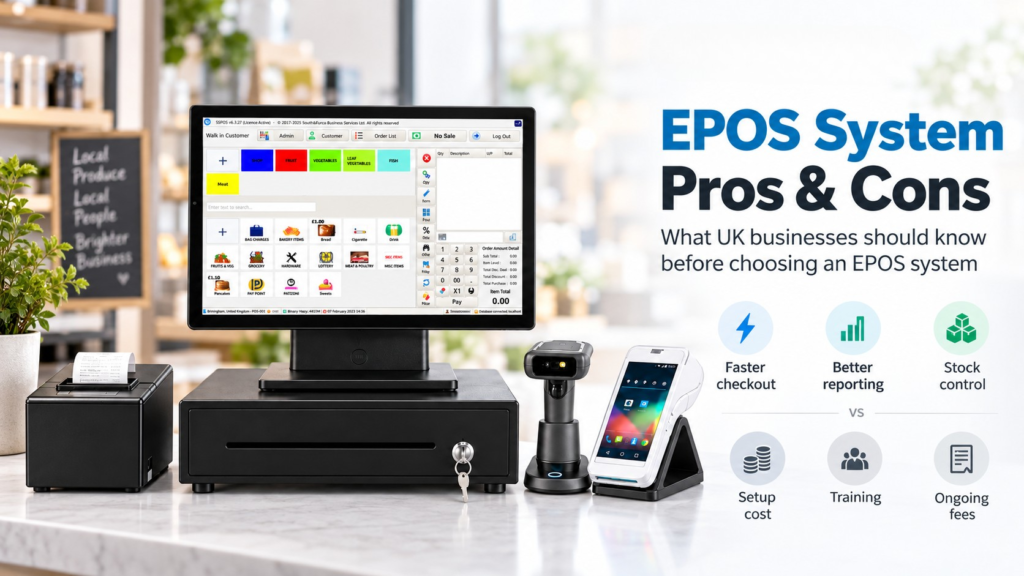
An EPOS system in the UK can make running a retail or hospitality business much easier by combining sales, payments, stock control, reporting and other everyday tasks in one place. The main advantages are faster checkout, fewer manual errors, better stock visibility and clearer business reporting. The disadvantages are the initial cost, possible monthly software fees, staff training and reliance on technology.
For most busy shops, cafés, restaurants, takeaways and growing small businesses, the benefits can outweigh the drawbacks — but only if you choose a system that matches the way your business actually operates.
This guide looks at the pros and cons without pretending an EPOS system is automatically right for everyone.
Key Takeaways
| Area | What you need to know |
|---|---|
| Faster checkout | An EPOS system can make sales and payments quicker, particularly when card payments are integrated |
| Better accuracy | Products, prices and VAT settings can be stored centrally, reducing manual entry |
| Stock control | Sales can automatically affect stock levels, giving you a clearer picture of what you have |
| Reporting | You can see sales, payment methods, products and trading patterns more easily |
| Initial cost | Hardware, installation and software can require an upfront investment |
| Ongoing costs | Some providers charge monthly software, support or integration fees |
| Training | Your team will need time to become comfortable with a new system |
| Reliability | Internet, hardware or software problems can temporarily affect normal operations |
| Best fit | The right EPOS depends on your business type, volume, features and budget |
What Is an EPOS System?
EPOS stands for Electronic Point of Sale.
At its simplest, it’s the system you use to record a sale at the till. Modern EPOS does much more than that.
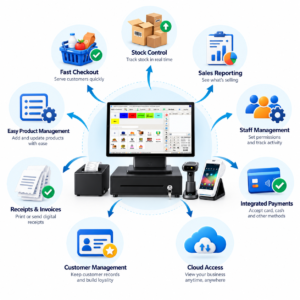
A typical system can combine your touchscreen till, product catalogue, barcode scanner, receipt printer, cash drawer and card payment terminal. More advanced systems may also include stock management, customer accounts, staff permissions, reporting and cloud access.
Switch & Save’s current EPOS system page, for example, covers systems designed for businesses ranging from grocery and convenience stores to cafés, takeaways and restaurants.
So what are the real advantages and disadvantages?
Advantages of Using an EPOS System
1. Faster Checkout
Speed is one of the most noticeable EPOS benefits.
Instead of manually entering prices, staff can scan a barcode, tap a product button or select an item from the screen. The system calculates the transaction automatically.
If your card machine is integrated, things can become even simpler.
So, what actually happens when a customer taps their card?
The EPOS can send the transaction value directly to the payment terminal. That means the employee doesn’t need to type the amount into the card machine separately.
For a busy convenience shop with a queue at 5:30 pm, saving even a few steps on every transaction makes the checkout process much smoother.
2. Fewer Manual Pricing Errors
Traditional tills rely heavily on the person operating them.
If a product costs £3.49 but somebody enters £3.94, you’ve immediately got a problem.
With an EPOS system, prices can be stored against each product. Staff select the product and the correct price is applied automatically.
The same principle can apply to discounts, VAT categories and promotions.
It doesn’t eliminate every possible mistake, but it removes a lot of repetitive manual entry.
3. Better Stock Control
For retailers, this can be one of the biggest benefits.
When you sell an item, an EPOS system can reduce the recorded stock quantity automatically.
Imagine you run a grocery shop with hundreds or thousands of products. Without an EPOS system, checking what’s selling and what needs reordering can involve a lot of manual work.
With stock connected to sales, you can more easily identify:
- low-stock products
- fast-selling lines
- slow-moving products
- products that may need reordering
- discrepancies between recorded and physical stock
A good retail EPOS system doesn’t replace stock takes completely. It simply gives you much better information between them.
For a deeper retail example, see Switch & Save’s guide to choosing an EPOS system for convenience stores.
4. Clearer Sales Reporting
Knowing that you took £2,000 yesterday is useful.
Knowing how you made that £2,000 is much more useful.
EPOS reporting can help you examine areas such as:
- daily and weekly sales
- payment methods
- bestselling products
- category performance
- discounts
- refunds
- VAT
- staff activity
- quieter and busier trading periods
In practice, this can change how you make decisions.
A café owner might discover that breakfast sales are strong Monday to Friday but much weaker on Saturday. A convenience store might see that cold drinks perform particularly well between 3 pm and 6 pm.
You can then make decisions based on actual trading information rather than memory.
5. Integrated Card Payments
Card payments and EPOS work particularly well together.
Without integration, your employee may need to read £18.70 from the till and manually enter £18.70 into the card terminal.
That’s simple enough, but errors happen.
With an integrated setup, the till can pass the amount directly to the card machine. The successful payment can then be recorded against the sale.
This can make reconciliation easier at the end of the day because your EPOS records and payment records are more closely connected.
Switch & Save’s EPOS bundles support compatible integrated card payment options.
6. Better Hospitality Operations
Hospitality businesses often need much more than a standard till.
A restaurant may need tables, split payments and kitchen printing. A takeaway might need collection and delivery orders. A café may want modifiers such as different milk choices, sizes or extras.
That’s where a dedicated hospitality EPOS system becomes useful.
Switch & Save’s current hospitality platform includes functions such as dine-in and takeaway ordering, kitchen printing, split payments, menu management, reporting and online ordering.
You can explore the Switch & Save Hospitality EPOS system if those features are relevant to your business.
7. Access to Business Information Away From the Till
Cloud-based EPOS systems can give business owners access to reports through a browser or online dashboard.
That’s useful if you’re not always physically at the business.
For example, a restaurant owner with two locations may want to check today’s sales without calling each manager.
A shop owner at home might want to see how the afternoon has performed.
Remote access doesn’t mean you should watch every transaction all day. The real advantage is having useful information available when you actually need it.
8. Easier Growth
A basic till may work perfectly well when you have one small shop.
Problems can appear when you add another terminal, another department or another location.
A well-designed EPOS system can give you room to add products, users, tills and locations without rebuilding the entire operation from scratch.
That’s worth thinking about even if expansion isn’t happening tomorrow.
Disadvantages of an EPOS System
EPOS has clear advantages, but there are trade-offs.
1. There Is a Cost
A complete EPOS setup may include:
- touchscreen hardware
- receipt printer
- barcode scanner
- cash drawer
- payment terminal
- software
- installation
- support
- integrations
Some providers charge an upfront hardware price. Others spread the cost through subscriptions or finance.
Don’t compare systems based only on the headline hardware price.
Ask for the total first-year cost and the likely ongoing cost after that.
2. You May Have Monthly Fees
Cloud reporting, software updates, support, online ordering or additional integrations may involve recurring charges.
That isn’t automatically bad.
Good software requires maintenance and support.
The problem comes when you discover charges after you’ve committed.
Before signing anything, ask exactly what’s included and which services carry an additional monthly fee.
3. Staff Need Training
Even an easy EPOS system requires some learning.
Your employees need to know how to:
process sales, apply discounts, issue refunds, change quantities, find products and handle unusual transactions.
Managers may need additional training for reports, stock, staff permissions and configuration.
The good news is that an intuitive interface can reduce the learning curve considerably.
If possible, ask for a live demonstration before purchasing.
4. Technology Can Fail
No technology is completely immune to problems.
A device can fail. A printer can disconnect. The internet can go down. Software may need updating.
That’s why support and offline functionality matter.
For example, if your broadband drops during Friday evening service, can you still take orders? Can you continue recording sales? What happens when the connection returns?
These aren’t glamorous questions, but they’re important ones.
5. More Features Can Mean More Complexity
More isn’t always better.
A small barbershop probably doesn’t need sophisticated restaurant table management.
Likewise, a busy takeaway may find a very basic payment app too restrictive.
Buying a system with dozens of features you’ll never use can make the software harder to operate and potentially more expensive.
Choose around your workflow, not the longest feature list.
6. Moving Systems Can Take Work
If you’ve used the same till for years, your existing system may contain hundreds or thousands of products.
Moving can involve transferring:
product names, prices, categories, VAT settings, customers, menus and other business information.
Ask potential providers what migration assistance they offer before committing.
Good preparation can make the transition much easier.
EPOS Pros and Cons for Different UK Businesses
The value of an EPOS system in UK businesses depends heavily on the type of operation.
Convenience stores and grocery shops
The strongest benefits are usually barcode scanning, fast checkout, stock control, product reporting and integrated payments.
The main challenge is setting up a large product catalogue correctly.
Restaurants and cafés
Table management, kitchen printing, modifiers, split bills and staff controls can be highly useful.
However, configuration may take longer because menus and service workflows tend to be more complex.
Takeaways
An EPOS can bring counter orders, collections, deliveries and kitchen operations together.
The downside is that you’ll need to check whether the system integrates properly with the ordering channels you actually use.
Mobile phone shops
Useful features may include product management, customer records, stock visibility, receipts and different payment methods.
A simple business may not need every hospitality-style feature, so configuration matters.
Small independent retailers
EPOS can provide much better visibility than a basic cash register.
But if you have a tiny product range and only a handful of transactions each day, you should consider whether the extra functionality justifies the expense.
Is an EPOS System Worth It?
An EPOS system is usually worth considering when your existing setup is creating unnecessary work.
Signs that you may benefit include:
- queues are becoming difficult to manage
- staff regularly enter prices manually
- you’re unsure what stock you actually have
- reconciling card payments takes too long
- reports are difficult to produce
- you can’t easily identify bestselling products
- you want to manage more than one till or location
- you’re using several disconnected systems
On the other hand, if your operation is extremely simple and your existing till already handles everything you need, upgrading simply for the sake of having newer technology may not make financial sense.
The question isn’t, “Is EPOS good?”
It’s:
“Will this EPOS solve problems that cost my business time or money?”
That’s a much better way to decide.

What Should You Check Before Choosing an EPOS System?
Start with your everyday workflow.
Think through a normal sale from beginning to end.
How does the customer order? How does your employee find the product? How is payment taken? Does something need printing? Does stock change? What information do you want to see later?
Then check the practical details.
Look at hardware cost, software fees, payment integration, stock functions, reporting, customer support, contract terms, data migration, hardware compatibility and what happens if the internet fails.
For hospitality, also check tables, kitchen printing, modifiers, delivery orders and split payments.
For retail, focus more heavily on barcode scanning, product management, stock, suppliers, pricing and reporting.
How Switch & Save Can Help
Switch & Save supports UK businesses with EPOS systems, card payment solutions and business finance.
Rather than choosing an EPOS simply because it has the most features, the aim should be to find a setup that fits how your business operates.
That could mean a straightforward retail EPOS for a convenience store, a hospitality system with kitchen workflows for a restaurant, or an integrated payment setup that reduces manual card-machine entry.
If the upfront cost of new equipment is also a concern, eligible businesses can explore Switch & Save’s business finance options. Terms and availability depend on the finance provider’s assessment. Switch&Save
Switch & Save helps UK businesses reduce costs with AI-powered EPOS systems, card payment solutions and business finance.
Frequently Asked Questions
What are the main advantages of an EPOS system?
The main advantages are faster checkout, more accurate transactions, integrated payments, improved stock control, better reporting and easier access to business information.
What are the main disadvantages of EPOS?
Potential disadvantages include upfront costs, recurring software fees, staff training, technology dependence and the work involved in migrating from an existing system.
Is an EPOS system suitable for a small business?
Yes, provided the system matches the size and needs of the business. A small shop may benefit from a simple EPOS setup without needing every advanced feature available.
Does EPOS work without the internet?
It depends on the system. Some EPOS platforms offer offline functionality for certain operations, while cloud features and payment services may still require connectivity. Ask the provider exactly what continues working during an internet outage.
Can an EPOS system manage stock?
Many retail EPOS systems can update stock quantities as products are sold and provide reports or low-stock information. The exact stock-control functionality varies by provider.
Can an EPOS system connect to a card machine?
Yes. Many modern EPOS systems support compatible integrated payment terminals. This can send the sale amount directly to the card machine and reduce manual entry.
Is EPOS useful for restaurants and takeaways?
Yes. Hospitality-specific systems can support tables, kitchen printing, order modifiers, collection, delivery, split payments and detailed reporting.
How much does an EPOS system cost in the UK?
Costs vary considerably according to hardware, software, number of tills, integrations and support. Compare the total upfront and ongoing cost rather than looking only at the advertised starting price.
Should I replace my traditional till with EPOS?
Consider replacing it when your existing till is limiting checkout speed, reporting, stock management, payment integration or your ability to expand. If your existing setup still handles everything efficiently, there may be less urgency to change.