A café till has one main job: keeping the morning queue moving. It has to cope with a flat white, a toastie for the kitchen and a “can I have that to take away?” in a few seconds. Afterwards it should tell you what sold, when, and how the day went.
Switch&Save EPOS is the café EPOS system we supply to cafés and coffee shops across the UK. It runs on a double-screen till with a customer-facing second screen, works with DNA Payments and Teya card machines, and comes with set-up help and UK support from our team in Birmingham. The café system is part of our hospitality EPOS range.
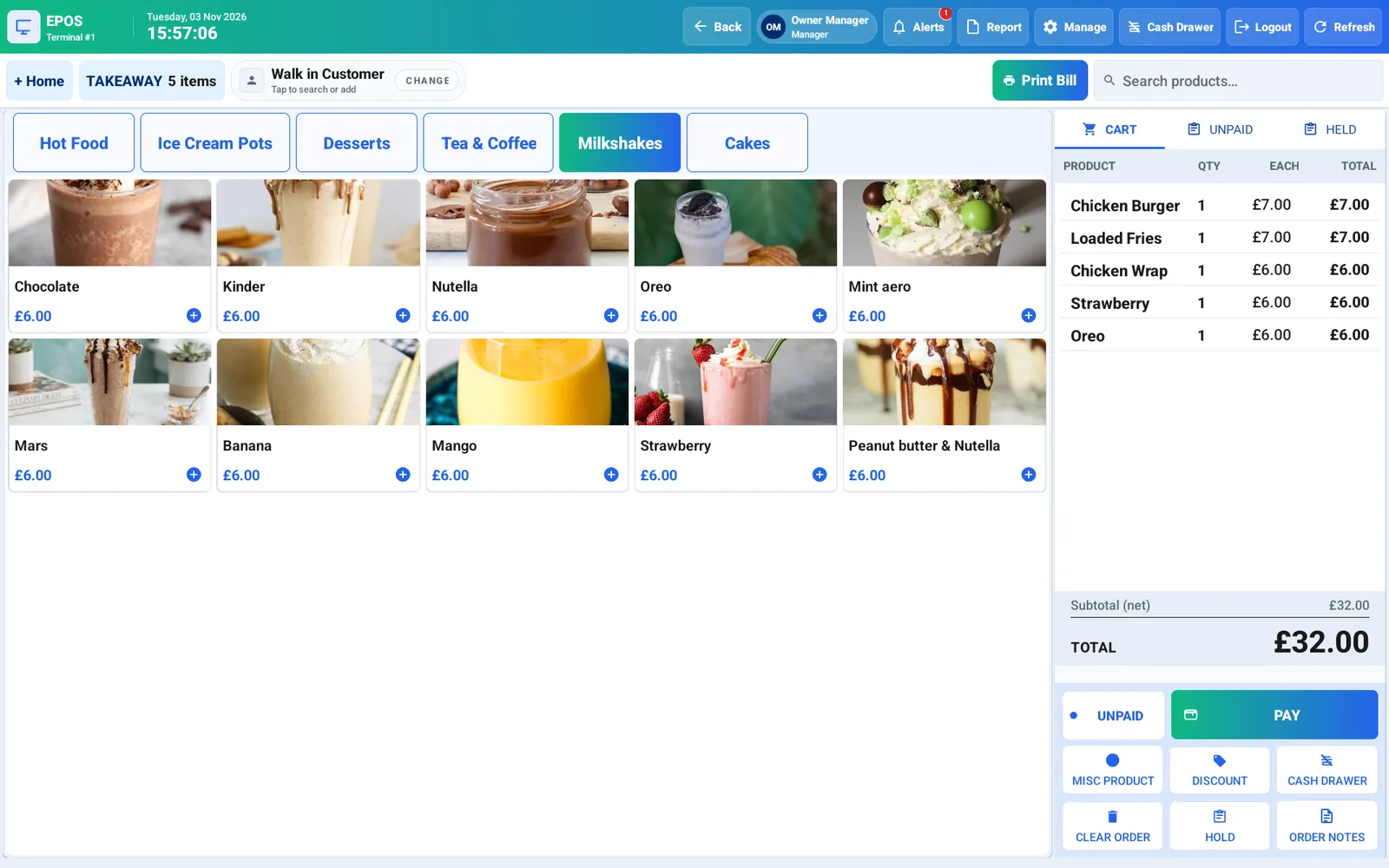
What does a café till need to do in the morning rush?
- Fast, easy ordering: a photo menu with category tabs that your staff learn in minutes, and a search box for anything that isn’t on the first screen.
- One tap to pay, discount or hold: park an order while a customer decides, and serve the next person in the queue.
- Card payments built in: the till sends the amount to your DNA Payments or Teya card machine, so nobody keys it in twice. Quick cash buttons and tips are there too. Card processing fees are separate and quoted by the card provider: see card machines and card machine fees.
- A customer display: customers see their order on the second screen, then your offers, such as a pastry with any coffee, while the till is idle.
- One-tap discounts: set your own offers, such as a breakfast deal or a staff discount, and apply them instantly.
Eat in or take away: what about VAT?
Every order is taken as takeaway, dine-in or collection, and the till’s real-time reports include VAT. That matters in a café, because the same item can be taxed differently depending on how it is sold. Food and drink eaten on your premises, and hot takeaway food and drink, are generally standard-rated. Much cold takeaway food is zero-rated, but there are exceptions such as confectionery, crisps and most soft drinks.
The rules have plenty of edge cases, so check HMRC’s VAT Notice 709/1 or ask your accountant how your menu should be set up. Our article on VAT rates at the till explains the common set-up mistakes.
Can I serve at tables as well as the counter?
Yes. If you have seating, a live floor plan shows your tables and every table keeps its own order, so a second round of drinks adds to the right bill. Split the bill by amount, by person or by item when a group pays separately. Collection orders are kept separate too, so a pre-ordered office run doesn’t get mixed up with the queue.
How do drinks and food orders reach the kitchen?
Kitchen printing sends the right items to the right printer. Hot food can print in the kitchen while drinks stay at the coffee machine, so the barista and the cook each see only their own orders. The bundle includes a receipt printer, and you can add an extra kitchen printer when you order. Prefer a screen? Add a kitchen display (KDS) instead of, or as well as, a kitchen printer.
See Switch&Save EPOS in 47 seconds
Café EPOS features at a glance
 Fast, easy ordering. A photo menu your staff learn in minutes.
 Card payments built in. Works with DNA Payments and Teya card machines.
 Customer display. Customers see their order, then your offers.
 One-tap discounts. Set your own offers and apply them instantly.
 Table service. A live floor plan. Every table keeps its own order.
 Update your menu. Change items and prices right on the till.
 Kitchen display (KDS). Orders appear on a screen in the kitchen, as well as or instead of a printed ticket.
 Self-order kiosk. Customers order and pay at a kiosk, and the order goes straight to the kitchen.
 Online ordering website. Take collection and delivery orders online, straight into the till.
 Real-time reports. Sales, staff, VAT and end-of-day Z reports.
 Staff PINs and clock-in. Everyone logs in with their own PIN.
What do the reports show at the end of the day?
Real-time reports cover sales, staff and VAT, and the end-of-day Z report closes the till. With the Cloud & Care service plan, your sales, products and reports sync to the cloud, so you can check the day’s takings from home. When you add a seasonal drink or a supplier puts the price of milk up, change the item or its price right on the till.
What if the Wi-Fi drops?
You keep selling. Orders and cash sales carry on, and orders saved on the till upload automatically when you are back online. Card payments still need the card machine’s own connection, so ask your card provider how its machine stays connected.
What hardware comes with it?
Both packages include the same hardware, and you own it: a double-screen EPOS till, a receipt printer and a cash drawer, with a 24-month return-to-base warranty. You can add an extra kitchen printer or cash drawer when you order.
How much does a café EPOS system cost?
Switch&Save EPOS starts from £349 + VAT upfront with the Complete Package. The Cloud & Care service plan is then £79 + VAT a month for months 1–12 and £39 + VAT a month from month 13, with a 12-month minimum term. A card machine is included, subject to your merchant application being approved. If you would rather choose your card provider, the Upfront Package lets you pick from our supported providers. Card processing fees are always separate.
Compare both packages, including what you pay at checkout, on our EPOS pricing page, or go straight to the Complete Package or the Upfront Package for cafés.
What the Cloud & Care service plan includes
- Cloud: sales, products and reports sync to the cloud, so you can see your reports from anywhere. Orders saved on the till upload automatically when you are back online.
- Automatic cloud backup of your products, sales and settings.
- Software updates: new features, security updates and UK rule changes such as VAT, installed automatically.
- UK support: remote support Monday to Friday, 9:00am to 5:30pm, by phone, WhatsApp and email.
- Card machine as set out in your package, with no separate card-machine rental added.
- Set-up help: we help load your menu and train your team, as agreed in your order.
The monthly fee is a service plan, not a payment for the hardware. You own the till, printer and cash drawer.
Key terms: 12-month minimum term · No change-of-mind returns · Card processing fees separate. Read the terms.
Switching till, or opening a new café?
Already using another EPOS? Check the notice period on your current EPOS and card contracts, then send us your menu. We help load it onto the new till and train your staff, as agreed in your order.
Still planning? Our step-by-step guide to starting a café in the UK covers registration, licences and set-up costs, and comparing EPOS packages for a new café lists what to check before you buy. Running a restaurant or takeaway too? See our restaurant EPOS and takeaway EPOS pages, or hospitality EPOS in Birmingham.
Café EPOS: frequently asked questions
Is the till quick enough for a morning queue?
That is what the main screen is for: a photo menu with category tabs, a live cart and one tap to pay, discount or hold an order. Staff learn it in minutes.
Does it handle eat-in and takeaway orders?
Yes. Orders are taken as takeaway, dine-in or collection, and the reports include VAT. Check how your menu should be set up for VAT with your accountant or HMRC’s VAT Notice 709/1.
Which card machine works with it?
DNA Payments and Teya. Both packages include a card machine, subject to approval; with the Upfront Package you choose your card provider. Card processing fees are separate.
Will it work if the Wi-Fi goes down?
Yes. Orders and cash sales carry on, and orders saved on the till upload automatically when you are back online. Card payments need the card machine’s own connection.
How much does a café EPOS system cost?
From £349 + VAT upfront with the Complete Package, then the Cloud & Care service plan at £79 + VAT a month for months 1–12 and £39 + VAT a month from month 13, with a 12-month minimum term. Both packages are on our EPOS pricing page.
Is there a contract?
Yes. Both packages have a 12-month minimum term, then roll monthly with 30 days’ written notice. There are no change-of-mind returns once the hardware is delivered or installed.
Book a free café EPOS demo
See the ordering screen, the customer display and the reports in a free 20-minute remote demo with our UK team, with no hard sell. Book your free demo or get in touch:
SWITCH&SAVE Business Services Ltd, 3A Perry Common Road, Erdington, Birmingham, B23 7AB · 0333 0389707 · hello@switch-and-save.uk · WhatsApp +44 7432 391811