
A butcher’s till has to price meat by the kilo, scan barcoded groceries and keep up with the Saturday queue, without anyone reaching for a calculator. Switch&Save EPOS does it on one Windows touch-screen till: KG items read the weight from the scale, scale labels scan straight in, and short-life stock is flagged before its date.
It is the same software as our retail EPOS system, set up for halal butchers, meat shops and grocers with a fresh counter.
From £349 + VAT upfront plus a monthly service plan, on a 12-month minimum term. See EPOS pricing · Compare the two packages · Book a free demo
What does a butcher EPOS system do?
It sells by weight and by the item in one sale. At the counter:
- Tap a KG item, such as lamb chops. The weight card opens.
- The till reads the weight from the scale. With no scale, the cashier keys the weight in.
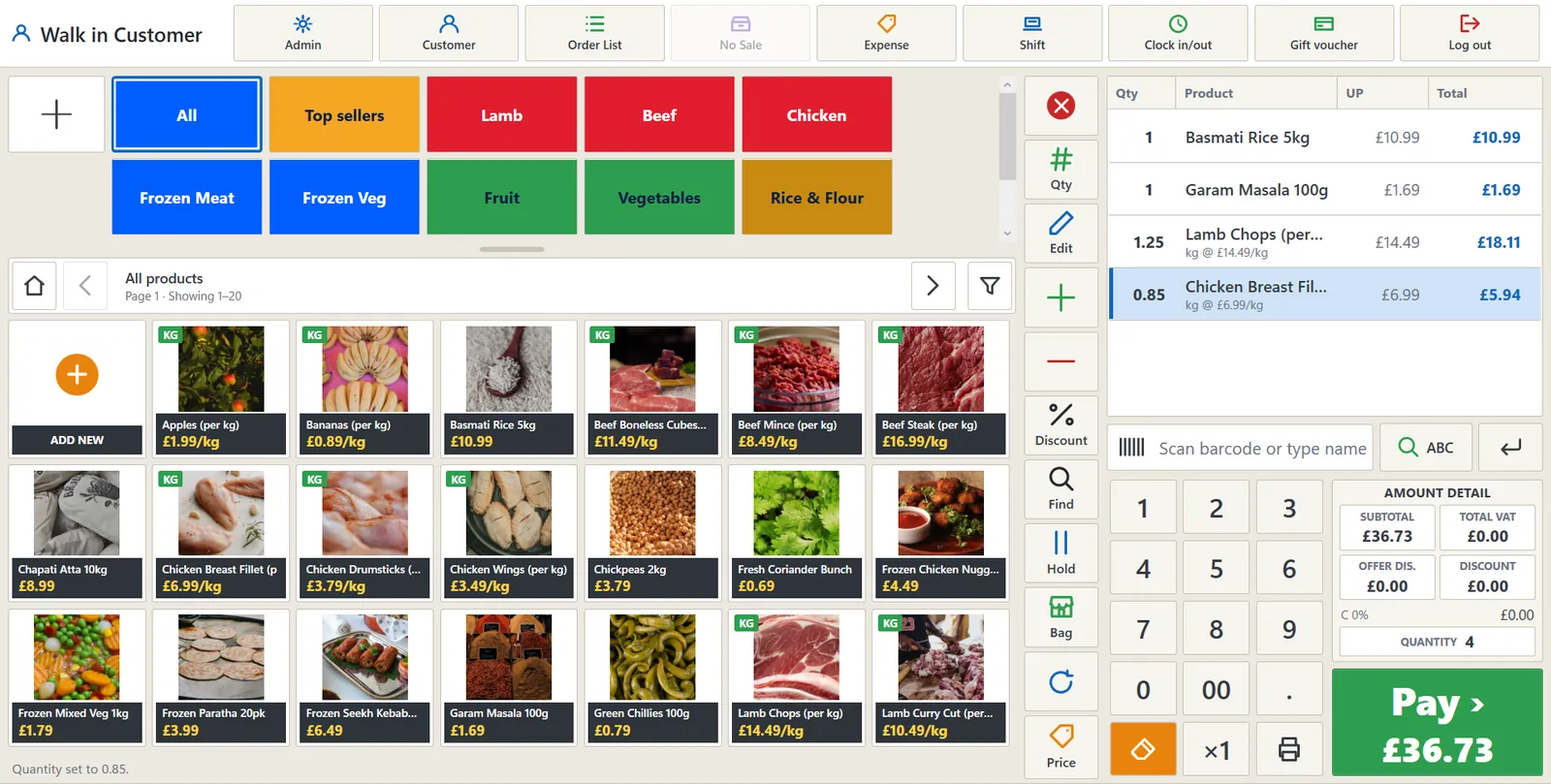
- The price is worked out from the price per kilo: 1.25 kg of lamb chops at £14.49/kg comes to £18.11 on the screen above.
- Scan rice, spices or drinks into the same sale.
- Take payment: the amount goes straight to the card machine, so it is never keyed twice.
Switch&Save EPOS features for butchers and grocers
- Sell by weight: KG items open the weight card: it reads the scale, or the cashier keys the weight.
- Scale label barcodes: Scan the label your scale prints and the weight or price comes from the barcode.
- Date checks and wastage: Short-life stock is flagged before its date, and wastage is recorded in seconds.
- Fridge and freezer checks: Temperatures, diary checks and incidents recorded right from the till.
- Customer accounts (udhar): Sales on account with credit limits, statements and WhatsApp reminders.
- Buying made simple: Purchase orders, goods in and a list of what to order next.
- Card payments built in: DNA Payments, Teya and Dojo terminals: the amount goes straight to the card machine.
- Analytics on every sale: Sales, margin, best sellers and busy times for any period, against last year.
Scales, scale labels and pre-packed meat
Counter scales such as Adam Equipment connect on a serial port, and Dibal label scales on the network. If you pre-pack for a chiller or for orders, the butcher set-up has scale label mode on, so the till reads the weight in kilos from the barcode your label scale prints.
If you sell by weight, your scale must be approved for trade use; your local Trading Standards service can tell you what applies. Our guide to POS scale integration covers what to check before you connect one, and our guide to Natasha’s Law explains what must go on the label of food you pack yourself.
Fresh stock, short dates and wastage
Switch&Save EPOS flags short-life stock before its date and records wastage in seconds, so the Wastage and Stock valuation reports show your real margin, not just your takings. Fridge and freezer temperatures, diary checks and incidents are recorded right from the till.
Buying stays simple: purchase orders, goods in and a list of what to order next. Analytics compares sales, margin and best sellers with last year, which helps when you plan for Ramadan, Eid or Christmas.
Customer accounts (udhar) and pre-orders
Regulars and trade customers can buy on account, with credit limits, statements and WhatsApp reminders. For Eid or Christmas orders, a customer order takes a deposit and the rest is paid on collection.
Switch&Save EPOS handles UK VAT and the VAT return. Most raw meat is zero-rated but hot food and soft drinks are not; see VAT rates at the till. Opening a new shop? Read how to start a grocery shop in the UK.
See Switch&Save EPOS for butchers in 23 seconds
Set up for grocery and halal butchers from day one
Pick Grocery & Halal Butcher as your shop type at set-up and the till starts with:
- Scale label mode on: scan the label your scale prints and the weight comes from the barcode
- Weight read from the barcode in kilos
- Medium tiles for a busy counter
- Reports ready to run: Sales by department, Wastage, Stock valuation, Z read
You can change any of it later in Settings.
Also included in Switch&Save EPOS
- Selling: Hold and recall, discounts, refunds and exchanges, receipts by print, email or WhatsApp.
- Customers: Loyalty points and cards, customer accounts, customer orders with deposits, gift vouchers.
- Stock and buying: Stock takes, wastage, transfers, recalls, purchase orders and goods in.
- Cash and reports: Shifts with floats, X and Z reports, end of day, reports to PDF, Excel or email.
- Staff: PIN sign-in, roles and permissions, clock in and out, rota and timesheets.
- More tills and branches: Run several tills in one shop and several shops from one system, with stock transfers between branches.
- Web portal: Full control of your tills from anywhere: products, prices, staff and reports, with automatic updates.
- PDA handheld: Stock counts, price checks and goods in on the shop floor, with a handheld PDA you can add to your system.
Hardware Switch&Save EPOS works with
- Windows touch-screen till
- 80 mm receipt printer
- Cash drawer
- Barcode scanner
- Counter and label scales
- Label printer
- Card terminals: DNA Payments, Teya, Dojo
- Customer display
- PDA handheld
Every package includes the double-screen EPOS till, a barcode scanner, a cash drawer and a receipt printer, with a 24-month return-to-base warranty. A card machine is included in both packages; on the Upfront Package you choose your card provider.
For a meat or deli counter, add a weighing scale when you order.
Switch&Save EPOS packages and prices
Both packages include the same hardware, which you own, and a 12-month minimum term.
| Complete Package | Upfront Package | |
|---|---|---|
| Upfront (hardware you own) | £349 + VAT | £899 + VAT |
| Monthly service plan | £79 + VAT a month for months 1–12, then £39 + VAT a month | £25 + VAT a month |
| Card machine | Card machine included, subject to approval. No separate card-machine rental. | Card machine included, from your choice of supported provider, subject to approval |
| Minimum term | 12 months, then monthly rolling (30 days’ written notice) | 12 months, then monthly rolling (30 days’ written notice) |
Buy now: Complete Package Buy now: Upfront Package
Card processing fees are separate and quoted by your card provider. Full details are on EPOS pricing, and the terminals on our card machines page.
What the monthly Cloud & Care plan covers
The monthly fee is a service plan, not a payment for the hardware, which is yours. It covers:
- Cloud: sales, products and reports sync to the web portal, so you can see your reports and manage your tills from anywhere.
- Automatic cloud backup of your products, sales and settings.
- Software updates: new features, security updates and UK rule changes such as VAT, installed automatically.
- UK support: remote support Monday to Friday, 9:00am to 5:30pm, by phone, WhatsApp and email.
- Card machine as set out for your package, and set-up help: we help load your products and train your team, as agreed in your order.
Key terms: 12-month minimum term · No change-of-mind returns · Card processing fees separate · Business customers only. Read the terms and the refund and cancellation policy before you order.
Butcher EPOS: frequently asked questions
Which scales can I use?
Adam Equipment counter scales and other makes on a serial port, and Dibal label scales on the network. With no scale the cashier keys the weight.
Can I scan the labels my scale prints?
Yes. Scale label mode reads the weight or price from the barcode, and the label layout is set up from one scanned label.
Can I bring my products from my old till?
Yes. Import products, offers, customers, suppliers, users and stock from Excel or CSV, or straight from eight other till systems.
Which card machines work with it?
DNA Payments, Teya and Dojo terminals are built in, so the amount goes to the card machine and is never keyed twice.
Can I have more than one till?
Yes. Add extra tills in the same shop; each keeps selling if the link to the main till drops and catches up afterwards.
Is it made for UK shops?
Yes: UK VAT and VAT return, UK shop time on every report, and UK rules such as Challenge 25 age checks, price-marked packs and HFSS offers.
Is there a minimum term?
Yes, 12 months on both packages. You can’t cancel for convenience during the term: ending early means an early termination charge based on the monthly fees left. After that the plan runs monthly and you can end it with 30 days’ written notice. Cancelling a Direct Debit or card payment does not end the agreement.
Am I paying off the hardware each month?
No. The hardware is yours once the upfront price is paid. The monthly fee is a service plan: cloud sync and backup, updates, UK support, the card machine for your package and set-up help.
Set up and supported from Birmingham
Our office is in Erdington, Birmingham, close to butchers and grocers across the West Midlands, and we set up shops anywhere in the UK the same way: a remote demo, help loading your cuts and prices, and training for your team. See also EPOS systems in Birmingham.
Book a free 20-minute remote demo, call 0333 0389707 or WhatsApp +44 7432 391811.