
A restaurant till follows a table through the whole sitting: the first round of drinks, the mains sent to the kitchen, the dessert order and a bill that four people want to pay separately. If any step is slow or unclear, guests notice and the kitchen backs up.
Switch&Save EPOS is the restaurant EPOS system we supply to UK restaurants. It runs on a double-screen till, so guests can see their order on the customer-facing screen, and it takes dine-in, takeaway, delivery and collection orders from one menu. It is part of our hospitality EPOS range. If most of your trade is collection and delivery, our takeaway EPOS system page is a better place to start.
What does a restaurant EPOS system need to do?
- Keep each table’s order separate, so any member of staff can pick up a table mid-meal.
- Get every item to the right printer, in the kitchen or at the bar.
- Split the bill the way guests ask, and take tips.
- Send the amount to the card machine, so nobody keys it in twice.
- Keep taking orders if the internet drops.
- Show you sales, staff and VAT figures at the end of the night.
How does table service work on the till?
You get a live floor plan of your dining room, and every table keeps its own order. Drinks, starters and mains add up against the right table through the evening, so the bill is ready when the guests are. Staff log in with their own PIN and clock in on the till at the start of a shift.
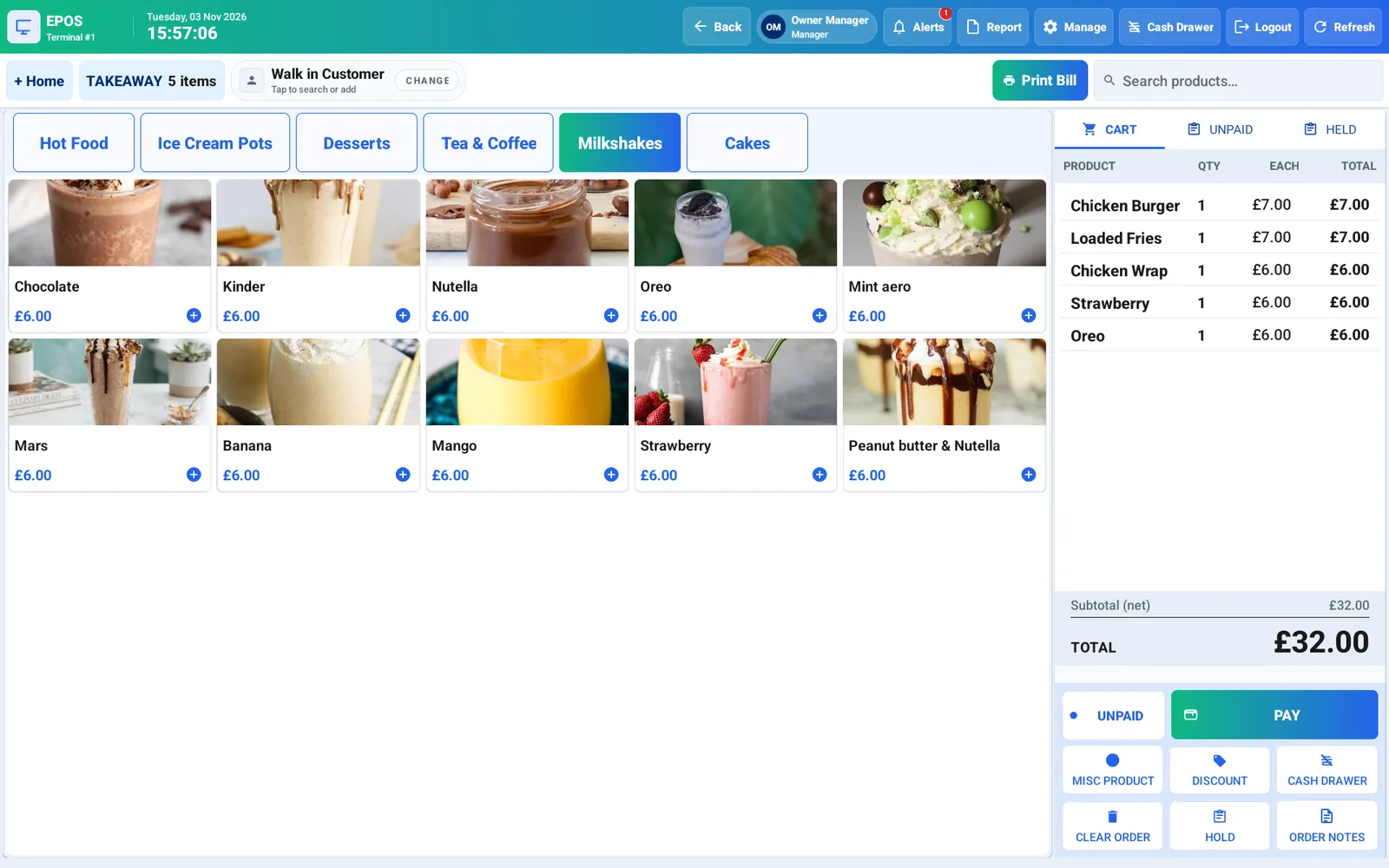
Orders go through the main screen: a photo menu with category tabs, a live cart with a running total and a search box for any item. Paying, applying a discount or holding an order takes one tap. New staff learn the photo menu in minutes, which helps at Christmas.
Our guide to table management for restaurants covers how to plan a floor layout and table flow.
A second screen for your guests
The till has a customer-facing second screen. Customers see their order as it goes through, then your offers when the till is idle. It helps catch a wrong item before it reaches the kitchen.
How do orders get to the kitchen?
Kitchen printing sends the right items to the right printer. Food can print in the kitchen while drinks print at the bar, so each station only sees its own tickets. The bundle includes a receipt printer, and you can add an extra kitchen printer when you order. Prefer a screen? Add a kitchen display (KDS) instead of, or as well as, a kitchen printer.
Not sure how many printers you need? Read do you need a kitchen printer with your restaurant EPOS?
Can the till split the bill and take tips?
Yes. Split the bill by amount, by person or by item, and take cash and card in any mix. Quick cash buttons speed up cash payments, and tips can be added to the bill. One-tap discounts let you apply your own offers, such as a lunchtime set menu or a staff discount, without anyone working it out on paper.
Card payments work with DNA Payments and Teya card machines. Card processing fees are separate and are quoted by the card provider: see card machines and card machine fees.
If you take tips, the Employment (Allocation of Tips) Act 2023 has required employers since 1 October 2024 to pass all tips to workers fairly and without deductions, and to keep a written tipping policy and records. Our guide to tips in UK hospitality explains the rules.
See Switch&Save EPOS in 47 seconds
What features does a restaurant get?
 Table service. A live floor plan. Every table keeps its own order.
 Kitchen printing. The right items go to the right printer.
 Split the bill any way. By amount, by person or by item.
 Card payments built in. Works with DNA Payments and Teya card machines.
 Customer display. Customers see their order, then your offers.
 One-tap discounts. Set your own offers and apply them instantly.
 Kitchen display (KDS). Orders appear on a screen in the kitchen, as well as or instead of a printed ticket.
 Self-order kiosk. Customers order and pay at a kiosk, and the order goes straight to the kitchen.
 Online ordering website. Take collection and delivery orders online, straight into the till.
 Real-time reports. Sales, staff, VAT and end-of-day Z reports.
 Staff PINs and clock-in. Everyone logs in with their own PIN.
What reports do you get after service?
Real-time reports cover sales, staff and VAT, with end-of-day Z reports to close the till. With the Cloud & Care service plan, your sales, products and reports sync to the cloud, so you can check the evening’s takings from home. When a dish sells out or a supplier puts a price up, change the item or its price right on the till.
What happens if the internet drops during service?
You keep selling. Orders and cash sales carry on, and orders saved on the till upload automatically when you are back online. Card payments still need the card machine’s own connection, so ask your card provider how its machine stays connected.
Can you run takeaway and delivery from the same till?
Yes. Many restaurants run a takeaway trade alongside the dining room. The same till takes takeaway, delivery and collection orders, with a UK postcode check and delivery fees on delivery orders. You can also add an online ordering website and a self-order kiosk, so those orders come straight into the till. For caller ID on phone orders, ask us what phone set-up you need. See our takeaway EPOS and café EPOS pages, or hospitality EPOS in Birmingham if you are near our Erdington office.
What hardware comes with it?
Both packages include the same hardware, and you own it: a double-screen EPOS till, a receipt printer and a cash drawer, with a 24-month return-to-base warranty. You can add an extra kitchen printer or cash drawer when you order.
How much does a restaurant EPOS system cost?
Switch&Save EPOS starts from £349 + VAT upfront with the Complete Package. The Cloud & Care service plan is then £79 + VAT a month for months 1–12 and £39 + VAT a month from month 13, with a 12-month minimum term. A card machine is included, subject to your merchant application being approved. If you would rather choose your card provider, the Upfront Package lets you pick from our supported providers. Card processing fees are always separate.
See both packages side by side, including what you pay at checkout, on our EPOS pricing page. Or go straight to the Complete Package or the Upfront Package for restaurants.
What the Cloud & Care service plan includes
- Cloud: sales, products and reports sync to the cloud, so you can see your reports from anywhere. Orders saved on the till upload automatically when you are back online.
- Automatic cloud backup of your products, sales and settings.
- Software updates: new features, security updates and UK rule changes such as VAT, installed automatically.
- UK support: remote support Monday to Friday, 9:00am to 5:30pm, by phone, WhatsApp and email.
- Card machine as set out in your package, with no separate card-machine rental added.
- Set-up help: we help load your menu and train your team, as agreed in your order.
The monthly fee is a service plan, not a payment for the hardware. You own the till, printer and cash drawer.
Key terms: 12-month minimum term · No change-of-mind returns · Card processing fees separate. Read the terms.
How do you switch to a new restaurant till?
Check the end date and notice period on your current EPOS and card contracts first. Then send us your menu: we help load it onto the new till and train your front-of-house team, as agreed in your order. Keep your old system running until the new till is set up and tested. Our guide to switching EPOS provider walks through the steps, and our restaurant till system guide covers what to compare before you buy.
Restaurant EPOS: frequently asked questions
Is this the same system as your hospitality EPOS?
Yes. Switch&Save EPOS is one system for takeaway, delivery, dine-in and collection. This page covers how it works for table service. The hospitality EPOS page sets out both packages and the full feature list.
Can drinks print at the bar and food in the kitchen?
Yes. Kitchen printing sends the right items to the right printer. The bundle includes one receipt printer, and you can add an extra kitchen printer when you order.
Can a large table split the bill by item?
Yes. Split the bill by amount, by person or by item, and take cash and card in any mix.
Which card machines work with it?
DNA Payments and Teya. Both packages include a card machine, subject to approval; with the Upfront Package you choose your card provider. Card processing fees are separate.
Is there a contract?
Yes. Both packages have a 12-month minimum term, then roll monthly with 30 days’ written notice. There are no change-of-mind returns once the hardware is delivered or installed.
Does it keep working if the internet goes down?
Yes. Orders and cash sales carry on, and orders saved on the till upload automatically when you are back online. Card payments need the card machine’s own connection.
Book a free restaurant EPOS demo
See the table plan, kitchen printing and split bills in a free 20-minute remote demo with our UK team. Bring your menu and your questions. Book your free demo or get in touch:
SWITCH&SAVE Business Services Ltd, 3A Perry Common Road, Erdington, Birmingham, B23 7AB · 0333 0389707 · hello@switch-and-save.uk · WhatsApp +44 7432 391811