
Friday night in a takeaway means walk-ins at the counter, the phone ringing, drivers waiting for the next delivery and customers arriving to collect. A good takeaway EPOS system keeps all of that on one till and gets each order to the kitchen correctly, the first time.
Switch&Save EPOS is the takeaway EPOS system we supply to UK takeaways, as part of our hospitality EPOS range. It runs on a double-screen till with a customer-facing second screen, works with DNA Payments and Teya card machines, and is set up and supported by our UK team in Birmingham.
What does a takeaway EPOS system need to do?
- Take counter orders quickly, even when the queue is out of the door.
- Handle delivery orders with the right address and delivery fee.
- Keep collection orders sorted, so the right bag goes to the right customer.
- Send each item to the right printer in the kitchen.
- Take card payments without staff keying in amounts.
- Keep the till running if the internet drops.
- Give you clear end-of-day figures.
How does the till handle counter, delivery and collection orders?
Every order starts on the same main screen, then you choose how the customer is ordering:
 Takeaway. Quick counter sales.
 Delivery. A UK postcode check and delivery fees, so the address and the charge are right before the driver leaves.
 Collection. Pick-up orders, sorted.
 Dine-in. A live table plan if you also have a few tables.
 Kitchen display (KDS). Orders appear on a screen in the kitchen, as well as or instead of a printed ticket.
 Self-order kiosk. Customers order and pay at a kiosk, and the order goes straight to the kitchen.
 Online ordering website. Take collection and delivery orders online, straight into the till.
Taking phone orders? Caller ID is available too: ask us what phone set-up you need before you order.
How fast is the ordering screen at the counter?
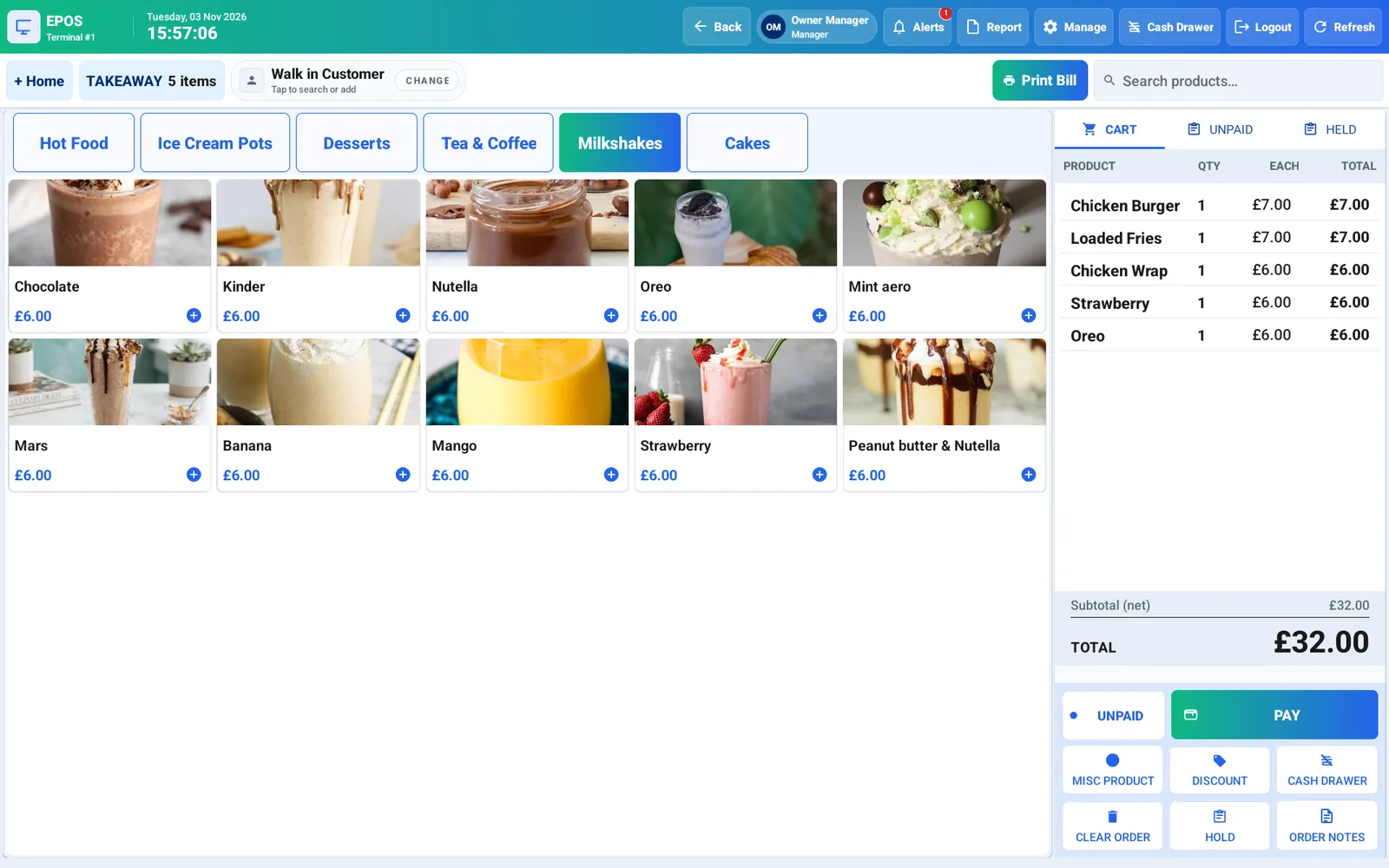
The main screen is built for speed: a photo menu with category tabs, a live cart with a running total and a search box for any item. Paying, applying a discount or holding an order is one tap, so a customer who needs a minute to decide doesn’t hold up the queue. New staff learn the photo menu in minutes.
The customer-facing second screen shows each order as it is put through, so customers can spot a mistake before it is cooked. When the till is idle, it shows your offers.
How do orders get to the kitchen?
Kitchen printing sends the right items to the right printer, so each station only sees what it needs to make. Fried food can print at the fryer and pizzas at the oven, for example. The bundle includes a receipt printer, and you can add an extra kitchen printer when you order. Our guide to receipt printer types explains the options.
When a dish runs out or a price changes, update the item or its price right on the till.
See Switch&Save EPOS in 47 seconds
Card payments, cash and end of day
Card payments work with DNA Payments and Teya card machines. The till sends the amount to the card machine, so staff don’t key it in twice. Quick cash buttons speed up cash sales, and you can take tips and split a bill by amount, by person or by item. One-tap discounts let you run your own offers, such as a student deal or a collection discount. Card processing fees are separate and are quoted by the card provider: see card machines and card machine fees.
At the end of the night, real-time reports show sales, staff and VAT, and the end-of-day Z report closes the till. With the Cloud & Care service plan your sales and reports sync to the cloud, so you can check the night’s takings from home. Staff log in with their own PIN and clock in on the till.
What happens if the internet drops on a busy night?
You keep selling. Orders and cash sales carry on, and orders saved on the till upload automatically when you are back online. Card payments still need the card machine’s own connection, so ask your card provider how its machine stays connected. If your connection is unreliable, our guide to 4G backup internet explains how to keep a second connection ready.
What hardware is included?
Both packages include the same hardware, and you own it: a double-screen EPOS till, a receipt printer and a cash drawer, with a 24-month return-to-base warranty. Add an extra kitchen printer or cash drawer when you order if you run more than one station.
How much does a takeaway EPOS system cost?
Switch&Save EPOS starts from £349 + VAT upfront with the Complete Package. The Cloud & Care service plan is then £79 + VAT a month for months 1–12 and £39 + VAT a month from month 13, with a 12-month minimum term. A card machine is included, subject to your merchant application being approved. Prefer to choose your card provider? The Upfront Package lets you pick from our supported providers. Card processing fees are always separate.
Compare both packages, including what you pay at checkout, on our EPOS pricing page, or go straight to the Complete Package or the Upfront Package for takeaways.
What the Cloud & Care service plan includes
- Cloud: sales, products and reports sync to the cloud, so you can see your reports from anywhere. Orders saved on the till upload automatically when you are back online.
- Automatic cloud backup of your products, sales and settings.
- Software updates: new features, security updates and UK rule changes such as VAT, installed automatically.
- UK support: remote support Monday to Friday, 9:00am to 5:30pm, by phone, WhatsApp and email.
- Card machine as set out in your package, with no separate card-machine rental added.
- Set-up help: we help load your menu and train your team, as agreed in your order.
The monthly fee is a service plan, not a payment for the hardware. You own the till, printer and cash drawer.
Key terms: 12-month minimum term · No change-of-mind returns · Card processing fees separate. Read the terms.
Moving from another EPOS?
Check the notice period on your current EPOS and card contracts first. Then send us your menu, or an export from your old till, and we help load it onto the new till and train your staff, as agreed in your order. Keep the old till running until the new one is set up and tested. Our guide to switching EPOS provider walks through it, and what to look for in a takeaway EPOS covers the questions to ask any supplier.
Running a restaurant or café as well? See our restaurant EPOS and café EPOS pages, or hospitality EPOS in Birmingham if you are local to us.
Takeaway EPOS: frequently asked questions
Can the till take delivery orders?
Yes. Delivery orders get a UK postcode check and your delivery fees. For caller ID on phone orders, ask us what phone set-up you need.
Can different items go to different printers?
Yes. Kitchen printing sends the right items to the right printer. The bundle includes one receipt printer, and you can add an extra kitchen printer when you order. Prefer a screen? Add a kitchen display (KDS) instead of, or as well as, a kitchen printer.
What happens if the internet goes down on a busy night?
Orders and cash sales carry on, and orders saved on the till upload automatically when you are back online. Card payments still need the card machine’s own connection.
Which card machines work with it?
DNA Payments and Teya. Both packages include a card machine, subject to approval; with the Upfront Package you choose your card provider. Card processing fees are separate.
How much does a takeaway EPOS system cost?
From £349 + VAT upfront with the Complete Package, then the Cloud & Care service plan at £79 + VAT a month for months 1–12 and £39 + VAT a month from month 13, with a 12-month minimum term. Both packages are on our EPOS pricing page.
Can I return the till if it doesn’t suit me?
We sell to businesses only, and there are no change-of-mind returns once the hardware is delivered or installed. That is why we offer a free demo first. Anything damaged on arrival must be reported within 48 hours with photos, and faults are covered by the 24-month return-to-base warranty.
Book a free takeaway EPOS demo
See the ordering screen, delivery orders and kitchen printing in a free 20-minute remote demo with our UK team. There’s no hard sell. Bring your menu and your questions. Book your free demo or get in touch:
SWITCH&SAVE Business Services Ltd, 3A Perry Common Road, Erdington, Birmingham, B23 7AB · 0333 0389707 · hello@switch-and-save.uk · WhatsApp +44 7432 391811