The best EPOS system for takeaways is one that helps you take orders quickly, send them clearly to the kitchen, manage delivery and collection orders, accept card payments, track sales, and reduce mistakes during busy service. A good restaurant EPOS system should make Friday night easier, not more stressful.
For most UK takeaways, the right setup includes a touchscreen till, kitchen order printing or kitchen display, integrated card payments, menu management, discount controls, delivery order tracking, customer records and useful daily reports.
If you run a pizza shop, fish and chip shop, kebab shop, dessert shop, café, Chinese takeaway or Indian takeaway, your EPOS needs to handle speed. Customers don’t want confusion at the counter. Staff don’t want messy handwritten orders. You need a system that keeps orders moving from the till to the kitchen without losing details.
Key Takeaways
| Point | Why it matters for takeaways |
|---|---|
| Speed is essential | Staff need to take orders fast during lunch and evening rushes |
| Kitchen communication matters | Printed or digital kitchen orders reduce missed items and mistakes |
| Menu control saves time | Easy price, modifier and deal updates help you manage changing costs |
| Integrated payments reduce errors | Card payments linked to the till avoid manual entry mistakes |
| Reports help you spot profit leaks | You can see best sellers, quiet times, refunds, discounts and staff activity |
| Delivery and collection need structure | Clear order status helps staff manage timing and customer expectations |
| The best system fits your workflow | A small kebab shop and a busy pizza takeaway may need different setups |
What Makes a Good EPOS System for Takeaways?
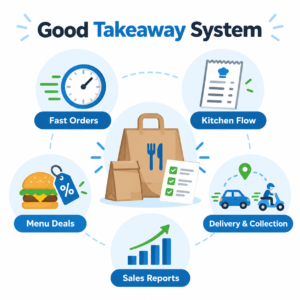
A good takeaway EPOS system helps you serve customers faster, keep orders accurate and understand what’s happening in your business.
It should be simple enough for staff to use during a rush. It should also give the owner useful control in the background.
For a takeaway, that usually means:
- Fast touchscreen ordering
- Clear product categories
- Menu modifiers such as size, toppings, sauces and spice level
- Kitchen printing or kitchen display
- Collection and delivery order notes
- Integrated card payments
- End-of-day reports
- Staff permissions
- Discounts and meal deals
- Customer details for repeat orders
You don’t need a system full of features you’ll never use. You need one that matches how your takeaway actually works.
Why Takeaways Need a Different EPOS Setup
A takeaway is not the same as a sit-down restaurant. The pace is different. The customer journey is shorter. Orders often come in from the counter, phone, website, QR code or delivery platform.
That creates pressure.
A customer might order a large pizza with half-and-half toppings, extra cheese, no olives and a drink deal. Another customer might phone in a collection order for 7:30 pm. At the same time, a delivery driver may be waiting at the counter.
If your EPOS can’t handle those details clearly, mistakes happen.
A restaurant EPOS system for takeaways should make the order flow simple:
Customer orders → Staff enter order → Kitchen receives clear ticket → Payment is taken → Order is prepared → Collection or delivery is completed.
That sounds basic, but in practice it’s where many takeaways lose time and money.
Key Features to Look For
1. Fast Touchscreen Ordering
Speed matters. Your staff should be able to find products quickly without searching through messy menus.
A good EPOS screen should have clear categories like:
- Pizzas
- Burgers
- Kebabs
- Sides
- Drinks
- Desserts
- Meal deals
- Delivery charges
For example, a fish and chip shop might need buttons for cod, haddock, chips, curry sauce, mushy peas and meal boxes. A dessert shop might need waffles, milkshakes, cookie dough and toppings.
The layout should feel natural to your staff. If it takes too many taps to complete an order, queues build up.
2. Menu Modifiers
Modifiers are the options added to a product. In simple terms, they’re the choices your customer makes.
For example:
- Small, medium or large
- Mild, medium or hot
- Extra cheese
- No salad
- Garlic mayo
- Add chips and drink
- Gluten-free base
For takeaways, modifiers are vital. They reduce the need for handwritten notes and help the kitchen see exactly what the customer wants.
A strong restaurant EPOS system should let you set modifiers properly, so staff don’t have to type the same notes again and again.
3. Meal Deals and Offers
Many takeaways rely on deals. Pizza deals, burger meals, family boxes and lunchtime offers are common.
Your EPOS should handle these without staff doing mental maths at the till.
For example:
- Any 2 pizzas and a drink
- Burger, fries and can
- Student discount
- Collection-only offer
- Lunch special before 3 pm
The good news is that proper deal setup can make pricing more consistent. Staff don’t have to remember every offer, and customers get charged correctly.
4. Kitchen Printing or Kitchen Display
Kitchen communication is one of the biggest reasons to use EPOS in a takeaway.
Instead of shouting orders or passing handwritten slips, the system sends the order straight to the kitchen printer or kitchen display screen.
A printed kitchen ticket might show:
- Order number
- Time
- Collection or delivery
- Items
- Modifiers
- Notes
- Paid or unpaid status
This helps your kitchen team work in order and avoid missed details.
For a busy takeaway, separate printers can also help. Hot food can go to the kitchen. Drinks or desserts can go to another station. It depends on your setup.
5. Delivery and Collection Notes
Takeaways need clear order types. Collection, delivery and eat-in orders should not be mixed up.
A good EPOS system lets staff add:
- Customer name
- Phone number
- Address
- Collection time
- Delivery notes
- Driver instructions
- Payment status
For example, a customer might say, “Flat 3, use side entrance, call when outside.” That note needs to stay with the order.
This is especially useful when you have new staff or weekend staff helping during busy periods.
6. Integrated Card Payments
So, what actually happens when a customer taps their card?
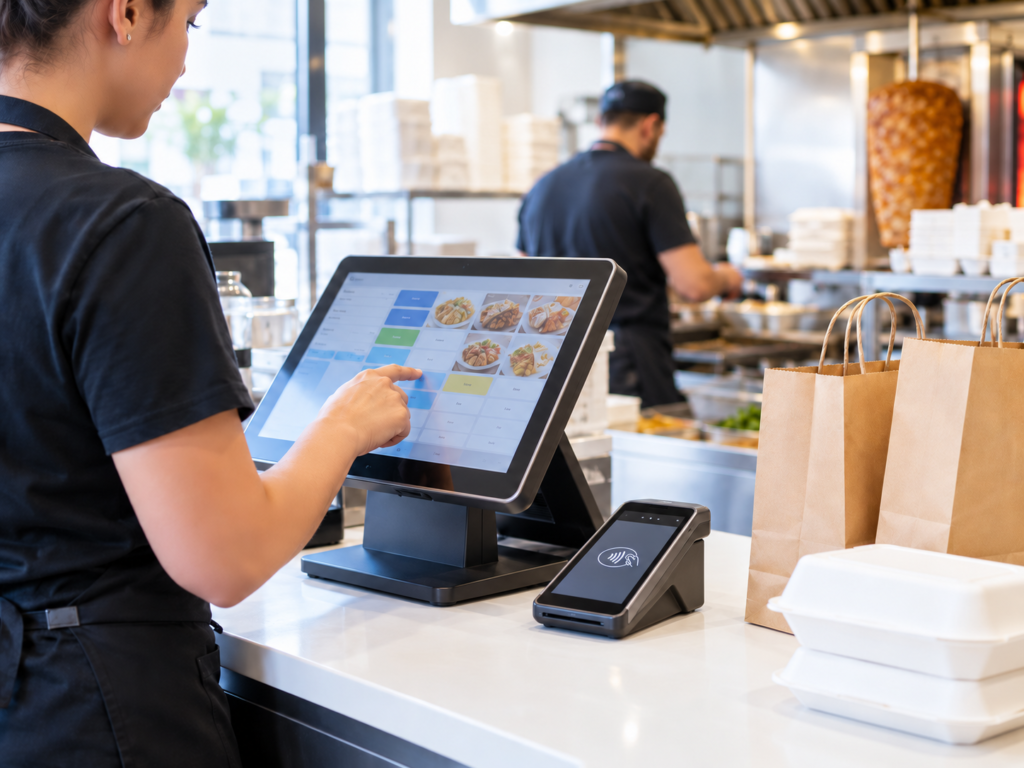
With integrated payments, the till sends the correct amount to the card machine automatically. The customer taps or inserts their card, and the payment result goes back to the EPOS.
That means staff don’t have to type the amount manually into the card machine.
This helps reduce:
- Wrong amounts entered
- Payment mismatches
- Slower checkout
- End-of-day confusion
For takeaways, where lots of payments happen quickly, this can make service smoother.
Switch & Save provides card payment solutions alongside EPOS systems, so your till and payments can work together more cleanly.
7. Staff Permissions
Not every staff member needs access to every part of the system.
Your EPOS should let you control who can:
- Apply discounts
- Process refunds
- Void items
- Open the cash drawer
- View reports
- Change prices
- Edit products
This protects your business and keeps daily operations tidy.
For example, a counter assistant may only need to take orders and payments. A manager may need access to refunds and reports.
8. Daily Sales Reports
A takeaway owner needs to know more than “we were busy”.
Your EPOS should show what actually happened.
Useful reports include:
- Total sales
- Cash and card split
- Best-selling items
- Refunds and voids
- Discounts given
- Busy times
- Staff sales
- Delivery vs collection sales
- End-of-day Z report
In practice, these reports help you make better decisions. If loaded fries sell well on weekends, you can promote them more. If a meal deal has low margin, you can adjust the price or contents.
How a Restaurant EPOS System Improves Takeaway Service

A restaurant EPOS system improves takeaway service by making orders faster, clearer and easier to manage from start to finish.
Here’s how it helps in real life.
At the counter, staff can tap items quickly instead of writing them down. In the kitchen, the team receives clear tickets with modifiers and notes. At payment, card transactions can be linked to the till. At close, the owner can check sales and spot issues.
It also helps reduce small mistakes that add up.
One wrong topping may mean a remake. One missed drink may annoy a customer. One incorrect card amount may cause cashing-up problems later.
The EPOS won’t run the takeaway for you. But it can remove a lot of the daily friction.
EPOS Hardware for Takeaways
The right hardware depends on your counter space, order volume and kitchen layout.
A typical takeaway EPOS setup may include:
- Touchscreen till
- Cash drawer
- Receipt printer
- Kitchen printer
- Card machine
- Barcode scanner, if you sell packaged drinks or snacks
- Customer display
- Kitchen display screen, if preferred
Some businesses only need one till and one kitchen printer. Others need multiple order points, especially if they have delivery, collection and counter service running together.
The key is to avoid overbuying. Your EPOS provider should understand your workflow before recommending equipment.
Card Payments and Customer Convenience
Customers expect card payments now, even for small orders. Many also expect contactless, Apple Pay and Google Pay.
For takeaways, quick payments help keep the queue moving.
Card payment integration can also make cashing up easier. If your EPOS records card sales properly, you can compare till totals against payment totals with less manual checking.
This doesn’t mean cash is gone. Many takeaways still take cash. But your system should handle both clearly.
Reports Every Takeaway Owner Should Check
You don’t need to spend hours reading reports. But a few regular checks can help you run the business better.
Best-Selling Items
This shows what customers buy most often. You can use it for promotions, stock planning and menu design.
If chicken burgers sell better than expected, you may want to create a meal deal. If a slow-moving item takes up prep time, you may decide to remove it.
Busy Times
This helps with staffing.
For example, if your sales report shows a rush from 6:30 pm to 8:30 pm on Fridays, you can plan staff around that pattern.
Discounts and Voids
Discounts and voids should be visible. Not because you don’t trust staff, but because the business needs control.
Too many voids may mean training is needed. Too many discounts may mean offers are unclear.
Payment Type Report
This shows how much came through cash, card or other payment methods.
It’s useful for reconciliation, cash handling and understanding customer behaviour.
Common Mistakes When Choosing Takeaway EPOS
Choosing Only on Price
A cheap system can become expensive if it slows staff down or lacks basic takeaway features.
Price matters, of course. But you should also look at support, setup, payment integration, reporting and ease of use.
Buying Features You Don’t Need
Some systems are too complex for a small takeaway. If your staff won’t use half the features, they don’t add value.
Look for the right fit, not the longest feature list.
Ignoring Kitchen Workflow
The till is only one part of the process. If the kitchen doesn’t receive clear orders, the customer experience still suffers.
Always think about how the order moves from counter to kitchen.
Forgetting Future Growth
You may start with one till now. Later, you may want online ordering, loyalty, extra printers, more devices or multiple branches.
Choose a system that can grow with your business.
How Switch & Save Can Help
Switch & Save provides AI-powered EPOS systems, card payment solutions and business finance for UK small businesses.
For takeaway owners, that means you can get a setup designed around your real workflow, not a generic till dropped on the counter.
A suitable Switch & Save setup may help you:
- Take orders faster
- Send clearer tickets to the kitchen
- Manage menu items, modifiers and deals
- Accept card payments smoothly
- Track sales and daily reports
- Reduce manual mistakes
- Understand where costs and delays appear
If you’re opening a new takeaway or replacing an old till, it’s worth checking your current costs and seeing where savings may be possible.
Switch & Save helps UK businesses reduce costs with AI-powered EPOS systems, card payment solutions and business finance.
FAQs
What is the best EPOS system for a takeaway?
The best EPOS system for a takeaway is one that supports fast order entry, kitchen printing, menu modifiers, meal deals, integrated card payments, delivery and collection notes, staff permissions and clear daily reports. It should fit the way your takeaway works.
Do takeaways need a restaurant EPOS system?
Yes, many takeaways benefit from a restaurant EPOS system because it handles food orders, modifiers, kitchen tickets and payment flows better than a basic cash register. It helps reduce mistakes and makes busy service easier to manage.
Can an EPOS system handle delivery and collection orders?
Yes, a suitable takeaway EPOS system can record delivery and collection orders, customer names, phone numbers, addresses, order notes and payment status. This helps staff keep track of what needs preparing and when.
Does EPOS work with card machines?
Yes, many EPOS systems can integrate with card machines. With integrated card payments, the till sends the amount to the card machine automatically, which reduces manual entry errors and speeds up checkout.
Can I update takeaway menu prices on an EPOS system?
Yes. A good EPOS system lets you update product prices, meal deals, modifiers and categories. This is useful when supplier costs change or you want to test new offers.
Is EPOS useful for a small takeaway?
Yes. Even a small takeaway can benefit from faster ordering, clearer kitchen tickets, better payment tracking and end-of-day reports. The setup should match the size of the business, so you’re not paying for features you don’t need.
What reports should takeaway owners check?
Takeaway owners should check daily sales, best-selling items, discounts, voids, refunds, payment types, staff sales and busy periods. These reports help with pricing, staffing and menu decisions.