
VAT at the point of sale runs on three rates: 20% standard, 5% reduced, and 0% zero. Between 25 June and 1 September 2026, a temporary 5% rate also applies to qualifying children’s meals and family admissions. Your POS must record every sale against the correct rate, then produce digital records that Making Tax Digital software can read. Get the rate wrong at the till and the error compounds on every receipt until someone spots it.
TL;DR:
- Ensure your POS system supports all applicable VAT rates at SKU level, including the temporary 5% rate for children’s meals between June and September 2026.
- Regularly verify that temporary rate flags are correctly applied and reversed by the deadline to avoid retaining the reduced rate beyond the allowed period.
- Continuously check that Daily Gross Takings reports split sales accurately by rate, include timestamps, and export seamlessly into your accounting software without manual edits.
- Confirm every SKU has a designated VAT category at setup, and avoid relying on manual judgment at checkout to reduce errors and HMRC compliance risks.
- Use a VAT-compliant EPOS system built for accurate rate management and digital export, especially for businesses with mixed hot and cold food sales or temporary VAT rate changes.
Table of Contents
- Current VAT rates and what they apply to in the UK
- Temporary VAT changes to watch in 2026
- How to apply VAT correctly at the point of sale
- VAT registration, MTD, and what your POS must record
- Common POS mistakes that lead to underdeclared VAT
- What to ask an EPOS supplier about VAT handling
- The part of VAT compliance most retailers get backwards
- Get an EPOS system built for accurate VAT handling
- Where to check the official VAT rules
- FAQ
Current VAT rates and what they apply to in the UK
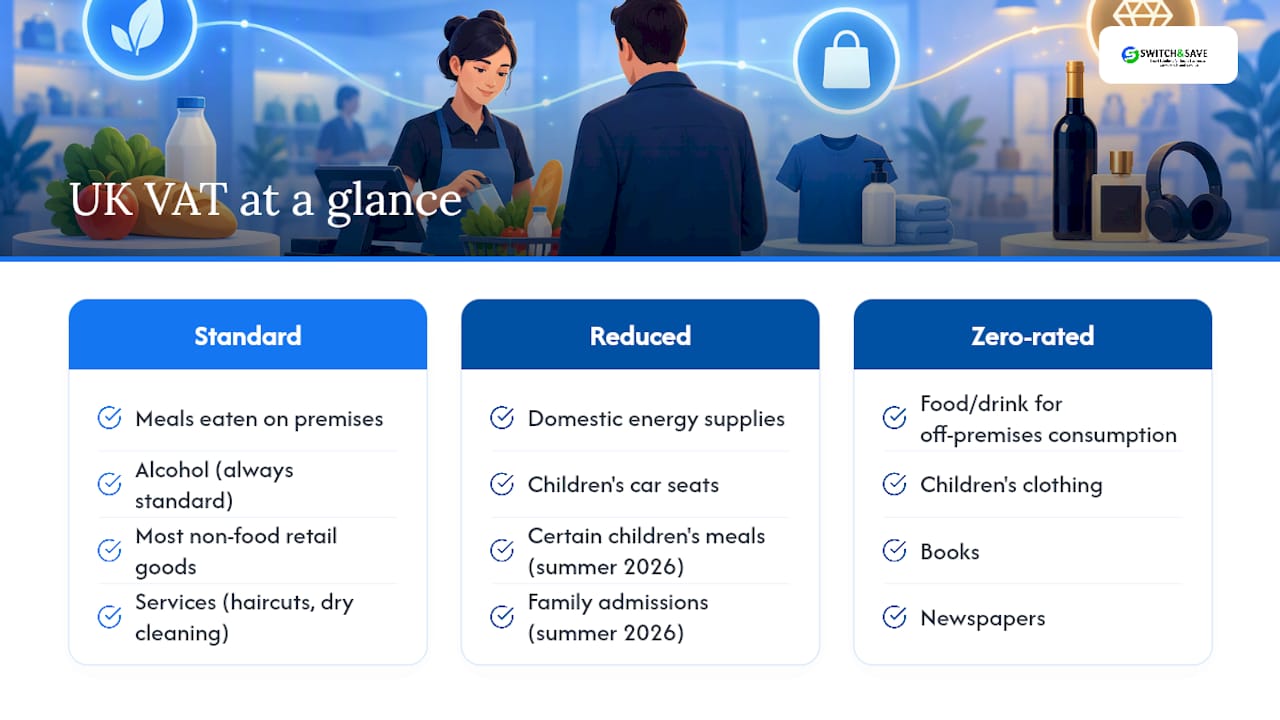
Most retail and hospitality sales fall under the standard VAT rate. That covers meals eaten on the premises, alcohol, most non-food retail goods, and services like haircuts or dry cleaning. If a customer sits down and eats in your café, that transaction is standard-rated regardless of what’s on the plate.
The reduced rate applies to certain specific items, including domestic energy supplies, children’s car seats, and temporarily certain children’s meals and family admissions during summer 2026. It’s a narrower band than most till operators assume, and it’s worth checking HMRC’s catering guidance whenever a new product line doesn’t fit neatly into your existing categories.
Zero-rated supplies are taxable supplies charged at no VAT, relevant for registration and record-keeping, including many food and drink items for off-premises consumption as well as children’s clothing, books, newspapers, and public transport fares.
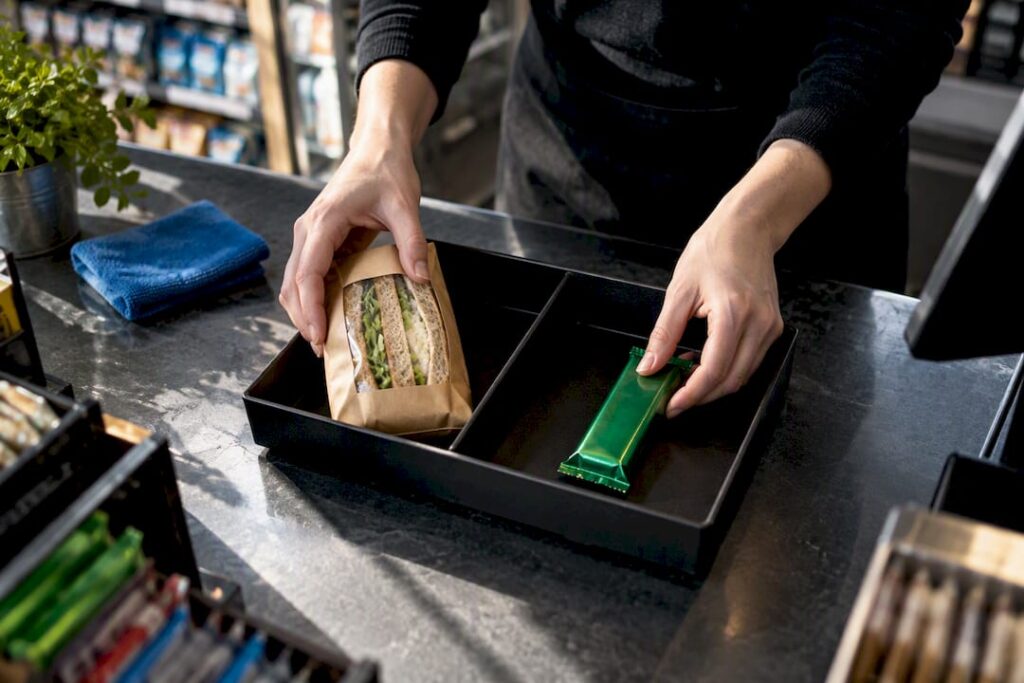
The exceptions catch out a surprising number of till operators. Confectionery, crisps, ice cream, and most bottled soft drinks are standard-rated even when sold cold and taken away, and alcohol is always standard-rated regardless of temperature or location. A newsagent selling a cold sandwich and a chocolate bar is ringing up two different VAT rates on one basket, and if the till doesn’t distinguish them, the VAT return will be wrong every single time.
This is where the gap between HMRC’s own terminology and everyday till language causes real friction. Retailers talk about “VAT at POS” or “till VAT settings,” but the governing framework is the Point of Sale retail scheme, set out formally in HMRC’s VAT Notice 727 series and the dedicated Point of Sale Scheme guidance. Learning that name matters, because it’s what you’ll need to search for when a till configuration question gets specific. When something falls outside these three headline categories, and it will eventually, HMRC’s catering and takeaway notice is the primary reference for edge cases, not a forum thread or a generic accountancy blog.
Temporary VAT changes to watch in 2026
A temporary reduced rate of 5% applies to qualifying children’s meals and certain family admissions for supplies made between 25 June 2026 and 1 September 2026. This isn’t a blanket discount. It applies to specific, defined items, and your POS needs a rate change that goes in on time and comes back out again once the window closes.
Pro Tip: Set a calendar reminder for 1 September 2026, not just 25 June. HMRC’s own guidance flags that businesses forget to reverse temporary rates far more often than they forget to apply them, leaving standard-rate items sitting at 5% for weeks after the relief ends.
Before the window opens, work through this sequence:
- Identify which SKUs or menu items genuinely qualify as children’s meals or family admissions under HMRC’s definition
- Apply the 5% rate flag to those items only, not to the whole children’s menu by default
- Run a handful of test transactions and keep the receipts as evidence of the change
- Set a hard reminder to revert the rate flags on 1 September 2026
- Run test transactions again after reverting, to confirm the rollback actually worked
HMRC’s compliance guidance specifically warns that temporary rate periods create elevated risk because systems get changed twice in quick succession, once to apply the rate and once to remove it, and each change is an opportunity for an item to be missed.
Separately, the VAT registration threshold rose to £90,000 of taxable turnover on 1 April 2024, and it remains the trigger point businesses need to watch. If your turnover for the previous 12 months exceeds that figure, or you expect to exceed it in the next 30 days, registration is compulsory within the legally mandated timeframe following the month-end in which the threshold was crossed. For a growing café or shop close to that line, it’s worth checking turnover monthly rather than waiting for the year-end accounts to flag it.
How to apply VAT correctly at the point of sale
Getting VAT right at the till comes down to five practical steps, in order.
-
Classify eat-in versus takeaway correctly. Food consumed on the premises, including at tables outside your shop, is standard-rated at 20%. The same item sold for someone to take away can be zero-rated if it’s cold, but standard-rated if it’s hot. A pasty sold from a heated cabinet is standard-rated whether the customer eats it on a bench outside or on your premises; the same pasty from a cold shelf, taken away, is zero-rated.
-
Apply the hot food test properly. HMRC’s definition of “hot” for VAT purposes is food heated above ambient air temperature and intended to be eaten while still warm, not simply food that happens to be warm from baking. A freshly baked loaf of bread cooling on a shelf is different from a rotisserie chicken kept hot for sale. Your POS needs a “hot/cold” flag on relevant SKUs, separate from the “eat-in/takeaway” flag, because the two combine to determine the actual rate.
-
Apportion mixed supplies fairly. Meal deals bundling a sandwich, a drink, and a snack often mix zero-rated and standard-rated items under one price. HMRC’s own guidelines on apportionment favour a market-value method: apportion the bundled price using each item’s normal shelf price, then apply VAT to each portion separately. It’s more work at setup than a flat rate on the bundle, but it’s the defensible method if HMRC ever asks how you arrived at the figure.
-
Map SKUs to VAT categories at setup, not on the fly. Every product or menu item in your EPOS needs a rate assigned when it’s created, not left to whoever’s on the till that day to judge. A sensible category structure might be: Hot Food (20%), Cold Food to Go (0%), Confectionery (20%), Eat-In (20% regardless of item), Children’s Meals (5% only during the temporary window), and Non-Food Retail (20%).
-
Record Daily Gross Takings split by rate for the Point of Sale scheme. Under the scheme, output tax is worked out using VAT fractions: divide standard-rated takings by 6 (the 1/6 fraction) and 5%-rated takings by 21 (the 1/21 fraction) to arrive at the VAT element. Your till needs to output DGT broken down by rate band, not just a single daily total, or this calculation can’t be done accurately.
If your till genuinely can’t record more than one or two VAT rates, HMRC allows fallback methods such as the Catering Adaptation or an agreed estimation approach, but these require HMRC’s internal manual conditions to be met and a “fair and reasonable” outcome that you can support with records. Treat these as a last resort while you plan an upgrade, not a permanent solution, because they generally require more manual checking, not less.
VAT registration, MTD, and what your POS must record
Registration becomes compulsory once taxable turnover passes £90,000 in a rolling 12-month period, or when you expect to cross that figure within the next 30 days. Below that threshold, registration is voluntary, and some small retailers choose it anyway to reclaim VAT on equipment and stock.
Once registered, Making Tax Digital rules apply. MTD requires digital record-keeping and filing through functional compatible software, which means your POS can’t just print a paper till roll and call it done. Records need to move from the till to your accounting software either through direct integration or through digital links, meaning a spreadsheet copy-and-paste at any stage in the chain breaks the digital link requirement.
Specifically, HMRC expects your system to produce:
- Per-rate totals for every VAT period (standard, reduced, zero, split clearly)
- Time and date of supply for each transaction
- Net values excluding VAT alongside the VAT charged
- An audit log showing configuration changes, particularly rate changes
- Itemised receipts retained for each sale, not summary totals alone
A POS system built around digital exports removes most of this friction, because the data structure is right from the point of sale onward rather than reconstructed afterwards. Test your own setup by exporting a week’s data and checking whether it lands in your accounting software without manual reformatting. If it needs editing before it’s usable, that’s a digital link gap, and it’s exactly the kind of gap HMRC penalises when discovered at inspection.
Common POS mistakes that lead to underdeclared VAT
Most VAT errors at the till aren’t dishonest, they’re structural. The till was configured once, correctly, for the business as it existed then, and nobody revisited it as the menu or product range changed.
Run through this before your next VAT return:
- Confirm every SKU has a rate flag, and that new products added since your last check haven’t defaulted to whatever rate was last used.
- Test the eat-in and takeaway toggle on a live transaction, not just in the settings screen.
- Check that any temporary-rate changes, including the 2026 children’s meals relief, have been switched off if the qualifying period has ended.
- Pull your Daily Gross Takings report and confirm it splits by rate, not just a single total.
- Confirm receipts are archived and retrievable, and that your accounting export runs without manual editing.
The two most persistent errors are treating hot and cold versions of the same product as one SKU, and relying on a single Z-reading as proof of takings. HMRC has been explicit that a Z-reading alone doesn’t satisfy record-keeping requirements; it expects individual transaction records or a comprehensive digital log behind that summary figure.
Pro Tip: After any configuration change, run five or six shadow transactions covering your typical product mix, then export the resulting DGT report and file it alongside your change notes. That small habit is the difference between a five-minute answer to an HMRC query and a week spent reconstructing what happened.
What to ask an EPOS supplier about VAT handling
The right EPOS reduces VAT risk through specific, checkable features rather than vague promises of compliance. Before choosing or upgrading, ask a supplier directly: does the system support all three rates at SKU level, including a temporary-rate toggle that’s easy to switch off? Does it flag dine-in versus takeaway automatically, and export DGT split by rate for MTD-ready accounting software? Is there an audit log for configuration changes, and is support based in the UK?
Switch-and-save’s Hospitality EPOS Bundle and Integrated Payments Bundle are both built with per-item VAT flags and digital export as standard, which addresses most of the checklist above out of the box rather than through a workaround.
The part of VAT compliance most retailers get backwards
Most advice on VAT and POS systems treats the technology as an afterthought, something you configure once after you’ve understood the rules. That gets the order wrong. The rules themselves are genuinely stable; the standard, reduced, and zero rates haven’t moved in years, and the definitions of hot food and eat-in versus takeaway are well established in HMRC’s own notice. What actually causes underdeclared VAT is a till that can’t express those stable rules accurately at the moment of sale.
The temporary 2026 rate window is a useful stress test for exactly this. Any system that handles a short-lived rate change cleanly, applying it, evidencing it, and reversing it without residue, will handle everyday hot food and meal deal complexity without much trouble either. The businesses that struggle aren’t confused about the law. They’re working around a till that was never built to hold more than one or two VAT categories at once, then patching the gap with a spreadsheet and hoping the numbers reconcile at year end.
If there’s one priority worth acting on now, it’s testing your own export, not reading more guidance. Pull last week’s takings, split by rate, into whatever software files your return, and see if it arrives clean.
— Amir
Get an EPOS system built for accurate VAT handling
Some EPOS systems provide per-item VAT flags, dine-in and takeaway toggles, and MTD-ready exports as standard, rather than as optional upgrades. That matters most in the exact scenarios covered above: a mixed meal deal, a temporary rate window, a Daily Gross Takings split that needs to reconcile without manual rework.

For cafés, restaurants, and takeaways, the Hospitality EPOS Bundle is built around exactly this kind of rate complexity, while the Integrated Payments Bundle suits retailers who also need an all-in-one card terminal alongside their till. Retail shops comparing configurations can browse the full range of EPOS bundles to see which setup fits their product range. Every package comes with UK-based support, so a VAT rate question doesn’t sit in a queue overnight. Book a free demo to see how your own product range maps onto the system before you commit to anything.
Where to check the official VAT rules
For the current legal detail behind everything above, go directly to GOV.UK: VAT rates, the Point of Sale Scheme, the catering notice, MTD guidance, and the temporary reduced-rate publication. Rules and thresholds do get updated, so check GOV.UK directly before filing if anything above looks close to a boundary case.
FAQ
What are the different VAT rates in the UK?
The UK has three VAT rates: 20% standard, 5% reduced, and 0% zero. Most retail and hospitality sales are standard-rated, while the reduced rate and zero rate apply to specific, defined categories of goods and services rather than broad sectors.
When was VAT 17.5% in the UK?
VAT stood at 17.5% for extended periods before the standard rate was permanently set at 20% in January 2011, with a temporary drop to 15% during the 2008 financial crisis in between.
Is there a 12.5% VAT rate in the UK?
Not currently. It is not part of the current rate system, so it shouldn’t appear in any till configuration in 2026.
Is UK VAT always 20%?
No. The 20% rate is the standard rate and covers most goods and services, but a meaningful share of retail sales, particularly cold food for takeaway, qualify for the zero rate, and a temporary 5% rate applies to specific children’s meals and family admissions between 25 June and 1 September 2026. Assuming a flat 20% across an entire till setup is one of the most common sources of overdeclared or underdeclared VAT.
How do I know if my POS system handles VAT correctly?
Export a sample period’s Daily Gross Takings and check it splits cleanly by rate, includes time-of-supply data, and loads into your accounting software without manual editing. Systems like Switch-and-save’s Hospitality EPOS Bundle are built to produce these exports directly, which removes most of the manual reconciliation that causes errors.



