A POS guarantee is a supplier’s written promise about what it will do if your point-of-sale system develops a covered fault or fails to meet an agreed condition. Depending on the agreement, that could mean a repair, replacement, technical support or refund. Before buying, check what’s covered, how long protection lasts, what’s excluded and how quickly help is available.
For a busy UK shop, café or takeaway, the practical question is simple: what happens if the till stops working while customers are waiting?
This guide explains how to assess a POS guarantee, compare EPOS warranty terms and choose cover that fits your working day.
Key Takeaways
| What to check | Why it matters |
|---|---|
| Covered equipment | Your touchscreen, printer and scanner may have different terms. |
| Repair arrangements | Returning equipment for repair creates different disruption from an on-site visit. |
| Support hours | Help needs to be available when your business trades. |
| Response and resolution times | A quick reply doesn’t necessarily mean a quick repair. |
| Exclusions and charges | Accidental damage, delivery and call-outs may cost extra. |
| Separate agreements | EPOS, card payments and finance may have different cancellation conditions. |
What Does a POS Guarantee Cover?
POS means point of sale: the place or system where you complete a customer’s purchase. EPOS means electronic point of sale, usually combining till software with equipment such as a touchscreen, cash drawer and receipt printer.
“POS guarantee” can describe several different promises. One supplier might use it for faulty hardware. Another might use it for a trial period or a specific service commitment.
The wording alone doesn’t tell you enough. You need the written conditions behind it.
Hardware protection
A POS hardware warranty may cover specified equipment faults during an agreed period. Check whether each item in your package is included and whether parts and labour are covered.
For example, your touchscreen terminal and receipt printer might come from different manufacturers. Don’t assume they share the same warranty period or claim process.
Software and technical support
Software support concerns the system you use to enter sales, manage products and view reports. Ask how the provider handles faults, updates and problems connecting compatible equipment.
Also check whether support depends on keeping a subscription active. Buying hardware doesn’t automatically tell you what ongoing software help is included.
Returns and satisfaction promises
A money-back promise is different from a repair warranty. It may have conditions about activation, packaging, equipment use or completed installation work.
If you want time to test the system, agree the trial arrangements before installation. A demonstration and a refundable trial are different things.
POS Guarantee vs Warranty vs Support
These terms can overlap, so compare the actual commitments rather than the labels.
| Term | What it may describe | What you should ask |
|---|---|---|
| POS guarantee | A promise covering faults, satisfaction or agreed performance | What triggers the promise, and what remedy follows? |
| EPOS warranty | Cover for specified defects over a stated period | Which items, faults and repair costs are included? |
| Support agreement | Access to help with technical problems | When is help available, through which channels? |
| Service-level agreement | Written service targets | Are targets for responding, restoring service or resolving faults? |
A service-level agreement, often shortened to SLA, sets out measurable commitments. For example, it might specify when a support request should receive a response.
That’s useful, but read carefully. An acknowledgement within an hour doesn’t necessarily promise a working till within an hour.
Six Things to Check Before Buying
1. Exactly which equipment is covered
Ask for an equipment list showing the model, warranty length and responsible supplier for every item.
Include smaller accessories. A faulty power supply or kitchen printer can still interrupt trading, even when the main screen works.
If you’re still deciding what equipment you need, read our guide to choosing an EPOS system for a small business. Build the package around your daily tasks before comparing protection.
2. How repairs and replacements work
“Return-to-base” means sending equipment to a repair location. Ask who pays for collection, how equipment should be packaged and what happens while it’s away.
On-site support means someone visits your premises, but availability and charges still need checking.
For example, a grocery shop with one checkout should ask whether a temporary terminal is available. A repair promise helps, but you also need a way to serve customers during the repair.
3. Whether support matches your opening hours
A weekday café and a late-night takeaway have different support needs.
Check evening, weekend and bank holiday arrangements. Ask whether urgent problems go through a phone line, support portal or email queue.
Be specific: “If our till stops taking orders at 8 pm on Saturday, how do we contact you?” That gives you a more useful answer than “Do you offer good support?”
4. What’s excluded and what costs extra
Ask about accidental damage, liquid spills, power problems, unauthorised repairs and faults involving third-party equipment. Establish which situations are excluded rather than assuming they’re covered.
Then check potential charges for diagnosis, delivery, replacement parts and engineer visits.
A café counter is a good example. If a drink spills near the terminal, you’ll want to know whether accidental damage needs separate cover.
5. What happens during an internet or payment outage
An equipment warranty doesn’t explain every interruption.
Ask which EPOS functions work without an internet connection and how sales synchronise afterwards. Check card payment arrangements separately: offline till functions don’t automatically mean offline card acceptance.
For a bar, this could affect open tabs and order entry. For a mobile shop, it could affect access to customer or product records.
Our guide to what happens when an EPOS system goes down explores the practical questions to include in your backup plan.
6. How cancellation affects the whole package
Your hardware purchase, software subscription, card terminal and finance arrangement may sit under separate agreements.
Switch & Save’s published terms state that separate agreements may apply to card payment services and finance. Its terms also say uninterrupted or error-free service isn’t guaranteed. Review those conditions alongside your quotation.
Before committing, request written confirmation of the applicable return period, activation charges, notice requirements and any remaining payments. Keep a copy of the terms and conditions and refund and cancellation policy supplied with your order.
Match the Cover to Your Business
The most useful POS guarantee addresses the disruption your business would actually face.
Retail, grocery and mobile shops
Retailers should test barcode scanning, product lookup, refunds and price changes before going live. Grocery shops should also check any agreed weighing-scale connection.
A mobile phone shop might need serial-number tracking. If that’s essential, have it demonstrated and included in the agreed specification.
Cafés, restaurants, takeaways and bars
Hospitality businesses should test order modifiers, kitchen tickets, split bills and the payment connection where those features are part of the package.
For example, a takeaway should check that an order with extra toppings reaches the kitchen correctly. Discovering a setup problem before Friday evening is much easier than dealing with it during service.
Training matters too. Ask what staff handover includes and whether follow-up help is available.
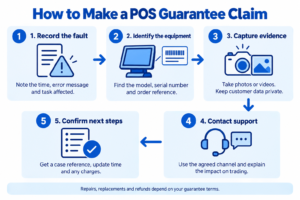
How to Make a POS Guarantee Claim
Prepare the information your supplier needs so it can identify the problem quickly.
- Record the fault. Note the time, error message and task that failed.
- Identify the equipment. Have the model, serial number and order reference ready.
- Capture evidence. Take relevant photos or videos without exposing customer information.
- Contact the agreed support channel. Explain whether trading has stopped or only one function is affected.
- Confirm the next step. Request a case reference, expected update and any proposed charges.
Follow approved troubleshooting instructions. Avoid opening equipment or arranging repairs without checking the warranty conditions first.
If a payment’s status is unclear, check the transaction record before trying again. Staff need to know how to distinguish a failed sale from a payment that completed despite a till error.
Review Your Options with Switch & Save
Switch & Save helps UK businesses review AI-powered EPOS systems, card payment solutions and business finance around their trading needs.
Bring your current costs, opening hours and essential features to the conversation. Ask for a demonstration using the sales your team handles every day, then request the relevant warranty and support details in writing.
Compare the full package: equipment, software, setup, payment charges and aftercare. A clear agreement makes it easier to understand both the cost and the help available.
Switch & Save helps UK businesses reduce costs with AI-powered EPOS systems, card payment solutions and business finance. Check your savings today.
Contact Switch & Save or call 0333 0389707 to discuss your requirements.
Frequently Asked Questions
What is a POS guarantee?
A POS guarantee is a written supplier promise explaining what happens under specified conditions, such as a covered equipment fault. Check the remedy, time limit, exclusions and claim process.
How long does an EPOS warranty last?
It depends on the equipment and agreement. Ask for the warranty period for each item, when cover starts and whether registration is required.
Does a POS guarantee include technical support?
Only if the agreement includes it. Hardware protection, software support, staff training and on-site assistance can have different conditions and charges.
Will I receive a replacement till immediately?
Don’t assume so. Ask whether replacements or temporary terminals are available, what qualifies and whether delivery times are guaranteed or estimated.
Can I get a refund after software activation?
That depends on the applicable conditions. Switch & Save’s refund policy says delivered, installed or activated software and services are generally non-refundable. Check your order terms before activation.
Does cancelling EPOS cancel my card machine contract?
It may require a separate cancellation. Check both agreements, including notice periods and remaining charges, before requesting cancellation.