
To train temporary staff on a POS system, teach the tasks they’ll use most: logging in, adding items, checking orders, taking payments and getting help when something goes wrong. Demonstrate each task, let them practise safely, then supervise real transactions before they work independently.
Keep access appropriate to their role. Temporary staff need to serve customers confidently, but refunds, price changes and other sensitive actions may need manager approval.
Whether you’re hiring Christmas shop assistants, summer café staff or extra takeaway workers, the aim is the same: help them handle an ordinary sale correctly and recognise when to stop and ask.
Key takeaways
| Question | Practical answer |
|---|---|
| What should temporary staff learn first? | The complete process for a normal sale, from login to receipt. |
| How should you teach it? | Demonstrate, let them practise, then observe them serving customers. |
| How long should training take? | Allow an initial session and supervised practice; judge readiness by demonstrated ability. |
| Should everyone have manager access? | No. Give each person the permissions their role requires. |
| What prevents repeat mistakes? | A short till guide, a named supervisor and feedback during the shift. |
| When should access end? | Remove or disable it when the temporary assignment finishes. |
Prepare the till before training starts
A confusing till makes training harder than it needs to be. Before your temporary team arrives, check that products, prices, menus and payment options are ready.
Make sure the receipt printer works, the card terminal is connected and someone knows where spare paper lives. Otherwise, your first training session can turn into a troubleshooting exercise.
Make common items easy to find
Put frequently sold products or menu items somewhere obvious. Use clear names that match what staff and customers actually call them.
For example, a Birmingham café might group regular drinks under “Hot drinks”, with visible options for size and milk choice. A grocery shop could keep loose produce together so staff aren’t searching through unrelated categories.
Avoid changing the layout halfway through training unless something needs correcting.
Prepare individual logins
Where your system supports them, create individual staff accounts with suitable permissions. Show each person how to log in, lock the screen and finish their session.
Don’t make sharing a manager’s PIN the normal way to get through a shift. Individual access helps you understand who handled a transaction and where further coaching may be needed.
Teach the everyday sale first
Start with the transaction staff will repeat most often. Leave advanced reports, stock adjustments and system settings for the people who need them.
POS means “point of sale”: the system you use to record purchases and take payments. An EPOS system is an electronic point-of-sale system, often connecting the till with other business functions.
Demonstrate one complete transaction
Show a normal sale from beginning to end:
- Log in using the correct account.
- Scan or select the items.
- Check quantities, options and the total.
- Confirm the order with the customer.
- Choose the payment method.
- Check that payment has completed.
- Offer the receipt and prepare for the next customer.
Explain what you’re checking as you go. “I’m checking the quantity because this item was scanned twice” is more useful than silently tapping through screens.
Then ask the trainee to repeat the process and explain their choices.
Give payments their own practice
So, what actually happens when a customer taps their card? Staff need to know which message confirms approval on your setup, and what to do if the result is unclear.
Teach them to check the transaction status before trying again. If they’re unsure, they should call the supervisor rather than risk charging the customer twice.
For cash sales, practise entering the amount received and checking the change. For standalone card terminals, include checking the amount entered against the till total.
Practise realistic customer situations
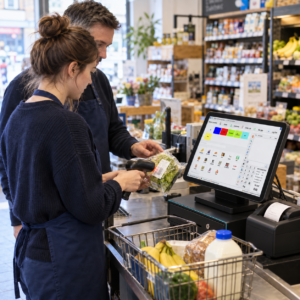
Watching a demonstration isn’t the same as serving someone while a queue builds. POS training for temporary staff should include ordinary interruptions and mistakes.
Use a training mode if your system provides one. Otherwise, agree a safe practice process with your provider so exercises don’t accidentally create live charges, stock changes or misleading sales records.
Retail and grocery examples
Ask a shop assistant to scan a small basket, correct an accidental duplicate and find a product whose barcode won’t scan.
Then introduce a price query. The correct response might be to check the shelf label and call a supervisor, rather than manually changing the price.
In a mobile phone shop, practise selecting the correct accessory model. Similar product names can lead to the wrong item being recorded even when the payment goes through correctly.
Café, restaurant and takeaway examples
For a café, practise an order with different drink sizes and an approved modifier, such as an alternative milk.
For a restaurant, show staff how to select the correct table and send the order to the kitchen. If your business offers split bills, practise that separately before someone attempts it during service.
In a takeaway, include correcting an order before it’s sent. Explain what staff must do if the kitchen has already received it.
Where a customer raises an allergy question, staff should follow your allergy procedure and involve the responsible person. Selecting a till modifier alone doesn’t confirm that a meal is safe.
Include one problem scenario
A customer says they’ve paid, but the till hasn’t completed the sale. What happens next?
Have the trainee show you how they would check the status and contact the supervisor. You’re testing their judgement as well as their knowledge of the buttons.
Set clear permissions and escalation rules
Temporary staff should know both what they can do and what needs approval.
Depending on the role, you may restrict refunds, voids, discounts, price overrides, cash-drawer opening and access to customer records or reports. A void usually cancels an item or sale before completion; a refund returns money after a completed payment.
Explain the difference using your own till screens.
Make asking for help straightforward
“Ask someone if you’re stuck” is too vague during a busy shift. Name the supervisor, explain how to reach them and identify the situations that require a pause.
For example:
“If a payment result is unclear, stop before retrying and call the shift supervisor. If a customer wants a refund, keep the transaction details ready for approval.”
Show staff how to protect customer information, too. They should never write down card details or ask for a customer’s PIN.
When the assignment ends, disable temporary accounts and review any shared access arrangements.
Use a simple first-shift training plan
A short, structured session gives you a useful starting point. The timings below are a planning example, not a guarantee that everyone will be ready within an hour.
| Stage | Suggested time | What to cover |
|---|---|---|
| Introduction | 5 minutes | Login, equipment and who provides help |
| Demonstration | 10 minutes | A complete everyday transaction |
| Guided practice | 15 minutes | Product selection, cash and card payments |
| Common problems | 10 minutes | Corrections, unclear payments and approval requests |
| Supervised service | 20 minutes initially | Real customers with an experienced colleague nearby |
Adjust this to the job. A Christmas retail assistant handling straightforward purchases may need different preparation from a restaurant worker managing tables, modifiers and split bills.
Check readiness through observation
Before someone works independently, ask them to complete a normal sale, correct an item and explain when they would call a manager.
Watch whether they check the order and payment status. Speed can develop with experience; skipping essential checks needs attention immediately.
If they struggle with one task, demonstrate it again and let them repeat it. Don’t restart the whole session when a focused explanation will help.
Provide support after training
Training shouldn’t end when the first customer arrives. Give temporary staff a named colleague to approach throughout their shift.
A quick check-in after the first busy period can reveal problems early. Ask which screen was difficult to find or which customer request caused uncertainty.
Keep a short guide beside the till
Create a one-page reference covering the tasks people are most likely to forget. Include how to correct an item, replace receipt paper, request approval and contact support.
Use screenshots from your actual system where helpful. Avoid including passwords or manager PINs.
Keep the guide current when buttons or procedures change. An outdated instruction sheet can create more confusion than it solves.
Use mistakes to improve the process
If several new starters make the same error, inspect the setup as well as the training. Two similarly named buttons or an unclear menu category may be contributing.
Managers can also review corrections and payment discrepancies to identify coaching needs. Switch & Save’s guide to reconciling card payments with daily sales explains how to compare the relevant records.
Choose an EPOS system your team can learn
When comparing systems, include staff training in the demonstration. Ask to see a normal sale, a correction, a refund approval and an unclear payment situation.
Check which staff controls are available in the package you’re considering. Also ask whether there’s a training mode, what support covers and how your chosen card terminal connects.
Switch & Save offers AI-powered EPOS systems and integrated card payment options for UK businesses. You can explore its EPOS systems or Integrated Payments Bundle when assessing your setup. Switch&Save
For a broader buying checklist, read how to choose an EPOS system for a small business.
Switch & Save helps UK businesses reduce costs with AI-powered EPOS systems, card payment solutions and business finance.
Frequently asked questions
How long does it take to train temporary staff on a POS system?
It depends on their experience, the till and the tasks involved. Start with a focused session, then provide supervised practice. Let demonstrated ability determine when they’re ready to work independently.
What should a POS training checklist include?
Include login, product selection, quantities, order corrections, cash and card payments, receipts, payment-status checks and escalation. Add role-specific tasks such as table orders or barcode searches.
Should temporary staff be allowed to process refunds?
Only if their role requires it and they’ve been trained and authorised. Otherwise, show them how to find the original transaction and request manager approval.
Can temporary staff practise without taking real payments?
Some systems offer training modes. Check what yours supports and whether practice affects payments, stock or reports before using it.
How can you reduce till mistakes during busy periods?
Keep the layout clear, provide supervised practice and make help easy to reach. Encourage staff to check orders and payment results, even when customers are waiting.