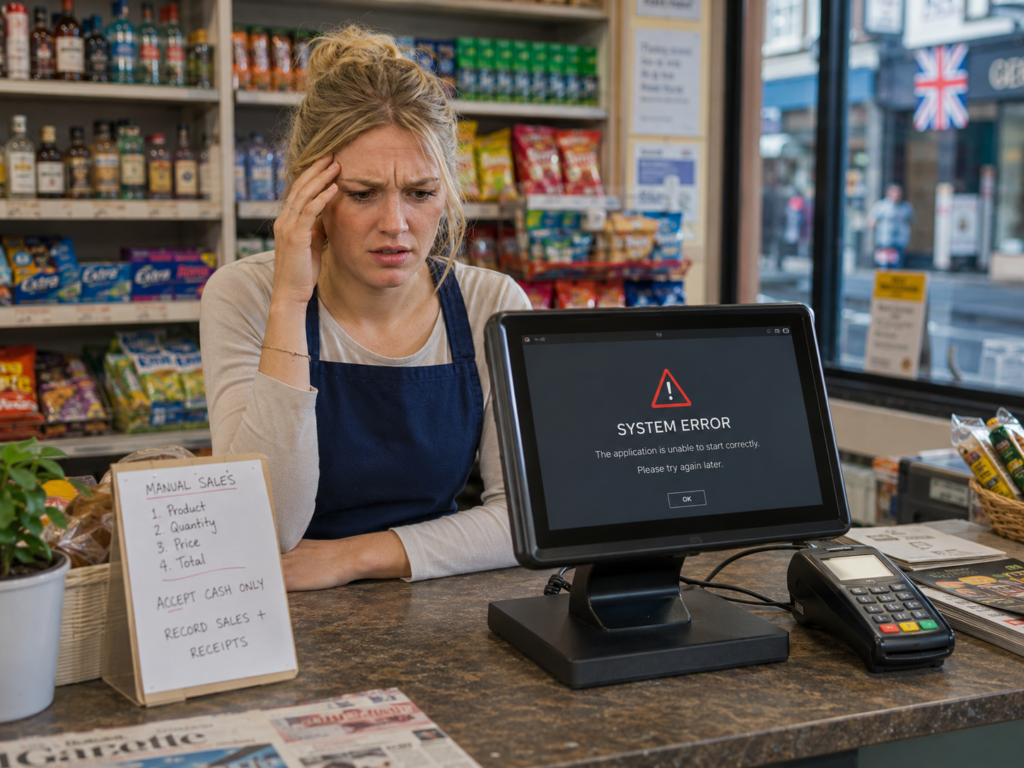
When an EPOS system goes down, a business may temporarily lose access to functions such as order processing, stock updates, receipt printing, customer records and integrated card payments. However, the business does not always need to stop trading. An effective continuity plan, offline-capable software, backup connectivity and trained staff can help you continue serving customers while the problem is resolved.
The correct response depends on what has failed. An internet outage, power cut, card terminal issue and complete EPOS hardware failure each require a different solution. This guide explains what UK businesses should do before, during and after an EPOS system outage.
Key Takeaways
| Question | Direct answer |
|---|---|
| Can you keep trading if your EPOS goes down? | Often, yes. Offline selling, backup devices and manual procedures may allow trading to continue. |
| Will sales data be lost? | Not necessarily. Locally stored or cloud-synchronised data may be recovered, depending on the system and failure. |
| Will card payments still work? | Sometimes. Standalone terminals or terminals with mobile connectivity may continue working, but integrated payments may be affected. |
| What should staff do first? | Identify whether the issue affects power, internet, hardware, software or card processing. |
| What reduces downtime? | Reliable support, backup internet, offline functionality, staff training and documented recovery procedures. |
| Should an EPOS system be restarted immediately? | A controlled restart may help, but staff should first save information and check whether other devices are affected. |
What Does It Mean When an EPOS System Goes Down?

An EPOS system is considered “down” when staff cannot use one or more essential functions needed to process sales or manage orders.
The term does not always mean the entire system has failed. An EPOS problem may affect only:
- One till
- A kitchen printer
- The internet connection
- An integrated card terminal
- A customer display
- A particular software feature
- Communication between multiple devices
- Access to cloud-based reports
For example, a restaurant may still be able to enter orders on its tills but be unable to send them to the kitchen. A retailer may be able to accept cash while integrated card payments remain unavailable.
Identifying the affected component is the first step towards restoring normal service.
What Happens During an EPOS System Outage?
The effect of an EPOS outage depends on the system configuration and the type of failure.
Sales processing may slow down
Staff may need to write orders manually, calculate totals separately or use another till. This can increase queues and create more opportunities for pricing or order-entry mistakes.
Integrated card payments may be interrupted
When a card terminal is integrated with an EPOS system, the till normally sends the transaction value directly to the terminal. If that connection fails, staff may be unable to start an integrated payment.
A standalone card machine may still operate independently, provided it has a working broadband, Wi-Fi, Ethernet or mobile connection.
Businesses reviewing their payment setup may find our guide to streamlining restaurant payments useful.
Stock levels may not update immediately
If sales cannot be entered into the EPOS system, stock quantities may temporarily become inaccurate. Businesses should record products sold during the outage and enter or reconcile them once the system is restored.
Orders may not reach preparation areas
In hospitality and takeaway businesses, kitchen display screens or order printers may stop receiving new orders. Staff may need to use handwritten tickets until communication is restored.
Reports may be temporarily unavailable
Owners may lose access to live sales figures, staff activity, stock information or branch-level performance. This does not necessarily mean the underlying data has been lost.
Common Causes of EPOS Downtime
Understanding the cause helps staff avoid unnecessary troubleshooting.
Internet connection failure
Cloud-connected features may stop working when broadband is unavailable. The local EPOS software may continue operating if it supports offline transactions or stores essential information on the device.
Power cut
A power failure can affect tills, routers, printers, kitchen displays and card terminals simultaneously. Mobile card terminals may remain powered temporarily, but their connectivity will still depend on the available network.
EPOS software problem
Software may freeze, close unexpectedly or fail to load correctly. This can be caused by a damaged update, operating system issue, configuration error or conflict with another application.
Hardware failure
A touchscreen, computer, barcode scanner, printer, cash drawer or network device may stop responding. A single faulty device should not always prevent the rest of the system from operating.
Card payment problem
A card terminal issue may be separate from the EPOS system itself. The terminal could have a network problem, configuration issue or temporary connection failure with the payment processor.
Local network failure
Restaurants and larger retailers often connect tills, printers and kitchen displays through a local network. A router, switch or network cable problem can prevent devices from communicating even when the internet is working.
User or configuration error
Incorrect login details, changed permissions, disconnected cables or accidental settings changes can appear to be a complete system failure.
What to Do When Your EPOS System Stops Working
Use a controlled process rather than repeatedly restarting devices.
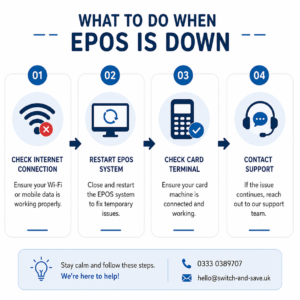
1. Identify what is still working
Check whether the problem affects:
- Every till or only one
- Cash and card payments
- Internet access
- Receipt or kitchen printing
- Back-office reporting
- One location or multiple branches
This information will also help the support team diagnose the problem more quickly.
2. Inform the person responsible
Every shift should have a named person responsible for managing technical interruptions. That person should coordinate staff, contact support and decide when manual processes are required.
3. Check basic connections
Confirm that devices have power and that network, printer and terminal cables are connected securely. Avoid changing advanced settings unless advised by your EPOS provider.
4. Test the internet separately
Open a trusted website on another connected device. If it does not load, the issue may be with the broadband connection rather than the EPOS software.
Where available, switch to an approved backup internet connection, such as a business 4G or 5G router.
5. Contact EPOS support
Provide clear details, including:
- When the issue started
- Which devices are affected
- Any error message displayed
- Whether the internet is working
- What troubleshooting has already been attempted
- Whether trading has stopped completely
Responsive support can make a significant difference during an outage. Read more about the benefits of reliable EPOS customer support.
6. Start your backup trading procedure
Depending on the business, this may include:
- Using a secondary till
- Recording sales on a prepared manual form
- Using a standalone card terminal
- Accepting cash where appropriate
- Writing restaurant orders manually
- Restricting sales to items with clearly known prices
- Issuing handwritten receipts when required
- Recording refunds, discounts and voids separately
Any manual process should preserve an accurate audit trail.
7. Reconcile transactions after recovery
When the system is working again, enter or reconcile transactions completed during the outage. Check card totals, cash received, stock sold, discounts applied and outstanding orders.
Avoid entering the same transaction twice. Where offline transactions have synchronised automatically, confirm that they already appear before adding anything manually.
Can an EPOS System Work Without the Internet?
Some EPOS systems can continue performing core functions without a live internet connection, but the exact capabilities vary.
An offline-capable system may allow staff to:
- Open the till
- Add products to a sale
- Calculate totals
- Accept cash
- Print receipts
- Save transactions locally
- Synchronise sales when connectivity returns
However, internet-dependent functions may remain unavailable, including:
- Cloud reporting
- Real-time multi-site updates
- Online orders
- Remote management
- Certain customer loyalty functions
- Some integrated payment services
- Live product or price updates
Businesses should ask their provider exactly what happens when internet access is lost. “Cloud-based” does not automatically mean a system becomes unusable offline, but offline functionality should never be assumed.
How to Create an EPOS Business Continuity Plan
A continuity plan should be short enough for staff to use during a busy shift.
Include emergency contact details
List the contact information for:
- EPOS support
- Card payment support
- Internet provider
- Electrician or hardware support
- Store manager
- Business owner or operations manager
Store a printed copy where staff can access it without using the EPOS system.
Define acceptable backup payment methods
Document whether staff can accept:
- Cash
- Standalone card payments
- Payment links
- Bank transfers
- Deferred payments for approved account customers
The business should set clear rules rather than leaving payment decisions to individual employees.
Prepare manual sales forms
A basic outage form can include:
| Information to record | Example |
|---|---|
| Date and time | 18 September, 7:35 pm |
| Staff member | Employee name or ID |
| Product or order details | Two meals and two drinks |
| Payment method | Cash or standalone card |
| Total amount | £42.50 |
| Card reference | Terminal transaction reference |
| Discounts | Manager-approved 10% discount |
| Notes | To be entered after system recovery |
Assign staff responsibilities
One employee may manage customer communication, another may record transactions, and a manager may contact technical support.
Defined roles prevent several staff members from attempting different fixes at the same time.
Test the procedure
Run a controlled test during a quiet period. Staff should know how to process a basic sale, record an order and reconcile payments without relying entirely on live EPOS functions.
How to Reduce Future EPOS Downtime
No technology can eliminate every interruption, but preparation can reduce its financial and operational impact.
Choose a system with suitable offline functionality
Ask which features remain available if broadband fails and how locally stored transactions synchronise afterwards.
Use backup connectivity
A properly configured mobile router can provide temporary connectivity when fixed broadband is unavailable. Test it regularly rather than waiting for an outage.
Maintain spare equipment
Businesses that depend heavily on printing or scanning may keep a compatible spare printer, scanner, cable or power supply.
Control software updates
Updates should be managed carefully and, where possible, completed outside peak trading hours. Devices should meet the provider’s recommended technical specifications.
Train staff
Staff should know the difference between a till problem, payment terminal issue, printer failure and internet outage. Simple training can prevent a minor fault from becoming a complete operational stoppage.
Review your EPOS provider
Ask whether your provider offers remote support, data backups, replacement hardware, service monitoring and clear escalation procedures.
Businesses considering another supplier should also review our guide to switching card machine providers.
Choosing a Resilient EPOS System
Business continuity should be considered before an EPOS system is installed, not only after something goes wrong.
When comparing providers, ask:
- Which functions work without internet access?
- Where is transaction data stored?
- How frequently is data backed up?
- How are offline sales synchronised?
- What support is available outside normal office hours?
- Can card payments operate independently?
- What happens if the main till fails?
- Can another device be activated quickly?
- How are multi-site outages handled?
- Is staff training included?
Switch & Save provides AI-powered EPOS systems designed around the practical requirements of UK retailers, hospitality venues, takeaways and other small businesses. Our team can help you assess your current setup, identify unnecessary costs and choose technology that supports more efficient day-to-day operations.
Frequently Asked Questions
Will I lose all my sales data if the EPOS system crashes?
Not necessarily. Transactions may be stored locally, backed up remotely or synchronised to the cloud. The result depends on the system architecture, backup settings and cause of the failure. Avoid resetting or reinstalling software before speaking with support.
Can I accept card payments when the EPOS system is offline?
Possibly. A standalone card terminal may continue operating independently. An integrated terminal may also have a fallback procedure, but this depends on the terminal, payment provider and available connection.
Should staff continue taking orders during an EPOS outage?
They can continue if the business has a safe and accurate backup process. Staff should record prices, payments, discounts, stock movements and order details so the information can be reconciled later.
What should I tell customers?
Be transparent and brief. Explain that there is a temporary technical issue, confirm the available payment methods and provide realistic information about delays.
How long does it take to restore an EPOS system?
The recovery time depends on the cause. A disconnected cable may take minutes to correct, while damaged hardware, a network outage or a serious software problem may take longer.
Can a power cut damage an EPOS system?
A sudden loss of power can interrupt transactions and may damage equipment in some circumstances. Appropriate surge protection and managed power backup equipment can help reduce risk.
Should I keep paper receipts and order pads?
Yes. A small supply of receipt books, order pads and printed outage forms can provide a useful temporary backup.
How often should an EPOS continuity plan be reviewed?
Review it whenever the system, payment provider, broadband service, business location or staff structure changes. It should also be tested periodically so employees understand the procedure.
Check Your EPOS Resilience with Switch & Save
An EPOS outage does not always need to bring your business to a standstill. The right combination of offline capabilities, backup connectivity, reliable support and trained staff can help you continue trading and recover accurately.
Switch & Save helps UK businesses reduce costs with AI-powered EPOS systems, card payment solutions and business finance.