Mobile POS is a practical choice for most retailers who want to sell beyond a fixed till, speed up checkout, and keep stock and reporting in sync across every sale. It lets your team take payments on the shop floor, at pop-ups, or at events, cutting queues and capturing sales that might otherwise walk out the door. This guide covers the features that matter, what mobile POS costs, how to deploy it, and the questions worth asking any vendor.
TL;DR:
- Mobile POS systems should support contactless, mobile wallets, and offline mode to ensure smooth transactions and real-time inventory updates across all locations.
- Hardware options include handheld terminals, tablet-plus-reader setups, and smartphones, each suited for different retail environments and footfall levels.
- Costs comprise hardware purchase or rental, software subscription, transaction fees, and additional setup or support charges, with long-term budgeting over one to three years.
- Successful deployment requires connectivity checks, system integration, staff training, and security compliance, especially PCI certification and offline mode testing.
- Piloting mobile POS at a single site or event for two to four weeks helps assess its impact on queue times and sales conversion before full implementation.
Table of Contents
- What mobile POS is and where it fits in retail
- Top benefits of mobile POS for retail
- Essential features to look for in a mobile POS system
- Hardware and software options for mobile checkout
- Costs, pricing models and how to budget for mobile POS
- Deployment, integration and keeping payments secure
- How to choose: decision criteria and vendor questions
- How we support mobile POS adoption for retailers
- Where mobile POS earns its keep, and how to pilot it
- Try mobile POS with a demo built around your shop
- FAQ
- Sources
What mobile POS is and where it fits in retail
Mobile POS covers handheld terminals, tablet-based EPOS setups, and mobile card readers paired with an app, all connected to a cloud back-office that tracks sales, stock and reporting in real time. Rather than tying every transaction to a fixed counter, your staff carry the till with them.
This flexibility shows up across several everyday retail situations:
- Floor selling: staff check customers out wherever they are standing, instead of sending them to a queue.
- Pop-ups and markets: a tablet or handheld terminal with a SIM connection turns any space into a functioning shop.
- Events: mobile POS handles high footfall in short bursts, where a single fixed till would create bottlenecks.
- Click-and-collect: staff confirm and process orders at the door or in-store without walking back to a counter.
- Line-busting: during peak hours, a second or third mobile device clears a queue fast.
For omnichannel retailers, mobile POS also closes the gap between online and in-store stock. When every sale updates the same inventory record, your online listings reflect what is actually on the shelf, which matters more as customers move between browsing online and buying in person.
Top benefits of mobile POS for retail
The appeal of mobile POS comes down to a handful of outcomes that affect your bottom line directly.
- Mobility lifts conversion. Staff who can check customers out anywhere capture sales that would otherwise be lost to a long queue or an abandoned basket.
- Checkout gets faster. Mobile terminals process contactless and chip-and-PIN payments in seconds, which matters most during busy periods.
- Stock stays accurate. Real-time inventory updates mean staff know what is actually available, reducing the lost sales that come from promising stock you do not have.
- Customer experience improves. Digital receipts, on-the-spot loyalty sign-ups, and mobile wallet acceptance all remove small points of friction.
- Running costs can fall. Fewer fixed tills and centralised reporting across locations reduce both hardware spend and the admin time spent reconciling sales.
That last point matters more than it might seem. Mobile wallet registration among UK adults increased notably between 2024 and 2025, reflecting rapid consumer adoption of mobile payments, according to UK Finance data on mobile payments. A till that cannot take Apple Pay or Google Pay smoothly is already behind what most shoppers expect at checkout.
Essential features to look for in a mobile POS system
Not every mobile POS system is built the same way, and the features you prioritise should match how your shop actually trades.
- Payments coverage: contactless, mobile wallets, chip-and-PIN, and straightforward refunds without needing to call support, supported by advanced solutions like Stripe payments for ticketing.
- Offline mode: the ability to keep taking payments when connectivity drops, with transactions syncing automatically once the connection returns.
- Inventory and variants: stock levels, sizes and colours visible and editable from the device itself, not just the back office.
- Receipts, CRM and loyalty: digital receipts, customer records, and loyalty enrolment built into the same checkout flow.
- Integrations: compatibility with your accounting software, ecommerce platform and existing stock systems.
- Durability and battery life: a device that survives a full trading day and the occasional knock, particularly for market stalls or events.
- Connectivity options: Wi-Fi as standard, with a SIM fallback for locations where the network is unreliable.
Pro Tip: Ask any shortlisted vendor to demonstrate offline mode live, not just describe it. How a system behaves when it reconnects tells you more than any spec sheet.
Hardware and software options for mobile checkout
Three broad device classes dominate mobile POS, and each suits a different kind of trading.
- Handheld terminals combine the card reader and till screen in one device, ideal for floor selling and queue-busting where speed matters most.
- Tablet-plus-reader setups give you a larger screen for browsing stock and ringing up complex baskets, paired with a separate card reader.
- Smartphone apps paired with a compact card reader suit very small operations or occasional mobile selling, such as a single market stall.
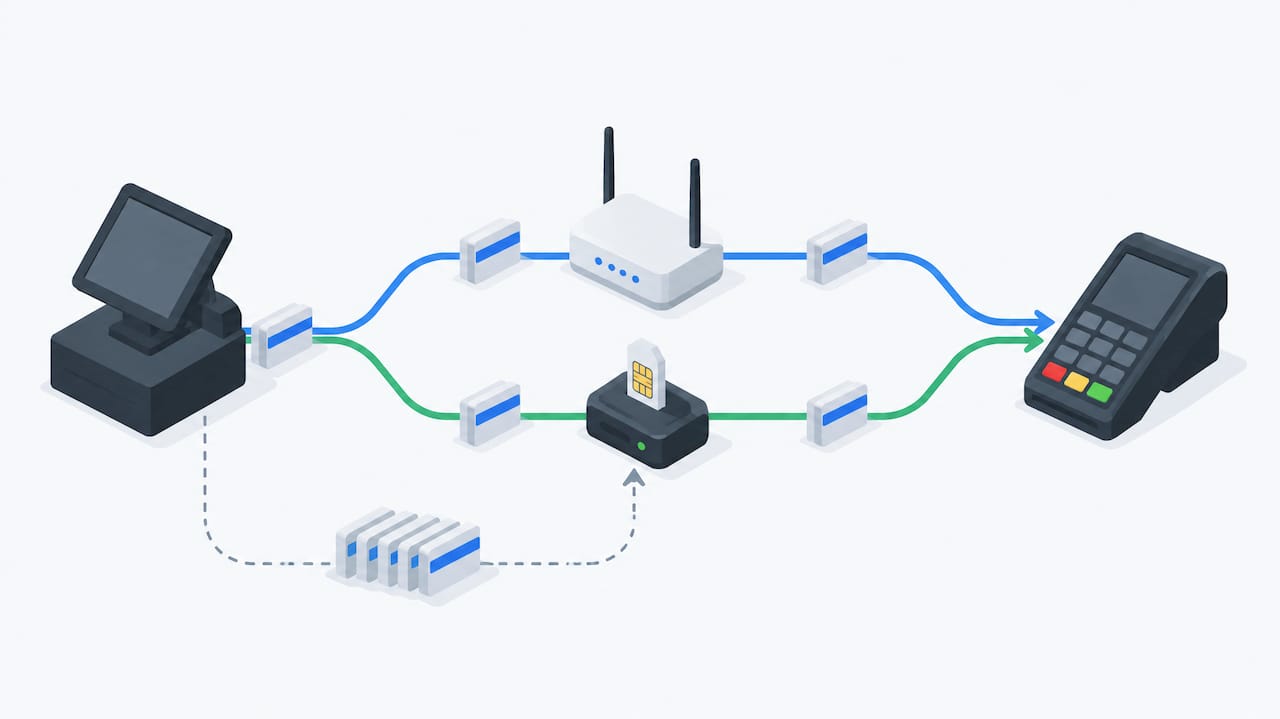
Connectivity choices matter just as much as the device itself. Wi-Fi works well in a fixed shop, but pop-ups and events usually need a 4G or 5G SIM, and a smart-roaming SIM that switches networks automatically avoids dead spots that a single-network SIM cannot work around, a detail covered in this payment terminal guide for retail and hospitality.
Peripherals such as barcode scanners and receipt printers add convenience but also add weight and another thing to charge. For seasonal or occasional use, renting hardware rather than buying it outright avoids tying up capital in devices that sit idle for months at a time.
Costs, pricing models and how to budget for mobile POS
Mobile POS pricing usually breaks down into three parts: the hardware, the software subscription, and the transaction fees charged per card payment. Hardware can be bought outright or rented, and rental options from providers listed on the Digital Marketplace often bundle a certified terminal with a roaming SIM and standard PCI security features, which suits retailers who want to avoid upfront capital spend.
Beyond the headline price, a few costs catch retailers out:
- Installation and setup, especially for multi-terminal or multi-site rollouts.
- Ongoing support fees, which vary depending on whether support is included or charged separately.
- Roaming SIM charges for mobile connectivity away from the shop.
- Device replacement or repair costs if hardware is damaged or lost.
When comparing offers, work out the total cost over one to three years rather than just the monthly figure. Ask each vendor directly what the transaction fee is, whether it changes with volume, and what happens to pricing once any introductory period ends.
Deployment, integration and keeping payments secure
A mobile POS rollout usually follows a predictable sequence: confirm connectivity at each location, configure devices and payment settings, migrate product and customer data, train staff, then run a short trial before going fully live. For a single shop, this can take as little as a few days; multi-site rollouts take longer because each location needs its own connectivity check.
Integration is worth mapping out before you commit to a vendor:
- Ecommerce platforms, so stock and orders stay in sync across channels.
- Accounting software, to avoid manual reconciliation at month-end.
- Existing stock systems, particularly if you already run a warehouse or multi-store setup, as shown in these EPOS integration examples for retail and hospitality.
Security is not optional. A 2025 UK public tender for an EPOS solution specified certification with a named merchant acquirer alongside formal compliance requirements, a reminder that vendor certification and PCI compliance are not just small-business concerns but standard procurement criteria. For the basics of what PCI compliance means for your till setup, our guide to PCI compliance for POS and hospitality is a useful starting point.
On connectivity resilience, pairing your primary Wi-Fi with a secondary SIM connection, and making sure offline mode is properly configured, keeps sales moving even when one connection fails.
How to choose: decision criteria and vendor questions
Shortlisting a mobile POS vendor comes down to five checks.
- Fit for your environment. Does the hardware suit your trading conditions, whether that is a shop floor, a market stall, or both?
- Integration support. Will it connect to your existing ecommerce, accounting and stock systems without manual workarounds?
- Support availability. Is help available when you need it, and in a time zone that matches your trading hours?
- Room to scale. Can the system add terminals or locations without a full system change?
- Transparent pricing. Are all fees, including transaction costs, stated clearly upfront?
When you get a vendor on a call, ask about their service level agreement, what a migration from your current system actually involves, whether they offer a live demo rather than a slide deck, and what certifications their payment processing holds.
Pro Tip: Treat vagueness about pricing or support hours as a red flag. A vendor confident in their offer will give you a straight answer on both, every time.
How we support mobile POS adoption for retailers
We offer EPOS systems that combine hardware, cloud software and integrated payment processing, with real-time inventory and reporting running across terminals and locations. Packages are available for retail bundles suited to single shops through to multi-store setups with centralised reporting, with migration support from existing systems as part of onboarding. Support is offered, and packages include a demo before commitment, so you can see how the system handles your actual stock and trading pattern before deciding.
Where mobile POS earns its keep, and how to pilot it
Mobile POS pays off fastest where queues or footfall spikes cost you sales: busy shop floors, markets, and events. For a steadier, lower-traffic shop, a single mobile terminal alongside a fixed till is often enough rather than a full mobile-first rollout.
If you are unsure, pilot it. Pick one location or one event, track queue times and conversion over two to four weeks, then compare the result against your usual setup. The right balance is rarely the flashiest system, it is the one that fits how your shop actually trades.
— Amir
Try mobile POS with a demo built around your shop
Our Standard EPOS Bundle for UK Retail and Integrated Payments Bundle both combine mobile and countertop hardware with AI-powered software, so you are not choosing between mobility and a reliable back office.

A demo shows the system running against your own stock and sales pattern, not a generic walkthrough, so you can judge fit before committing. Pricing is presented clearly, and support is available for system migration. Book a demo to see how it would work in your shop.
FAQ
Can I use my mobile as a POS machine?
A smartphone can work as part of a mobile POS setup when paired with a compact card reader and a payment app, though dedicated handheld terminals or tablet setups tend to offer more reliable battery life and durability for regular trading. For occasional or low-volume selling, a phone-based setup is often enough.
What POS system is best for retail?
The best system depends on your trading pattern: handheld terminals suit floor selling and queue-busting, while tablet-based EPOS setups suit shops needing fuller stock and customer management. Our Retail EPOS System combines both approaches with integrated payments and real-time stock sync.
How much does a mobile POS system cost?
Costs vary by hardware choice, software subscription and transaction fees, with rental options reducing upfront spend. Our Hospitality EPOS Bundle is £549 one-off with AI-powered cloud software from £20 per month, while the Integrated Payments Bundle includes a software subscription from £30 per month, with hardware pricing available on request.
What is the best POS system for a retail shop?
A retail shop benefits most from a system that syncs stock across mobile and fixed tills, supports contactless and mobile wallet payments, and integrates with existing accounting or ecommerce tools. Checking vendor certification and support availability before committing avoids most common rollout problems.
Sources
- Digital payments continue to grow as mobile wallets become more popular
- Electronic Point of Sale Solution – Find a Tender
- Merchant payment terminal services – Chip and Pin – Digital Marketplace