
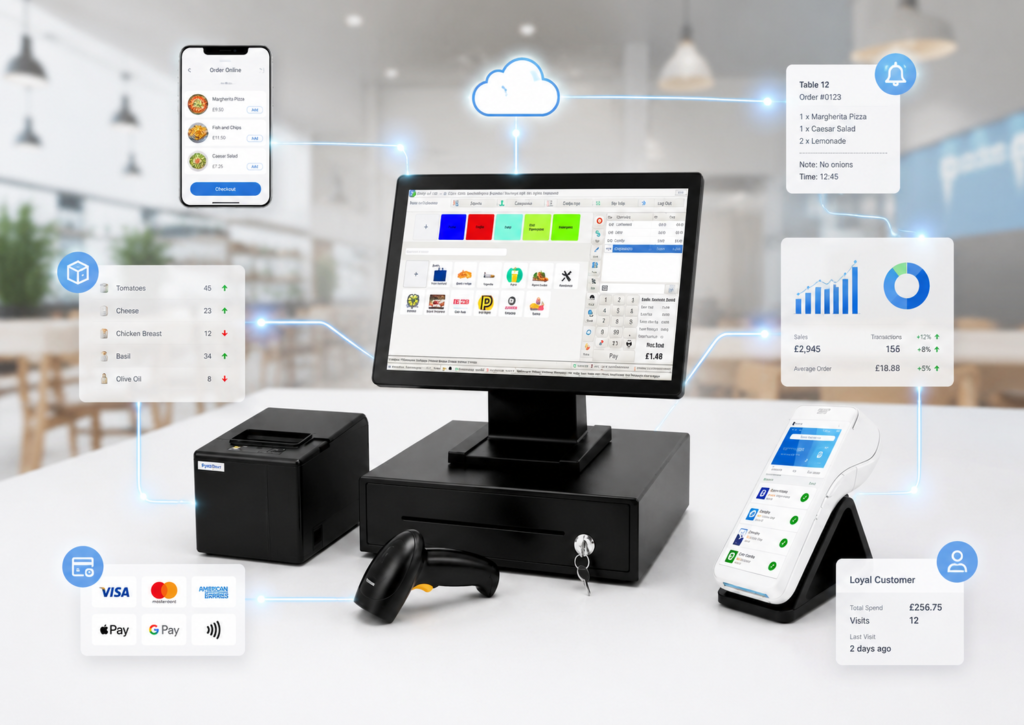
POS system integration means connecting your till system with the other tools your business already uses, such as card machines, kitchen printers, online ordering websites, delivery platforms, stock control, staff management, reporting dashboards and business finance support. For UK small businesses, the main benefit is simple: fewer manual jobs, fewer mistakes and faster service.
The best POS system is not just a till. It should work as the centre of your business, connecting sales, payments, orders, stock and reports in one place. Switch & Save supports this approach with EPOS solutions for hospitality and retail businesses, including integrated card payments, kitchen printing, online ordering, QR/kiosk ordering, stock management, staff reporting and live dashboards.
Key Takeaways
| Key Point | What It Means for Your Business |
|---|---|
| POS integration connects your tools | Your till, payments, online orders, printers and reports work together. |
| Compatibility with other tools saves time | Staff do not need to retype orders or totals into different devices. |
| Integrated card payments reduce errors | The payment amount can flow from the till to the card machine. |
| Delivery app integration improves order control | Orders from platforms such as Uber Eats, Just Eat and Deliveroo can land directly in the POS. |
| Kitchen printing and KDS speed up service | Food orders go straight to the correct kitchen station. |
| Cloud reporting improves visibility | Owners can check sales, VAT, staff and product performance from a browser. |
| The right EPOS should grow with you | Choose a system that supports retail, hospitality, multi-site growth and future tools. |
What Is POS System Integration?
POS system integration is the process of connecting your point of sale system with other software, hardware and business services. Instead of using separate tools that do not speak to each other, an integrated POS brings key operations into one connected workflow.
For example, a restaurant may connect its POS with card payments, online ordering, kitchen printers, table management, delivery platforms and reporting. A retail shop may connect its EPOS with barcode scanners, stock control, receipt printers, customer records, card machines and sales analytics.
The goal is not to make the system complicated. The goal is to remove unnecessary work. When your POS has strong compatibility with other tools, your team can serve customers faster, reduce double entry and keep better control over sales.
Why Compatibility With Other Tools Matters
For a small business, time and accuracy directly affect profit. If staff have to type the same order into a till, a delivery tablet, a kitchen printer and a card machine, mistakes are more likely. Wrong totals, missed items, delayed tickets and stock errors all create pressure during busy hours.
Good POS system integration helps solve this by keeping information connected. Sales update reports. Card payments match till totals. Online orders print to the kitchen. Stock levels reduce when items are sold. Staff activity is recorded under the right login.
For UK businesses, this is especially important because customers now expect faster service, contactless payments, online ordering, delivery options and accurate receipts. A basic till may still process sales, but an integrated EPOS gives more control over the full business.
Key Tools Your POS System Should Integrate With
1. Card Payment Machines
Card payment integration is one of the most important features for modern businesses. Without integration, staff usually type the amount into the card machine manually. This increases the risk of typing mistakes and slows down checkout.

With integrated card payments, the POS and card terminal work together. The amount is sent from the till to the card machine, the payment is recorded correctly and the receipt process becomes smoother. Switch & Save supports integrated card payment options and works with payment providers including Teya and takepayments for hospitality EPOS, with custom integration options for existing setups.
For restaurants, cafés and takeaways, this means quicker payment at the counter or table. For retail stores, grocery shops and mobile shops, it means faster queues and cleaner reconciliation at the end of the day.
2. Online Ordering Websites
Online ordering is now a major part of hospitality. If your restaurant or takeaway takes orders online, the best setup is one where online orders go directly into the POS.
This avoids staff checking a separate device, writing down the order or retyping items manually. Switch & Save’s hospitality EPOS page explains that the system can include a branded ordering website where takeaway, delivery and collection orders land automatically on the Android POS and print to the kitchen.
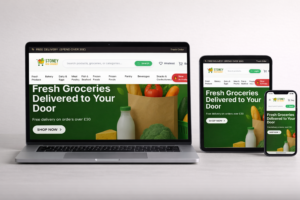
For a takeaway in Birmingham, this could mean fewer missed orders during peak times. For a café offering collection, it can help staff prepare orders before the customer arrives.
3. Delivery Platforms
Delivery apps can bring more orders, but they can also create operational problems if every platform needs a separate tablet. Staff may need to watch Uber Eats, Just Eat and Deliveroo separately, then re-enter orders into the till.
A better approach is delivery platform integration. Switch & Save lists Uber Eats, Just Eat and Deliveroo as supported delivery integrations, allowing delivery orders to flow into the POS and print to the kitchen automatically.
This is useful for takeaways, burger shops, pizza shops, dessert shops and restaurants that want to reduce “tablet chaos”. It also helps owners keep all order data in one reporting system.
4. Kitchen Printers and Kitchen Display Screens
For hospitality businesses, kitchen communication is critical. If an order is delayed or sent to the wrong station, service suffers.
Kitchen printer integration sends orders from the POS directly to the correct kitchen printer. A restaurant may route starters to one printer, drinks to another and mains to the kitchen. A kitchen display screen, also known as KDS, can show orders digitally so staff can bump items when they are ready.
Switch & Save highlights kitchen printing, station routing, kitchen display and order status features for hospitality businesses.
This is especially useful for busy restaurants, takeaways, cafés and food trucks where speed matters.
5. Stock and Inventory Tools
Retail businesses need accurate stock control. Hospitality businesses also need product and ingredient visibility. A POS that integrates with stock tools can update inventory when products are sold, returned or restocked.
For a grocery shop, this can help identify low-stock items before shelves become empty. For a mobile phone shop, it can help track accessories, devices and high-value products. For a takeaway, it can help monitor menu items, add-ons and product availability.
Switch & Save’s retail EPOS page describes real-time stock and sales tracking, automatic stock updates with each sale, supplier tracking, low-stock alerts and detailed stock movement reports.
6. Staff, Shifts and Permissions
A good POS system should also integrate with staff management. This includes PIN logins, roles, permissions, clock-in/out and staff sales reports.
This matters because not every staff member should have access to refunds, discounts, reports or settings. A cashier may only need checkout access, while a manager may need end-of-day reports and void controls.
For cafés, restaurants and bars, staff reports can show who served which table or processed which sale. For retail shops, permissions can help reduce mistakes and improve accountability.
7. Cloud Reporting Dashboard
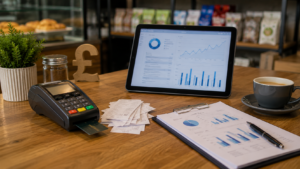
A connected POS should give owners clear reports without needing to be physically at the counter. Cloud reporting allows business owners to check sales, VAT, expenses, payment reports, product performance and staff activity from a browser.
Switch & Save describes a web dashboard where business owners can view live sales, covers, average order, VAT, expenses, profit, multi-site reporting and staff reporting.
For a business owner managing more than one shop, this is particularly valuable. You can compare branches, review performance and make decisions without waiting for paper reports.
POS Integration for Hospitality Businesses
Hospitality businesses need fast service, accurate orders and smooth communication between front-of-house, kitchen and delivery channels.
A restaurant POS should integrate with:
- Table management
- Split bills
- Tips and service charge
- Kitchen printers
- Kitchen display screens
- Online ordering
- Delivery platforms
- QR ordering
- Card payments
- Staff roles
- End-of-day reports
For example, a restaurant manager may take an order at the counter, send it directly to the kitchen, accept card payment, print the receipt and view the sale in the dashboard. A takeaway may receive an online order, print it automatically and track delivery status without retyping anything.
Switch & Save’s hospitality EPOS is built for restaurants, takeaways and cafés, with dine-in, takeaway, pickup, delivery, integrated payments, kitchen printing, reporting and online ordering features listed on its website.
POS Integration for Retail Shops
Retail businesses have different needs. A retail EPOS should focus on speed, stock accuracy and product control.
A retail POS should integrate with:
- Barcode scanners
- Receipt printers
- Cash drawers
- Card machines
- Product databases
- Stock control
- Customer and loyalty tools
- Staff permissions
- Sales reports
- Multi-location reporting
For example, a convenience store can scan items quickly, take card payment, update stock automatically and check low-stock alerts later. A mobile shop can manage accessories, devices, repairs and customer sales history more professionally.
Compatibility with other tools is important because retail shops often handle hundreds or thousands of products. Without integration, stock and pricing errors become harder to control.
What to Check Before Choosing a POS System Integration
Before choosing a POS system, ask these questions:
Does it work with your current payment provider?
Some businesses already have a card payment contract. Check whether your POS can integrate with your provider or whether you need a new card machine deal.
Can it connect online and offline sales?
If you sell through a counter, website, QR ordering or delivery platforms, your POS should bring these orders into one system.
Does it support your hardware?
Check compatibility with receipt printers, kitchen printers, cash drawers, barcode scanners, weighing scales, tablets and customer displays.
Can it handle your business type?
A restaurant needs table plans and kitchen routing. A retail shop needs barcode scanning and stock control. A takeaway needs delivery app and online order management. Choose a system built for your workflow.
Is reporting clear?
Your POS should show sales, VAT, payment types, refunds, discounts, staff activity and product performance in a simple format.
Is support available in the UK?
Good integration is not just about software. You also need setup, training and support when something needs adjusting.
How Switch & Save Helps UK Businesses
Switch & Save helps UK businesses reduce costs with AI-powered EPOS systems, card payment solutions and business finance. The aim is to give small businesses a practical system that connects the tools they need without unnecessary complexity.
For hospitality businesses, Switch & Save supports EPOS features such as integrated card payments, delivery app integration, branded online ordering, QR/kiosk ordering, kitchen printing, KDS, table management, stock, staff and reporting tools.
For retail businesses, Switch & Save supports fast checkout, stock tracking, integrated payments, product management, reporting and scalable EPOS features for shops that need better control.
Switch & Save also provides business finance support through YouLend, helping UK small businesses access flexible funding options where suitable.
Ready to connect your POS with the tools your business already uses?
Switch & Save helps UK businesses reduce costs with AI-powered EPOS systems, card payment solutions and business finance.
FAQs
What does POS system integration mean?
POS system integration means connecting your till with other tools such as card machines, kitchen printers, online ordering websites, delivery apps, stock control and reporting dashboards.
Why is compatibility with other tools important?
Compatibility with other tools helps your business avoid double entry, reduce staff mistakes, speed up service and keep sales, payments and reports connected.
Can a POS system integrate with card machines?
Yes. Many modern POS systems can integrate with card machines so the payment total moves from the till to the terminal, reducing manual entry errors.
Can delivery app orders go straight into the POS?
Yes, with the right integration. Switch & Save supports delivery platform integrations for Uber Eats, Just Eat and Deliveroo for hospitality businesses.
Can online orders print directly to the kitchen?
Yes. A connected hospitality EPOS can send online orders directly to the POS and kitchen printer, helping staff prepare orders faster.
Is POS integration only for restaurants?
No. POS integration is useful for restaurants, takeaways, cafés, bars, grocery shops, convenience stores, mobile shops and other UK small businesses.
What tools should a retail POS integrate with?
A retail POS should connect with barcode scanners, receipt printers, cash drawers, card machines, stock control, product management and reporting tools.
Does Switch & Save offer EPOS for both retail and hospitality?
Yes. Switch & Save provides EPOS solutions for hospitality and retail businesses, with features designed around each business type.



