Pay by Link lets a business accept card payments remotely by sending the customer a secure payment link through email, SMS, WhatsApp or another digital channel. The customer opens the link, enters their payment details on a secure hosted page and completes the transaction without needing to visit your premises or use a physical card machine.
For UK businesses, payment links can be especially useful for deposits, telephone orders, takeaway orders, invoices, reservations and customers who simply aren’t standing at your counter.
You don’t necessarily need a full ecommerce website either. Payment-link systems can operate through standalone hosted payment pages, making them useful for small retailers, restaurants, cafés, trades and service businesses that occasionally need to take payments remotely. GOV.UK Pay, for example, uses payment links to let organisations accept card and digital-wallet payments without building a complete online checkout.
Key Takeaways
| Question | Quick answer |
|---|---|
| What is Pay by Link? | A secure URL that lets a customer make an online payment |
| Do you need a card machine? | No. The payment is completed online |
| Do you need a website? | Usually not; many providers host the payment page |
| How can you send the link? | SMS, email, WhatsApp, invoices or other digital channels |
| Can customers pay by card? | Usually yes, depending on the payment provider |
| Is Pay by Link secure? | It can be when provided through a reputable payment provider using secure hosted payment pages |
| Is it suitable for UK small businesses? | Yes, particularly for deposits, remote orders and invoice payments |
| Does it replace an EPOS system? | No. It normally complements your EPOS and card-payment setup |
What Is Pay by Link?
Pay by Link, sometimes called a payment link, is a way of taking an online payment without putting a physical card terminal in front of the customer.
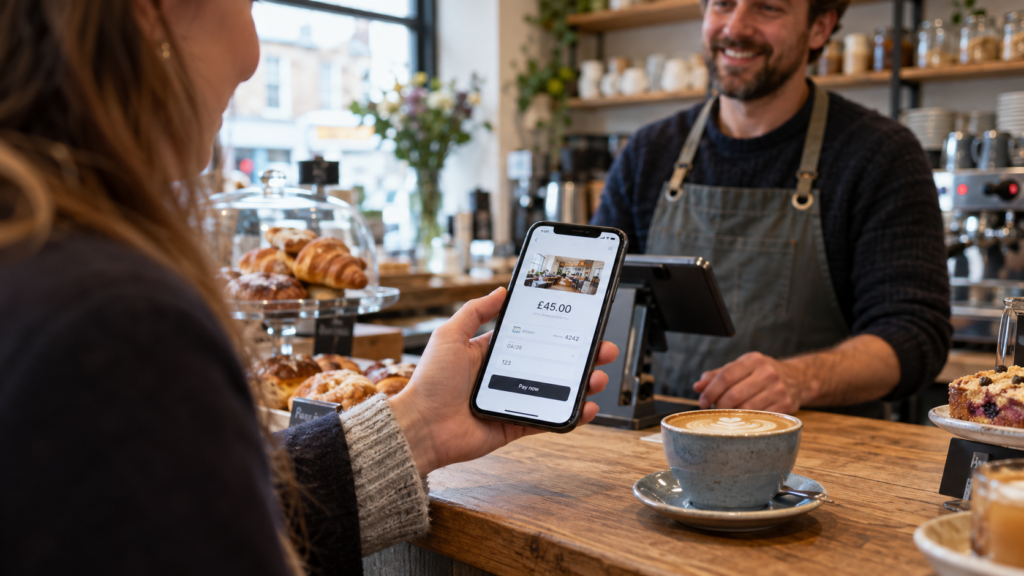
Your payment provider creates a secure payment page. You send the customer a link to that page, and they complete the transaction from their phone, tablet or computer.
Imagine a customer phones your takeaway and wants to place a £42 order.
Instead of asking them to read their card number over the phone, you can send them a secure link. They open it, make the payment and you receive confirmation when the transaction has been processed.
It’s a relatively simple idea, but it can solve several everyday payment problems.
How Does Pay by Link Work?
The exact process varies between payment providers, but the basic workflow is straightforward.
1. You create the payment request
You log into your payment provider’s dashboard and create a new payment.
Depending on the system, you may enter details such as:
- amount
- customer reference
- order number
- customer name
- description
Some systems also let you prefill the amount and reference so the customer doesn’t need to enter them manually. GOV.UK Pay, for example, supports payment links with prefilled payment amounts and references.
2. The system creates a secure link
You’ll receive a unique URL connected to that payment.
You can then send it to your customer.
3. Your customer opens the link
The customer taps the link and is taken to a secure checkout page.
They enter their card details or choose an available digital payment method.
4. The payment is authenticated
Depending on the transaction, their bank may ask them to confirm their identity.
This is known as Strong Customer Authentication, or SCA. In plain English, it’s an extra security check used for many electronic payments to help confirm that the person making the payment is genuinely authorised to do so.
5. You receive confirmation
Once the transaction succeeds, your payment provider records it.
You can then process the order, confirm the booking or mark the invoice as paid.
When Would a UK Business Use a Payment Link?
Pay by Link is particularly useful when the customer isn’t physically standing in front of your card machine.
For example, imagine a restaurant taking a large group booking.
You might require a £100 deposit.
Rather than asking the organiser to travel to the restaurant, you send a secure payment link by text or email. Once the deposit has been paid, you confirm the reservation.
A mobile phone shop might use a payment link for a repair deposit.
A wholesaler might send one alongside an invoice.
A takeaway could use one for a telephone order.
A café providing catering might collect an advance payment before preparing the order.
That’s why remote card payments can be useful even when most of your normal transactions still happen at the counter.
What Are the Advantages of Pay by Link?
You can take payments remotely
This is the biggest benefit.
The customer doesn’t need to be inside your business.
As long as they can access the secure payment page, they can usually complete the transaction from wherever they are.
You don’t need to ask for card details
Taking card numbers manually over the telephone can create unnecessary complexity.
With a payment link, the customer enters their payment information directly into the provider’s checkout page.
That means your employee doesn’t need to write down, repeat or manually type the customer’s card details.
It can make deposits easier
Restaurants, catering businesses, repair shops and service businesses often need deposits.
A payment link gives you a straightforward way to collect them.
You can send:
“Your booking deposit is £50. Please use this secure payment link to confirm your reservation.”
Once payment arrives, the booking can be confirmed.
Customers can pay quickly
Most customers already understand online checkout.
There is no new account for them to learn how to use in many payment-link setups. They simply open the page, enter the required details and pay.
You may not need an ecommerce website
This can be particularly helpful for small businesses.
Building a complete online shop just to collect occasional payments may not make sense.
A hosted payment page can provide a much simpler option.
Are There Any Disadvantages?
Pay by Link is useful, but it isn’t the right payment method for every transaction.
You’ll normally pay transaction fees
Payment providers charge for processing transactions.
The exact fee can depend on your provider, agreement, card type and transaction setup.
Before choosing a service, compare the total processing cost, not just the headline rate.
You can also review Switch & Save’s guidance on choosing a suitable card-payment setup through our card machine solutions for UK businesses.
Customers need to trust the link
People are increasingly cautious about clicking payment links, and that’s understandable.
Businesses should clearly identify themselves and explain what the payment is for.
For example:
“Hi Sarah, this is your £50 booking deposit for ABC Café on 18 October. Here’s your secure payment link.”
That is much clearer than simply sending an unexplained URL.
Payment links can be targeted by scammers
Customers should be able to recognise that the payment request genuinely came from your business.
UK business guidance recommends verifying suspicious payment requests through a trusted contact rather than simply relying on the message containing the link. Business Growth Service
Use consistent business contact details and a recognised payment provider.
It doesn’t replace your full payment setup
For customers paying at your counter, tapping a physical card terminal is normally easier.
Pay by Link should usually complement your normal checkout rather than replace it.
Is Pay by Link Secure?
A properly implemented payment-link service can provide a secure method of taking remote card payments.
One key factor is where the card details are entered.
With a hosted payment page, the customer is redirected to a payment page operated by the payment processor rather than entering their card details directly into your own website or messaging system. PCI Security Standards Council guidance describes this type of arrangement as a third-party hosted payment page. PCI Security Standards Council
That can simplify how payment-card information is handled, although businesses still need to understand their own PCI DSS responsibilities.
You should choose a recognised payment provider and check:
- PCI DSS compliance
- encryption
- transaction monitoring
- Strong Customer Authentication support
- refund handling
- chargeback processes
- payment reporting
Don’t ask customers to send complete card details through WhatsApp, SMS or email.
Send the secure payment link instead.
Pay by Link vs Card Machine
The two payment methods serve slightly different situations.
| Pay by Link | Card machine |
|---|---|
| Customer can pay remotely | Customer normally pays in person |
| Link sent digitally | Card tapped, inserted or wallet presented |
| Useful for deposits | Ideal for counter checkout |
| Useful for telephone orders | Ideal for everyday retail sales |
| No physical terminal needed for the customer | Requires payment hardware |
| Online transaction | In-person transaction |
For most established businesses, having access to both is useful.
A convenience store may take nearly everything through its card terminal but occasionally send a payment link for a large customer order.
A restaurant may process normal table payments through integrated card machines while using Pay by Link for group-booking deposits.
Switch & Save already supports UK businesses with integrated payment setups alongside its retail and business EPOS solutions. Switch&Save
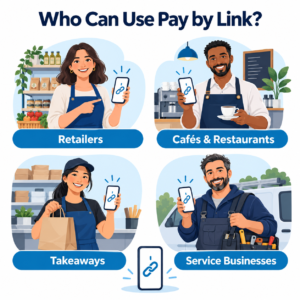
Pay by Link for Restaurants, Cafés and Takeaways
Hospitality businesses can find payment links particularly useful.
Imagine a takeaway receives a £150 catering order for an office.
Taking payment when the driver arrives creates unnecessary risk.
Instead, the takeaway sends a payment link immediately.
The business gets confirmation before preparing the food.
Restaurants can use the same process for:
- booking deposits
- private parties
- large group reservations
- catering
- pre-orders
- outstanding balances
For businesses combining online ordering, kitchen operations and card payments, Switch & Save also provides a dedicated hospitality EPOS system with integrated payment and ordering functionality. Switch&Save
Pay by Link for Retail Businesses
Retailers may have fewer obvious reasons to send payment links, but there are still useful situations.
A customer might phone asking you to reserve a high-value item.
You could take a deposit through a payment link.
A mobile phone store might take payment for a repair.
A grocery business might use payment links for a large local delivery.
You could also use them when dealing with business customers who prefer to pay an invoice electronically rather than visiting the shop.
Pay by Link and Your EPOS System
Ideally, payments shouldn’t become another disconnected piece of your business.
Your EPOS records what you’ve sold.
Your payment platform records what customers have paid.
Your reporting tells you whether everything matches.
The closer those systems work together, the easier reconciliation becomes.
If you’re reviewing your overall payments setup, our guide to why UK businesses switch to card payments explains how modern card payments can fit into the wider EPOS workflow. Switch&Save
What Should You Look for in a Pay by Link Provider?
Don’t choose solely because creating a payment link looks easy.
Look at the complete service.
Check the transaction fees, settlement process and contract terms.
Ask whether refunds can be processed easily.
Find out whether links can include fixed amounts and customer references.
Check what happens when a customer payment fails.
Also look at reporting.
If you send 30 payment links during a busy week, you need to know which customers paid and which payments remain outstanding.
Good reporting can save a surprising amount of admin.
How Switch & Save Can Help
Pay by Link works best as part of a wider payment strategy.
You might use a card machine for customers standing at your counter, an integrated EPOS system to record transactions and a secure payment link when someone needs to pay remotely.
Switch & Save helps UK businesses review their EPOS systems, card payment solutions and business finance together rather than treating each area separately.
Whether you run a retail shop, grocery store, café, takeaway, restaurant, bar or mobile shop, the aim is the same: make taking payments simpler while keeping your costs and operations under control.
Switch & Save helps UK businesses reduce costs with AI-powered EPOS systems, card payment solutions and business finance.
Frequently Asked Questions
What does Pay by Link mean?
Pay by Link means sending a customer a secure URL that takes them to an online payment page where they can complete a card or supported digital-wallet payment.
Can I send a payment link through WhatsApp?
Many payment systems allow you to copy a secure link and send it through messaging channels such as WhatsApp, SMS or email. Check your provider’s specific rules and features.
Do customers need an account to use a payment link?
Usually not. In many systems, the customer simply opens the payment page and enters their payment information.
Can I use Pay by Link without a website?
Yes. That’s one of its main advantages. Hosted payment links can work independently of a full ecommerce website.
Can a payment link include a fixed amount?
Some providers allow the amount and payment reference to be included in the link so that the customer sees a prefilled checkout.
Is Pay by Link the same as an invoice?
No. An invoice requests payment and contains transaction details. A payment link provides the mechanism for making the payment. You can, however, include a payment link inside an invoice.
Is Pay by Link safe?
It can be secure when you use a reputable payment provider with secure hosted payment pages, appropriate authentication and recognised payment-security standards.
Does Pay by Link replace a card machine?
Not usually. A card terminal is generally better for face-to-face transactions, while payment links are useful when customers need to pay remotely.
Can restaurants use Pay by Link for deposits?
Yes. Booking deposits, large orders, catering and private events are common examples of situations where remote payment links can be useful.