A fish and chip shop EPOS system should let staff enter counter, phone and delivery orders clearly, pass the right details to the kitchen and identify each bag at handover. Set it up around your busiest service. A cashier should be able to add a side, mark an order for collection and check whether it’s been paid for without leaving the checkout to ask. Switch&Save EPOS supports counter, collection and delivery orders, with kitchen printing and optional online ordering. Online & Delivery Orders
| What your till setup should help staff do | |
|---|---|
| A walk-in orders fish, chips and sides | Find common items quickly and confirm the order before sending it. |
| A customer phones ahead | Record a collection time or name and check whether payment is due. |
| A driver arrives for a delivery | Match the bag to the order reference and check its delivery details. |
| The kitchen receives a change | See what changed and which original order it belongs to. |
| The last order goes out | Check cash and card totals and review any refunds or order errors. |
How can EPOS speed up counter orders?
Build the first screen around the orders your staff take most often. If regular cod, haddock, chips, curry sauce and mushy peas account for much of your Friday trade, make those items easy to find. Put less common products in clear categories so the main screen stays useful when the queue builds.
Use names the kitchen and counter staff both recognise. If ‘large’ can refer to the fish or the chips, make the size clear on each item. During setup, have a team member enter a typical order while someone at the fryer reads it back. You’ll quickly hear where the wording could cause confusion.
How should you handle extras and changes?
Decide which choices belong with the item and which should appear as separate extras. A customer asking for salt and vinegar on one portion needs that instruction attached to the right portion. A separate pot of curry sauce needs to be visible to whoever packs the bag, with the correct price applied at the till.
Try this example. A customer orders two fish suppers, one with salt and vinegar and the other without. They add a curry sauce for the second meal. Check that the till, kitchen ticket and packing station all show which instruction goes with which meal. That’s a better test of a fish and chip shop EPOS setup than putting through two identical orders.
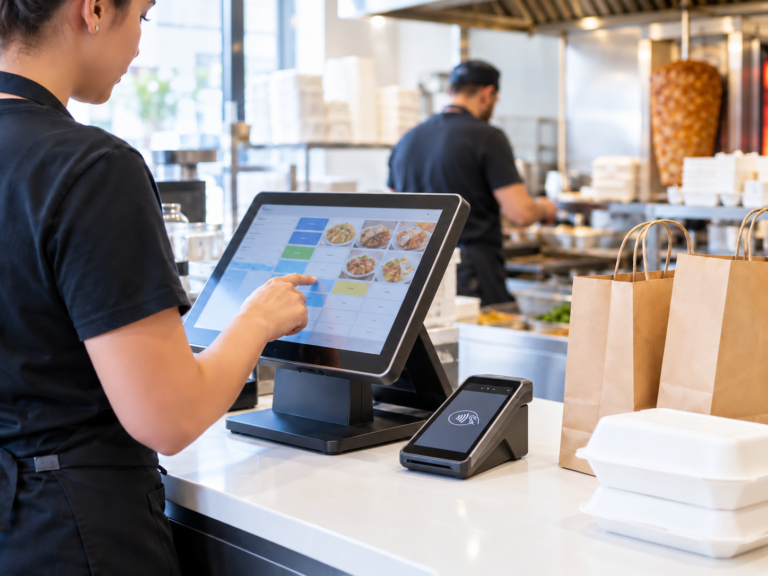
Switch&Save EPOS has a photo menu, category tabs and a running basket total. The customer-facing display shows the order as it’s entered, giving the customer and cashier a chance to catch a missing side before the order goes to the kitchen. Online & Delivery Orders
How should you take phone and collection orders?
Use the same routine each time the phone rings. Confirm what the customer wants, when they expect to collect it and which name or reference staff will use to find the order. Repeat the order before ending the call, especially when it includes several meals or changes.
A customer who phones at 5pm for a 6.30pm collection needs to be identifiable when they arrive. If someone named Patel walks in at 6.30pm and two orders have that surname, a collection reference gives staff a second detail to check before handing over the bag.
How can staff tell whether a collection has been paid for?
Agree where staff should check payment status and what they should do if anything is unclear. The person handing over the bag may be different from the person who answered the phone. Both should know how to find the order and confirm whether anything is still due.
Practise one prepaid collection and one that will be paid at the counter. Ask a colleague who didn’t take either order to handle both pickups. If they need to ask the original cashier which customer owes money, work out what information is missing from the handover.
Switch&Save EPOS supports collection orders, and caller ID is available depending on your phone setup. Ask what your existing phone system needs if you want that feature. See our takeaway EPOS system. Online & Delivery Orders
How can you keep delivery orders organised?
Record the delivery address, postcode, charge and any access detail your driver needs. Check the house or flat number when taking orders by phone. In a busy shop, a missing flat number can cost the driver more time than it takes the cashier to ask for it.
Give deliveries and collections clear references at the packing station. A shop in Coventry might have three nearly identical fish and chip orders waiting at once. Check the bag against the order reference at handover, even if the driver can name all the items inside.
What if you take orders online or through a delivery platform?
Map out how each order reaches the kitchen. With Switch&Save’s online ordering website option, customers can place collection and delivery orders that go into the till. If you also use a third-party platform, ask which connections are available for your setup. If staff enter those orders manually, test how they’ll record the platform reference and payment status. Online & Delivery Orders
Run the test with a walk-in order arriving at the same time. That’s when a duplicate ticket or a missed delivery note is easiest to spot. Agree who checks each incoming order and who confirms it’s ready to leave.
What should the fryer and packing station see?
The fryer needs the item, size and cooking instructions. The packing station needs the full order, including drinks, sauces and items prepared elsewhere. Set up tickets around those two jobs. If you use separate stations, decide which one gets each ticket and where staff check that the bag is complete.
For example, the fryer might need to see cod and a large portion of chips, while the packer also needs to see the bottled drink and the pot of curry sauce. Give both stations a way to recognise that their items belong to the same order.
Switch&Save EPOS supports routing items to kitchen printers. An additional kitchen printer is available, and a kitchen display is another option. Decide where staff can read a ticket or screen without crossing between the fryer and the counter. See our hospitality EPOS options. Online & Delivery Orders
How should you handle changes once the kitchen has the order?
Test what happens when a customer changes a side after the first ticket has gone through. The fryer and packer should be able to tell which order has changed and what to prepare. Agree how the cashier will alert the kitchen if cooking has already started. Use the same rule for cancelled items so a bag doesn’t go out with something the customer removed.
How should you handle payments and cashing up?
With a supported integrated card terminal, Switch&Save EPOS sends the sale total from the till to the card machine. DNA Payments and Teya are supported for the takeaway setup. At closing, the end-of-day Z report helps you review the till’s figures. Online & Delivery Orders
Include a declined payment and a refund in staff training. Have the cashier check the transaction status before trying the card again. At the end of the shift, review any differences while the person who handled the sale can still explain what happened.
What should you test in a fish and chip shop EPOS demo?
Bring your menu and run a short practice rush. Have one person take orders and another read the kitchen tickets or check the display.
- Enter a walk-in order with two portions and different instructions.
- Take a phone order for a later collection.
- Enter a delivery order and check the address and charge.
- Change an item after sending the first kitchen ticket.
- Hand over a prepaid order and take payment for another.
- Find both transactions at the end of the shift.
Book a Switch&Save demo on 0333 038 9707. Bring your menu and a few orders from a typical Friday. We’ll walk through how they move from the counter to the fryer and on to the customer.
What else do fish and chip shop owners ask?
Can one till handle counter, collection and delivery orders?
Yes. Switch&Save EPOS supports all three order types. Ask to see how staff distinguish them during order entry and handover. Online & Delivery Orders
Can I print orders at the fryer?
Switch&Save EPOS supports kitchen printing and can route items to different stations. A kitchen printer can be added to the standard till setup. Online & Delivery Orders
Can I use it if my fish and chip shop also has tables?
Switch&Save EPOS offers a dine-in order type and a table plan. If you run both counter and table service, include one order of each type in your demo. Online & Delivery Orders
What happens if the internet drops during service?
Switch&Save says its takeaway till can continue recording orders and cash sales locally and sync them after reconnecting. Card payments depend on the terminal’s connectivity, so check its setup with your payment provider. Online & Delivery Orders