
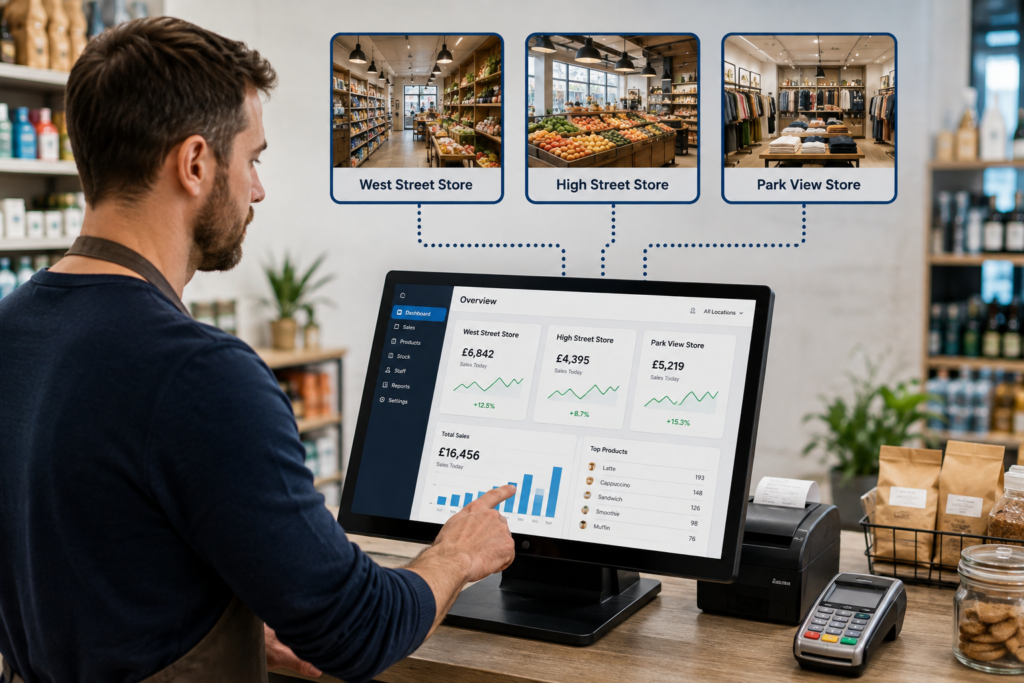
Yes. A multi store EPOS system can let you manage several shops, tills and locations from one central platform. Instead of treating every branch as a separate business, you can bring sales, stock, staff access, reporting and product information together in one system.
For a business with two shops, that might mean checking both locations without travelling between them. For a growing retailer with five or ten branches, it can mean keeping prices, stock information and reporting consistent across the whole business.
The exact features depend on the EPOS setup you choose, but a well-configured multi-location system can make running several sites much simpler.
Key Takeaways
| Question | Quick answer |
|---|---|
| Can one EPOS system manage several shops? | Yes, if it supports multiple shops, branches or locations. |
| Can you see sales from every branch? | Usually yes. Central reporting lets you compare individual sites and overall performance. |
| Can stock be managed by location? | Yes. Stock can be recorded separately for each shop while still being viewed centrally. |
| Can products and prices be updated centrally? | In a suitable system, yes. Changes can be managed from one central platform. |
| Can staff have different permissions? | Yes. Access can normally be restricted by employee, till, shop or management role. |
| Is multi-store EPOS only for large chains? | No. It can be useful as soon as you operate two or more locations. |
What Is a Multi Store EPOS System?
A multi store EPOS system is an electronic point of sale setup designed to work across more than one business location.
Each shop can have its own tills, staff, stock and daily sales while information is connected to a central system.
Think of a convenience store owner with branches in Birmingham, Wolverhampton and Coventry. Each location needs to operate independently during the day, but the owner still wants to know what’s happening across the whole business.
With a multi-location EPOS setup, they can potentially see each branch separately and then view combined business performance from one place.
That’s much easier than maintaining completely separate systems and manually bringing reports together at the end of the week.
If you’re still comparing different types of systems, our guide to what an EPOS system is explains the basics in more detail.
How Does Multi-Store EPOS Work?
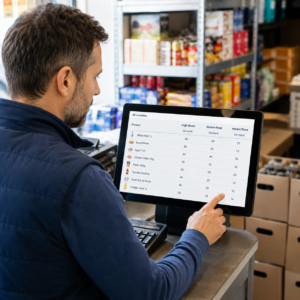
Each shop normally operates as its own location inside the EPOS platform.
For example, your structure might look like this:
Business: Green Lane Stores
Shop 1: Birmingham
Shop 2: Solihull
Shop 3: Walsall
Each site can have its own tills and stock levels. Sales are recorded against the location where the transaction takes place.
At management level, you can then review information across one shop, several shops or the entire business.
Here’s how it works in practice.
A customer buys a bottle of water in your Birmingham store. The sale is recorded against Birmingham, the stock level for that location is reduced, and the transaction appears in Birmingham’s sales figures.
Your other stores remain separate, so the sale doesn’t incorrectly reduce stock from Solihull or Walsall.
That location-based structure is one of the most useful parts of a multi store POS system.
What Can You Manage Across Multiple Shops?
The precise capabilities vary between systems, but multi-site EPOS can typically bring several areas of your business together.
You may be able to manage:
- sales and transaction reporting
- stock by shop or location
- product information
- selling prices
- staff accounts and permissions
- refunds and transaction history
- promotions and offers
- till activity
- payment reporting
- branch performance
The main advantage is visibility.
Instead of asking every store manager to send you figures, you can see what is happening through the EPOS system.
That can make day-to-day management much more practical.
Centralised Stock Management Across Multiple Locations
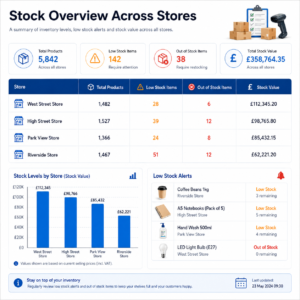
Stock becomes more complicated as soon as you open a second location.
Imagine you run three grocery shops.
You have 20 cases of a particular drink in Birmingham, six in Coventry and none in Solihull.
A basic till system might only tell you what has been sold at each shop. A stronger multi-location stock system can help you see how much inventory remains at each site.
That gives you a clearer picture before ordering more stock.
Stock Transfers Between Shops
It can also help when stock needs moving between branches.
Instead of ordering another case for Solihull while Birmingham has excess stock, you may decide to transfer some between locations.
A good system should record where the stock came from and where it went.
That matters because simply changing a quantity without recording the movement can make stock records unreliable.
If inventory control is a priority for your business, you can also read our guide to preventing stock loss and improving stock control.
Compare Sales and Performance Across Every Shop
One of the biggest reasons businesses move to a multi store EPOS system is reporting.
You don’t just want to know your total sales.
You want to know which shop generated those sales.
For example:
| Location | Monday Sales |
|---|---|
| Birmingham | £2,850 |
| Coventry | £2,120 |
| Solihull | £3,060 |
| Total | £8,030 |
Now the figures become more useful.
You can compare branches, investigate quieter locations and see where particular products are performing well.
Perhaps Solihull consistently sells more lunchtime food, while Birmingham performs better in the evening.
That information may influence staffing, promotions, opening hours and stock levels.
You’re making decisions using actual transaction data instead of assumptions.
For more information about useful EPOS data, see our guide to EPOS reports every business should understand
Manage Products and Prices From One Place
Updating product information individually at every shop can become frustrating very quickly.
Imagine you operate six convenience stores and need to change the selling price of 50 products.
Without central management, somebody may need to make those changes several times.
With the right multi store EPOS system, product information can be managed centrally and applied across relevant locations.
That can include details such as:
- product names
- barcodes
- categories
- VAT settings
- selling prices
- promotional pricing
You may still want different prices at different shops.
For example, a city-centre café and a suburban café may have slightly different menus or pricing.
A flexible multi-location system should allow you to manage those differences without turning every branch into a completely separate setup.
Staff Access Across Different Locations
Not every employee needs access to every part of your EPOS system.
A cashier may only need to process sales.
A supervisor may need permission to process refunds.
A branch manager may need access to reports for their own shop.
The business owner may need visibility across every location.
This is where user permissions become useful.
A well-configured EPOS system can give different employees different levels of access.
For example:
Cashier: sales only
Supervisor: sales and authorised refunds
Store manager: branch reporting and local operations
Owner: business-wide reporting and management
This helps keep the system organised as the business grows.
It also creates clearer accountability because activities can be linked to individual users rather than everyone sharing the same login.
Can Shops Continue Trading if the Internet Goes Down?
This is an important question to ask before buying any cloud-connected EPOS system.
Some systems depend heavily on an active internet connection. Others can continue handling certain EPOS functions locally and synchronise information once connectivity returns.
The exact behaviour will depend on the provider, configuration and payment setup.
You should therefore ask what happens if:
- broadband temporarily fails
- one branch loses connectivity
- the central service is unavailable
- a card terminal loses its connection
You don’t want to discover the answer during a busy Saturday afternoon.
Ask your EPOS supplier exactly what continues working offline and which features require internet access.
You can read our guide to preparing your business for EPOS downtime for further practical advice.
Who Needs a Multi-Location EPOS System?
You don’t need to operate a national chain.
A multi-location setup can make sense as soon as you manage two sites.
For example, it could suit:
Independent Retailers
A retailer opening a second convenience store can maintain separate stock levels while monitoring both shops centrally.
Takeaways and Restaurants
A takeaway business with three branches can separate each site’s sales while keeping menus and products easier to manage.
Café Groups
A café owner can compare branch performance and see which products are selling well at each location.
Mobile Phone Shops
A phone retailer may want individual stock records for every branch, particularly for higher-value products.
Grocery Businesses
Grocery operators can manage large product ranges across different shops while keeping stock and sales information organised.
Growing Businesses
Even if you only have one location today, multi-site functionality may be worth considering if another shop is already part of your expansion plans.
Changing systems after opening several branches can be much more disruptive than choosing a scalable setup earlier.
What to Look for Before Choosing a Multi Store EPOS System
Don’t choose a system simply because it says “multi-site” on the feature list.
Look at how the feature actually works.
First, check whether you can view each store separately as well as your business as a whole.
Then look at stock management. You should understand whether inventory is tracked by location and how transfers between stores are handled.
Reporting is also important. Make sure you can filter results by shop rather than seeing one combined number.
You should also consider central product management, user permissions, card payment integration and what happens during connectivity problems.
Finally, think about future expansion.
Adding shop number three shouldn’t require replacing the system you bought for shops one and two.
Can Card Payments Also Work Across Multiple Shops?
Yes, although your card payment setup and EPOS setup are two separate parts of the operation.
Each shop may have its own payment terminals and merchant configuration while still being connected to your wider EPOS environment.
The useful part is being able to understand sales at location level.
For example, if you manage four stores, you may want to compare EPOS sales against payment records for each branch.
That makes reconciliation easier than combining everything into one figure and trying to separate it later.
Switch & Save provides both card payment solutions and EPOS systems, which can help businesses review the wider setup rather than treating payments and EPOS as completely unrelated decisions.
How Switch & Save Helps Businesses Manage Multiple Locations
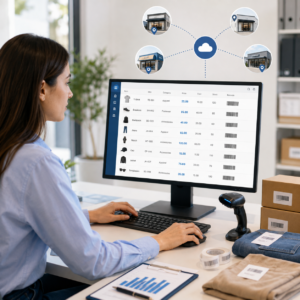
Switch & Save provides AI-powered EPOS systems for UK businesses, including businesses operating across more than one shop or location.
The goal isn’t simply to add another till.
It’s to give you a clearer way to manage your business as it grows.
Depending on your setup, that can include centralised business visibility, location-based stock management, sales reporting and EPOS tools designed around everyday retail and hospitality operations.
Switch & Save also provides card payment solutions and access to business finance options, helping businesses review more than one area of their operating costs.
If you’re planning another location, it’s worth thinking about the technology before the new shop opens.
A system designed for one till in one shop may eventually become a limitation.
A system designed around multiple shops gives you more room to grow.
Yes, you can run multiple shops from one EPOS system, provided the system has proper multi-location functionality.
Each shop can still operate separately, with its own tills, sales, staff and stock. The difference is that you can manage and review those locations through one wider system.
For a business owner, that means less manual reporting, clearer stock visibility and a much better understanding of what is happening across every branch.
If you’re opening your second location or trying to simplify an existing group of shops, choosing the right multi store EPOS system can make day-to-day management much easier.
Check How Much Your Business Could Save
Switch & Save helps UK businesses reduce costs with AI-powered EPOS systems, card payment solutions and business finance.
Frequently Asked Questions
Can one EPOS system control multiple shops?
Yes. A multi-location EPOS system can connect several shops under one business account while keeping each location’s sales, tills and stock separate.
How many shops can I connect to an EPOS system?
That depends on the platform and your subscription or system configuration. Some businesses only need two locations, while others may need significantly more. Ask the provider about limits before committing.
Can I see sales from all my stores remotely?
With a cloud-connected system that supports central reporting, you can usually review branch sales without being physically present at each shop. The available reports will depend on the EPOS platform.
Can different shops have different stock quantities?
Yes. Stock should be recorded against the location where it is physically held. The same product may therefore have different quantities in each shop.
Can different branches charge different prices?
Many multi-location systems can support location-specific pricing, although the feature varies between providers. This can be useful when different branches have different operating costs or product ranges.
Can stock be transferred between stores?
A suitable inventory system can record transfers between locations so stock leaves one branch and arrives at another without being treated as a customer sale.
Is a multi store POS system suitable for restaurants?
Yes. Restaurants, cafés and takeaways with multiple branches can use multi-location EPOS to separate branch sales, manage products or menus and compare performance across locations.
Should I get multi-store EPOS before opening my second shop?
Ideally, yes. If expansion is already planned, choosing a system that supports multiple locations can reduce the need for major changes when your next branch opens.



