Your business can accept card payments without an internet connection. The technical term for this is store-and-forward: your terminal captures and encrypts card data locally, then queues and submits those transactions the moment connectivity returns. It works, but it carries real financial risk, and it should function as an emergency backup rather than a routine method.
The three things to do right now (under 10 minutes):
- Check your terminal or EPOS settings and confirm offline mode is enabled or can be enabled before your next outage.
- Set or confirm a per-transaction offline limit with your provider. A conservative cap helps protect against losses.
- Brief your staff: they need a short script for customers and clear guidance on when to request chip-and-PIN rather than contactless.
Quick TL;DR:
- Offline transactions are only provisionally accepted. Real authorisation happens after reconnection.
- PCI DSS requires encrypted, certified devices for any offline card data storage.
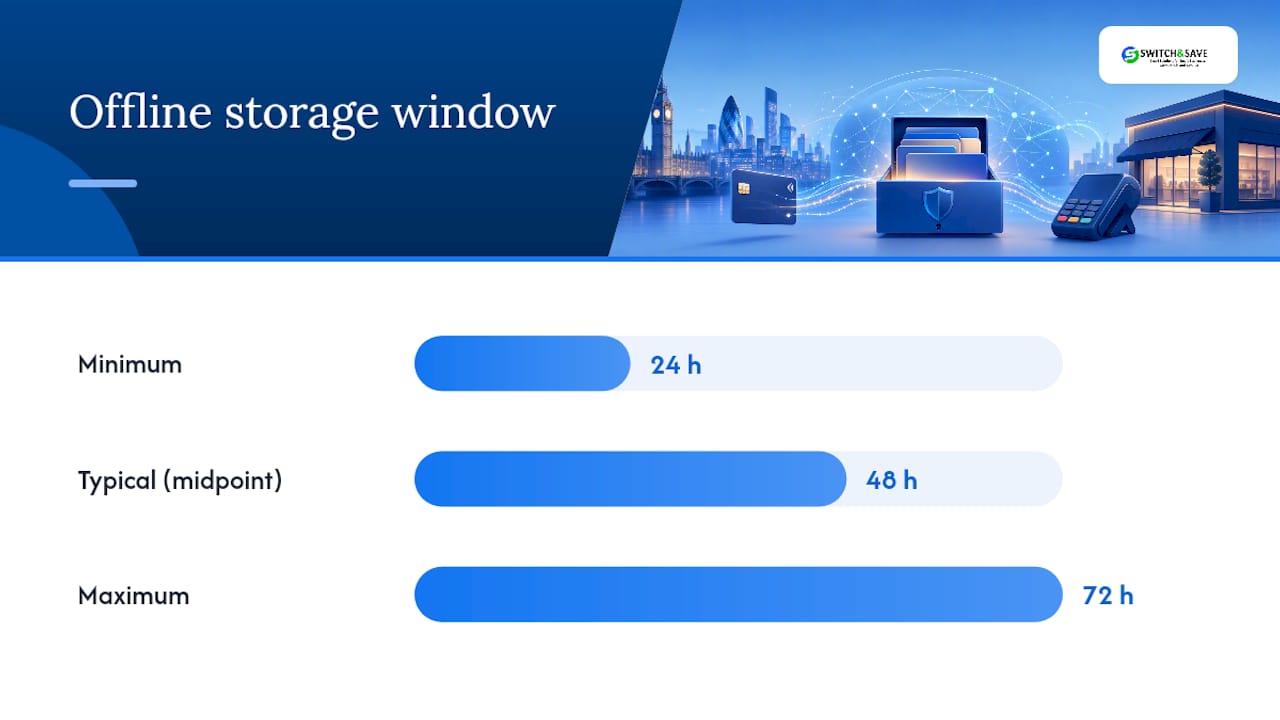
- Most systems store offline payments for 24–72 hours before the window closes and transactions are dropped.
- You, the merchant, are responsible for any losses if an offline transaction is later declined.
Table of Contents
- What is offline credit card processing and how does it work?
- How to accept offline card transactions in your UK business
- Which devices and connection methods work for offline payments?
- What are the main risks of offline payments and how do you reduce them?
- What are your PCI and legal obligations for offline transactions in the UK?
- One-page checklist: prepare your business for offline payments
- How Switch-and-save handles offline payments in its EPOS systems
- Key takeaways
- When Switch-and-save recommends offline mode — and when it doesn’t
- Switch-and-save EPOS systems with built-in offline capability
- Useful sources for UK merchants
- FAQ
What is offline credit card processing and how does it work?
The industry term is store-and-forward, and it describes a specific fallback behaviour built into many modern card terminals and EPOS systems. Under normal conditions, your terminal connects to the payment network in real time, the issuing bank authorises the transaction instantly, and funds are reserved. Offline processing delays that authorisation entirely: the terminal says “approved” to the customer, but no bank has actually confirmed the funds exist.
Here is the step-by-step flow:
- Accept the card — via chip-and-PIN, contactless (where your provider permits it offline), or swipe. The terminal captures the card data.
The “approved” message the customer sees at step 2 is provisional. Offline processing caches encrypted payment data locally and raises timing and fraud risks precisely because no real-time check has taken place. Transactions not submitted within your system’s storage window — commonly 24–72 hours — will time out and be dropped entirely.
Pro Tip: Check your terminal’s offline storage window and preset transaction limit before you need them. Discovering a 24-hour timeout during an actual outage is too late.
How to accept offline card transactions in your UK business
Getting this right requires preparation before the outage, not during it.
Before any outage
- Confirm your terminal or EPOS supports offline mode — Not all devices do. Check your contract and your provider’s documentation.
After reconnection
- Run a manual batch sync — if your system supports it, rather than waiting for the automatic submission.
Pro Tip: Keep a timestamped paper log of every offline transaction. If a payment is later disputed or declined, that log is your first line of evidence.
For a broader setup walkthrough, the step-by-step payment setup guide covers the full configuration process for UK retail and hospitality.
Which devices and connection methods work for offline payments?
Not all card readers behave the same way offline. Your choice of hardware directly affects how resilient your business is during a connectivity gap.
| Feature | Standalone SIM/4G reader | Phone-dependent reader | Wired countertop terminal |
|---|---|---|---|
| Independence from phone | ✅ Fully independent | ❌ Requires paired phone | ✅ Fully independent |
| Offline store-and-forward | Varies by provider | Varies by provider | Varies by provider |
| Outdoor reliability | High (own SIM) | Moderate (phone signal) | Low (fixed location) |
| Battery life | Moderate (4 hours typical) | Dependent on phone | Mains powered |
| Reconnection behaviour | Auto-reconnects via SIM | Auto-reconnects via phone | Auto-reconnects via broadband |
| Best use case | Events, mobile trading | Low-cost mobile setup | Permanent counter |
Standalone 4G/SIM card readers are the most reliable option for outdoor trading or locations with inconsistent signal. They connect directly to the mobile network and do not depend on a paired phone or a local Wi-Fi router. For a permanent shop counter, a wired terminal backed by a MiFi device as a secondary connection gives you two layers of protection. Phone-dependent readers are the most affordable entry point but carry the most variables: if the phone loses signal, so does the reader.
A two-layer redundancy approach is the recommended standard: a network failover (such as a 4G router or MiFi) as your primary backup, with offline store-and-forward as the last line of defence. Relying on offline mode alone is a single point of failure.
For detailed buying guidance on UK card readers, the UK buyer’s guide to card readers covers connectivity and offline capability across current hardware options.
What are the main risks of offline payments and how do you reduce them?
The core risk is straightforward: you hand over goods before any bank has confirmed the funds. Everything else flows from that.
Principal risks:
- Later declines. Insufficient funds, expired cards, and exceeded tap limits are the most common reasons an offline transaction fails at authorisation. Merchants are responsible for all resulting losses.
- Fraud. Stolen or cloned cards cannot be checked against live fraud systems offline. Contactless is particularly exposed.
- Transaction timeouts. Payments not submitted within the storage window are dropped. You lose the sale and the goods.
- Inventory and refund errors. Stock systems may not update correctly if a transaction later fails, creating reconciliation headaches.
Practical mitigations:
- Set a conservative per-transaction offline cap and document it in writing with your provider.
- Require chip-and-PIN for any transaction above a low threshold. The PIN provides a basic verification layer even offline.
- For higher-value sales, ask for ID and note the details manually.
- Keep devices physically secure. An unattended terminal is a fraud risk.
- Reconnect and batch-submit as quickly as possible to minimise the timeout window.
- Void any stale pending transactions promptly rather than leaving them to time out.
Pro Tip: Configure offline limits per terminal and document which staff member is authorised to override them. An undocumented override is a liability.
📋 Storage window reminder: Most systems store offline payments for 24–72 hours. If your connection is down for longer than that, queued transactions will be dropped automatically. Plan your reconnection accordingly.
What are your PCI and legal obligations for offline transactions in the UK?
Storing card data locally — even temporarily and even encrypted — brings compliance obligations. These are not optional.
PCI DSS requirements:
- Use only PCI-certified point-of-interaction devices for any offline card data capture.
- Card PANs (primary account numbers) must never be stored in plain text. Encryption is mandatory.
- Follow your terminal vendor’s documented offline handling policies and keep device software current.
- Confirm your provider’s PCI attestation covers offline mode. Not all do by default.
UK data protection and GDPR:
- Minimise the personal data stored during offline operation. Logs kept for reconciliation should contain only what is necessary.
- Restrict access to offline transaction logs to authorised staff only.
- Set and follow a clear retention policy: reconciliation logs are not indefinite records.
- Brief staff on what data is captured offline and who may access it.
For a practical overview of securing card payment data, the guide to secure card payments covers PCI controls and data handling in plain terms for UK businesses.
This article provides general information, not legal or compliance advice. Confirm your specific obligations with your terminal provider, acquirer, and a qualified compliance professional.
One-page checklist: prepare your business for offline payments
Pin this near your till or share it with your team.
Before an outage:
- ☐ Confirm your terminal supports offline store-and-forward mode
- ☐ Enable offline mode and set a per-transaction limit with your provider
- ☐ Update terminal software to the latest version
- ☐ Print and post the staff quick-reference card (limit, void process, contact number)
- ☐ Test reconnection and batch submission during a quiet period
During an outage:
- ☐ Confirm offline mode indicator is active on the terminal
- ☐ Apply the transaction limit — decline anything above it
- ☐ Request chip-and-PIN; avoid contactless where possible
- ☐ Use the customer communication script
- ☐ Record receipt details manually for any higher-value transaction
After reconnection:
- ☐ Reconnect as quickly as possible (storage window: 24–72 hours)
- ☐ Run manual batch sync if available
- ☐ Reconcile all offline receipts against the transaction log
- ☐ Investigate and action any declines within the same business day
- ☐ Update stock records for any failed transactions
How Switch-and-save handles offline payments in its EPOS systems
Switch-and-save builds offline capability directly into its EPOS bundles rather than leaving it as an afterthought. The table below shows how an integrated EPOS system compares to a generic standalone reader across the key operational points.
| Feature | Switch-and-save integrated EPOS | Generic standalone reader |
|---|---|---|
| Offline queue enablement | Configurable via dashboard before outage | Varies; often requires manual setup per device |
| Per-terminal offline limits | Set centrally via cloud dashboard | Set per device; no central control |
| Staff alerts during offline mode | On-screen indicator and configurable alerts | Basic indicator only |
| Manual batch sync option | Available | Varies by model |
| Automatic reconnection and submission | Yes, with cloud sync | Yes, but no central visibility |
| Reconciliation tools | Integrated reporting and decline flagging | Manual reconciliation required |
| UK-based support | Yes, dedicated UK support team | Varies by provider |
The practical difference is visibility. With a standalone reader, you may not know a transaction has declined until you manually check the terminal. Switch-and-save’s cloud dashboard flags declined offline transactions centrally, so you can act on them without hunting through individual devices. For multi-terminal businesses — a restaurant with three tills, or a retailer with a counter and a mobile reader — that central view matters.
Switch-and-save also offers free demos and UK-based setup assistance, which means offline mode can be configured correctly before you ever need it.
Key takeaways
Offline credit card processing is a valuable emergency backup for UK businesses, but it requires pre-configured limits, chip-and-PIN preference, and prompt reconnection within the 24–72 hour storage window to avoid unrecoverable losses.
| Point | Details |
|---|---|
| Offline mode is provisional | The terminal’s “approved” message is not real authorisation; the bank confirms or declines only after reconnection. |
| Storage window is 24–72 hours | Transactions not submitted within this window are dropped; reconnect quickly to avoid losing sales. |
| Merchant bears the loss | If an offline transaction is later declined, you absorb the cost — set conservative per-transaction limits to cap exposure. |
| Chip-and-PIN reduces fraud risk | Prefer chip-and-PIN over contactless during offline operation; some providers block contactless offline entirely. |
| Switch-and-save centralises control | Switch-and-save EPOS systems allow offline limits and reconciliation to be managed from a single cloud dashboard across all terminals. |
When Switch-and-save recommends offline mode — and when it doesn’t
Offline mode is a safety net, not a strategy. That is the honest position, and it shapes every recommendation made here.
For a permanent retail shop or restaurant, the better investment is a reliable primary connection plus a 4G failover router. Offline store-and-forward should sit behind both of those layers. A business that leans on offline mode regularly is carrying unnecessary financial risk every trading day.
The picture shifts for outdoor and event trading. A market stall, a festival bar, or a mobile catering unit genuinely cannot guarantee a stable broadband connection. There, a standalone SIM terminal with offline capability as a secondary layer is a sensible, practical setup. The key is still to reconnect and batch-submit as quickly as possible.
For Switch-and-save clients, the recommendation is always to configure offline limits and test reconnection during onboarding, not after the first outage. UK-based support is available to walk through that setup. Knowing your system’s behaviour before you need it is the difference between a minor disruption and a day of losses.
Switch-and-save EPOS systems with built-in offline capability
👉 Connectivity gaps are a fact of life for UK retail and hospitality businesses. What separates a minor inconvenience from a costly afternoon is whether your system was set up to handle it before the outage happened.

Switch-and-save EPOS systems come with offline queueing, configurable per-terminal limits, and automatic batch submission built in. The cloud dashboard gives you central visibility across every terminal, so declined offline transactions are flagged immediately rather than discovered at end-of-day reconciliation. The hospitality EPOS bundle is preconfigured for restaurants, cafés, and takeaways, with UK-based setup support included.
📞 Book a free demo and let the team walk you through offline configuration for your specific setup. You’ll leave knowing exactly what your system does when the connection drops.
Useful sources for UK merchants
- Manage Offline Payments (Australia, Canada, Ireland, & the UK)
- FAQ: What to do when the internet in the store goes down? Offline Mode – Helplink
- Offline Payment Processing: How It Works & When You Need It
- Offline credit card processing: seamless sales for businesses
- POS Offline Mode: Everything You Need to Know | myPOS
- Card readers without WiFi or 4G: options for offline UK trading | GoSmallBusiness
- Card machines need WiFi / internet — what merchants should know
- PCI Security Standards Council – participating organisations
FAQ
What does “offline” mean on a card machine?
Offline means the terminal accepts a card payment without connecting to the payment network in real time. The transaction is stored locally and submitted for authorisation once the connection returns.
What does “approved offline” mean on a receipt?
“Approved offline” means the terminal provisionally accepted the payment without live bank authorisation. The transaction still needs to be submitted and confirmed by the issuing bank after reconnection — it is not a guaranteed approval.
Which payment apps and terminals work offline in the UK?
Many modern EPOS systems and card terminals support offline store-and-forward, including integrated systems like those from Switch-and-save. Capability varies by provider and device; confirm with your provider before relying on offline mode.
How long can a terminal store offline transactions?
Most systems store offline payments for 24–72 hours. Transactions not submitted within that window are dropped and cannot be recovered, so reconnecting quickly is critical.
Who is responsible if an offline transaction is declined?
The merchant bears the loss. If the issuing bank declines an offline transaction after reconnection — due to insufficient funds, an expired card, or exceeded limits — the business absorbs the cost, not the customer or the bank.