
A franchise POS needs six things to earn its place in your estate: centralised reporting, standardised inventory across sites, master pricing with controlled local overrides, secure and compliant payment processing, open integrations, and offline resilience when connectivity drops. Vendors should also support multi-site rollouts and help you meet Making Tax Digital, PCI DSS and data protection obligations. Some providers offer these capabilities as part of their EPOS bundles.
TL;DR:
- Standardize SKUs and product codes across sites before automating inventory or margin reports; inconsistent names make figures across the estate unreliable.
- VAT registered franchises need digital records and linked systems for returns; ask vendors which PCI DSS controls they manage and which remain yours.
- Test price and menu changes at pilot sites before estate wide release, and limit each manager’s access to the locations they oversee.
- Choose two or three contrasting pilot sites, migrate in phases, train site champions first, and keep the previous system briefly for rollback.
- Offline tills can queue sales, but card authorization may still require live connectivity; ask vendors about limits and add 4G failover.
Table of Contents
- Must-have features checklist for franchise POS
- Operational requirements: how a POS enforces consistency at scale
- Compliance and security requirements for payments, tax and data
- Integration and technical requirements
- Implementation checklist and migration considerations
- How Switch&Save meets franchise POS requirements
- System downtime contingency and backup solutions
- Author perspective: prioritising requirements and avoiding common pitfalls
- How Switch&Save can help with bundles and next steps
- FAQ
- Sources
Must-have features checklist for franchise POS
Before you write an RFP or sit through another demo, use this checklist to separate systems built for single shops from ones built for multi-site operations.
- Centralised reporting and role-based dashboards showing real-time sales, labour and margins across every site from one login.
- Multi-site inventory with standardised SKUs and PLUs, updated centrally so every location sells the same item under the same code.
- Master pricing and menu management that lets head office set defaults while allowing controlled local overrides for regional pricing or promotions.
- Multi-terminal and handheld support with offline resilience, so a till keeps taking payments when the internet drops.
- Loyalty and CRM tools that deliver a consistent guest experience whether someone orders in Leeds or Luton.
- Open APIs and pre-built integrations for accounting, payroll and ecommerce platforms, so data moves without manual re-entry.
Treat this list as a filter, not a wish list. A system that nails the first four points but lacks polished loyalty features is still workable. One that can’t standardise inventory across sites will cause reporting headaches from day one, regardless of how good the dashboard looks.
Operational requirements: how a POS enforces consistency at scale
Features only matter if they translate into repeatable operations. Franchises grow by replicating what works, and a POS either supports that discipline or quietly undermines it.
- Standardise SKUs and PLUs across every site first. Standardising the product database before automating inventory or margin reporting prevents aggregated figures becoming unreliable the moment two stores name the same item differently.
- Build audit and excellence-scoring workflows into daily routines. Operators report that excellence-scoring helps enforce procedures and flag training gaps as sites multiply.
- Stage central price or menu changes through a test group before pushing them estate-wide, catching errors before they hit every till.
- Set a clear access model: head office sees the full estate, area managers see their patch, and local managers see their own site, nothing more.
Pro Tip: Run a monthly report comparing like-for-like SKUs across sites. Gaps usually point to a training issue before they point to a system fault.
Compliance and security requirements for payments, tax and data
Franchise POS systems sit at the intersection of three regulatory frameworks, and ignoring any one of them creates risk that scales with every new site you open.
- PCI DSS: card payment processing must meet the PCI Data Security Standard, which sets baseline technical and operational controls for protecting cardholder data. Ask vendors exactly which controls they handle and which remain your responsibility.
- Making Tax Digital for VAT: VAT-registered franchises must keep digital records and submit returns through compatible software, with digital links between systems required wherever more than one application is involved.
- Data protection by design: the ICO treats this as a management responsibility, not an afterthought, and expects granular access controls and clear retention policies built into everyday workflows.
- Electronic sales suppression: the government is consulting on software standards to stop sales data being hidden or altered, which makes tamper-proof, encrypted audit trails a forward-looking requirement rather than a nice-to-have.
The government is actively consulting on software standards for electronic sales suppression, a signal that tamper-proof transaction logs will matter more, not less, as franchise estates grow.
For a deeper walkthrough of configuring these controls, see our practical GDPR actions for POS systems.
Integration and technical requirements
A POS that can’t talk to the rest of your estate’s software creates manual work that compounds with every site you add.
- Open APIs and webhooks for connecting accounting, payroll and ecommerce platforms without custom development each time.
- MTD-compatible exports and agent access, so your accountant or bookkeeper can pull digitally linked records without re-keying figures.
- Reliable hardware: terminals, handhelds and kitchen display screens that keep working during peak trading, with offline modes that queue transactions until connectivity returns.
- Cloud, multi-tenant deployment with staging environments for testing changes and clear support SLAs for when something breaks.
Integrating inventory data with your accounting system properly from the outset avoids the reconciliation headaches that come from bolting systems together after launch. Our SSPOS software is built with these connection points in mind.
Implementation checklist and migration considerations
Switching POS systems across multiple sites is where good planning pays off and poor planning costs weeks of disruption.
- Pre-rollout: standardise SKUs, audit current workflows, and pick two or three pilot sites with contrasting connectivity and staffing levels.
- Migration: map old data to new fields, stage hardware before go-live day, and roll out in phases rather than switching the whole estate overnight.
- Rollback plan: keep the previous system available for a short window at each site in case of unexpected issues.
- Training and support: train a small group of site champions first, then let them train their own teams, backed by clear on-site versus remote support expectations.
A phased rollout across a handful of sites typically takes a few weeks per wave, depending on hardware lead times and staff availability. Our EPOS features checklist is a useful companion document for this stage.
How Switch&Save meets franchise POS requirements
Some EPOS bundles combine hardware, AI-powered software and card processing in one package, which removes the integration guesswork many multi-site operators face.
- Multi-store dashboards can give head office and area managers real-time visibility without separate logins per site.
- Inventory controls can support standardised SKUs across locations to help keep cross-site reporting trustworthy.
- Integrated card terminals can bundle payment processing with the till, so that PCI DSS responsibilities may sit with a single, accountable setup.
- Support based in the UK and AI-powered software may be included with some packages.
You can view the Hospitality EPOS Bundle or the Integrated Payments Bundle to see how the pieces fit together.
System downtime contingency and backup solutions
A franchise can’t afford a till going dark during Saturday lunch service, so downtime planning deserves as much attention as feature selection.
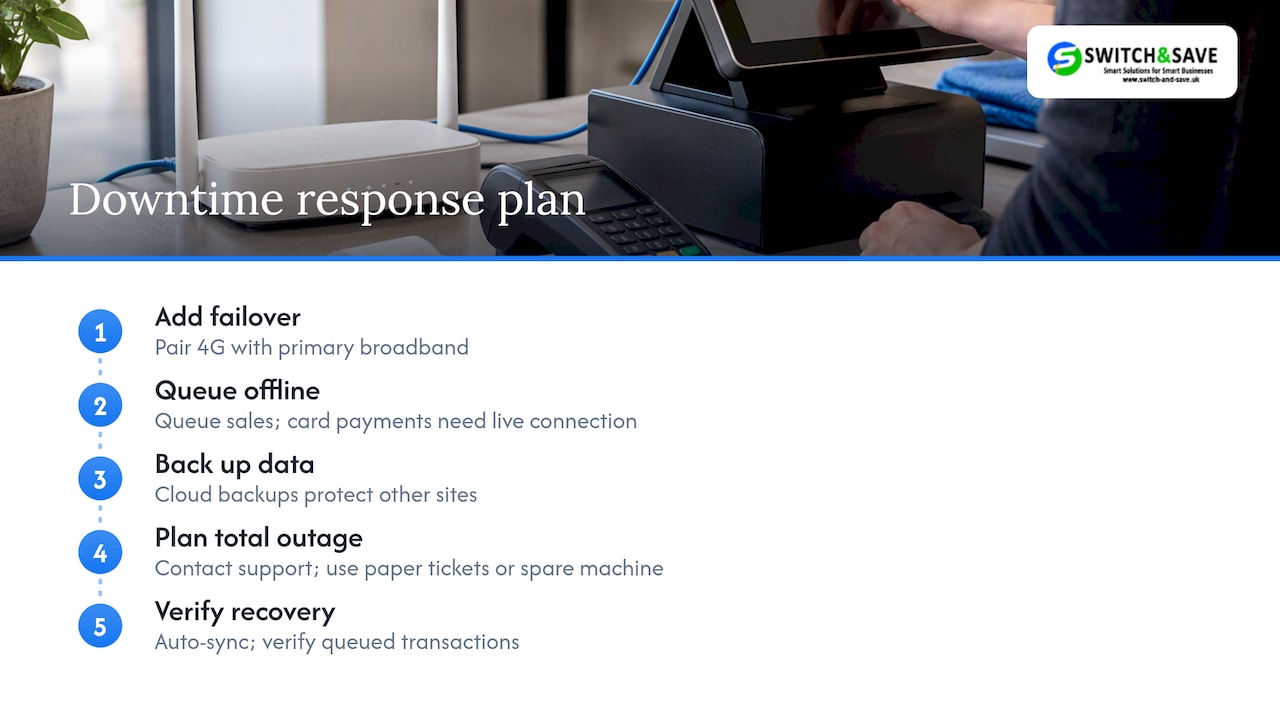
Offline mode is the first line of defence: transactions should queue locally on the terminal and sync automatically once connectivity returns, meaning a dropped internet connection never stops a sale. Ask any vendor exactly how long a terminal can run offline and what happens to payment authorisation during that window, since card processing typically needs a live connection even when the till itself keeps working.
Backup connectivity matters too. A 4G failover alongside the primary broadband connection reduces the chance that a single outage takes a whole site offline. For multi-site operators, centralised cloud backups of sales and inventory data mean a hardware failure at one location doesn’t threaten records for the rest of the estate.
Finally, build a simple incident process: a known contact number for support, a documented manual fallback (paper tickets, a spare card machine) for the rare total outage, and a post-incident check to confirm all queued transactions synced correctly. None of this needs to be elaborate, but it does need to be written down and tested once, not discovered for the first time during an actual outage.
Author perspective: prioritising requirements and avoiding common pitfalls
Franchisors often chase every feature on a vendor’s brochure before fixing basics. Central control matters less than clean data: a system with perfect reporting but messy SKUs still gives you unreliable numbers. Start with a short internal audit, list every product name variation across three sites, and you’ll likely find the real problem before you shortlist a single vendor. Pilot before you commit.
— Amir
How Switch&Save can help with bundles and next steps
Once you know what your franchise needs, choosing a system becomes far less complicated.

Some providers offer transparent pricing and support migration from existing EPOS providers to ease the switching process.
- Hospitality EPOS Bundle: £549 one-off, plus AI-powered cloud software from £20 per month.
- Integrated Payments Bundle: combines card terminal and EPOS software subscription from £30 per month, price on request for hardware.
- Standard and Premium retail bundles: pricing available on request.
Book a demo or request a quote to see how a bundle fits your franchise’s sites.
FAQ
What is a franchise business a level?
A franchise business typically operates under a licence from a franchisor, following an established brand, operating model and standards in exchange for fees. Decision-makers running one or more units still need operational tools, including POS systems, that enforce those standards consistently across sites.
What do you need to start a franchise?
Starting a franchise generally requires capital for the franchise fee and setup costs, agreement to the franchisor’s operating standards, and the infrastructure to run day-to-day operations, including point-of-sale and payment systems. Specific requirements vary by franchisor and sector, so check the franchise agreement for exact obligations.
Is Tesco a franchise?
Tesco operates primarily through company-owned stores rather than a traditional franchise model, though some smaller Tesco-branded convenience formats involve franchise-style partnerships in certain markets. The core Tesco supermarket estate in the UK is company-run rather than independently franchised.
Is Chick-fil-A a franchise?
Chick-fil-A operates a franchise-style model, though it differs from many traditional franchises by requiring a lower upfront investment from operators while retaining tighter control over site selection and operating standards. Each operator still needs systems capable of enforcing consistent pricing, menus and reporting across locations.
Sources
- VAT Notice 700/22: Making Tax Digital for VAT
- PCI Data Security Standard (PCI DSS)
- Guide to accountability and governance: data protection by design and by default
- Electronic sales suppression: introduction of software standards in EPOS/MPos systems



