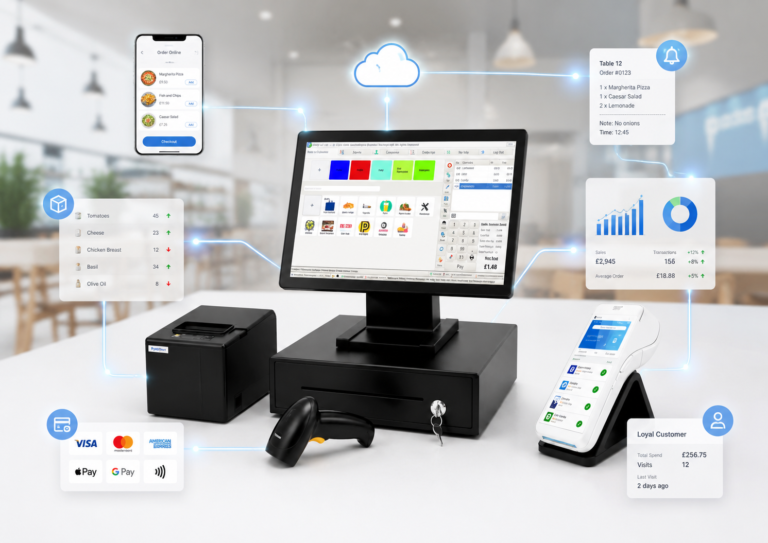
An EPOS features checklist is a curated list of critical functionalities your Electronic Point of Sale system must deliver to support daily retail or hospitality operations. Choosing the wrong system costs you more than money. It costs you speed, accuracy, and customer trust. This guide walks you through every feature category worth evaluating before you commit, from hardware setup to integrations and loyalty tools. Whether you run a single shop or a small chain of restaurants, using a structured epos features checklist gives you a clear framework to compare systems and avoid expensive mistakes.
1. hardware flexibility and physical setup
The hardware your EPOS system runs on determines how reliably it performs during your busiest hours. You need to decide early whether tablets, touchscreen PCs, or proprietary terminals best suit your counter layout and workflow. Tablets work well for mobile hospitality environments. Fixed terminals suit high-volume retail counters where speed and durability matter most.

Physical setup is where many businesses trip up. Poor cable management is one of the leading causes of unexpected system failure during peak trading periods. USB and Ethernet disconnections are surprisingly common root causes of downtime in UK retail stores. Before going live, label every cable, seat every connector firmly, and count your available power outlets at each counter position.
Your peripheral checklist should include:
- Receipt printer (thermal is standard for speed)
- Barcode scanner (1D or 2D depending on your product range)
- Card reader with contactless support
- Cash drawer with secure locking
- Customer-facing display for transparency at the till
Pro Tip: Plan your counter layout before ordering hardware. A system that fits neatly on a 60cm counter with one power strip will cause far fewer problems than one that requires cable extensions across the floor.
2. real-time sales and inventory management
Real-time reporting is the feature that separates a modern EPOS system from a basic till. Dashboards accessible from mobile devices let managers monitor sales performance remotely, without needing to be on the shop floor. That means you can check your busiest hour, your top-selling product, and your current stock level from anywhere.
Inventory management goes beyond counting stock. A strong system sends low-stock alerts, recommends reorder quantities, and flags shrinkage before it becomes a serious loss. For hospitality businesses, this is especially valuable because ingredient waste directly affects margin.
Here is what your software inventory checklist should cover:
- Live stock level tracking across all product lines
- Automated low-stock alerts with reorder triggers
- Shrinkage and wastage reporting
- Product categorisation with pricing tiers
- Modifier and variant management for menu items or product options
- Historical sales data with trend analysis
Systems like Epos Now provide digestible dashboards that give you this data in one view. The practical benefit is that your purchasing decisions become data-led rather than guesswork.
3. integration and connectivity with third-party platforms
Integration capability is the feature most business owners underestimate until they are manually copying sales figures into their accounting software at midnight. Cloud-based EPOS systems now support over 100 third-party app integrations as standard among leading providers. That figure matters because it means your EPOS can talk directly to your accountancy, ecommerce, and marketing tools without manual input.
The platforms worth prioritising in your epos system requirements review include:
- Accounting: Xero and QuickBooks for automated bookkeeping and VAT reporting
- Ecommerce: Shopify for synchronising online and in-store inventory
- Marketing: Mailchimp for customer data and campaign management
- Payment processing: Integrated card terminals that reconcile automatically
For a deeper look at how these connections work in practice, the EPOS integration examples for retail and hospitality from Switch-and-save show real-world use cases worth reviewing.
Payment processing fees are a key part of your total cost calculation. Transaction fees vary by provider and comparing them upfront is the only way to budget accurately for the full cost of ownership.
Pro Tip: Before signing any contract, ask the vendor for a live demonstration of the integration with your existing accountancy software. If they cannot show it working in real time, treat that as a warning sign.
4. customer-facing and operational features
The features your customers and staff interact with daily have the biggest impact on satisfaction and efficiency. Tableside ordering using tablets reduces order-to-kitchen times in hospitality environments and cuts errors caused by handwritten notes. Fewer errors mean fewer comped meals and faster table turns.
Loyalty and promotion management is equally important for retention. A built-in loyalty programme lets you reward repeat customers without relying on a separate app or paper stamp card. Promotion tools let you run time-limited discounts, happy hour pricing, or bundle deals directly from the till.
Offline mode is the feature that protects your revenue when your broadband drops. A system that processes sales locally and syncs transactions once the connection is restored means you never have to turn a customer away. For any business in a location with variable connectivity, this is non-negotiable.
Multi-location support rounds out this category. If you plan to open a second site or already operate more than one, your EPOS must manage stock, staff, and reporting across all locations from a single dashboard. Switching systems later is far more disruptive than choosing the right one from the start.
5. staff training and go-live readiness
A system with every feature on your checklist is worthless if your staff cannot use it confidently on day one. Thorough staff training before launch directly improves operational efficiency and reduces costly errors during the first weeks of trading. Role-based training works best. Cashiers need to know the till flow. Managers need to know the reporting tools. Kitchen staff need to understand order display screens.
A proper EPOS go-live checklist covers five areas before you switch on: hardware readiness, data migration, integration testing, staff training, and a full workflow test under realistic conditions. Skipping any one of these phases creates avoidable downtime on your busiest trading days.
Run a full simulation the day before launch. Process test transactions, print receipts, trigger a refund, and check that your accountancy integration is pulling data correctly. This one hour of preparation prevents hours of chaos on opening day.
6. EPOS feature comparison: what should smbs prioritise?
Not every feature carries equal weight for every business type. Retail and hospitality have different operational priorities, and your budget will shape which features you can access from day one.
| Feature | Retail Priority | Hospitality Priority | Notes |
|---|---|---|---|
| Real-time inventory | High | High | Core for both sectors |
| Tableside ordering | Low | High | Key for table-service venues |
| Loyalty programme | Medium | High | Drives repeat visits |
| Offline mode | High | High | Protects revenue during outages |
| Ecommerce integration | High | Low | Critical for click-and-collect |
| Multi-location support | Medium | Medium | Grows with your business |
| Accounting integration | High | High | Saves hours of admin weekly |
Retail businesses should weight their checklist towards inventory accuracy, ecommerce connectivity, and barcode scanning speed. Hospitality businesses should prioritise tableside ordering, kitchen display integration, and table management tools.
Cost is a real factor. Look at the total cost of ownership, not just the monthly subscription. Hardware, payment processing fees, and integration costs all add up. Free trials are available from most reputable providers. Use them. A two-week trial under real trading conditions tells you more than any sales demonstration.
For a broader view of how EPOS systems connect with current UK retail ecommerce trends, understanding the direction of the market helps you choose a system that will still serve you well in three years, not just today.
Key takeaways
Choosing the right EPOS system requires a structured checklist that covers hardware, software, integrations, and staff readiness before you commit to any provider.
| Point | Details |
|---|---|
| Hardware setup matters | Label cables, confirm power outlets, and test peripherals before going live. |
| Real-time reporting is core | Live dashboards let you manage stock and sales remotely from any device. |
| Integrations save hours | Connecting Xero, Shopify, or QuickBooks eliminates manual data entry every week. |
| Offline mode protects revenue | Systems that process sales without internet prevent lost transactions during outages. |
| Train staff before launch | Role-based training before go-live reduces errors and speeds up adoption. |
What i have learned from watching businesses choose EPOS systems
Having spent years working with UK retail and hospitality businesses on their technology decisions, the pattern I see most often is this: owners spend 90% of their evaluation time on price and almost none on integration compatibility. That is the wrong order of priorities.
The businesses that struggle after switching to a new EPOS system are almost never unhappy with the hardware. They are unhappy because their accountancy software does not sync, or their online store inventory is out of step with the till, or their staff found the interface confusing and reverted to workarounds. These are not hardware problems. They are planning problems.
The feature I would tell every hospitality owner to test first is offline mode. Broadband in the UK is more reliable than it was five years ago, but it still drops. A busy Saturday lunchtime is not the moment to discover your system cannot process card payments without a connection.
For retail, I would push hard on the automation benefits that come from a well-integrated system. Small errors in stock counts add up to significant losses over a quarter. A system that updates inventory automatically at the point of sale removes that risk almost entirely.
My honest advice: build your checklist before you speak to any vendor. Know what you need, what you can compromise on, and what is a deal-breaker. That clarity makes every conversation shorter and every decision easier.
— Amir
How Switch-and-save helps you find the right EPOS system

Switch-and-save works with UK retail and hospitality businesses to match them with EPOS systems that fit their actual operations, not just their budget. The range covers everything from entry-level retail setups to full hospitality bundles with kitchen display integration and tableside ordering. Every system combines hardware, software, and payment processing in one package, so you are not piecing together components from three different suppliers.
Browse the full range of EPOS systems at Switch-and-save, or explore dedicated solutions for hospitality businesses and retail operations. UK-based support and free demos are available across all packages.
FAQ
What is an EPOS features checklist?
An EPOS features checklist is a structured list of must-have functionalities you evaluate before choosing a system. It covers hardware, software, integrations, and operational tools relevant to your business type.
Which EPOS features matter most for hospitality?
Tableside ordering, offline mode, kitchen display integration, and loyalty programme management are the highest-priority features for hospitality businesses. These directly affect service speed and customer retention.
How many integrations should a good EPOS system offer?
Leading cloud-based EPOS systems support over 100 third-party integrations, including Xero, QuickBooks, Shopify, and Mailchimp. The number matters less than whether your specific tools are supported.
Should i use a free trial before buying an EPOS system?
Yes. A free trial under real trading conditions reveals usability issues and integration gaps that no demonstration will show. Most reputable UK providers offer trials before commitment.
What is the most overlooked feature on an EPOS checklist?
Offline mode is consistently underestimated. Systems that cannot process sales during an internet outage put your revenue at risk on your busiest days.