The best card machine for a retail store is usually a fast, EPOS-integrated countertop or portable terminal that can handle continuous transactions at a fixed checkout. For service businesses, the best option is generally a portable or mobile card machine that lets staff accept payments at a table, treatment room, worksite or customer’s address.
Retailers should prioritise checkout speed, barcode and stock integration, reliable connectivity and straightforward payment reconciliation. Service businesses should focus more on portability, battery life, mobile connectivity, tipping, deposits and the ability to take payments away from a traditional till.
The right choice therefore depends less on which card machine looks best and more on where, how often and in what context customers pay.
Key Takeaways
| Business requirement | Recommended card machine |
|---|---|
| Fixed retail checkout | Countertop or integrated terminal |
| Busy convenience or grocery store | Fast EPOS-integrated terminal |
| Restaurant or café table payments | Portable Wi-Fi card machine |
| Salon, barber or clinic | Portable standalone or integrated terminal |
| Mobile trader or tradesperson | SIM-enabled mobile card machine |
| Market stall or occasional seller | Pay-as-you-go mobile card reader |
| Multiple tills or staff members | Integrated multi-terminal setup |
| High card turnover | Bespoke merchant pricing rather than a standard flat rate |
Retail Card Machines vs Service Business Card Machines
Retail stores and service businesses process payments differently.
A convenience store may handle hundreds of relatively quick transactions from one counter. A hair salon may process fewer transactions, but staff might need to take payments from different chairs or treatment rooms. A plumber, mobile mechanic or market trader may not have access to fixed broadband at all.
Here is the main difference:
| Feature | Retail store | Service business |
|---|---|---|
| Typical payment location | Fixed checkout | Counter, table, room or customer location |
| Transaction pattern | Frequent, fast purchases | Fewer, sometimes higher-value payments |
| Most important feature | Speed and EPOS integration | Portability and flexible connectivity |
| Preferred connection | Ethernet or reliable Wi-Fi | Wi-Fi and mobile SIM |
| Stock integration | Usually important | Sometimes unnecessary |
| Receipt requirements | Printed and digital receipts | Often digital receipts |
| Typical device | Countertop or portable terminal | Portable or mobile terminal |
No single terminal is automatically best for both environments. The machine should match your daily payment workflow.
Best Card Machines for Retail Stores
1. Integrated countertop card machines
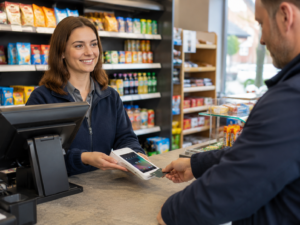
An integrated countertop terminal is usually the best card machine for a convenience store, grocery shop, mobile phone shop, off-licence, pharmacy or specialist retailer with a permanent till.
The terminal connects to the EPOS system, allowing the sale total to pass directly to the card machine. The cashier does not have to type the amount manually.
This can provide several practical benefits:
- Faster checkout during busy periods
- Fewer incorrect amounts entered
- Automatic payment recording
- Easier end-of-day reconciliation
- More accurate sales reports
- Less risk of a card payment being processed without the sale being completed on the till
Switch & Save’s retail EPOS system combines payment functionality with product management, stock tracking, sales reporting and integrated card payments.
2. Portable retail card machines
A portable card machine may be more appropriate when payments are not always taken at the main counter.
Examples include:
- Furniture and homeware shops where staff assist customers around a showroom
- Garden centres with indoor and outdoor payment areas
- Car garages taking payments at a service desk or vehicle
- Shops offering kerbside collection
- Businesses operating temporary checkout points during busy periods
Portable terminals normally use Wi-Fi within the premises. Some also include mobile data, giving the business a backup connection or allowing the terminal to be used outside the building.
3. Multi-terminal retail systems
Retailers with several tills should consider terminals that can be centrally managed and linked to the same reporting system.
This is particularly useful for:
- Supermarkets
- Busy convenience stores
- Departmental retail stores
- Multi-branch businesses
- Seasonal retailers
- Stores with separate customer service and checkout desks
A connected setup makes it easier to compare till performance, reconcile payments and monitor sales across different terminals.
Best Card Machines for Service Businesses
The best card machine for a service business is usually portable, easy to carry and capable of working independently from a fixed checkout.
1. Portable card machines for on-site services
Portable terminals are well suited to businesses where the customer moves through different areas of the premises.
Examples include:
- Hair salons
- Barbers
- Beauty clinics
- Restaurants
- Cafés
- Bars
- Dental practices
- Repair centres
- Hotels
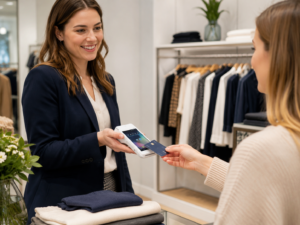
A salon employee, for example, can take payment beside the customer rather than asking them to queue at reception. A restaurant can bring the card machine directly to the table.
Portable terminals can also support features such as tipping and digital receipts, depending on the provider and payment plan.
2. Mobile card machines for trades and field services
A mobile terminal uses a built-in SIM or mobile data connection, allowing payments to be accepted away from business premises.
This is often the best option for:
- Plumbers
- Electricians
- Mobile mechanics
- Cleaning companies
- Taxi and private-hire operators
- Delivery businesses
- Mobile caterers
- Market traders
- Event businesses
Mobile card readers available in the UK may connect through Bluetooth, Wi-Fi or built-in mobile data. Some compact readers work with a smartphone, while standalone terminals can process payments without requiring the employee’s personal phone.
For a mobile service business, check mobile-network coverage in the areas where you usually work. A terminal is only useful when it can establish a stable connection.
3. Card machines for appointments and deposits
Some service businesses take deposits when appointments are booked and collect the remaining balance after the service.
In this situation, the payment system may need to support:
- In-person card payments
- Payment links
- Telephone or virtual-terminal payments
- Digital invoices
- Refunds
- Deposits and part-payments
- Customer receipts
A card machine alone may not cover every requirement. Consider the provider’s complete payment platform rather than judging only the physical device.
Countertop, Portable or Mobile: Which Should You Choose?
Choose a countertop terminal when:
- Customers always pay at one till
- You have stable broadband
- Speed is your main priority
- The terminal will be integrated with your EPOS
- You process frequent transactions throughout the day
Choose a portable terminal when:
- Staff take payments around the premises
- Customers pay at tables, chairs or service areas
- You have reliable business Wi-Fi
- Several employees may need access to the machine
- The terminal needs to return to a charging dock
Choose a mobile terminal when:
- You visit customers
- You operate at markets or events
- You make deliveries
- Fixed broadband is unavailable
- You need a built-in mobile-data connection
Compact smartphone-connected readers can work well for occasional or lower-volume payments. Standalone terminals are generally more practical when the machine is used continuously or shared between employees.
Current UK payment hardware ranges from small contactless readers to standalone portable terminals and complete POS devices. For example, Square offers readers that accept chip-and-PIN, contactless and mobile-wallet payments, while its hardware ecosystem can connect with accessories such as barcode scanners and receipt printers.
Integrated vs Standalone Card Machines
A standalone card machine processes the payment separately from the EPOS system. The employee reads the total from the till and enters it into the terminal.
This may be sufficient for:
- Low-volume businesses
- Sole traders
- Occasional sellers
- Businesses without a full EPOS system
- Temporary events
However, manual entry creates an additional step and increases the possibility of human error.
An integrated terminal receives the payment amount automatically from the till. Once the transaction is approved, the payment status returns to the EPOS system.
Integration is particularly valuable for busy retailers, restaurants and takeaways because it can:
- Reduce double entry
- Improve transaction accuracy
- Speed up checkout
- Simplify refunds
- Match card payments with orders
- Improve daily reporting
- Make staff training easier
Businesses considering a connected setup can review Switch & Save’s guide to the best card payment solutions for UK small businesses.
What Should a Good Card Machine Include?
Whether you operate a retail store or service business, assess the following features before committing to a provider.
Reliable connectivity
Look for the most appropriate combination of Ethernet, Wi-Fi, Bluetooth and mobile data. A retailer may prioritise wired connectivity, while a tradesperson may need a multi-network SIM.
Contactless and mobile-wallet payments
The terminal should accept major debit and credit cards as well as contactless wallets such as Apple Pay and Google Pay. Current mainstream UK readers commonly support chip-and-PIN, contactless and mobile-wallet transactions.
Suitable battery life
Battery performance matters for restaurants, salons, deliveries and mobile services. Check how long the device operates between charges and whether a charging dock is included.
Clear receipts and reporting
Decide whether you need a built-in printer, a separate receipt printer or digital receipts. Your reporting system should make it easy to match payments, refunds and daily sales.
Refund and tipping functionality
Restaurants, bars, salons and hospitality businesses may need tipping. Retailers may place greater importance on quick refunds and accurate payment reconciliation.
Accessible UK support
A low-cost machine may become expensive if technical support is difficult to reach when the terminal stops working. Check support hours, replacement procedures and whether assistance is provided directly or through a third party.
Appropriate security controls
Use approved hardware, keep terminals updated and limit access to refunds and sensitive payment functions. Businesses can find further guidance in Switch & Save’s article on how to secure card payments.
Card Machine Costs: Do Not Compare Transaction Rates Alone
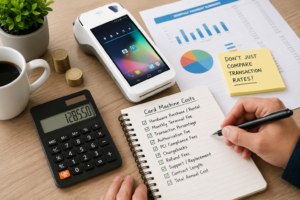
Card machine pricing may include several separate costs:
- Hardware purchase or rental
- Monthly terminal fee
- Transaction percentage
- Fixed authorisation charge
- PCI-related fees
- Minimum monthly service charges
- Refund charges
- Chargeback administration
- Replacement or support costs
- Early termination fees
A pay-as-you-go reader can be attractive for a new or seasonal service business because there may be no monthly commitment. However, a retailer processing a high volume of card sales could pay more overall under a standard flat transaction rate.
Subscription or merchant-account arrangements can sometimes offer more suitable pricing for established businesses, but the agreement must be assessed carefully. Pay-as-you-go options tend to favour occasional and lower-volume sellers, while subscription arrangements may be more suitable when lower per-transaction costs offset the monthly fee.
Calculate the estimated annual cost using your actual:
- Monthly card turnover
- Average transaction value
- Number of transactions
- Mix of UK, international and commercial cards
- Hardware and monthly charges
You can also review this guide on reducing card machine fees for UK retail businesses.
How Switch & Save Helps Businesses Choose the Right Setup
Switch & Save helps UK businesses compare card machines based on how they actually trade rather than recommending the same terminal to every company.
Its card machine solutions include options through payment partners such as Worldpay, Teya, Dojo and Shift4, alongside integration with retail and hospitality EPOS systems.
A suitable setup may include:
- Countertop, portable or mobile card machines
- Integrated card and EPOS payments
- Retail inventory and barcode management
- Hospitality order and table management
- Real-time sales reporting
- UK-based assistance
- Payment options matched to transaction volume
- Flexible business finance for eligible businesses
The objective is not simply to install a card machine. It is to create a payment workflow that reduces manual work, keeps reports accurate and makes checkout easier for customers and staff.
The best card machines for retail stores and service businesses solve different operational problems.
Retail stores normally benefit most from a fast, integrated countertop terminal that connects payments with sales, products and stock. Service businesses generally need a portable or mobile terminal that can follow the employee or customer.
Before making a decision, compare:
- Where payments will be taken
- Expected monthly turnover
- Transaction frequency
- Connectivity requirements
- EPOS integration
- Battery and printing needs
- Contract length
- Total annual cost
- Support and replacement arrangements
Choosing a machine around these requirements will produce a more reliable and cost-effective payment setup than selecting one based only on its advertised transaction rate.
Check Your Potential Savings
Switch & Save helps UK businesses reduce costs with AI-powered EPOS systems, card payment solutions and business finance. Check your savings today.
Frequently Asked Questions
What is the best card machine for a retail shop?
For most retail shops, the best option is an integrated countertop card machine connected to the EPOS system. It supports fast checkout, removes manual amount entry and makes sales reconciliation easier.
What is the best card machine for a service business?
Portable or mobile terminals are usually best for service businesses. Portable machines work well inside salons, restaurants and clinics, while SIM-enabled mobile machines suit tradespeople, delivery companies and businesses visiting customers.
Is a mobile card reader suitable for a busy retail store?
It can process payments, but it may not be the most efficient option for a busy store. Retailers should consider a dedicated terminal with stable connectivity, receipt options and EPOS integration.
Should my card machine integrate with my EPOS system?
Integration is strongly worth considering when you process frequent transactions. It sends the sale total directly to the terminal, reduces manual errors and keeps payment reports aligned with EPOS sales.
Can one business use different types of card machines?
Yes. A retailer could use integrated countertop terminals at the main tills and a mobile terminal for deliveries or outdoor sales. A restaurant could combine fixed terminals at the counter with portable machines for table payments.
Are card machines available without monthly fees?
Yes. Some providers offer pay-as-you-go machines without monthly terminal fees. However, transaction rates and hardware costs still apply, so businesses should compare the total annual cost rather than the monthly fee alone.
How many card machines does my business need?
The correct number depends on transaction volume and staff workflow. A small shop may need one terminal, while a restaurant may need several portable devices to prevent delays during peak service.
Can a card machine accept Apple Pay and Google Pay?
Most modern contactless terminals support major mobile wallets, but businesses should confirm supported payment methods with the provider before signing an agreement.