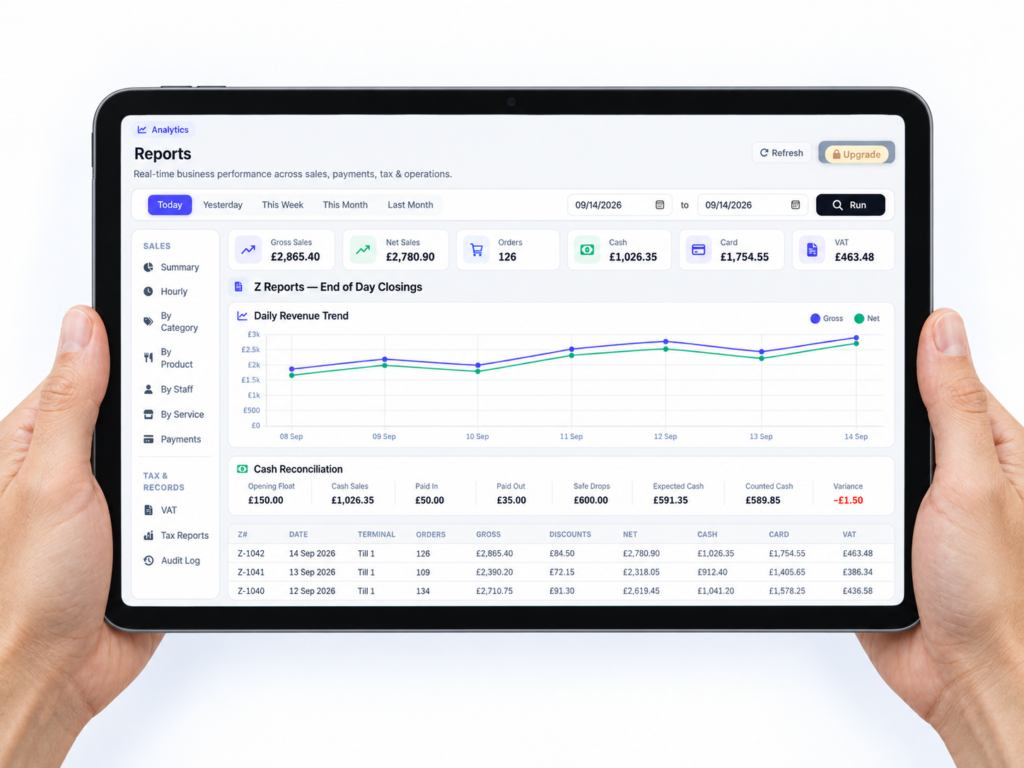
An end-of-day Z report is a final summary of the sales, payments and till activity recorded during a trading day or shift. It usually shows gross and net sales, VAT, refunds, discounts, cash transactions, card payments and any difference between the expected and counted cash.
Once completed, the report creates a clear closing record for that trading period. Depending on your EPOS system, running the Z report may also close the shift, lock the figures or reset selected daily totals ready for the next session.
For a shop, café, takeaway or restaurant, this is one of the most useful EPOS reports you can check. It helps you understand what happened during the day, identify discrepancies and prepare accurate records for bookkeeping.
Key takeaways
| Key point | What it means for your business |
|---|---|
| A Z report closes a trading period | It creates a final summary of sales and till activity for the day or shift |
| It separates payment types | You can compare cash, card and other tender totals |
| It supports cash reconciliation | The expected cash figure can be checked against the money counted |
| It highlights discrepancies | Refunds, voids, discounts and cash differences are easier to investigate |
| An X report is normally a preview | It lets you check current figures without closing the trading period |
| Reports depend on correct setup | Products, VAT rates, staff permissions and payment types must be configured properly |
| It isn’t a complete set of accounts | Your accountant may still need bank, expense, purchase and other financial records |
What information does a Z report contain?
A Z report brings together the important financial activity recorded by your till during a selected trading period. The precise layout varies between EPOS providers, but a useful report will normally include several core figures.
These may include:
- Gross sales
- Net sales before VAT
- VAT totals by rate
- Cash payments
- Card payments
- Refunds and cancelled transactions
- Discounts
- Paid-in and paid-out amounts
- Opening cash float
- Expected closing cash
- Actual cash counted
- Cash shortages or overages
- Number of transactions
- Average transaction value
- Sales by department, product or category
- Staff or till operator activity
A restaurant Z report might also show service charges, tips, covers, table orders and takeaway sales. A convenience shop may pay more attention to cash movements, product departments, refunds and VAT categories.
The purpose is the same: to give you a reliable closing view of the day.
How does an end-of-day Z report work?
Throughout the day, your EPOS system records each sale and the payment method used. It may also record refunds, discounts, voided items, cash added to the drawer and money removed for safe drops or business expenses.
At closing time, a manager or authorised employee counts the cash drawer. The EPOS system then compares the counted amount with the amount it expected to be there.
A simplified expected-cash calculation looks like this:
Opening float + cash sales + paid-in amounts − cash refunds − paid-out amounts − safe drops = expected closing cash
Imagine that a grocery shop starts the day with a £100 float. It takes £850 in cash sales, processes a £20 cash refund and removes £500 for a safe drop.
The expected cash is:
£100 + £850 − £20 − £500 = £430
If the employee counts £427, the Z report should show a £3 shortage. That doesn’t automatically mean theft or serious error. It may be caused by incorrect change, a transaction entered under the wrong payment type or an unrecorded cash movement.
The key is that the difference becomes visible and can be investigated.
Once the figures have been checked, the shift or business day is closed. With some traditional tills, running the Z report resets the daily totals. Modern cloud-connected systems may preserve the information permanently while marking the reporting period as finalised.
Always confirm how your particular EPOS system handles closure and resets.
What is the difference between an X report and a Z report?
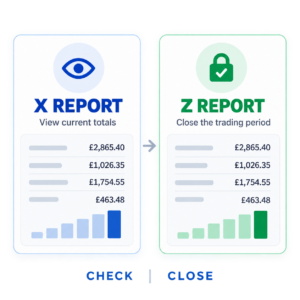
The simplest distinction is that an X report checks the current totals, while a Z report normally closes them.
| Feature | X report | Z report |
|---|---|---|
| Purpose | Review progress during a shift | Finalise the trading day or shift |
| Resets or closes totals | Usually no | Often yes |
| Can be run several times | Yes | Normally once per closing period |
| Useful during trading | Yes | Usually run at closing time |
| Creates a final record | No | Yes |
For example, a café manager might run an X report at 3pm to see how much cash should be in the drawer. The café remains open and new sales continue to be added.
At the end of the evening, the manager counts the drawer and runs the Z report. That closes the trading period and creates the final record.
Don’t use a Z report when you only want to check performance halfway through the day. Closing a shift too early can split your daily figures and make reconciliation more confusing.
Why are Z reports important for UK businesses?
They help you balance the cash drawer
Without a closing report, you know how much cash you counted, but you don’t know how much should have been there.
The Z report provides the expected figure. You can then record whether the drawer was exact, over or short. If differences keep appearing, you can look for patterns involving particular shifts, processes or training needs.
They make card reconciliation easier
Your report should separate card payments from cash and other payment methods. You can compare the EPOS card total with the card machine’s settlement or transaction report.
So, what actually happens when a customer taps their card?
If your card machine is integrated with the EPOS system, the correct amount is normally sent directly to the terminal. That reduces manual entry. With a standalone card machine, an employee could accidentally enter one amount on the till and another on the terminal.
Daily reconciliation helps you find these differences before they become harder to trace. Our guide to the best EPOS systems for small UK businesses explains why integrated payments and clear reporting should be considered when comparing systems.
They provide a record of refunds and discounts
A good report doesn’t only show money coming in. It should also reveal activity that reduced your sales total, including refunds, cancelled orders, voided items and discounts.
A high number of voids isn’t automatically suspicious. A restaurant may have legitimate changes because customers altered their orders. However, repeated unexplained voids or large discounts deserve a closer look.
Staff accounts and permissions make this much easier. Each employee can use an individual login, while sensitive actions require manager approval.
They support bookkeeping
Your bookkeeper or accountant needs organised sales information. A series of completed Z reports provides a useful daily audit trail and can make month-end work easier.
However, a Z report isn’t a replacement for full accounting records. It doesn’t necessarily include supplier invoices, bank fees, payroll, purchases or every business expense.
Think of it as an important part of your records, not the entire picture.
They help you understand performance
Z reports are often associated with compliance and cash control, but they can also help you make better decisions.
You might notice that Friday evenings generate more sales but also more refunds. A takeaway may find that card payments dominate after 7pm. A mobile phone shop might see strong revenue but a low number of high-value transactions.
When you review these patterns alongside other EPOS reports and performance tools, the information becomes useful for staffing, stock purchasing and opening-hour decisions.
How to read a Z report
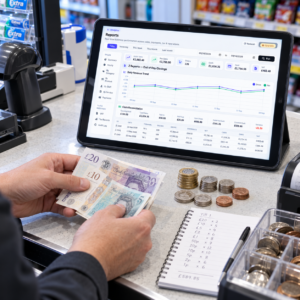
A long report can look complicated at first. In practice, you can review it in a sensible order.
1. Check the reporting period
Confirm the date, opening time, closing time, till number and staff member. If you operate past midnight, make sure the report covers the intended business day rather than simply following the calendar date.
2. Review the main sales figures
Check gross sales, net sales, VAT and total refunds. Make sure the relationship between these figures makes sense.
Gross sales and net sales can mean different things across systems. On one report, gross sales may mean sales before discounts and refunds. On another, it may mean sales including VAT. Your provider should clearly define each field.
3. Compare payment totals
Review cash, card, voucher, loyalty credit and any other tender types. Together, these should reconcile with the relevant sales and payment activity.
Pay particular attention to transactions completed with more than one payment method, such as £10 cash and £15 by card.
4. Reconcile the cash drawer
Compare the expected closing cash with the amount physically counted. Record the difference even if it’s small. Consistent records are more useful than relying on memory later.
5. Review unusual activity
Look at refunds, large discounts, cancelled transactions, drawer openings and paid-out entries. If something needs an explanation, add a note while the shift is still fresh in everyone’s mind.
6. Confirm card totals
Compare the report with the card terminal’s transaction or settlement information. Remember that settlement reports may group transactions differently, especially around cut-off times.
A Birmingham convenience store closes at 11pm. The owner reviews cash sales, card payments, lottery-related tender categories, refunds and safe drops.
The drawer is £10 short. The report shows that one £10 transaction was marked as cash, but the customer actually paid by card. The overall money received is correct, but the payment type was entered incorrectly.
An integrated card terminal could help prevent that mismatch.
A café closes its morning and afternoon shifts separately. Each shift has its own float and staff member.
Running separate Z reports creates clearer responsibility. If one drawer is short, the manager knows which period to investigate instead of reviewing the entire day.
Restaurant
A restaurant’s Z report shows dine-in, takeaway and delivery sales alongside tips, service charges, discounts and refunds.
The manager notices an unusually high discount total. On review, staff had used a general discount button for a lunch promotion. The sales were genuine, but the promotion should have had its own button to make reporting clearer.
Mobile phone shop
A phone shop completes fewer transactions than a grocery store, but each sale may be worth considerably more. Its manager checks card totals, refunds, product categories and staff sales.
One refund appears without a linked original transaction. The manager investigates before closing the day and corrects the process for future returns.
Common Z report problems and how to avoid them
The report doesn’t match the cash drawer
Recount the cash first. Then check cash refunds, paid-outs, safe drops and transactions entered under the wrong payment method.
Don’t change a figure simply to make the report balance. Record the genuine difference and investigate it.
The card total doesn’t match the terminal
Check whether any payments were processed directly on the card machine without being entered on the till. Also look for declined payments, duplicated entries, manual transactions and differences in settlement cut-off times.
The Z report was run too early
If a shift is closed while the business is still trading, later transactions may appear in a second report. This doesn’t necessarily lose data, but it can make the daily record harder to follow.
Limit Z-report access to supervisors or managers and use an X report for mid-shift checks.
VAT figures look wrong
Check that products and services have been assigned the correct VAT categories. If an item is placed in the wrong category, the EPOS report can reproduce that incorrect setup consistently.
Your accountant can advise on VAT treatment. Your EPOS provider should help you configure the available VAT rates and reporting categories correctly.
Staff share one login
Shared logins make it difficult to identify who processed a refund, applied a discount or closed a shift. Individual staff accounts provide a clearer audit trail and allow permissions to match each person’s role.
How long should you keep Z reports?
UK businesses should retain appropriate accounting and tax records for the period that applies to their legal structure and circumstances. Because retention requirements can vary, confirm the correct period with your accountant or check current HMRC guidance.
Modern EPOS systems can keep Z reports digitally, making them easier to search, export and back up. If your system only prints reports, create a reliable filing process and protect thermal-paper records from heat and sunlight because they can fade.
A sensible electronic report should be searchable by:
- Date or business day
- Register
- Location
- Shift
- Staff member
- Z-report number
Never rely on the paper copy alone if a secure digital version is available.
Better EPOS reports mean better daily decisions
A Z report should do more than print a collection of figures. It should give you a clear and trustworthy view of your trading day.
Switch & Save provides AI-powered EPOS systems for UK retail and hospitality businesses, including shops, cafés, takeaways, restaurants and bars. Our systems can help you track sales, payment types, stock, cash movements and staff activity from one connected setup.
Clear reporting is one of the practical features to consider when choosing an EPOS system. You can explore Switch & Save’s EPOS solutions to see how integrated sales, payments and reporting can simplify your daily operations.
Check your potential savings
If your current till makes end-of-day reporting confusing, it may be time to review the way your sales and payments are connected.
Switch & Save helps UK businesses reduce costs with AI-powered EPOS systems, card payment solutions and business finance.
Frequently asked questions
What does Z report mean?
A Z report is the final till report for a trading day or shift. It summarises sales, payments, VAT, refunds, discounts and cash activity. Running it usually closes or finalises that reporting period.
When should I run a Z report?
Run it after you’ve finished trading and completed the relevant closing checks. Count the cash, record any safe drops or paid-outs, compare card totals and then close the shift.
Can I run a Z report more than once?
This depends on the EPOS system. Some systems allow multiple Z reports but treat each one as a separate closed period. If you only want to see current figures, use an X report instead.
Does a Z report reset the till?
On some traditional tills, yes. On modern EPOS systems, the report may close the shift without deleting anything. All historical information remains stored while the next trading period begins with new totals.
What is the difference between a Z report and a daily sales report?
A daily sales report may be generated whenever you need it and can often be filtered or changed. A Z report is normally a formal closing record connected to a completed shift or business day.
Should the Z report match the money in the bank?
Not exactly. Cash may remain in the drawer or be deposited separately, while card payments may reach your bank after processing fees and according to the provider’s settlement schedule. The report should first be reconciled with the cash drawer and card terminal records.
Is a Z report required for VAT?
A Z report can support your VAT and accounting records by showing sales and VAT totals. However, it isn’t a VAT return and may not contain every record your business must retain. Ask your accountant what supporting information you need.
Can a Z report show staff activity?
Yes, if your EPOS system uses individual staff logins. It may show sales, refunds, discounts, voids and cash movements by employee or register.