For Coventry retailers, the right move is a cloud-based EPOS system from a UK-supported provider like Switch-and-save, priced either as a one-off licence or a monthly subscription depending on cash flow. Expect software from around £99 a month or a one-time licence fee, plus separate card payment charges. Book a free demo before signing anything, so you can see the till screen and reporting dashboard working with your own stock list.
TL;DR:
- Cloud POS systems in Coventry typically cost between £50 and £300 a month per outlet, depending on the number of locations, hardware included, and add-ons like e-commerce integration.
- Real-time inventory synchronization across multiple tills and locations is crucial for daily operations and should be demonstrated live during demos to confirm instant stock updates.
- Support from UK-based providers with clear response times and the ability to export data upon exit are key factors in choosing a reliable POS supplier.
- Most Coventry retailers opt for bundled hardware kits with essential peripherals, but compatibility checks for existing equipment are vital before purchase.
- Updates for cloud systems happen automatically, reducing downtime and maintenance costs, while on-premise systems often require costly engineer visits for upgrades.
Table of Contents
- What does retail POS cost in Coventry?
- What features actually change your day-to-day running?
- What hardware comes in a starter kit?
- What support and training should you expect?
- How do you choose the right supplier?
- How are updates and maintenance handled?
- How does Coventry POS compare with other options?
- What do Coventry retailers say about switching systems?
- Does the system meet UK data protection rules?
- Can the system grow with your business?
- Which payment methods and gateways does it support?
- Switch-and-save’s view on serving Coventry retail
- Book a demo with Switch-and-save
- Sources
- FAQ
What does retail POS cost in Coventry?
Retail POS pricing splits into two shapes: a one-time licence fee, or a rolling subscription. Neither is automatically cheaper. A licence suits a shop planning to run the same system for five years with minimal change. A subscription suits a shop that wants updates, support, and hardware refreshes bundled in without a big upfront outlay.
Cloud POS software for UK small and medium retailers typically runs £50 to £300 a month per outlet, according to comparative pricing analysis of cloud versus on-premise systems. On-premise setups, by contrast, often demand £5,000 to £30,000 or more upfront, which is why so many independent Coventry shops have shifted to cloud systems over the past few years.
Vendors serving the Coventry market commonly advertise entry-level subscription packages alongside one-time licence deals, so the two pricing shapes sit side by side on most quote pages. What you pay depends heavily on:
- Number of tills and locations you need covered
- Whether hardware is included or bought separately
- Card payment processing rates, which are billed separately from the software
- Whether you want e-commerce or loyalty add-ons bundled in
Card processing fees rarely appear on the headline price, so always ask for the payment rate in writing before comparing two quotes side by side. It’s the detail that trips up most first-time buyers.
What features actually change your day-to-day running?
Feature lists on vendor websites can look identical. What separates a genuinely useful system from a frustrating one is how those features behave once you’re mid-queue on a Saturday afternoon.
- Real-time inventory sync across every till and, if you trade from more than one site, every location. Stock counts update the moment a sale completes, not overnight.
- Sales reporting and till reconciliation that produce an end-of-day summary in seconds rather than a spreadsheet exercise that eats into your evening.
- Payments integration covering card, contactless, and refunds, with PCI-compliant handling so customer card data never sits unprotected on your system.
- E-commerce and loyalty integrations, letting a Shopify or WooCommerce store share stock data with your till, and rewarding repeat customers automatically.
- Offline capability, so a broadband dropout doesn’t stop you taking payments, and UK-based data hosting that meets local security expectations.
Small Business UK’s roundup of leading retail POS systems flags multi-location inventory and detailed reporting as the features UK retailers rank highest, well ahead of cosmetic extras.
Pro Tip: Ask any shortlisted supplier to show you a live stock count updating across two terminals during the demo. If they can’t demonstrate it in real time, assume the sync isn’t as instant as the brochure claims.
Stock damage from pests is a cost few retailers budget for. Storerooms holding packaged goods are a common target, and it’s worth reviewing pest risks specific to retail stockrooms alongside your inventory setup, particularly if you’re moving to a new unit.
What hardware comes in a starter kit?
Most Coventry retailers starting fresh choose a bundled kit rather than sourcing hardware separately. A typical starter package includes a touchscreen till, receipt printer, cash drawer, and barcode scanner, with card payment terminal integration either built in or added as a companion device.
- Software-only options suit shops that already own compatible tablets or till hardware and simply want new software layered on top.
- Full kits suit shops starting from scratch, or replacing an ageing system where the old hardware isn’t worth keeping.
- Compatibility checks matter before you commit. Confirm your existing card terminal, barcode scanner, or receipt printer will actually talk to the new software, rather than assuming any hardware works with any system.
- “Free setup” claims usually mean an installer configures the software and connects your hardware on-site, but always confirm whether that visit is genuinely free or bundled into the price elsewhere.
Ask for an itemised hardware list before you order, so you know exactly what’s arriving and what you’re expected to already own.
What support and training should you expect?
UK-based support matters more than it sounds. When your till freezes on a Friday afternoon, a call centre in a different time zone is not what you need. Look for providers offering UK phone or chat support with a clear response time promise, not a vague “we’ll get back to you” line.
- Staff training typically runs as a short on-site or remote session, usually an hour or two, covering till operation, refunds, and basic troubleshooting.
- Written documentation or video guides should back up that training for new staff who join later.
- Go-live timelines commonly run one to three weeks from order, with delays usually caused by hardware compatibility issues or slow data migration from an old system rather than the software itself.
How do you choose the right supplier?
Narrow your shortlist against five criteria, then interrogate each supplier with the same set of questions before you sign anything.
- Cost structure. Is it a one-time licence or subscription, and what’s included versus billed separately (card fees, hardware, support)?
- Payments. Which card networks and contactless standards does it support, and what’s the per-transaction rate?
- Inventory. Does it sync in real time across every till and location you run?
- Integrations. Does it connect to your existing e-commerce platform, accounting software, or loyalty scheme?
- Support. Is it UK-based, and what response time do they commit to in writing?
When you speak to a supplier, ask directly: can I export my own data if I leave? What’s the minimum contract length? What’s covered under warranty, and for how long? Can I get hands-on demo access before paying anything?
Feature parity across many vendors is real, according to Small Business UK’s analysis of leading retail POS options, which is exactly why cost structure and local support should decide your shortlist, not marginal feature differences that rarely matter in daily use.
Walk away if a supplier refuses to confirm contract length in writing, won’t offer a demo before payment, or can’t explain what happens to your data on exit.
How are updates and maintenance handled?
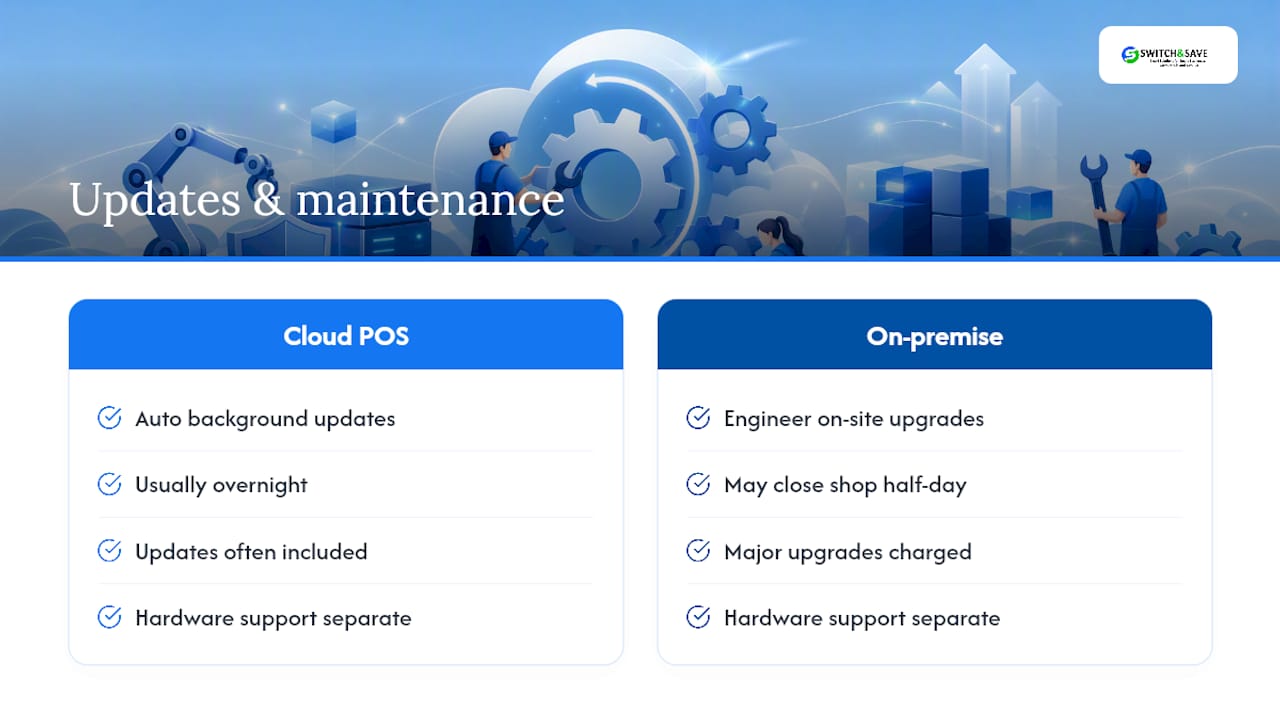
Cloud POS systems update automatically in the background, usually overnight, so you rarely need to schedule downtime for a new feature or security patch. That’s one of the clearest advantages over older on-premise tills, where an upgrade often meant an engineer visit and a closed shop for half a day.
Ask your supplier exactly what’s included in ongoing maintenance before you sign. Some providers bundle software updates, security patches, and minor feature releases into the subscription price. Others charge separately for major version upgrades or new module rollouts. Get this in writing, because it directly affects your running costs two or three years down the line.
Hardware maintenance is a separate conversation. Till screens, receipt printers, and card terminals wear out, and warranty terms vary widely between suppliers. Confirm whether hardware repairs or replacements are covered under your support plan or billed as a separate call-out charge.
A well-run upgrade policy should never force you offline during trading hours. If a supplier’s update schedule involves scheduled downtime during the working day, that’s worth flagging before you commit, particularly for a shop trading six or seven days a week where there’s no obviously quiet window.
How does Coventry POS compare with other options?
Coventry retailers researching POS options will find broadly similar systems marketed under different names, and the underlying technology often overlaps more than the branding suggests. Widely known platforms mentioned in national roundups include general retail EPOS tools built around card payments, stock tracking, and reporting dashboards.
What separates providers in practice is rarely the feature list. It’s local support responsiveness, contract flexibility, and whether the pricing you’re quoted matches what actually lands on your invoice. A system with slightly fewer bells and whistles but a UK support line that answers on the first ring beats a feature-rich platform routed through an overseas call centre when your till goes down mid-Saturday trade.
Some providers position themselves around that gap: UK-based support, transparent package pricing, and demo access before you commit, rather than a long features brochure with vague costs attached.
What do Coventry retailers say about switching systems?
Independent shops across Coventry and the wider West Midlands have moved to cloud POS largely for the same two reasons: lower upfront cost and faster stock visibility across multiple tills. A cloud system typically offers a faster return on investment than an on-premise setup, precisely because deployment is quicker and there’s no large hardware outlay to recoup first, a pattern cloud versus on-premise cost comparisons confirm across UK retail more broadly.
Switch-and-save’s own material on how a POS system increases sales in UK retail points to faster checkout speeds and tighter stock control as the two changes shop owners notice first after switching, both of which translate directly into fewer lost sales during busy periods and less time spent on manual stock checks.
Does the system meet UK data protection rules?
Any POS system handling customer card data or personal information must meet UK GDPR requirements, which govern how that data is stored, processed, and protected. Card payment handling additionally needs to meet PCI DSS standards, the payment industry’s security framework, so customer card details are never stored in a way that leaves them exposed.
Ask your supplier directly where data is hosted, whether it’s UK or EU based, and what happens to your sales history if you ever cancel. A provider that can’t answer clearly hasn’t thought it through properly, which is a poor sign for how they’ll handle a genuine data incident.
Can the system grow with your business?
A single-till corner shop and a three-site homeware retailer need very different things from the same software family. The better providers offer tiered packages, letting you start with one till and add locations, users, or modules as trade grows, rather than forcing a full system replacement later.
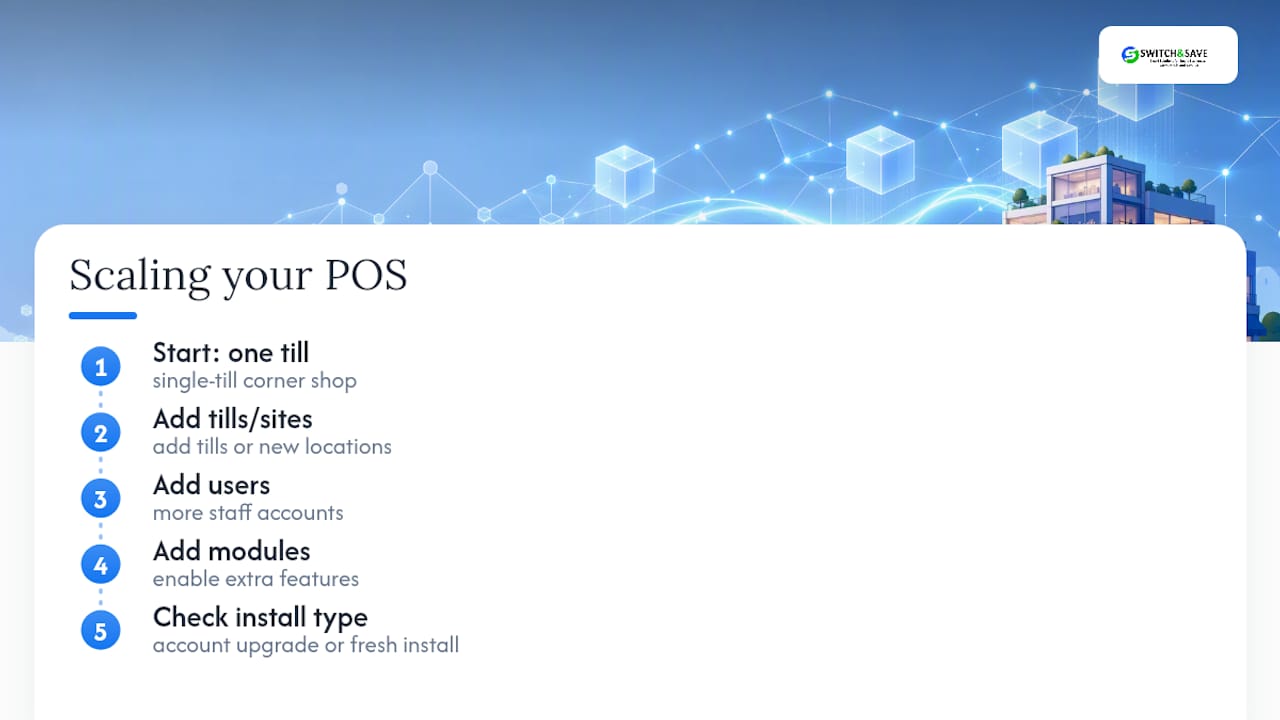
Ask whether adding a second location means a simple account upgrade or a fresh installation. That answer tells you a lot about how the system was actually built.
Which payment methods and gateways does it support?
Contactless and card payments now account for the overwhelming majority of retail transactions in the UK, so gateway compatibility isn’t optional. Confirm your shortlisted system supports major UK card networks, Apple Pay, Google Pay, and standard contactless limits, and that refunds process through the same integrated flow rather than a separate manual step.
Switch-and-save’s view on serving Coventry retail
We think too many small retailers get sold a features list when what they actually need is a working till on day one and someone local to call when it isn’t. Our packages, UK support, and free demos exist for exactly that gap. For a small Coventry shop, that usually means a quick site visit, a same-week install, and staff trained before opening hours. Get in touch for a tailored walk-through.
— Amir
Book a demo with Switch-and-save
There are practical alternatives to piecing together software, hardware, and payment processing from three different suppliers. Often, till hardware, stock management, and card payments come from a UK-supported provider with transparent package pricing.

The SSPOS software covers real-time inventory, sales reporting, and multi-terminal support, while the retail EPOS system page sets out full hardware and software packages built specifically for shop environments. If you want to browse everything available first, the EPOS systems category lists current packages side by side.
Booking a demo means seeing the till screen, stock dashboard, and reporting tools working with a setup close to your own, before you commit to anything. Request a demo or a written quote through the EPOS system page and get a clear price for your shop within days.
FAQ
Which POS providers are available in the UK?
UK retailers can choose from a wide mix of cloud POS platforms and local suppliers, with providers like Switch-and-save focused specifically on UK-based support and transparent package pricing for retail and hospitality.
Who is the biggest POS company?
There’s no single dominant POS company in the UK retail market; larger international platforms compete alongside UK-focused providers, and market share varies considerably by sector and business size.
Does the UK use POS systems widely?
Yes, POS systems are standard across UK retail, from single-till independents to multi-site chains, driven largely by the shift to card and contactless payments over cash.
What are the 5 types of POS systems?
Common categories include on-premise terminal systems, cloud-based POS, mobile/tablet POS, self-service kiosks, and hybrid systems that combine cloud software with in-store hardware.
How long does it take to set up a retail POS system in Coventry?
Most Coventry installations go live within one to three weeks of ordering, though timelines can stretch if hardware compatibility checks or data migration from an old system take longer than expected.