
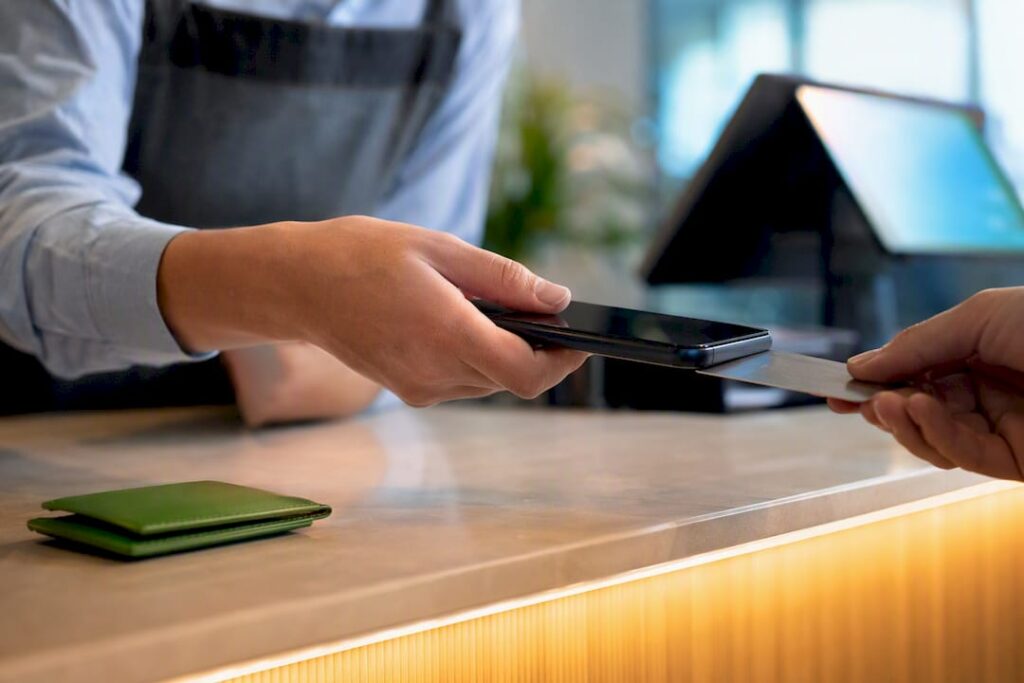
Yes, UK businesses can accept contactless card and wallet payments straight from a smartphone. You need a compatible device, a Tap to Pay–enabled app, and a verified merchant account. No terminal required. The next step is straightforward: check your phone against the compatibility list below, then contact a payment app or provider to switch the feature on.
TL;DR:
- Tap to Pay in the UK requires a compatible device, an enabled NFC function, and a supported payment app with merchant verification.
- Android compatibility depends on the OS version and provider, with many requiring Android 11 to 13, while iPhones need XS or later running on iOS.
- Transaction fees are similar to standard card machine rates, but savings come from eliminating hardware costs and enabling flexible, mobile payments.
- Settlement times remain one to three days, with offline mode and faster payouts available depending on the provider, while security features mirror those of hardware terminals.
- For multi-site operations, standalone Tap to Pay apps demand manual reconciliation, whereas integrated EPOS systems enable real-time inventory and sales tracking.
Table of Contents
- What is tap to pay in the UK and how does it differ from a card machine?
- Which phones and apps work for tap to pay in the UK?
- How much does tap to pay cost UK merchants?
- Is tap to pay secure and what are the contactless limits?
- How do I set up tap to pay for my business?
- Where does tap to pay work best for UK retail and hospitality?
- What Switch & Save has learned deploying tap to pay across UK sites
- How long does it take to receive tap to pay funds in the UK?
- Does tap to pay feel different for customers than a card terminal?
- The real question isn’t whether tap to pay works. It’s whether it fits how you actually trade
- Bring tap to pay and your till together with Switch-and-save
- Where to check the official rules yourself
- Sources
- FAQ
What is tap to pay in the UK and how does it differ from a card machine?
Tap to Pay, sometimes called SoftPOS, turns a smartphone’s built‑in NFC chip into a contactless card reader. There’s no separate card machine to buy, rent, or charge overnight. The phone does the job a terminal used to do, using the same NFC technology that lets customers tap their card on a shop counter.
It accepts the same range of payments a physical terminal takes:
- Contactless debit and credit cards
- Apple Pay
- Google Pay
- Other NFC‑based digital wallets
The practical differences show up behind the scenes rather than at the till. There’s no dedicated hardware to maintain, though your merchant ID handling often works slightly differently to a countertop setup, and you may need to configure Tap to Pay separately in your dashboard even if you already take card payments elsewhere, according to Trust Payments’ setup guidance. Settlement still runs through your existing acquirer, so money lands in your bank account on the same schedule as your other card sales.
Which phones and apps work for tap to pay in the UK?
Not every phone qualifies, and the rules differ sharply between Apple and Android.
For iPhone, the requirement is simple: iPhone XS or later, running an up‑to‑date version of iOS. You then enable Tap to Pay inside a supported payment app rather than through the phone’s native settings, and Apple recommends linking your account through Apple Business if you want your organisation’s name and icon to appear during customer transactions.
For Android, the picture is more fragmented. You need NFC and Google Play Services, but the minimum operating system version depends entirely on the provider, with many requiring somewhere between Android 11 and 13. Several UK acquirers, including Stripe, SumUp, Revolut Business, Tide and myPOS, have offered Tap to Pay on Android, though their compatibility lists and attestation requirements vary, as MerchantHQ’s Android breakdown explains. Some apps also require a SoftPOS attestation check before they’ll let you go live.
Before enabling anything, run through this checklist:
- Confirm NFC is switched on in your phone’s settings.
- Check your OS version and update if needed.
- Look up your chosen app’s published compatibility list rather than assuming.
- Locate your phone’s NFC antenna (usually near the top back) so you tap it correctly against cards.
- Enable a screen lock, since most providers require one before they’ll activate the feature.
- Complete any provider attestation step if your app requests it.
Pro Tip: If you’re running an older Android handset that technically has NFC but isn’t on your provider’s approved list, don’t assume it’ll work. Some manufacturers restrict background NFC access in ways that block SoftPOS apps even when the hardware is capable.
How much does tap to pay cost UK merchants?
Per‑transaction rates for Tap to Pay tend to sit close to what you’d pay on a physical terminal. The real saving isn’t on each sale. It’s in the hardware you never buy or rent.
That distinction matters when you’re weighing this against a conventional card machine, which typically involves upfront cost or a monthly rental on top of transaction fees. Cut out the box and you cut out that layer entirely.
Typical cost shapes you’ll encounter:
- Percentage‑based transaction fees, often broadly similar to standard card‑machine rates
- No hardware purchase or rental charge, since the phone you already own is the reader
- Possible subscription or platform fees layered on top, depending on the provider and package
- Faster onboarding for temporary or seasonal setups, since there’s no device to ship or return
Tap to Pay tends to save the most money for mobile traders, market stall holders, and seasonal or pop‑up operations where a dedicated terminal would sit unused for months, making it easy to sell physical products online for free as well. A busy fixed till at a high‑volume shop or restaurant, by contrast, may still find a proper terminal or an integrated EPOS setup more cost‑effective over time, particularly once you factor in speed of service and reconciliation. Our payment terminal guide for UK retail and hospitality breaks down where that trade‑off tends to land.
Is tap to pay secure and what are the contactless limits?
Security‑wise, Tap to Pay relies on the same protections underpinning any modern card payment: tokenisation, secure elements, and sandboxed PIN entry that keeps cardholder credentials away from the merchant’s device entirely, according to Stripe’s security overview. The risk profile is comparable to a hardware terminal, not weaker.
Despite a regulatory change lifting the formal contactless cap, many UK card issuers have continued to voluntarily cap contactless transactions at a limit around £100 into 2026, according to MerchantHQ’s reporting. That means PIN‑on‑glass, where the customer enters their PIN on your phone’s screen, still kicks in above that threshold for a large share of cards.
Your responsibilities as a merchant are practical rather than technical:
- Keep your phone’s operating system and payment app updated
- Enforce a screen lock at all times
- Choose an established, reputable payment app rather than an unfamiliar new entrant
- Train staff on how PIN‑on‑glass works, so they aren’t caught out when a customer’s card triggers it
A guide like our secure payment processing overview covers the compliance side in more depth if you want the fuller picture.
How do I set up tap to pay for my business?
Getting Tap to Pay running in your business is a short sequence, not a project.
- Check your device. Confirm your phone meets the iPhone or Android compatibility rules above and update the operating system if it’s behind.
- Lock it down. Turn on NFC and set a screen lock, since most providers won’t activate the feature without one.
- Pick your provider. Confirm your payment app or provider supports Tap to Pay in the UK, then complete merchant verification, which usually means KYC checks and setting up your merchant ID.
- Enable the feature. Switch on Tap to Pay inside the app, link or verify your merchant ID (Apple Business linking, where relevant), and run a test transaction before trading live.
- Set your operating rules. Decide when staff use a phone versus a terminal, how receipts and reconciliation will work, and brief the team on the process.
Our step‑by‑step payment setup walkthrough covers the merchant verification stage in more detail if your business hasn’t been through KYC checks before.
Pro Tip: Run your first test transaction with a real card, not a demo mode, and check the receipt lands in your dashboard within a few minutes. That single test catches most configuration errors before a customer ever sees them.
Where does tap to pay work best for UK retail and hospitality?
Some businesses gain more from Tap to Pay than others, and the pattern is fairly consistent.
- Market stalls and festival traders who need a checkout that fits in a pocket
- Table‑service hospitality, where a server can take payment at the table instead of walking to a fixed till
- Click‑and‑collect and delivery drivers who need to charge on the doorstep
- Queue‑busting during peak periods, letting a second staff member open an ad‑hoc checkout point rather than making customers wait, a use case NMI’s research on mobile checkout highlights directly
The benefits are speed, flexibility, and a lower upfront cost for anyone opening a new outlet or trading at a one‑off event. The limitations show up once you scale: linking multiple phones across a multi‑terminal operation gets fiddly, integration with your existing EPOS and inventory system needs checking carefully, and you’re ultimately relying on a consumer device’s battery health rather than purpose‑built terminal hardware.
What Switch & Save has learned deploying tap to pay across UK sites
Rolling out Tap to Pay across more than one site exposes a problem that rarely shows up in a single‑phone pilot: double‑entry. A standalone Tap to Pay app records sales in its own dashboard, separate from your stock and revenue figures, which means someone ends up reconciling two systems by hand at the end of each day.
An integrated EPOS setup avoids that split by recording the sale, updating stock, and settling the payment in one place. For a single trader, a phone and an app is genuinely enough. For anyone running more than one till, more than one site, or wanting real‑time stock visibility, that gap becomes a daily chore rather than a minor inconvenience.
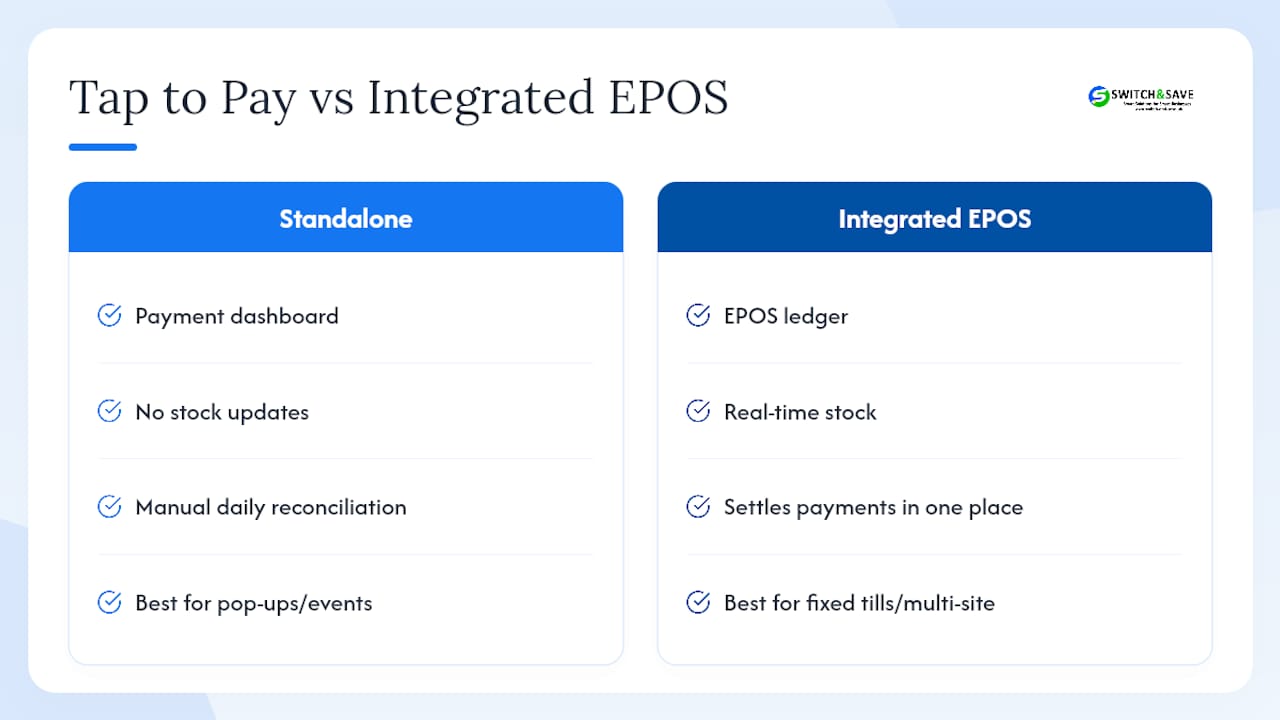
Our own deployments across UK retail and hospitality clients point to a simple rule: use Tap to Pay for the edge cases (pop‑ups, events, table service) and lean on integrated hardware for the fixed till. Device management gets harder to ignore too. Anyone issuing several staff phones for payments needs a plan for updates, lock policies, and battery checks, or the “no hardware” saving quietly turns into a support headache.
How long does it take to receive tap to pay funds in the UK?
Tap to Pay doesn’t change your settlement timeline. It changes how the payment is captured, not how it’s paid out.
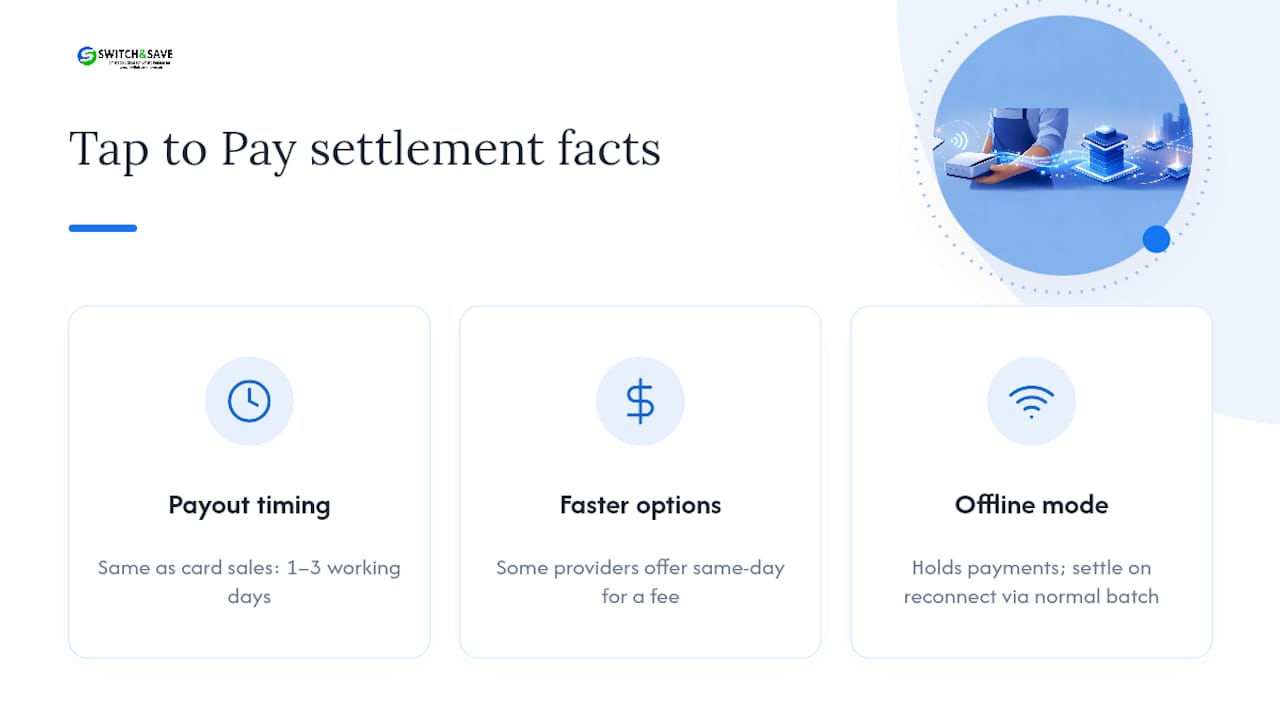
Because the transaction still routes through your existing acquirer and card networks, funds typically arrive on the same schedule as any other card sale, usually within one to three working days depending on your provider and account setup. Some providers offer faster or even same‑day payout options for an extra fee, exactly as they do for terminal transactions, so it’s worth checking your specific provider’s settlement terms rather than assuming a default.
Where Tap to Pay genuinely differs is in resilience during poor connectivity. Apple’s offline “store and forward” mode, available on iPhone running iOS 18.4 or later, lets merchants keep accepting a limited number of payments without an internet connection, holding them until the connection returns. Support for this feature varies by provider, so confirm it with your app before relying on it at an outdoor market or festival where signal can be patchy. Once connectivity returns, those held transactions settle through the normal batch process, joining the rest of the day’s sales without any separate action from you.
For most day‑to‑day trading, the practical takeaway is this: don’t expect Tap to Pay to speed up when you get paid. Expect it to widen where and how you can take a payment in the first place.
Does tap to pay feel different for customers than a card terminal?
For the customer, the tap itself looks almost identical whether they’re tapping a phone or a terminal. The card or wallet touches the reader, a beep or vibration confirms it, and the sale is done in a couple of seconds either way.
The differences customers do notice tend to be about context rather than mechanics. A card machine has a screen, a receipt slot, and a fixed spot on the counter that feels familiar and slightly more formal. A phone acting as a reader can feel more personal, especially when a server brings it straight to the table, but some customers pause the first time they see a staff member holding up their own mobile to take a payment, unsure whether it’s legitimate. That hesitation usually disappears the moment they see the familiar contactless symbol and payment prompt on screen.
PIN‑on‑glass is the other visible change. Instead of entering a PIN into a dedicated keypad, the customer taps their PIN directly on the phone’s screen when a transaction requires it. Apple and providers such as Stripe sandbox this input so staff never see the digits, but customers who haven’t encountered it before sometimes need a quick reassurance that it’s secure. A short, confident explanation from staff (“it’s the same as chip and PIN, just on the screen”) tends to settle any doubt within seconds.
The real question isn’t whether tap to pay works. It’s whether it fits how you actually trade
Most coverage of Tap to Pay treats it as a binary choice: phone versus terminal, pick a side. That framing misses what actually matters for a UK retail or hospitality business, which is matching the tool to the trading pattern rather than picking a winner.
A single trader at a Saturday market doesn’t need an EPOS system. A phone and a supported app cover everything they need, and the lack of hardware is a genuine advantage rather than a compromise. But the advice that “Tap to Pay replaces your terminal” falls apart fast for anyone running a busy till, several sites, or stock that needs tracking in real time. At that point, the missing piece isn’t payment acceptance. It’s the reconciliation and inventory link that a standalone app was never built to provide.
The overlooked nuance is this: Tap to Pay and integrated EPOS aren’t competitors, they’re complements. The businesses getting the most value are running both, terminal or till for the fixed counter, phone for the queue‑buster or the pop‑up stall. Anyone reading this to find a single answer for their whole operation is asking the wrong question.
— Amir
Bring tap to pay and your till together with Switch-and-save
Switch-and-save gives you what a standalone Tap to Pay app can’t: one system where sales, stock, and payments update together, instead of two dashboards you reconcile by hand at closing time. If you’ve read this far because you’re weighing up a phone‑only setup against something more permanent, that’s exactly the gap our EPOS software closes.

Our packages cover both retail and hospitality operations, with real‑time inventory tracking, multi‑store support, and a cloud dashboard you can check from anywhere. If you’re running a restaurant or café, the restaurant EPOS system is built around table service and reconciliation specifically. Pricing is transparent from the first conversation, support is UK‑based, and a free demo covers your device compatibility, a realistic implementation timeline, and costs whether you’re running one till or several sites. Book a demo to see how it fits your setup before you commit to anything.
Where to check the official rules yourself
For device requirements and setup steps, go straight to the source: Apple’s Tap to Pay business guidance and Apple’s newsroom announcement cover iPhone rules, while PayPal’s Tap to Pay page and Stripe’s security guidance detail provider‑specific implementation.
Sources
- Set up Tap to Pay on iPhone for your organisation in Apple Business – Apple Support (UK)
- Apple introduces Tap to Pay on iPhone in the U.K. | Apple Newsroom
- Tap to pay | Stripe
- Tap to Pay on Android UK: Acquirers, Fees, Phones, Setup | MerchantHQ
FAQ
How much is the contactless limit in the UK?
The regulatory contactless cap has changed, but many UK card issuers continue to voluntarily hold transactions at £100 into 2026, according to MerchantHQ, meaning PIN‑on‑glass often still triggers above that figure.
When did the UK start using Tap to Pay on iPhone?
Apple made Tap to Pay on iPhone available in the UK in July 2023, letting merchants accept contactless payments without extra hardware.
Can I use Google Pay in the UK with Tap to Pay?
Yes. Tap to Pay accepts Google Pay alongside contactless cards and Apple Pay, provided your Android device has NFC and meets your provider’s minimum OS requirement.
Does Tap to Pay work abroad?
Tap to Pay works wherever your payment provider supports it and local contactless infrastructure exists, but coverage and rules vary by country, so confirm with your specific app or provider before travelling to trade.
Do I need a new merchant account to use Tap to Pay?
Not always a brand‑new account, but you typically need to enable Tap to Pay separately within your existing merchant dashboard and complete verification, since it can use a distinct merchant ID from your countertop setup.



