
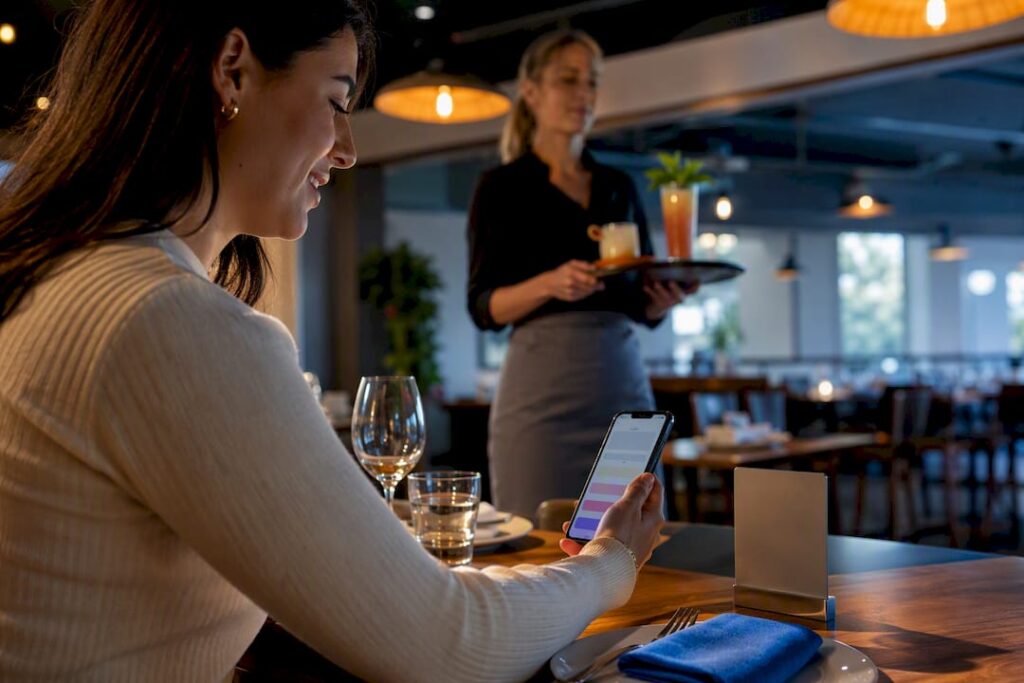
Yes, adopt a hybrid QR order-and-pay pilot alongside your existing card and contactless terminals. It speeds up service and typically lifts average spend, without forcing every guest onto a screen. Pick your busiest section, run it for four to six weeks, and track scan rate, ticket size, and table turn before you scale it further.
TL;DR:
- QR order-and-pay systems are mostly effective when piloted in high-traffic sections for four to six weeks, with key metrics tracking scan rate, ticket size, and table turn.
- Dynamic QR codes linked to specific tables and integration with existing EPOS systems are essential for accurate order routing and streamlined reporting.
- Implementation success depends on proper placement, clear microcopy, hybrid models supporting all guests, and thorough staff training to avoid technical and service failures.
- Payment security relies on using FCA-authorised providers, PCI compliance, and choosing platforms supporting card, Apple Pay, Google Pay, and bank transfer options like Open Banking.
- QR payment adoption is higher among younger guests and fast-casual venues, with measured benefits including faster service, increased revenue, and better staff utilization.
Table of Contents
- What QR code payments for restaurants in the UK actually deliver
- How do QR payments actually work?
- Setting up QR payments: a step-by-step checklist
- Where should QR codes go, and how should they be presented?
- Is QR payment legal and secure for UK restaurants?
- How do you measure whether QR payments are working?
- How Switch&Save supports QR payment integration for restaurants
- What limits QR payments in a UK restaurant setting?
- Who is actually using QR payments in UK restaurants?
- Does QR payment work with your existing POS and loyalty scheme?
- What’s next for QR payments in UK restaurants?
- A note on getting the balance right
- Ready to bring QR payments into your EPOS system?
- Sources
- FAQ
What QR code payments for restaurants in the UK actually deliver
Restaurant owners keep hearing that QR payments are the future, but the more useful question is what they change on a Tuesday lunch shift. The honest answer: less time chasing card machines, more drinks sold, and staff freed up for the parts of the job that actually need a human.
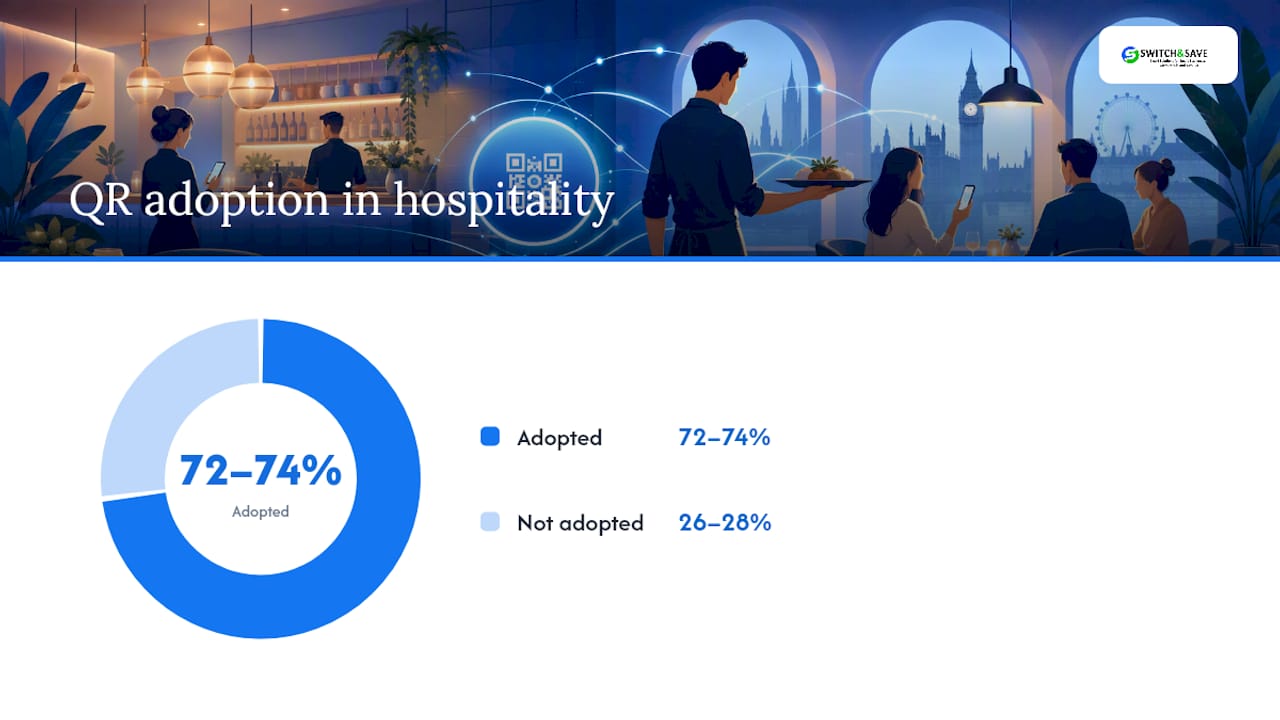
Roughly 72–74% of UK restaurants and hospitality venues now use some form of QR menu, ordering, or payment system. That is not a niche trend anymore, it is close to the operational baseline. If you are still running purely on handwritten pads and a single card terminal by the till, you are the outlier now, not the QR adopter.
The efficiency case is straightforward. When a guest can scan, order, and pay without waiting for a server to notice them, you cut the two slowest points in table service: taking the order and settling the bill. That time saved compounds across a shift. A server who is not standing at a table keying in a card payment is instead running food, checking on a table that actually needs attention, or upselling a dessert.
The revenue case is where it gets interesting. Venues that integrate QR ordering with payment, rather than just using it as a digital menu, often see a 10–40% increase in average ticket or drinks-per-cover. That range is wide because it depends heavily on venue type, but the mechanism is consistent: guests order more when there is no social friction in asking, and no need to catch a server’s eye for another round.
QR payments tend to work best for:
- Fast-casual restaurants and counter-service concepts where speed is the main selling point
- Bars and venues with high drinks-per-cover potential, where repeat ordering matters
- Busy urban restaurants with high table turnover and tight service windows
- Venues with younger or mixed-age customer bases comfortable with a phone-first flow
QR payments work less well for:
- Fine dining, where the pacing and service ritual are part of the product
- Venues with a strong proportion of elderly or accessibility-constrained guests
- Very small teams where staff already have capacity to spare
Statistic: Trade reporting on UK QR adoption confirms the pattern isn’t uniform. Fast-casual and chain venues adopt QR at higher rates than fine dining, and many operators who tried a QR-only model have since rolled back to a hybrid approach.
That rollback pattern matters. A QR-only policy tends to alienate a slice of your customer base and can make a venue feel understaffed even when it isn’t. A hybrid model, QR available but staffed service still the default, consistently performs better on guest satisfaction while still capturing the speed and upsell benefits. Treat QR as an addition to your service, not a replacement for it.
How do QR payments actually work?
Before you buy anything, it helps to understand the moving parts. “QR code payments” covers several distinct setups, and picking the wrong one is the most common early mistake.
1. Static QR codes are fixed images, often printed once and laminated onto a table stand. They usually link to a menu or a generic ordering page and don’t change per table or per bill. They’re cheap and simple, but they can’t identify which table placed an order, which limits them to menu browsing or a single shared payment link.
2. Dynamic QR codes are generated per table, per session, or even per bill. Scan the code at table 12 and the system knows it’s table 12, routes the order correctly, and generates a payment request tied to that specific tab. Dynamic codes cost more to set up because they need backend logic, but they’re what makes order-and-pay actually work at scale.
Beyond the code type, you’re choosing between two service models:
- Order-and-pay: guests scan, browse the full menu, order food and drinks, and pay, all from their phone, with the order routing straight to the kitchen or bar.
- Pay-only (scan-to-pay): a server still takes the order and enters it into the till as normal, but the guest settles the bill by scanning a code rather than waiting for a card machine to arrive at the table.
Pay-only is the lower-risk entry point. It changes nothing about how your kitchen or floor staff work, it just removes the final bottleneck of bill settlement. Order-and-pay changes more of your workflow but delivers the bigger upside.
On the payment side, UK diners expect the same rails they use everywhere else. A workable QR system should support:
- In-browser card payment (no app download required)
- Apple Pay and Google Pay for one-tap checkout
- Open Banking or pay-by-bank options, which are gaining ground as a way to avoid card network fees
That last point is worth watching. Open Banking and account-to-account QR payment paths are emerging in the UK specifically because they sidestep card interchange fees, and providers are actively building this into their roadmaps.
Finally, orders need somewhere to go once they’re placed. Three common routes:
- Printer routing: the order prints directly at a kitchen or bar printer, much like a traditional EPOS ticket.
- Tablet or KDS (kitchen display system): orders appear on a screen in the kitchen, which suits busier sites that need to track multiple tickets at once.
- EPOS API integration: the QR platform talks directly to your existing EPOS system, so orders, stock, and reporting all sit in one place rather than two disconnected systems.
The API route is the one worth aiming for if you already run an EPOS system, since it avoids duplicate reporting and keeps your sales data in a single dashboard.
Setting up QR payments: a step-by-step checklist
Rolling out QR payments doesn’t need to be a big-bang, restaurant-wide change. The venues that get the best results treat it as a pilot first, then expand once they’ve proven it works for their specific floor.
Step 1: Design the pilot.
Pick a single zone, your bar area, your outdoor terrace, or one section of the dining room, rather than converting the whole venue on day one. Set clear goals before you start: are you optimising for table turn, average ticket, or reducing staff workload during peak hours? Decide your fallback now too. Every table needs a visible way to flag a server if the guest doesn’t want to use their phone.
Step 2: Sort your hardware and software.
- QR codes printed and laminated, or set into table stands that survive spills and wiping down
- A thermal printer or tablet/KDS at the kitchen or bar pass, depending on your routing choice
- EPOS integration confirmed with your provider, so orders land in the same system as your till
- A payment gateway or provider selected, ideally one that already supports card, Apple Pay, Google Pay, and Open Banking
Step 3: Nail the integration details.
Table IDs need to be unique and mapped correctly in the system, a mismatched table code is the single most common cause of orders going to the wrong printer. Decide whether receipts print automatically or only on request. Map out exactly how a QR order appears to kitchen staff versus a till-entered order, so nobody misses a ticket during a rush.
Step 4: Train your team properly.
Staff need to understand the system well enough to troubleshoot it mid-service, not just use it. That means knowing what to do when a guest’s payment fails, how to manually key an order if a scan doesn’t work, and how to reassure a guest who simply doesn’t want to use their phone.
Step 5: Set your success metrics before you launch.
Agree what “working” looks like in numbers, not just impressions, so the pilot review is a data conversation rather than an argument.
On cost and timeframe: a small-to-medium UK restaurant can typically get a QR order-and-pay pilot running within two to four weeks, assuming the EPOS integration is straightforward. Costs vary by provider and scope, but the biggest cost driver isn’t the QR codes themselves, it’s the integration work between the ordering platform and your existing till system. Cheap standalone QR tools that don’t talk to your EPOS often end up costing more in the long run through double data entry and reconciliation headaches.
Pro Tip: Laminate your table QR codes rather than relying on paper inserts in a plastic stand. Grease, spilled drinks, and daily wiping down destroy paper prints within weeks, and a scuffed code that won’t scan undoes all the speed benefits you’re trying to create.
The staffing piece matters more than most rollout guides admit. The venues that get the most out of QR payments don’t cut headcount, they repurpose it. Freeing a server from keying in repeat drink orders or splitting a six-way bill means that server has more time for the guest interactions that actually build repeat custom, greeting regulars, recommending the specials, checking in on a table that’s gone quiet.
If your current till system makes any of this harder than it should be, it’s worth reading up on choosing the right EPOS system for a restaurant before you commit to a QR provider, since the two decisions are closely linked.
Where should QR codes go, and how should they be presented?
Placement and wording decide whether guests actually scan the code or ignore it entirely. A code buried on the back of a menu gets used a fraction as often as one sitting in a guest’s direct eyeline the moment they sit down.
- Put a laminated QR stand on every table, angled towards the seat, not flat on the surface where it’s easy to miss
- Add a small code near the entrance for guests who want to browse the menu while queuing
- Print a code on the receipt itself, useful for guests who want to leave a review or rejoin a loyalty scheme after paying
- Time the prompt: show the ordering code as soon as guests sit down, but hold the payment prompt until a server has at least checked in once
Microcopy matters more than owners expect. “Scan to order” performs better than “QR menu” because it tells the guest exactly what happens next. For tipping, present the options clearly rather than defaulting to a pre-selected percentage, guests notice manipulation and it can sour an otherwise good experience. Split-bill functionality should be visible from the first screen, not buried three taps deep, since group tables are exactly where payment friction causes the most delay.
Accessibility has to be built in from the start, not bolted on. Some guests can’t or won’t use a phone to order, whether through visual impairment, unfamiliarity with the technology, or simple preference for being served. A hybrid model handles this naturally: the QR option sits alongside, never replaces, a server’s ability to take an order the traditional way. A hybrid service model consistently yields higher guest satisfaction precisely because nobody feels forced into an interface they didn’t ask for.
Post-payment prompts for reviews or loyalty sign-ups work well, but only if they appear after the transaction completes, not before. A review request that interrupts someone trying to pay reads as pushy and can actually damage the review you’re hoping for.
Is QR payment legal and secure for UK restaurants?
Security and compliance are where a promising QR rollout can quietly turn into a liability, so it’s worth being precise about what’s actually required.
Any provider handling payments in the UK operates under the Payment Services Regulations 2017, which set out the legal framework for payment services and the authorisation requirements providers must meet. Before signing with any QR payment platform, check that the provider is authorised or registered with the Financial Conduct Authority, or operates as an agent of an authorised institution. This isn’t a box-ticking formality, an unauthorised provider handling your customers’ card data is a genuine business risk, not just a compliance footnote.
PCI Security Standards govern how card data must be handled, but the good news for most restaurants is that using a hosted payment page or a payment service provider’s checkout flow keeps you largely out of scope for the heaviest PCI requirements. Card details never touch your own systems, they go straight to the provider’s secure infrastructure. Ask any QR payment provider directly how their flow affects your PCI scope before you sign anything.
Data protection is the other half of the picture. Any ordering page that captures a name, email, or phone number for loyalty or marketing purposes falls under UK GDPR, and government guidance on data protection sets out what businesses must do to handle that data lawfully.
A practical compliance checklist:
- Confirm your payment provider’s FCA authorisation status in writing
- Check who holds PCI scope, you or the provider, and get it in the contract
- Review the provider’s data retention and deletion policy for customer information
- Confirm refund handling: who processes it, how fast, and who absorbs any dispute
- Ask about incident response times and service level agreements before you commit, not after something goes wrong
Statistic: With adoption now sitting at 72–74% across UK hospitality, the providers most restaurants are choosing between have largely standardised on hosted payment flows, which is good news for anyone worried about compliance overhead.
How do you measure whether QR payments are working?
Numbers, not gut feel, should decide whether your pilot becomes permanent. Track a small set of metrics consistently rather than drowning in dashboard noise.
- Scan rate: what percentage of tables actually scan the code at least once during service
- Conversion to payment: of those who scan, how many complete a payment through the QR flow versus reverting to a server
- Average ticket: compare QR-flow tables against equivalent non-QR tables over the same period
- Drinks-per-cover: a strong early signal, since repeat drink orders are one of the biggest friction points QR removes
- Table turn: how much faster tables clear once payment settlement no longer waits on a server
Industry benchmarks give you a rough target, not a promise. The 10–40% average ticket uplift range reported across UK operators is wide precisely because venue type drives so much of the variance, a busy bar will land nearer the top, a mid-range family restaurant nearer the bottom.
Run your pilot for at least four to six weeks before drawing conclusions. Shorter than that and you’re likely reacting to a single unusually busy or quiet week rather than a genuine trend. Pull your comparison data from your EPOS reporting and your payment provider’s dashboard side by side, most providers will export transaction-level data you can cross-reference against till sales for the same tables.
| Metric | What it tells you | Where to pull it from |
|---|---|---|
| Scan rate | Guest willingness to use the QR option | Payment provider dashboard |
| Conversion to payment | Whether the flow itself is frictionless | Payment provider dashboard |
| Average ticket | Revenue impact per table | EPOS sales reporting |
| Table turn time | Service speed improvement | EPOS timestamps, till open to close |
How Switch&Save supports QR payment integration for restaurants
Most of the QR rollout headaches described above trace back to one problem: the ordering platform and the till don’t talk to each other properly. Solving this issue is central to effective QR payment integration for hospitality venues.
An EPOS deployment that integrates QR order-and-pay transactions into the same system handling card and contactless terminals allows Apple Pay, Google Pay, and card payments to reconcile against a single sales record rather than two separate reports you have to cross-check manually. Orders placed via QR route to the kitchen through the same printer or KDS setup as till-entered orders, which means kitchen staff see one consistent ticket flow regardless of order source.
What Switch&Save covers for a hospitality rollout:
- Cloud dashboard access so managers can check sales and table activity remotely
- Kitchen routing that treats QR orders and till orders identically
- UK-based support for setup and troubleshooting during the pilot phase
- Multi-terminal support for venues running QR alongside staffed till points
Questions worth asking on a demo:
- How does the integration checklist work for our specific EPOS setup?
- What are the pricing tiers for a hospitality bundle versus a standard retail package?
- What SLA applies if a payment issue happens mid-service?
Pro Tip: Ask to see the reconciliation report during the demo itself, not just the ordering interface. The interface is the easy part to sell you on. Whether Apple Pay, card, and QR transactions land in one clean report is what actually saves your bookkeeper hours every week.
What limits QR payments in a UK restaurant setting?
Connectivity is the most common practical failure point. If your venue has patchy WiFi or relies on guests’ mobile data in a basement bar or a thick-walled Victorian building, QR ordering simply won’t work reliably, no matter how good the platform is. Test signal strength at every table before committing to order-and-pay, not just at the bar where you happen to be standing.
Accessibility is the second major limitation. Guests without a smartphone, guests with visual impairments, and older customers unfamiliar with scanning codes all need a straightforward staffed alternative that doesn’t feel like a downgrade. Venues that treat QR as compulsory rather than optional consistently see complaints rise.
There’s also a service-personality risk. Restaurants that sell an experience, attentive service, a sense of occasion, can undermine that with a QR-first approach that feels transactional. Guests notice when technology replaces hospitality rather than supporting it.
Battery life and phone storage are smaller but real issues: a guest with a dying phone or a browser that struggles to load a heavy ordering page will simply give up and flag a server instead, which is fine as a fallback but defeats the point if it happens on most tables.
Finally, staff resistance is underrated as a limitation. If your team hasn’t been properly trained on how QR orders appear in the kitchen system, mistakes and missed tickets happen, and that damages guest trust faster than any technical failure.
Who is actually using QR payments in UK restaurants?
Adoption skews younger, but the gap is narrowing faster than most owners assume. Guests under 40 tend to scan and order without hesitation, treating it as no different from ordering a taxi or food delivery through an app. Older guests are catching up, particularly since contactless card use became the default during recent years, but a meaningful minority still prefer a server taking their order directly.
Group dynamics matter more than age alone. Tables of friends splitting a bill are among the highest QR adopters, since the split-bill function solves a genuine pain point that used to require a server manually dividing a card payment three or four ways. Solo diners and couples show more mixed behaviour, sometimes preferring the traditional interaction, sometimes valuing the speed.
Venue type shapes adoption as much as customer demographics. Fast-casual and chain restaurants see far higher voluntary uptake than traditional or fine-dining venues, partly because guests arrive already expecting a self-service style flow. This lines up with the wider adoption pattern across UK hospitality, where fast-casual venues sit well ahead of fine dining.
The clearest trend is towards choice rather than mandate. Guests who are given the option to scan or wait for a server tend to try scanning at least once, then settle into whichever method suits their mood or table size on a given visit. Few want it forced either way.
Does QR payment work with your existing POS and loyalty scheme?
Integration quality is what separates a QR system that saves time from one that creates more admin than it removes. The best setups treat QR as another input channel into your existing EPOS system, not a bolt-on that runs in parallel.
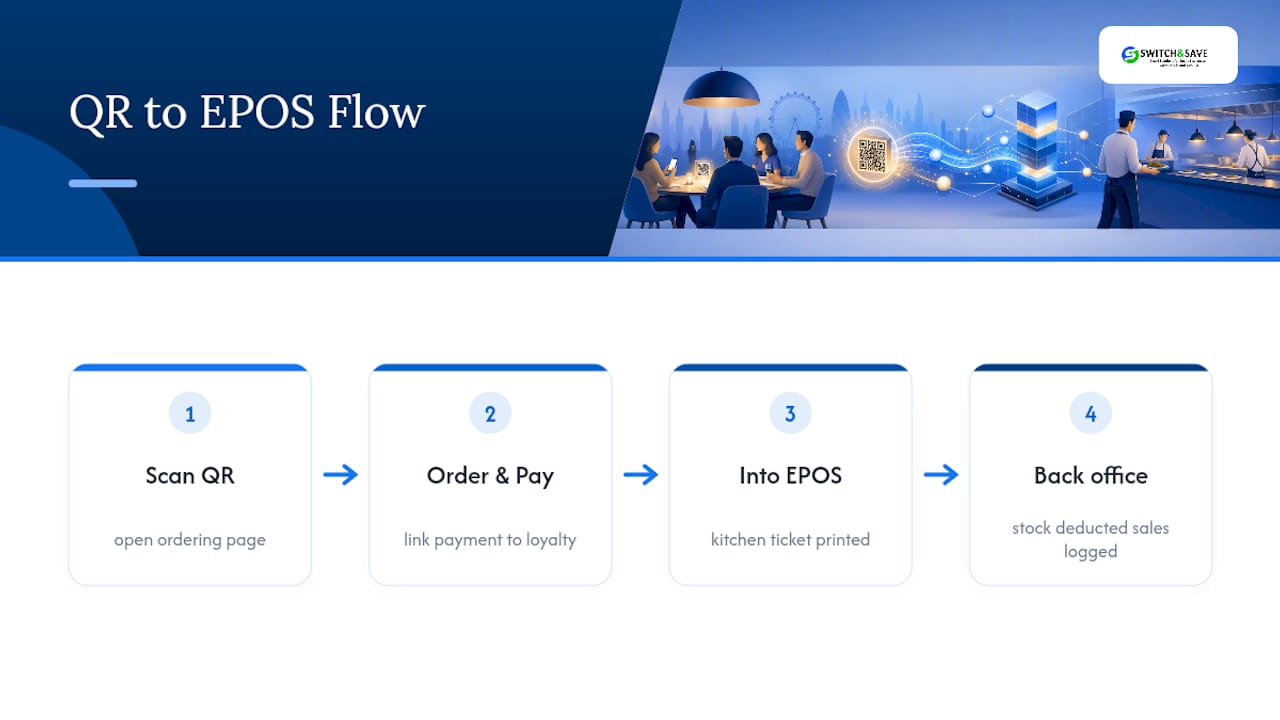
Done well, a QR order routes into your EPOS exactly like a till-entered order: same kitchen ticket, same stock deduction, same sales reporting. Done badly, you end up running two separate systems that need manual reconciliation at the end of every shift, which quietly erases most of the time savings QR was supposed to deliver.
Loyalty programmes need the same joined-up thinking. If a guest earns points through your till system but the QR ordering page doesn’t recognise their loyalty account, you’ve built a two-tier customer experience that frustrates your most regular guests. The stronger approach links loyalty identification to the guest’s payment or account details at the point of scanning, so points accrue automatically regardless of which channel they ordered through.
Before choosing a QR provider, ask specifically how it integrates with the POS software your restaurant already runs. A provider that only offers a generic API without proper documentation for your specific EPOS will cost you far more in integration time than a slightly pricier option built for hospitality from the ground up.
What’s next for QR payments in UK restaurants?
Open Banking and pay-by-bank options are the clearest near-term shift. Rather than routing every transaction through card networks, these paths let guests pay directly from their bank account via the QR flow, cutting interchange fees for operators. Providers are actively building this into their roadmaps, and it’s worth asking any new provider whether Open Banking support is already live or still on the way.
Expect tighter integration between QR ordering and loyalty schemes as platforms mature, reducing the current gap where loyalty and QR often run as separate systems. AI-assisted upsell prompts within the ordering flow, suggesting a side dish or a specific wine pairing based on what’s already in the basket, are also starting to appear in more advanced platforms.
The broader direction is convergence: QR ordering, payment, loyalty, and EPOS reporting collapsing into a single system rather than four separate tools bolted together. Venues that choose an integrated platform now will find each new feature easier to adopt than those juggling disconnected systems.
A note on getting the balance right
Rolling out QR tech across UK venues teaches you the same lesson every time: the technology is rarely the hard part, the service design around it is. Guests forgive a slightly clunky menu page. They don’t forgive feeling ignored because a server assumed the QR code had them covered.
Do: pilot in one section first, and involve your floor staff in designing the fallback before launch, they’ll spot the friction points you won’t.
Don’t: remove staffed service entirely, and don’t assume one busy Saturday proves the rollout works. Iterate, watch the numbers over several weeks, and let your team’s feedback shape the second version, not just the first.
— Amir
Ready to bring QR payments into your EPOS system?
A practical route to QR order-and-pay enables restaurants to avoid managing two disconnected systems and manual report reconciliation. Such a hospitality EPOS bundle brings QR ordering, card, Apple Pay, Google Pay, and kitchen routing into one dashboard, with support available if issues arise mid-service.

That matters most on your busiest night, when a payment issue can’t wait for a call centre in a different time zone. Hospitality packages built specifically for restaurants, cafés, and bars running order-and-pay alongside staffed service, rather than adapted from a generic retail template, are designed to meet the needs of these venues. If you’re weighing up EPOS systems for restaurants or want to see how QR ordering slots into a dedicated hospitality EPOS setup, book a free demo and walk through your specific floor plan, table count, and current till setup with the team before you commit to anything.
Sources
Legislation and regulatory guidance: the Payment Services Regulations 2017 and PCI Security Standards. Industry benchmarks: Hospitality Tech 360 and The Payments Association.
- Measuring return on restaurant tech — Hospitality Tech 360
- Qrcode
- Legislation
- PCI Security Standards
FAQ
Can I use QR code payments in the UK?
Yes. QR payments are legal across the UK provided the payment provider is authorised under the Payment Services Regulations 2017, and adoption already sits at roughly 72–74% among UK hospitality venues.
How much does a QR code cost to set up in a restaurant?
The QR codes themselves cost very little to print and laminate. The real cost sits in the integration between the ordering platform and your EPOS system, which varies by provider and setup complexity.
Who accepts QR code payments in the UK?
Most fast-casual restaurants, bars, and a growing number of full-service restaurants accept QR payments, typically alongside card and contactless terminals rather than instead of them.
What’s the best payment platform for a UK restaurant?
The right platform depends on whether you need order-and-pay or simple pay-only, and how well it integrates with your existing EPOS. A system like Switch-and-save’s hospitality bundle is built to bring QR, card, and wallet payments into one dashboard rather than requiring separate tools.
Do QR payments reduce table turn time?
Yes, since guests no longer wait for a server to bring a card machine to settle the bill. The exact improvement varies by venue, but it consistently ranks among the biggest reported benefits alongside the 10–40% average ticket uplift many operators see.



