

Yes, you can integrate Uber Eats with your EPOS in the UK, and most operators have three practical routes to choose from: a direct connector, a middleware aggregator, or a manual tablet fallback. Each cuts down on the copy-paste order chaos that plagues busy kitchens. Done properly, the result is fewer mistakes, faster ticket handoff, and one central view of every order across your channels.
TL;DR:
- A direct POS connector is the quickest and cheapest setup option if supported by your EPOS provider, often operational within days to two weeks.
- Middleware aggregators are suitable for multi-site groups or multiple delivery platforms, but require ongoing monthly fees and management of an additional system.
- Testing must include order accuracy, refund processes, and stock alerts to prevent errors that cause customer complaints and operational issues.
- Menu updates and prices should always be controlled via your POS or middleware, not directly inside the Uber Eats portal, to avoid menu drift and price mismatches.
- Support from Uber Eats and your EPOS vendor, along with strict ownership and monitoring routines, are essential to maintain seamless integration and resolve issues quickly.
Table of Contents
- What UberEats POS integration actually does for your business
- Which integration route suits your venue: connector, middleware, or tablet?
- How do you set up UberEats POS integration step by step?
- What should you test before going live?
- How much does it cost and how fast does it pay back?
- Keeping your POS as the single source of truth
- What support is available if something goes wrong?
- How do you train staff to use an integrated Uber Eats POS?
- Switch&Save perspective: supporting UK customers through marketplace integrations
- Get set up with Switch&Save EPOS
- Sources
- FAQ
What UberEats POS integration actually does for your business
Integration replaces manual re-typing with automatic order flow. When a customer places an Uber Eats order, it lands straight in your EPOS as a ticket, ready for the kitchen, rather than beeping on a separate tablet that someone has to notice and retype.
Uber’s own merchant resources describe the practical benefits: consolidated orders, synchronised menus, and a smoother path from ordering to delivery. In practice, that breaks down into three areas that matter most to UK venues:
- Order injection: Uber Eats orders appear as standard tickets in your EPOS, printing to the kitchen exactly like a dine-in or phone order.
- Menu synchronisation: items, modifiers, prices, and daypart availability update centrally, so your lunch menu doesn’t accidentally sell at 11pm.
- Reporting and reconciliation: channel mix, revenue posting, and end-of-day totals sit in one report instead of three separate tablet summaries.
Which integration route suits your venue: connector, middleware, or tablet?
Your choice depends on how many sites you run, how many marketplaces you sell through, and how much internal IT support you have.
A direct connector works when your EPOS provider already has a native link with Uber Eats. It’s usually the quickest to set up and carries the lowest ongoing software cost, since you’re not paying a third party to sit between the two systems. Uber’s help pages confirm that supported POS providers can connect this way, and it’s worth checking your provider against that list first.
Aggregator or middleware platforms suit multi-site groups or anyone selling on several delivery apps at once. One mapping layer feeds Uber Eats, Deliveroo, and others simultaneously, which saves duplicate admin, but you’re maintaining an extra system and paying a monthly fee for the privilege.
Tablet or manual entry should really be your emergency fallback, not your long-term plan. It carries the highest labour cost and the highest error risk, since every order gets retyped by hand during a dinner rush.
Before deciding, run through this checklist:
- How many locations need connecting?
- How many delivery marketplaces do you sell on?
- How complex is your menu, in terms of modifiers and dayparts?
- Do you have internal IT resource to manage a middleware account?
How do you set up UberEats POS integration step by step?
Setup follows a predictable sequence, whether you’re running one takeaway or five sites.
- Run pre-checks. Confirm your EPOS software version supports the integration, check user permissions, and make sure your POS can act as the master menu source, not the Uber Eats portal.
- Authorise accounts. Link your Uber Eats merchant account to your POS or middleware provider, then select which stores go live.
- Map your menu. Match every item, modifier, and price point, and confirm VAT and tax mapping follows UK rules correctly for each product category.
- Configure routing. Set up kitchen display system (KDS) routing, printer assignments, and label printing, then map revenue centres and payment tenders so reporting lines up.
- Activate carefully. Switch on during a quiet trading window, and document exactly who has permission to edit live menus afterwards.
Pro Tip: Activate on a Tuesday morning rather than a Friday night. If something maps incorrectly, you want time to fix it before a weekend rush, not during one.
Square’s UK setup guide for Uber Eats integration is a useful reference if your provider follows a similar stepwise flow.
What should you test before going live?
Testing isn’t optional. It’s the difference between a smooth launch and a night of refunded orders and confused kitchen staff.
- Place staged test orders covering every menu category and modifier combination, then check the printed ticket and KDS screen match what was ordered.
- Simulate cancellations, partial refunds, full refunds, and scheduled orders for future collection or delivery times.
- Test age-restricted items, such as alcohol, to confirm the verification step actually triggers.
- Check auto-86 behaviour, where items automatically hide when stock runs out, and confirm courier handoff instructions and pickup labelling print correctly, following expert advice on how to minimise shrinkage in your retail business from Spaceman.
- Document a manual fallback process and reconciliation steps for when the integration goes down unexpectedly.
Practical how-to guidance consistently flags refunds and cancellations as the scenarios operators forget to test, and they’re usually the ones that cause complaints when they go wrong live.
How much does it cost and how fast does it pay back?
Timelines vary by route. A direct connector between an already-supported EPOS and Uber Eats can go live in a matter of days to two weeks. Middleware setups across multiple sites typically take two to eight weeks, depending on menu complexity and how many locations need mapping.
Costs generally break down into three parts: a one-off setup fee, a monthly middleware subscription if you’ve chosen that route, and occasionally a fee from your POS vendor for the connector itself.
Industry write-ups on POS integration payback point to measurable labour savings once manual tablet re-entry is removed, since staff no longer retype every delivery order by hand during service.
A rough way to think about payback: estimate the minutes saved per order by not manually re-keying it, multiply by your average order volume, and weigh that against your hourly staff cost. For most delivery-heavy sites, that calculation tips in favour of integration within a few months.
Keeping your POS as the single source of truth
The biggest operational mistake we see at Switch&Save is treating the Uber Eats portal as a second menu editor. It isn’t one. It should be a mirror of what your POS or middleware console tells it to display, nothing more.
- Always push menu and price changes from your POS or middleware console, never directly inside the Uber Eats portal.
- Assign a named owner for monitoring sync failures, with alerts set up so nobody discovers a problem from a customer complaint.
- Keep a written fallback and reconciliation routine ready, so staff know exactly what to do the moment the connection drops.
- Use throttling, realistic prep times, and daypart settings to protect service quality during peak periods rather than accepting every order at once.
Pro Tip: Label any manually entered order during an outage distinctly, such as with a note field or a specific tag, so reconciliation afterwards is quick and nothing gets double-counted.
This governance discipline matters more than the technology choice itself. A well-run direct connector with clear ownership will outperform an expensive middleware setup nobody monitors.
What support is available if something goes wrong?
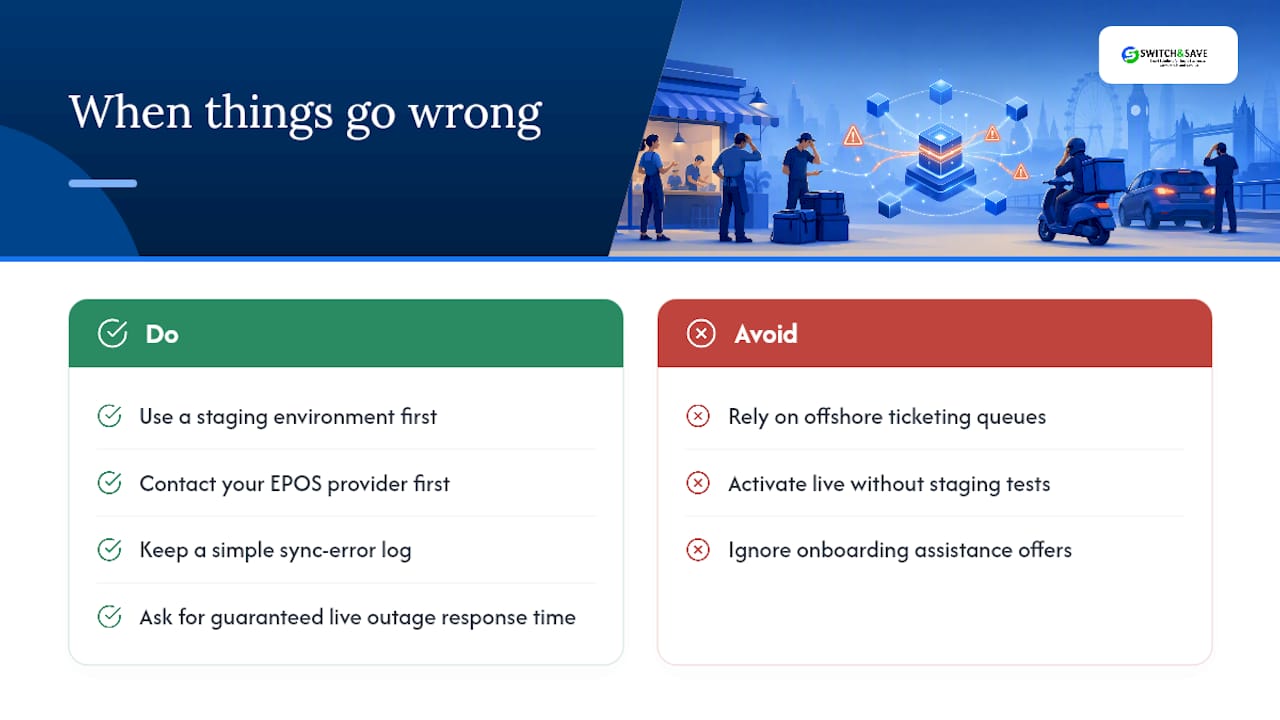
Uber Eats provides merchant-facing help resources covering integration troubleshooting, and its developer documentation includes guidance on using a staging environment before you activate anything live, which is worth doing regardless of which route you choose.
Your EPOS provider is usually your first call for anything integration-related, since most sync issues sit on the mapping or configuration side rather than with Uber Eats itself. UK-based support matters here: providers with local phone or chat support during trading hours can usually resolve a stuck sync or a mispriced item faster than an offshore ticketing queue.
Beyond the vendor relationship, build an internal troubleshooting habit. Keep a simple log of any sync error, what caused it, and how it was fixed, so recurring issues get spotted rather than repeatedly firefought. If you’re running multiple marketplaces alongside Uber Eats, ask your middleware or POS provider directly what their guaranteed response time is for a live outage during service, not just during office hours. That single question separates providers who understand hospitality from those who don’t.
For the initial setup phase specifically, most providers offer a period of closer support, sometimes called onboarding assistance, where a technical contact helps with menu mapping and initial testing. Ask for this explicitly if it isn’t offered upfront.
How do you train staff to use an integrated Uber Eats POS?
Staff training for an integrated system is different from training on a standalone tablet, and skipping it is where most launch-day problems come from.
Front-of-house and kitchen staff need to understand that Uber Eats tickets now print and route exactly like any other order, which sounds simple but changes existing habits. Someone who’s used to glancing at a separate tablet needs to retrain their attention to the KDS or printer queue instead.
Kitchen staff specifically need a walkthrough of how modifiers appear on the new ticket format, since layout often changes slightly when orders come through the POS rather than the native Uber Eats tablet screen. A five-minute session comparing old and new ticket layouts side by side prevents a surprising number of missed modifiers in week one.
Whoever manages menu changes needs clear boundaries on where edits happen. If everyone understands that price and availability changes go through the POS or middleware console, not the Uber Eats app directly, you avoid the menu drift that causes price mismatches and customer complaints.
Finally, nominate at least one staff member per shift who knows the manual fallback process cold, in case the connection drops mid-service. That person should know how to flag an order as manually entered and where the reconciliation notes get logged. Training this once, properly, before go-live saves considerably more time than fixing confusion after the fact.
Switch&Save perspective: supporting UK customers through marketplace integrations
We work with UK hospitality venues running real-time stock, multi-site setups, and UK-based support day to day, which puts marketplace integration questions directly in our lane. A typical onboarding runs through a demo, menu mapping, a staging period, structured testing, and go-live support, in that order, because skipping the staging step is where most avoidable errors creep in.
What we’d add to the conventional wisdom: most integration failures aren’t technical at all. They’re governance failures, where nobody owns the sync, and menu drift creeps in because someone edited a price directly on the delivery app instead of the POS. Fix the ownership question first, and the technology tends to behave.
— Amir
Get set up with Switch&Save EPOS
If you’re weighing up a direct connector against middleware and wondering whether your current EPOS can even handle either, that’s exactly where a proper EPOS review pays off. Switch&Save is the practical alternative to patching together mismatched systems: one EPOS that handles real-time stock, multi-site management, and marketplace order injection without three separate logins to manage.

Our hospitality EPOS system is built for exactly this kind of setup, with menu mapping and integration support included rather than bolted on as an afterthought. The EPOS systems range covers standard, premium, and hospitality packages depending on how many sites and terminals you’re running, and every package comes with UK-based support if something needs fixing mid-service.
If you’re not sure whether your current setup is holding you back, request a free demo and ask specifically about Uber Eats mapping. We’ll walk through what a proper integration would look like for your menu and site count, with no obligation attached.
Sources
- POS Integration: from Ordering to Delivery | Uber Eats
- POS Integration with Uber Eats: A Practical How-To Guide
FAQ
Does Uber Eats work in the United Kingdom?
Yes, Uber Eats operates across major UK cities and many towns, and UK restaurants can integrate it with a supported EPOS using a direct connector, middleware, or manual tablet entry.
Does Uber Eats report to HMRC?
Platforms operating in the UK are subject to reporting obligations under HMRC rules for digital platforms, so income earned through Uber Eats should be declared as part of your normal business tax reporting regardless of how orders are processed.
Who is bigger, Deliveroo or Uber Eats?
Market share between Deliveroo and Uber Eats varies by region and shifts over time, and both operate at significant scale in the UK, so the better question for most operators is which platform’s customer base fits their location and menu rather than which is nominally larger.
Can I use my US Uber app in the UK?
The consumer Uber Eats app works across regions, but merchant accounts and POS integrations are set up per market, so a UK restaurant needs a UK merchant account rather than one configured for the US.
How long does UberEats POS integration take to set up in the UK?
A direct connector between an already-supported EPOS and Uber Eats typically takes days to two weeks, while middleware setups across multiple sites usually take two to eight weeks depending on menu complexity.



