
Check sales by item, hourly takings, refunds and top sellers first: these reports tell you what to restock, when to roster more staff, and where discounts are leaking margin. Gov sets out what you must retain for VAT, and a system like Switch&Save pulls the figures together automatically so you spend time acting on them, not compiling them.
TL;DR:
- Check hourly sales and refunds daily, review top sellers and stock clearance weekly, and reserve full margin and site comparisons for monthly reviews.
- For retail VAT schemes, record daily gross takings and VAT separately by rate, retain adjustment records, and preserve digital links between EPOS and accounting software.
- Compare matching weeks or months, then test a price change on one product or site for two to four weeks before expanding it.
- Limit report access to managers, use individual logins, and store exported files securely; transaction level reports may contain staff activity and customer or payment references.
Table of Contents
- Common EPOS sales reports: what each report shows and when to run it
- Key metrics in sales reports and how to read them
- Turning report findings into decisions: staffing, stock and pricing actions
- Record-keeping and VAT: what EPOS reports must capture for compliance
- Why an integrated EPOS makes reporting simpler in practice
- Integration of AI insights within sales reports to forecast trends and enhance business strategy
- Security and data privacy considerations when handling sales reports in EPOS systems
- Author perspective: prioritising reports for small retail vs small hospitality venues
- How Switch&Save can help: demo, packages and next steps
- FAQ
- Sources
Common EPOS sales reports: what each report shows and when to run it
Every EPOS system produces a handful of reports that matter far more than the rest. Knowing which one answers which question saves you from scrolling through screens you don’t need.
- Sales by item shows your best and slowest sellers; run it weekly, or straight after a promotion ends, to see what actually moved.
- Hourly or time-of-day sales reveals your peak windows, so you can plan rotas and cover without guessing.
- Sales by category or department groups performance by product range, helping you decide where to expand or cut stock.
- Refunds, voids and discounts flag leakage, whether that’s genuine returns or a pattern worth questioning.
- Payment-type reports and end-of-day Z-reads reconcile cash and card totals and capture your daily gross takings (DGT) for VAT purposes.
Many managers find it practical to review the first two reports daily and the others weekly. A café owner checking hourly sales might spot that Saturday mornings need an extra pair of hands behind the till, while a shop owner running sales by item each Monday catches a slow-moving line before it ties up cash in stock nobody wants.
Key metrics in sales reports and how to read them
Reports are only useful once you know which numbers to watch and what a change in them actually means.
- Gross and net takings show total sales before and after VAT; reconciling the two against your VAT totals each period keeps your return accurate.
- Average transaction value (ATV) and units per sale tell you whether customers are spending more per visit or simply visiting more often.
- Sell-through rate at item level shows how fast stock clears; a slowing rate on a line that used to move quickly is your cue to promote or discount it before it ties up shelf space.
- Return rate and discount ratio flag pricing or service problems; a rising return rate on one product often points to a quality or description issue rather than customer fussiness.
- Date-range comparisons matter because a single quiet day can look like a trend when it’s really just weather, a local event or a bank holiday.
Keeping digital records of your daily gross takings and VAT by rate isn’t optional under current rules. GOV.UK guidance on VAT record-keeping confirms that VAT-registered businesses must retain these figures digitally, with compatible software maintaining the link between your till and your accounts.
Filter by comparable periods, not just the last seven days against the previous seven. A fairer comparison is the same week last month, or the same month last year, which strips out one-off noise and shows the real trend underneath.
Turning report findings into decisions: staffing, stock and pricing actions
Reports only earn their keep when they change what you do next. Here’s a practical order of operations for the most common signals.
- Size your rota from hourly sales and transaction counts. Pull recent hourly data over several weeks, identify the busiest periods, and roster accordingly rather than relying on habit.
- Set reorder and promotion rules from top-sellers and slow-movers. Automate reorder points for your best-selling lines, bundle slow stock with a bestseller, or run a time-limited discount to clear it before it ages further.
- Run small pricing experiments. Test a price change on one line or one site for two to four weeks, measure the effect on units sold and margin, then decide before rolling it out wider.
- Use multi-site consolidation to compare productivity. If one branch sells through stock twice as fast as another, that’s a signal to rebalance inventory rather than order more for both.
Pro Tip: Check hourly sales and refunds daily, review top-sellers and stock sell-through weekly, and leave full margin and multi-site comparisons for a monthly sit-down.
Daily checks catch problems while they’re still small: a till discrepancy, an unusual refund, a quiet hour that needed more cover. Weekly checks shape what you buy and promote. Monthly checks are where you step back and ask whether a whole category, site or pricing structure is pulling its weight.
Record-keeping and VAT: what EPOS reports must capture for compliance
If you use a retail VAT scheme, your EPOS needs to capture daily gross takings (DGT) in a specific way, not just a single sales total.
- Record DGT by VAT rate, not as one lump figure, since standard, reduced and zero-rated sales each feed into the calculation differently.
- Retain working papers for any adjustments, such as refunds processed after the till closed or vouchers redeemed against a sale.
- Keep digital links in place between your EPOS and your accounting software; copying figures by hand between systems breaks the chain Making Tax Digital requires.
VAT Notice 727/3 sets out exactly what DGT must include and how to calculate output tax from it, while HMRC’s internal manual on EPOS functions explains that store-level transaction detail and head-office aggregated totals both have a role, and should reconcile to each other.
| Field | Why it matters |
|---|---|
| Daily gross takings by VAT rate | Required for output tax calculation under retail schemes |
| VAT amount per rate | Needed to complete VAT returns accurately |
| Adjustments (refunds, vouchers) | Must be retained as supporting evidence |
| Transaction-level detail | Reconciles against head-office aggregates |
Set up automated exports at the end of each trading day, maintain the digital link to your accounting software, and keep original till rolls or Z-reads as backup evidence rather than relying on memory if HMRC ever asks questions.
Why an integrated EPOS makes reporting simpler in practice
Pulling DGT, VAT totals and multi-site figures together by hand is where most reporting errors creep in. An integrated system like Switch&Save handles this by design rather than leaving it to a spreadsheet at month-end.
- A real-time dashboard shows takings, refunds and top sellers as they happen, across every till.
- Multi-site consolidation lets you compare branches on one screen instead of chasing separate exports.
- CSV export and integrated payments keep the digital link between your till and your accounting software intact, supporting Making Tax Digital without manual re-entry.
- A free demo and support help ensure setup and VAT-rate configuration get checked properly from day one, not left to guesswork.
Configuring VAT liability correctly at item level inside your EPOS is worth the time it takes: done right, it removes months of manual reconciliation later.
Integration of AI insights within sales reports to forecast trends and enhance business strategy
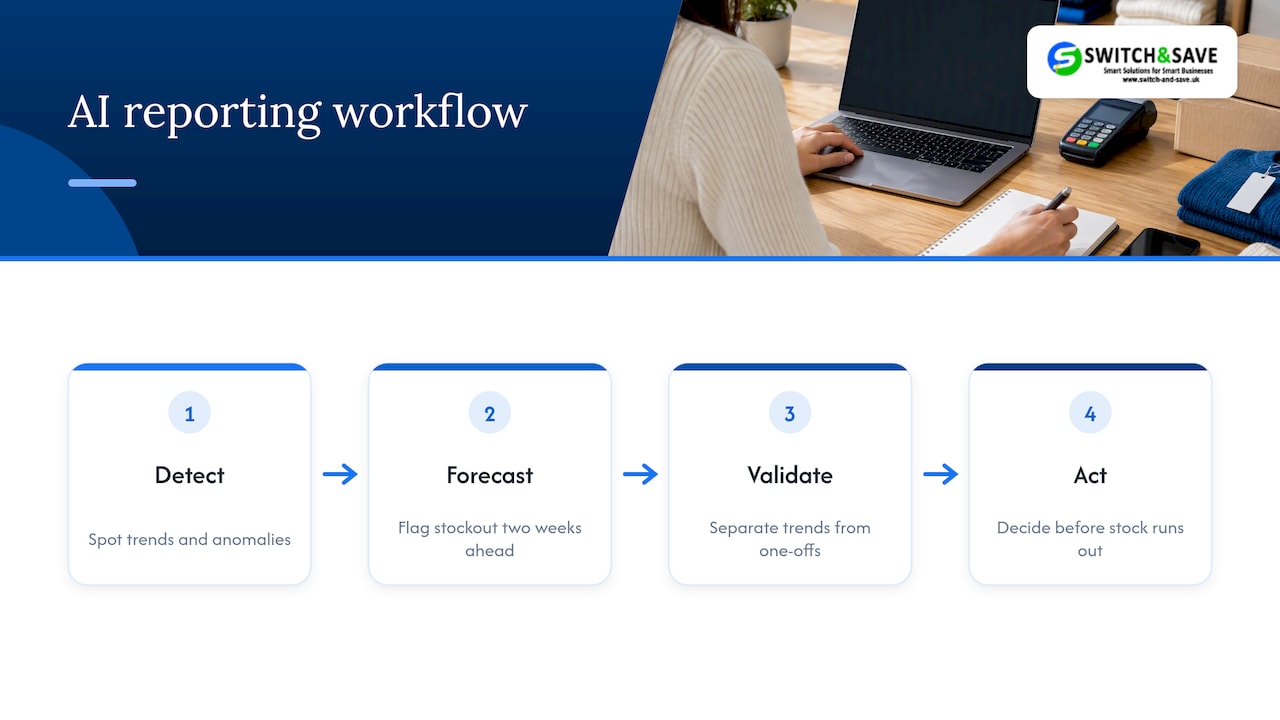
Modern EPOS platforms increasingly layer AI-driven analysis on top of the raw sales figures, spotting patterns a manual review would miss. Rather than just showing you last week’s numbers, this layer looks for trends across weeks or months: a slow creep in refunds on one product line, a seasonal dip starting earlier than last year, or a category quietly outperforming the rest.
The practical value is in forecasting. Instead of reordering stock based on gut feel, AI-assisted reporting can flag that a line is trending towards a stockout two weeks before it happens, based on the rate of sale rather than a fixed reorder point. The same logic applies to staffing: if footfall patterns are shifting gradually, a forecast built from several months of hourly data will catch that shift sooner than a manager eyeballing last week’s till roll.
This doesn’t replace judgement, it sharpens it. A forecast still needs a manager to decide whether a dip is a genuine trend or a one-off caused by roadworks outside the shop. What AI-assisted reporting does well is surface the pattern early enough that the decision is made with more notice, rather than in a rush once stock has already run out or a shift has already gone understaffed.
For a small retail or hospitality business, the most useful application is simple: let the system flag anomalies and trends automatically, and spend your own attention on deciding what to do about them rather than hunting for them in raw data.
Security and data privacy considerations when handling sales reports in EPOS systems
Sales reports contain more than totals: transaction-level detail can include payment references, staff login activity and, depending on your setup, customer loyalty or contact data. Treating that data carelessly creates both a commercial and a compliance risk.
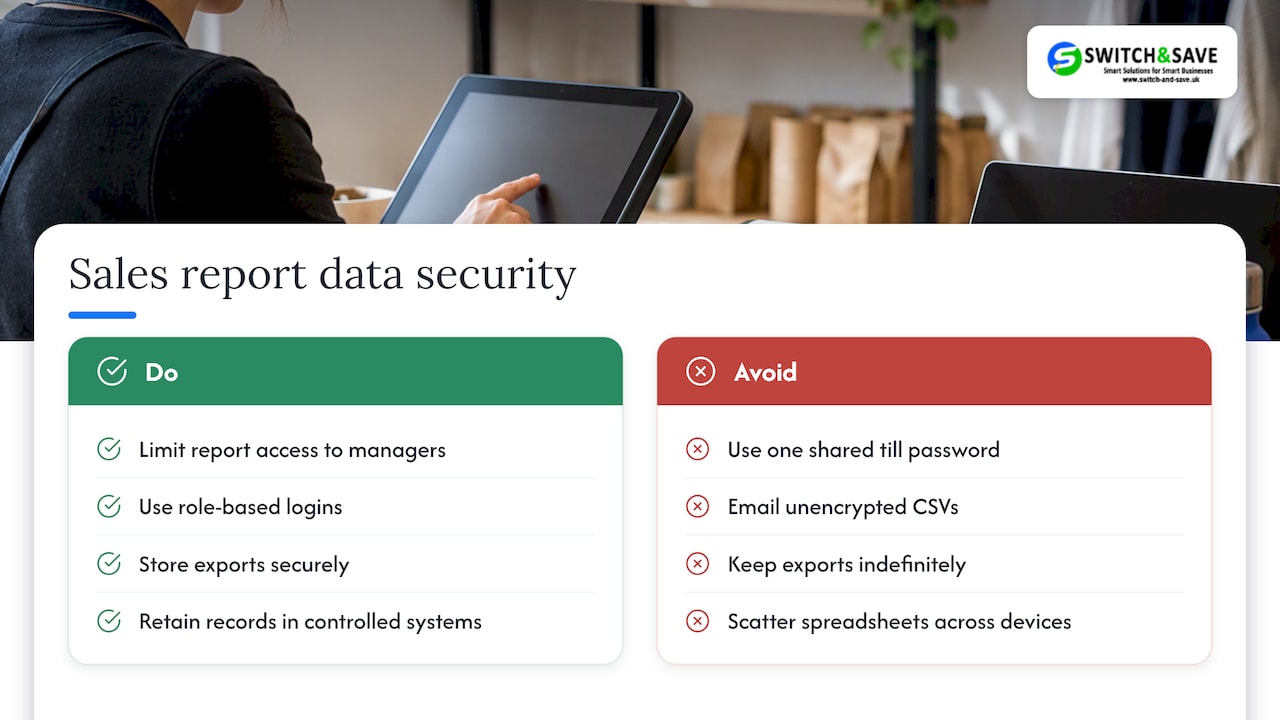
Access controls matter first. Not every staff member needs to see full sales reports or refund histories, and limiting report access to managers reduces the chance of data being copied, shared or misused. Cloud-based EPOS platforms should support role-based logins rather than one shared password for the till.
Encryption and secure storage matter next, particularly where reports are exported as CSV files and emailed or stored locally. A file sitting unencrypted in a shared inbox is a weak point, whereas a system with secure, authenticated exports keeps that data inside a controlled environment.
Retention policy is the part most businesses overlook. You need records for VAT purposes, but that doesn’t mean every export should sit indefinitely on an unsecured drive. Keeping retained records in the system itself, or in an accounting platform with proper access controls, is safer than scattering spreadsheets across devices.
Finally, check how your provider handles payment data specifically. Integrated payment processing should be PCI-compliant, meaning card details never sit in plain text inside your sales reports at all, only the transaction outcome does.
Author perspective: prioritising reports for small retail vs small hospitality venues
If you run a small shop or café, don’t try to review everything daily. Check your Z-read, an hourly sales snapshot and refunds each day, five minutes at most. Weekly, look at top sellers, stock sell-through and whether your rota matched actual footfall. Once you’re running multiple sites or terminals, that’s the point to add consolidated, cross-site reviews rather than before.
— Amir
How Switch&Save can help: demo, packages and next steps
If reconciling tills and chasing VAT figures by hand is eating into your week, we built our bundles to take that off your plate. The Hospitality EPOS Bundle pairs AI-powered cloud software with reporting built for fast-moving service, while our Integrated Payments Bundle brings card payments and reporting together under one dashboard.

- Hospitality venues get real-time sales and stock reporting alongside integrated payments.
- Retail shops can choose from our standard and premium bundles for multi-terminal reporting and stock control.
- A free demo walks through migration from your current system and UK-based training for your team.
Book a demo through our EPOS systems page and see your reports running before you commit to anything.
FAQ
What does EPOS stand for in business?
EPOS stands for Electronic Point of Sale, the till and software system a shop or hospitality venue uses to process transactions and record sales. It covers everything from the card reader to the reporting dashboard that shows daily takings and VAT totals.
What is included in a sales report?
A typical EPOS sales report includes gross and net takings, VAT by rate, sales by item or category, payment type breakdown, and figures for refunds, voids and discounts. Some reports also show transaction counts and average transaction value for a chosen period.
What are 5 types of POS systems?
Common types include traditional countertop terminals, mobile or portable card readers, self-service kiosks, cloud-based EPOS systems with multi-site support, and integrated systems that combine EPOS software with payment processing. The right type depends on whether a business needs fixed tills, mobile service, or reporting across multiple locations.
How do I keep EPOS sales records compliant for VAT?
Your EPOS needs to record daily gross takings by VAT rate and retain supporting working papers for any adjustments, as set out in VAT Notice 727/3. Maintaining a digital link between your till and your accounting software is also required under Making Tax Digital, as confirmed in GOV.UK’s VAT record-keeping guidance.
Does catering VAT affect how I record takings?
Catering sales can carry a different VAT treatment to standard retail, which affects how your DGT splits by rate. For a closer look at catering-specific VAT rules, see this guide to catering VAT rates for UK caterers.



