
Pick a cloud-native EPOS retail manufacturer that bundles integrated payments, real-time inventory tracking, and UK-based support with transparent pricing. That combination is what actually protects your margins, because separate systems for tills, payments, and stock create reconciliation gaps and duplicate data entry that cost you hours every week.
Before you contact anyone, check three things: whether payments are built into the till software or bolted on afterwards, whether the provider is GDPR and PCI DSS compliant, and whether support is based in the UK with a real response time attached to it.
- Next step: book a live demo and ask the supplier to show you a stock report and a card transaction reconciling in real time. If they cannot demonstrate that in the first five minutes, move on.
Key Takeaways
The strongest EPOS choice for most retail and hospitality buyers is a cloud-native system with integrated payments, verified UK-based support, and a total cost of ownership modelled over three to five years rather than judged on subscription price alone.
| Point | Details |
|---|---|
| Match features to business type | Retailers need SKU and barcode tools; hospitality needs table management and kitchen routing. |
| Insist on integrated payments | Reduces manual reconciliation errors versus running standalone card terminals. |
| Model total cost over years | Low subscriptions can hide transaction fees that compound over three to five years. |
| Use the seven-question test | Ask about fees, SLAs, data exports, and multi-site management before signing. |
| Consider Switch-and-save | Offers retail and hospitality EPOS packages with integrated payments and UK-based support. |
Table of Contents
- What does a retail manufacturer actually supply?
- Which EPOS features matter for your business type?
- Why does payments integration matter for security?
- What hardware and bundles should you expect?
- How do you choose between competing suppliers?
- How long does deployment take and what does it cost?
- Why Switch-and-save is worth putting on your shortlist
- What most buyers get wrong about EPOS rollouts
- Sources
- FAQ
What does a retail manufacturer actually supply?
An EPOS retail manufacturer, in the sense that matters to you, is the company behind the till software, the connected hardware, and the ongoing service that keeps both running. Some suppliers build everything themselves; others assemble software from one developer, terminals from another, and payments from a separate processor. The difference matters because it decides who you call when something breaks at 8am on a Saturday.
A typical scope of supply includes:
- Point-of-sale software (stock, sales, reporting, customer records)
- Card payment terminals and readers, integrated or standalone
- Barcode scanners and label printers
- Receipt printers and cash drawers
- Weighing scales for grocery, deli, or butcher counters
- A cloud dashboard for remote access across sites
- Integrations with accounting or CRM tools
- Support, training, and hardware servicing
Starter bundles usually cover the software licence, one terminal, a card reader, and a printer. Extra terminals, multi-store licensing, bespoke integrations, and specialist hardware like weighing scales tend to sit outside the base package as optional add-ons. Always ask what’s included before you compare two quotes side by side, because “starting from” prices rarely mean the same thing twice.
Which EPOS features matter for your business type?
Retail, hospitality, and service businesses need overlapping but distinct feature sets, and buying a generic system built for none of them usually means paying for features you’ll never touch. Real-time inventory syncing, integrated payments, and strong third-party integrations rank among the most differentiating retail EPOS features heading into 2026, but the priority order shifts by sector.
Retail shops need:
- SKU and product variant management
- Barcode scanning at speed
- Multi-location stock visibility
- Straightforward returns and exchanges
- Integrated weighing scales for fresh produce or meat counters
Hospitality venues need:
- Table management and floor plans
- Kitchen order routing
- Modifiers for allergens and customisations
- Split-bill and service-charge handling
Service and mobile sellers need:
- Appointment booking and client history
- Offline mode for patchy connectivity
- Portable card readers for on-site payments
Different business types genuinely demand different EPOS priorities — a hairdresser and a butcher’s shop are not shopping for the same thing, even though both are technically “retail.”
Pro Tip: Rank features by revenue impact first. Inventory accuracy and payment reliability protect your cash flow directly, so get those right before worrying about receipt branding or loyalty widgets.
Why does payments integration matter for security?
Integrated payments mean your till and your card machine share one ledger, so every sale reconciles automatically overnight. Standalone terminals force someone on your team to manually match till totals against a separate payments report, and that’s where small errors creep in and quietly add up over a month.
Before signing with any retail production partner, insist on:
- PCI DSS compliant card processing
- GDPR-aligned data handling and storage
- UK-based support that can respond to incidents quickly
- Encrypted card readers, not just password-protected software
One caution worth flagging: vendors offering integrated payments sometimes lock you into their own processor as part of the deal. That can genuinely cut reconciliation admin, but it can also limit your ability to shop around on transaction rates later, so ask about contract length before you commit.
Small businesses should verify compliance evidence directly rather than taking a vendor’s word for it — ask for the actual PCI certificate, not just a badge on the website.
What hardware and bundles should you expect?
A typical retail goods manufacturer package includes an EPOS terminal or tablet, a card reader, a receipt printer, a cash drawer, a barcode scanner, and often a customer-facing display. Grocery and specialist food retailers usually add weighing scales, and multi-terminal shops need a network router capable of handling several devices without dropping connections.
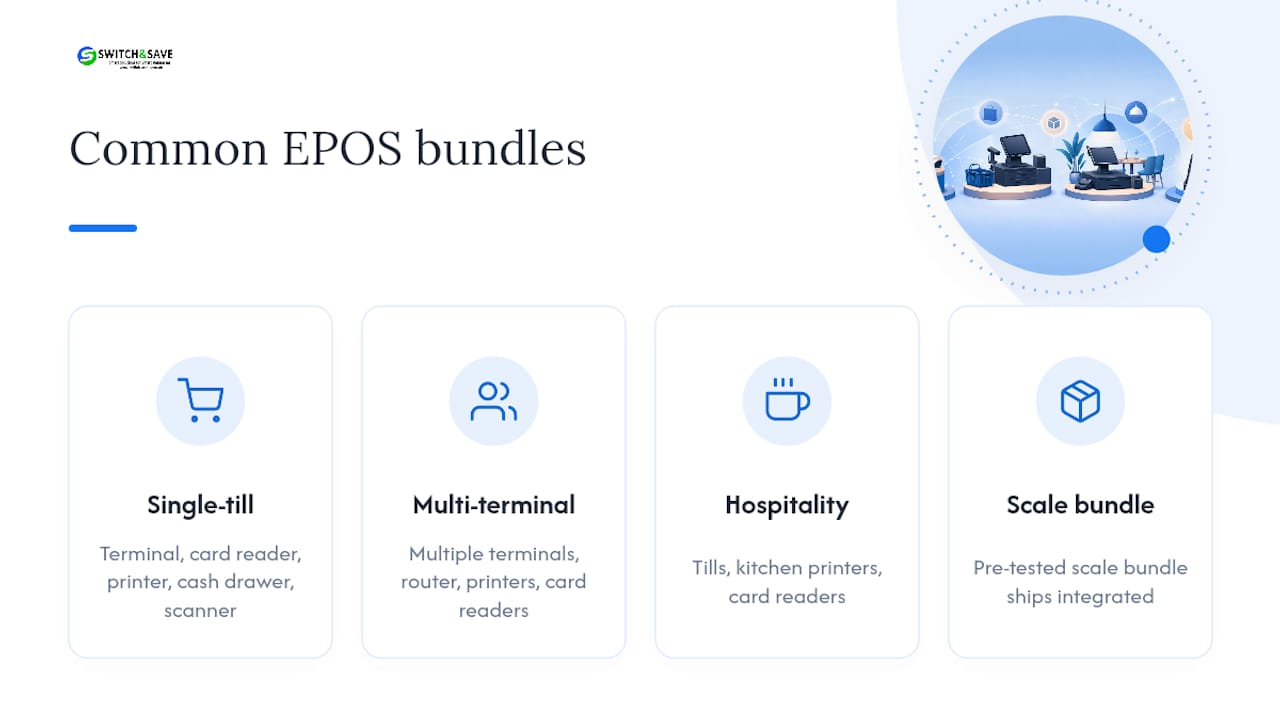
Common bundles look like this: a single-till retail pack for independent shops, a multi-terminal retail pack for busier stores or small chains, and hospitality tills paired with kitchen printers for restaurants and cafés. A pre-tested weighing scale bundle is a good example of how specialist hardware can ship ready-integrated rather than needing separate setup work.
Buying hardware outright is usually cheaper over a longer term than renting, unless you’re running a short-term pop-up or seasonal event, where a rental avoids dead stock once the season ends.
How do you choose between competing suppliers?
Ask every retail production partner these seven questions before you sign anything:
- What’s the total cost of ownership over three to five years, including hardware replacement?
- What exactly are the integrated payments fees, per transaction and per month?
- Can you demonstrate a real inventory use-case relevant to my stock type?
- What’s your support SLA, and what are the actual response times?
- Can I export my sales and customer data if I leave?
- How does multi-site management work if I open a second location?
- Do you offer open APIs for accounting or CRM integrations?
Watch for these red flags:
- Hidden fees not disclosed until the contract stage
- Closed ecosystems that block data export
- No clear upgrade path as you grow
- UK support hours that don’t match your trading hours
- Long minimum contract terms with no exit clause
- Hardware only available on lease, never to buy
Comparing systems means separating software costs, hardware costs, and payment processing fees into three distinct lines. A low headline subscription can mask transaction fees that compound into a much higher bill by year three.
Pro Tip: Score each supplier 0 to 3 on all seven questions during the call. Anything below 15 out of 21 total is a pass on quality grounds alone, regardless of price.
How long does deployment take and what does it cost?
A typical rollout runs through discovery, data migration, hardware delivery, configuration, staff training, testing, and finally go-live. Multi-store retailers benefit from staging this as a pilot at one site before wider deployment, which limits disruption if something needs adjusting.
Costs generally split into: hardware (one-off or financed), software subscription (monthly or annual), payment processing (per-transaction), integration work, staff training, and a contingency for replacement hardware. Modelling this properly means projecting total cost across three to five years, not just comparing month-one invoices.
A single-register shop can usually go live within one to two weeks. A multi-store rollout with thousands of SKUs and several integrations often needs a staged plan spanning several weeks, particularly where data migration and staff training both need dedicated time slots rather than being squeezed in overnight.
Why Switch-and-save is worth putting on your shortlist
Switch-and-save builds EPOS packages specifically for UK retail and hospitality, so you’re not adapting a generic system to fit your till. Standard and premium packages suit single-site starters, retail packages add multi-location stock control, and hospitality packages handle table management and kitchen routing out of the box.

The product range maps directly onto what this guide has covered: real-time inventory across every site, integrated payments bundles with transparent fees, multi-terminal and multi-store support, and UK-based technical support when something needs fixing fast. Specialist retailers get purpose-built options too, including the weighing scale bundle for grocers and butchers who need scales talking to the till without custom setup work.
If you run a restaurant, café, or hotel, the dedicated hospitality EPOS system is built around that workflow specifically. Retail owners should start with the retail EPOS system page to see starter bundle pricing. Either way, book a free demo, request a tailored quote, or ask to see a sample invoice showing hardware, subscription, and payment fees split out clearly. There’s no reason to commit to a three-year contract without seeing the numbers first.
What most buyers get wrong about EPOS rollouts
Every EPOS rollout I’ve watched fail wasn’t a software problem. It was a training problem dressed up as one. Staff get five minutes with a new till on a Friday afternoon, then it’s expected to run a Saturday rush without a hitch.
If you take one thing from this guide, make it this: schedule two separate training sessions before go-live, not one, with a few days between them so questions from the first session can be answered in the second. Run a weekend pilot on your quietest till before rolling out across every register. It costs you almost nothing and it catches the mistakes that would otherwise surface in front of a queue of customers.
Sources
- Choosing the Right POS System for UK Small Businesses | PayPal UK
- POS System Implementation Checklist: A Practical Guide for a Smooth Launch
- How to Choose the Best Retail POS System in the UK — Pos-Hardware Ltd
- EPOS costs (CompareYourBusinessCosts)
FAQ
What is an EPOS retail manufacturer?
It’s a supplier providing the till software, connected hardware like card readers and printers, and ongoing support, sometimes alongside integrated payment processing.
Should I buy or rent EPOS hardware?
Buying is usually cheaper over three to five years; renting suits short-term pop-ups or seasonal trading where you won’t need the equipment afterwards.
Is integrated payments better than a standalone card machine?
Integrated payments reduce reconciliation errors because sales and card transactions sync automatically, though some vendors tie you into their own processor as a result.
How long does an EPOS rollout take?
A single-register shop can go live within one to two weeks, while multi-store rollouts with heavy data migration often need a staged plan over several weeks.
Does Switch-and-save offer packages for both retail and hospitality?
Yes, Switch-and-save provides standard, premium, retail, and hospitality EPOS packages alongside integrated payments bundles and UK-based support.



