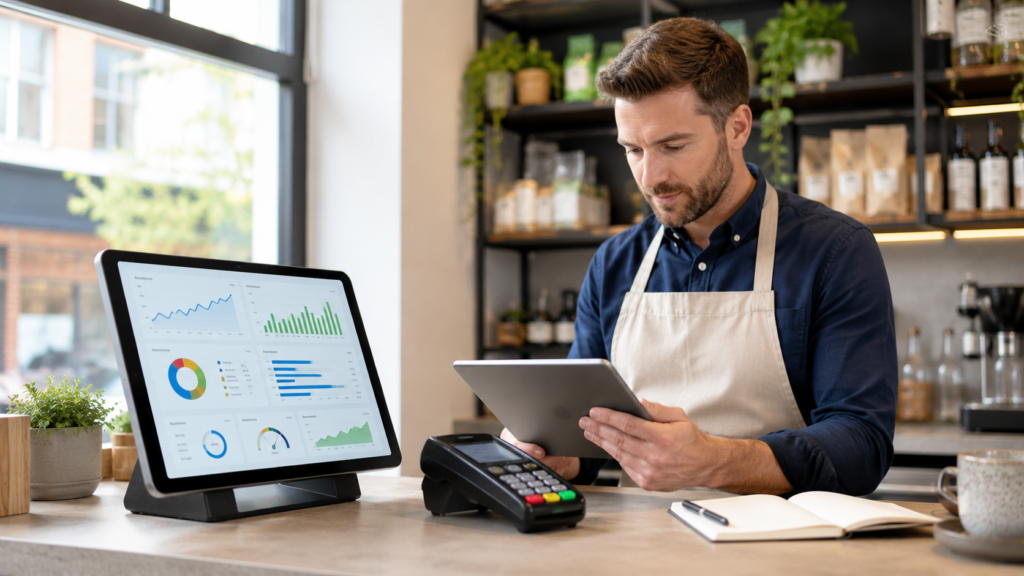
A new business should track sales, cash flow, profit and loss, expenses, stock, payment methods, customers and staff performance from day one. These reports show whether the business is generating enough revenue, controlling costs, maintaining healthy cash reserves and operating efficiently.
You do not need dozens of complicated spreadsheets. Start with a small set of reliable business reports for new businesses, review operational figures daily, examine performance weekly and complete a detailed financial review every month.
For retail shops, cafés, restaurants, takeaways and other customer-facing businesses, a modern EPOS system can automatically collect much of this information as transactions happen.
Key Takeaways
| Report | What it tells you | Recommended frequency |
|---|---|---|
| Sales report | How much the business is selling | Daily |
| Cash flow report | Money entering and leaving the business | Daily or weekly |
| Profit and loss report | Whether the business is profitable | Monthly |
| Expense report | Where business money is being spent | Weekly |
| Stock report | What is selling, running low or being wasted | Daily or weekly |
| Payment report | How customers are paying | Daily |
| Product performance report | Best and worst-performing items | Weekly |
| Customer report | Buying patterns and repeat visits | Weekly or monthly |
| Staff report | Sales, hours, refunds and productivity | Weekly |
| VAT and tax report | Information needed for compliance | Monthly or quarterly |
Why Should a New Business Track Reports from Day One?
Reports give business owners evidence instead of assumptions.
Without reliable reporting, a busy shop may appear successful while losing money through high supplier costs, excessive staffing, stock waste or payment processing fees. A quiet business may also be healthier than expected if it has strong margins and controlled overheads.
Starting on day one provides a clean performance history. You can compare:
- One day against another
- Weekday sales against weekend sales
- Revenue against targets
- Stock purchased against stock sold
- Card payments against cash payments
- Labour costs against sales
- Current performance against previous months
Good reporting also makes bookkeeping, tax preparation, finance applications and business planning easier.
HMRC requires sole traders and business partnerships to keep records of business income and expenses. Businesses may also need VAT and PAYE records depending on their circumstances.
1. Daily Sales Report
The daily sales report is usually the first report a new business should establish.
It should show:
- Total gross sales
- Net sales after discounts and refunds
- Number of transactions
- Average transaction value
- Sales by hour
- Sales by product or category
- Cash and card totals
- Refunds, voids and discounts
Reviewing sales every day helps you identify unusual activity quickly.
For example, a new Birmingham café may discover that most weekday revenue is generated between 7:30am and 10:00am. The owner could schedule more employees during the breakfast rush while reducing staffing during slower afternoon periods.
A convenience store may find that Friday evening sales are consistently higher than Monday sales. This information can guide ordering, employee scheduling and promotional decisions.
Calculate average transaction value
Use this formula:
Average transaction value = Total sales ÷ Number of transactions
If your shop generates £1,800 from 300 transactions, the average transaction value is £6.
You can then test practical ways to increase it, such as meal deals, product bundles, add-ons or carefully targeted promotions.
2. Cash Flow Report
A cash flow report tracks the money entering and leaving your business.
It is different from a profit report. A business can appear profitable on paper but still struggle to pay suppliers, wages or rent when cash is not available at the right time.
Your cash flow report should include:
Cash coming in
- Cash sales
- Card payment settlements
- Customer invoice payments
- Business finance received
- Owner investment
- Other income
Cash going out
- Stock and ingredients
- Rent and business rates
- Payroll
- Utilities
- Card processing charges
- Software subscriptions
- Insurance
- Tax payments
- Loan or finance repayments
Create a short-term cash flow forecast covering at least the next several weeks. Add expected income, scheduled bills and estimated operating expenses.
For example, a restaurant may have strong weekend sales but need to pay suppliers every Thursday. Its cash flow plan should ensure enough money remains available before the weekend revenue arrives.
3. Profit and Loss Report
A profit and loss report, sometimes called a P&L or income statement, shows whether your business generated a profit during a specific period.
The basic calculation is:
Revenue − Cost of sales − Operating expenses = Net profit
A P&L report normally includes:
- Sales revenue
- Cost of goods sold
- Gross profit
- Payroll costs
- Rent
- Utilities
- Marketing
- Insurance
- Software and service fees
- Other operating expenses
- Net profit or loss
Do not confuse revenue with profit
A takeaway generating £25,000 in monthly sales has not necessarily made £25,000.
If food, packaging, payroll, rent, utilities, delivery commissions and other costs total £23,000, the actual profit is £2,000 before any further tax considerations.
Review the P&L every month and compare the result with your budget. Investigate substantial differences rather than simply recording them.
4. Expense Report
An expense report shows where your money is being spent and whether those costs are necessary.
Create clear categories such as:
- Stock and ingredients
- Packaging
- Payroll
- Rent
- Electricity and gas
- Card processing
- Marketing
- Repairs
- Delivery charges
- Software
- Professional fees
- Insurance
Review expenses weekly while the business is new. This makes duplicate payments, unexpected supplier increases and unnecessary subscriptions easier to notice.
Keep receipts, invoices and supporting records for business purchases. HMRC guidance identifies receipts for goods and stock, bank statements, sales invoices, till records and bank slips as examples of supporting evidence businesses may need to retain.
5. Stock and Inventory Report
Businesses selling physical products should track stock from the first delivery.
A useful inventory report should show:
- Current quantity
- Stock received
- Stock sold
- Stock adjustments
- Damaged or expired stock
- Returned items
- Low-stock products
- Stock value
- Stock turnover
- Differences between recorded and counted stock
For a grocery shop, poor stock reporting can result in empty shelves for popular items and excessive quantities of slow-moving goods.
For a café, it can reveal wastage involving milk, pastries, syrups or fresh ingredients.
For a mobile phone shop, it can help control higher-value items such as handsets and accessories.
Regular stock counts should be compared with system quantities. Any repeated discrepancy should be investigated for incorrect receiving, unrecorded waste, scanning errors or potential theft.
6. Payment Method Report
The payment method report divides sales by cash, debit card, credit card, contactless payment and any other payment types accepted.
It helps you:
- Reconcile the till
- Confirm card settlements
- Identify cash shortages
- Understand customer payment preferences
- Compare processing costs
- Detect payment discrepancies
Your card terminal total, EPOS card total and payment provider settlement should be reconcilable.
Integrated payments can reduce manual entry because the transaction amount is transferred from the till to the card machine. Learn more about card machines for UK businesses.
7. Product or Menu Performance Report
A product performance report identifies which products generate sales and which products generate profit.
Track:
- Quantity sold
- Sales value
- Cost price
- Gross profit
- Gross margin
- Refunds
- Discounts
- Wastage
- Time of sale
Your highest-selling item may not be your most profitable item.
For example, a café may sell large quantities of standard coffee, while speciality drinks or food add-ons produce a higher margin. A takeaway may find that certain meal combinations increase order value without creating significant additional preparation costs.
Use the report to decide which products to promote, reprice, reposition or remove.
Avoid removing an item based only on low sales. It may support another profitable purchase, appeal to an important customer group or perform strongly during a particular season.
8. Customer Report
Customer reporting helps a new business understand who is buying, when they visit and what they purchase.
Depending on the business and the information customers have agreed to provide, useful measurements can include:
- New customers
- Returning customers
- Purchase frequency
- Average customer spend
- Most popular products
- Loyalty points issued and redeemed
- Customer location
- Collection, delivery or dine-in preferences
A takeaway might find that returning customers order more frequently through direct channels than through third-party delivery platforms. A retailer may identify customers who regularly buy from one category and could be interested in related offers.
Customer information should be collected transparently, stored securely and used only for legitimate business purposes.
9. Staff Performance Report
Staff reports should help improve operations, not simply rank employees.
Depending on the business, track:
- Hours worked
- Sales processed
- Average transaction value
- Discounts applied
- Refunds and voids
- Cash drawer differences
- Orders completed
- Table turnaround
- Attendance
- Overtime
Context is essential. An employee covering a quiet shift cannot be compared fairly with someone working during the busiest period.
However, repeated unusual discounts, refunds, voided transactions or cash differences should be checked. Role-based EPOS permissions and audit records can provide greater accountability.
10. VAT and Tax Reports
Tax-related reporting should be established before records become difficult to reconstruct.
Depending on your legal structure and tax status, you may need records covering:
- Sales and income
- Business expenses
- VAT
- PAYE
- Supplier invoices
- Customer invoices
- Till records
- Bank transactions
- Stock value
- Amounts owed by customers or owed to suppliers
VAT-registered businesses generally need to keep specified records digitally under Making Tax Digital rules unless an exemption applies.
Limited companies must keep company and accounting records, including records of money received and spent. GOV.UK states that relevant records normally need to be kept for six years from the end of the financial year concerned, although longer periods can apply in certain circumstances.
Record-retention requirements differ for sole traders, partnerships and limited companies, so confirm your obligations with HMRC guidance or a qualified accountant.
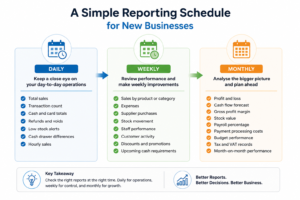
A Simple Reporting Schedule for New Businesses
You do not need to analyse every report every day. Use a practical schedule.
Reports to check daily
- Total sales
- Transaction count
- Cash and card totals
- Refunds and voids
- Low-stock alerts
- Cash drawer differences
- Hourly sales
A daily review can usually be completed quickly when the information is available from one system.
Reports to check weekly
- Sales by product or category
- Expenses
- Supplier purchases
- Stock movement
- Staff performance
- Customer activity
- Discounts and promotions
- Upcoming cash requirements
Use the weekly review to make immediate operational adjustments.
Reports to check monthly
- Profit and loss
- Cash flow forecast
- Gross profit margin
- Stock value
- Payroll percentage
- Payment processing costs
- Budget performance
- Tax and VAT records
- Month-on-month performance
A monthly meeting with your manager, bookkeeper or accountant can turn these figures into clear decisions.
How EPOS Reporting Makes the Process Easier
Manual spreadsheets can work when a business has very few transactions, but they become harder to maintain as sales volumes, products and employees increase.
A suitable EPOS system can record transactions automatically and produce reports for:
- Daily sales
- Product performance
- Stock levels
- Payment methods
- Refunds and discounts
- Staff activity
- Customer purchasing patterns
- Tax categories
Connecting business systems can also reduce repeated data entry and improve consistency. Read our guide to POS system integration and compatibility.
Switch & Save provides modern EPOS systems and business solutions for UK retail and hospitality businesses, alongside card payment and business finance options.
The objective is not to produce more data. It is to make essential information easy to find, understand and act upon.
Final Checklist: Reports to Create from Day One
Every new business should establish the following:
- Daily sales report
- Cash flow report
- Monthly profit and loss report
- Weekly expense report
- Stock and inventory report
- Payment method report
- Product or menu performance report
- Customer activity report
- Staff activity report
- VAT and tax record summary
Start with accurate, consistent information. Once you have several weeks of data, establish realistic targets and compare actual results against them.
Check Your Business Savings
Switch & Save helps UK businesses reduce costs with AI-powered EPOS systems, card payment solutions and business finance.
Frequently Asked Questions
What is the most important report for a new business?
The daily sales report is the most important operational report because it shows revenue, transaction volume, payment totals, refunds and sales patterns. However, it should always be reviewed alongside cash flow and expenses.
How often should a new business review its reports?
Sales, payments and major stock alerts should be checked daily. Expenses, inventory and product performance should be reviewed weekly. Profit and loss, cash flow forecasts and overall financial performance should be reviewed monthly.
What financial reports does a small business need?
The core financial reports are a profit and loss statement, cash flow report, expense report and, where appropriate, a balance sheet. Businesses should also maintain the supporting transaction records required for tax and accounting purposes.
Can an EPOS system create business reports automatically?
Yes. Depending on its features and configuration, an EPOS system can produce sales, payment, product, stock, discount, refund and staff activity reports from transaction data.
What should a café or restaurant track every day?
A café or restaurant should track total sales, orders, average order value, hourly sales, payment methods, refunds, discounts, ingredient shortages, wastage and cash drawer differences.
What reports should a retail shop monitor?
A retail shop should monitor sales by product and category, stock levels, low-stock items, gross margin, returns, discounts, payment methods, staff activity and stock discrepancies.
Why is cash flow more important than sales alone?
Sales show how much the business has generated, while cash flow shows whether money is available to meet upcoming obligations. A business can record strong sales but still experience difficulty paying suppliers, wages or rent.