
Secure your terminals against tampering, enforce multi-factor authentication on every admin account, patch software and firmware on a set schedule, split your POS traffic onto its own network, train staff to spot fraud attempts, and write down a one-page incident plan. That’s the shortlist. Bodies like the NCSC, the PCI Security Standards Council, and the Cyber Essentials scheme all point to the same basics, and the checklist below organises every one of them by how often you need to check it, from daily glances to annual health checks.
TL;DR:
- Regular daily tamper checks on card slots, keypads, and seals are essential to detect skimming devices early, preventing weeks of unnoticed theft.
- Segmenting POS traffic onto separate networks and scheduling prompt patches for software and firmware reduces vulnerabilities that could lead to breaches.
- Enforcing individual staff accounts with MFA and changing default passwords significantly lowers the risk of insider or remote compromises.
- Reducing payment data storage and using encryption or tokenisation minimizes PCI scope and protection complexity, making compliance more manageable.
- Outsourcing support through bundled EPOS solutions simplifies ongoing maintenance, patching, and incident response, especially for busy retail operations.
Table of Contents
- Building a pos security checklist that actually gets used
- Physical POS security: spotting tampering and skimmers
- Software patching and network segmentation for POS systems
- Passwords, MFA and staff access controls
- PCI DSS basics and how to reduce your compliance scope
- Incident response: backups, logging and reporting fraud
- Ongoing maintenance: patch cadence and annual health checks
- The consolidated POS security checklist, by cadence
- Making POS security part of daily operations, not an annual scramble
- A managed alternative: how bundled EPOS support fits in
- Where this checklist’s guidance comes from
- Sources
- FAQ
Building a pos security checklist that actually gets used
A point of sale security guide only works if someone follows it on a Tuesday afternoon during a lunch rush, not just when an auditor is watching. That’s the gap most retail security checklist templates miss: they list good controls but never say who checks them or how often.
This guide fixes that. Every control below gets tied to a cadence, whether that’s a daily glance at the card reader or an annual penetration test. It also covers ground that generic advice skips: PCI DSS scope reduction, tokenisation, encryption in transit and at rest, and how to hold your POS vendor accountable for their own patching. Retail and hospitality firms are among the least likely UK sectors to treat cyber security as a board-level issue, according to the government’s Cyber security breaches survey 2025, which is exactly why a working checklist matters more here than in most industries.
Physical POS security: spotting tampering and skimmers
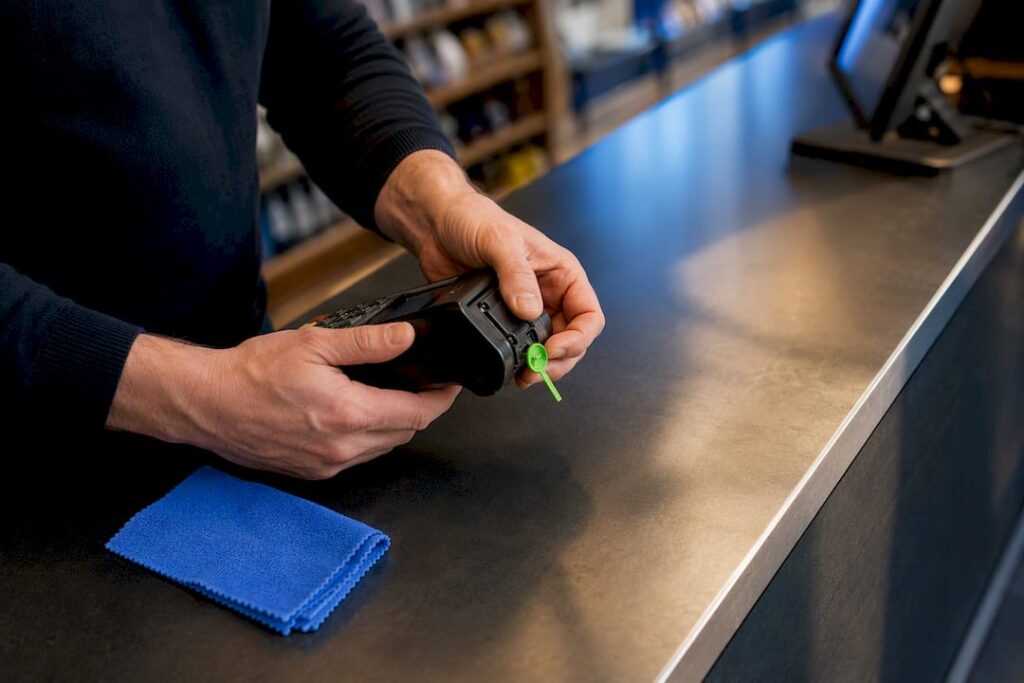
Skimming devices are built to look invisible, which is precisely why a five-minute daily check beats an occasional deep inspection. Card slots, keypads, and the screws holding the casing together are the three places criminals target first, because a false front or an overlay reader can sit there for weeks unnoticed.
Build these checks into opening and closing routines:
- Run your fingers and eyes over the card slot, keypad, and screen bezel every morning for anything loose, discoloured, or added.
- Check tamper-evident seals on terminal housings; if one is broken or missing, isolate that device before another transaction runs through it.
- Bolt or clip terminals to the counter so nothing can be swapped out during a busy service and handed back later.
- Route cables out of reach behind the counter, and make sure CCTV actually covers the payment point, not just the till drawer.
- Retire any terminal that can no longer receive security firmware updates. EMVCo notes that current chip card security depends on keeping device kernels and firmware up to date, so an unsupported terminal is a permanent weak point, as EMVCo explains.
Pro Tip: Take a photo of each terminal’s underside and serial number when it’s installed. If you ever suspect tampering, you’ll have a clean reference to compare against.
For guidance on setting terminals up correctly from day one, this POS hardware setup guide walks through mounting and cabling in more detail.
Software patching and network segmentation for POS systems
Software vulnerabilities and open network paths are how a single compromised till turns into a full breach; these are key online security essentials for businesses to address in your POS setup. The fix isn’t exotic: patch on a schedule, and stop letting POS traffic mix with everything else on your network.
- Document a patch schedule. Set a fixed day for routine updates to POS software and terminal firmware, but treat critical security fixes as same-week, not same-quarter, priorities.
- Segment the network. Put POS devices on their own VLAN, keep guest Wi-Fi entirely separate from anything handling payments, and configure firewalls to block lateral movement between segments.
- Run a managed firewall and current anti-malware, and schedule regular vulnerability scans. If your acquirer requires it, arrange an Approved Scanning Vendor (ASV) scan for your public-facing systems.
- Lock down remote access. Any remote connection to POS infrastructure should go through a VPN with MFA enabled, and every unused port or service on the terminal itself should be switched off.
A remote POS setup that isn’t configured this way is one of the more common ways small retailers get compromised without ever noticing an intruder walk through the front door.
Passwords, MFA and staff access controls
Most POS breaches trace back to something dull: a shared login, a default password nobody changed, or an ex-employee’s account that was never switched off. Fixing that costs nothing and takes an afternoon.
- Give each role its own account. Cashiers, supervisors, and admins should never share a single login.
- Turn on MFA for every admin or remote-access account. The NCSC’s password guidance is explicit that privileged and remote accounts need MFA, not just a strong password.
- Change every vendor default password before a terminal goes live, and use a password manager to avoid weak, reused credentials.
- Cut off access the same day a staff member leaves, and keep a log of privileged actions so you can review who did what.
Government data shows the gap clearly: anti-malware sits at roughly 81% adoption among UK businesses and backups at around 74%, but MFA adoption trails behind at about 47%. That’s the single biggest opportunity most retail and hospitality businesses are leaving on the table.
PCI DSS basics and how to reduce your compliance scope
You don’t need to become a compliance specialist to meet your obligations as a merchant. You need to reduce how much cardholder data your systems ever touch, because the less you store, the less there is to protect and the less paperwork you face.
- Use point-to-point encryption (P2PE) terminals so card data is encrypted the instant it’s captured, before it ever reaches your systems in readable form.
- Apply tokenisation wherever possible, replacing the actual card number with a token that’s useless if intercepted, and avoid storing primary account numbers (PAN) altogether.
- Ask which Self-Assessment Questionnaire (SAQ) applies to your setup; P2PE and outsourced payment pages often qualify a merchant for the shorter SAQ-A or SAQ-B-IP rather than the full assessment.
- Layer in Cyber Essentials or the NCSC’s baseline guidance as a foundation underneath your PCI obligations, not instead of them.
The PCI Security Standards Council’s small merchant guide walks through scope reduction in more depth, and this breakdown of SAQ-A and SAQ-B-IP eligibility is worth reading before your next PCI attestation is due.
Incident response: backups, logging and reporting fraud
A breach becomes a crisis when nobody knows what to do in the first hour. A tested plan turns that hour into a routine.
- Keep backups of POS configuration and transaction logs, tested regularly, not just scheduled and forgotten.
- Retain logs long enough to support a forensic review if you ever need one, typically several months at minimum.
- If you suspect a compromised terminal, isolate it immediately, preserve any physical evidence such as skimming devices, and don’t power-cycle it before you’ve documented what you found.
- Contact your acquiring bank straight away, and report suspected card fraud through Action Fraud, the UK’s national fraud reporting service.
Pro Tip: Print your incident steps on a laminated card and keep one behind every till. In a genuine panic, nobody remembers where the PDF is saved.
Ongoing maintenance: patch cadence and annual health checks
Security controls decay if nobody maintains them, which is why a published cadence matters as much as the controls themselves.
- Publish a patch cadence for terminals, POS servers, and any supporting infrastructure, with emergency fixes fast-tracked outside the normal cycle.
- Run vulnerability scans regularly, and where your risk profile justifies it, commission an annual IT health check or full penetration test.
- Ask your POS and payment vendors for evidence of their own patching practices, ISO certifications, and PCI claims. A layered defence depends on your suppliers holding up their end, and documented supplier evidence around patch schedules and testing frequency is a reasonable thing to request.
If any supplier can’t produce that evidence on request, that’s a red flag worth acting on before renewal, not after an incident.
The consolidated POS security checklist, by cadence
Print this, hand it to whoever runs the shift, and use the notes column as an audit trail.
- Daily: Visual check of terminals for tampering; quick spot-check of transaction logs for anything unusual.
- Weekly: Apply non-critical software patches; review who currently has system access.
- Monthly: Test that backups actually restore, not just that they ran.
- Quarterly: Request and review patching and certification evidence from third-party suppliers.
- Annually: Commission a penetration test or IT health check where your risk level justifies it.
| Cadence | Priority action | Owner | Notes |
|---|---|---|---|
| Daily | Visual tamper check, log spot-check | Shift supervisor | Escalate anomalies same day |
| Weekly | Patch review, access review | IT/manager | Confirm MFA still enforced |
| Monthly | Backup restore test | Manager | Record test date |
| Quarterly | Supplier evidence review | Owner/IT | Request patch cadence proof |
| Annually | Penetration test / IT health check | Owner | Book ahead of peak season |
Three quick wins cost almost nothing and should happen this week: turn on MFA, change every default password left on a terminal, and separate your guest Wi-Fi from anything that touches payments.
Making POS security part of daily operations, not an annual scramble
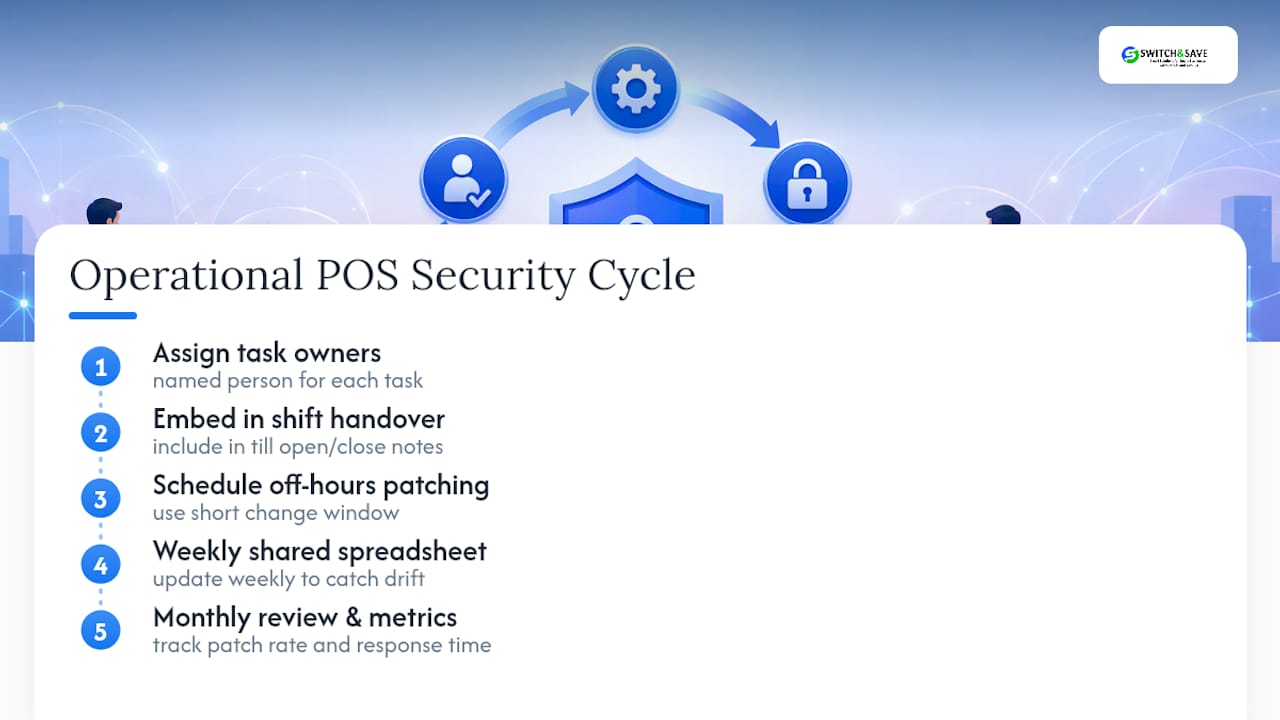
Checklists fail when nobody owns them. Assign a named person to each recurring task, fold the checks into shift handover notes, and the list stops being a separate chore and becomes part of how the till gets opened and closed.
Schedule patching and testing outside trading hours, ideally with a short change window, so a routine update never becomes the reason a Saturday lunch service grinds to a halt. Track a handful of simple numbers: patch completion rate, how long it takes to respond to a flagged incident, and whether the monthly access review actually happened. None of that needs a dashboard. A shared spreadsheet updated weekly is enough to catch drift before it becomes a gap.
A managed alternative: how bundled EPOS support fits in
Running every item on this checklist yourself is entirely possible, but it takes time most retail and hospitality managers don’t have spare during a trading week. Switch-and-save exists as the alternative to piecing security together terminal by terminal, patch by patch, and supplier by supplier.

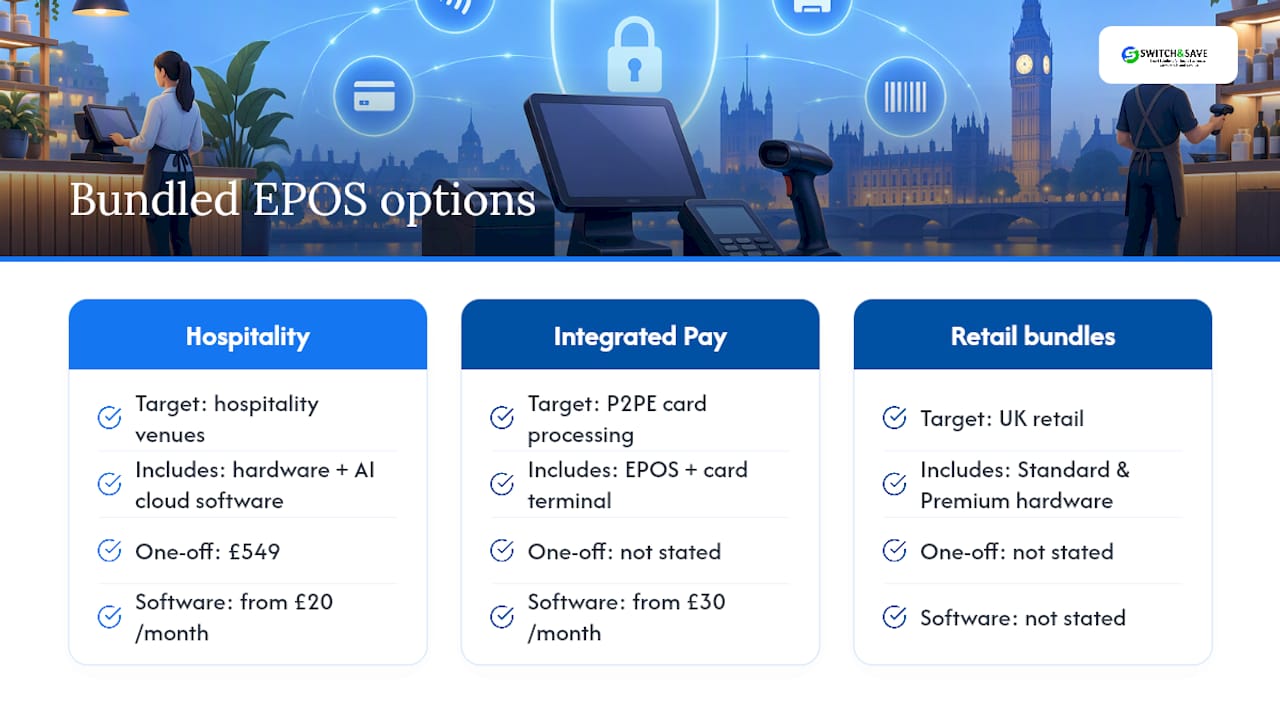
The Hospitality EPOS Bundle pairs hardware with AI-powered cloud software from £549 one-off, plus the software subscription from £20 per month, with updates and support handled centrally rather than left to whoever’s on shift that day. For businesses wanting P2PE-capable card processing without managing a separate vendor relationship, the Integrated Payments Bundle combines EPOS and card terminal into one setup, with the EPOS software subscription priced from £30 per month. Retailers looking at a broader range of hardware options can compare the Standard and Premium EPOS bundles built specifically for UK retail.
One supplier handling patching, firmware, and support means one call when something goes wrong instead of three. If that sounds like less to manage on your end, book a free demo through Switch-and-save and ask them to walk through how your current setup compares.
Where this checklist’s guidance comes from
This checklist draws on the NCSC’s small organisations guide for practical baseline steps, the government’s cyber security breaches statistics for context on sector risk, the PCI Security Standards Council’s small merchant guidance, and Action Fraud for reporting card fraud. All are worth bookmarking for updates.
Sources
- Cyber security breaches survey 2025
- Password policy: updating your approach — NCSC
- Small merchant guide to safe payments — PCI SSC
FAQ
What is a security checklist?
A security checklist is a structured list of controls and checks, organised by how often each needs doing, that helps a business apply consistent protection without relying on memory. For POS systems specifically, it covers physical device checks, software patching, access controls, and incident response steps, usually sorted from daily tasks through to annual reviews.
What are the three P’s in security?
There’s no single universal definition of “the three P’s” in security; the phrase gets used differently across industries. In a POS context, the practical equivalents worth focusing on are people (staff training and access control), process (documented patch and incident procedures), and physical protection (tamper checks and secure mounting).
What is a SOC 2 Type 2 compliance checklist?
SOC 2 Type 2 is a US-focused auditing standard that assesses how well a service organisation’s controls operate over a period of time, typically covering security, availability, and confidentiality. It’s less relevant to UK retail POS security directly; UK merchants are generally better served focusing on PCI DSS obligations and Cyber Essentials rather than SOC 2, which mainly applies to software and cloud service providers.
What is the GDPR checklist for retail businesses?
A GDPR checklist for a retail or hospitality business covers lawful handling of customer data, secure storage, staff training on data access, and a process for responding to data breaches or subject access requests. It overlaps with PCI DSS in places, particularly around encrypting stored data and limiting who can access it, but GDPR covers all personal data, not just card details.
Does Switch-and-save help with POS security specifically?
Switch-and-save’s EPOS bundles include integrated payment processing and centrally managed software updates, which reduces how much patching and firmware management falls on individual staff. Current pricing for each bundle, including the Hospitality EPOS Bundle and Integrated Payments Bundle, is listed on the Switch-and-save site.



