
A properly planned POS data migration can be completed with minimal downtime and without losing sales history or customer records, provided you follow a staged export, test, verify, and go-live workflow and lock your data before the final import. The five core steps are: choose, clean, back up, map, and plan.
Your quick-start checklist:
- Back up your full database and sales history before anything else
- Map old fields to new fields and flag any gaps
- Run a test import and check item counts, prices, and customer records
- Schedule go-live during a quiet trading window
- Reconcile till totals against your accounting records on day one
Pro Tip: Start with a full data export from your current system today, then book a test import session with your vendor or Switch-and-save before committing to a cutover date.
Key takeaways
A well-executed POS data migration requires a staged workflow, a data freeze before final import, and compliance checks for both PCI DSS and UK GDPR before go-live.
| Point | Details |
|---|---|
| Plan for 8–10 weeks total | Allow 4–6 weeks of planning before go-live, plus 2–3 weeks stabilisation after. |
| Back up before anything else | Export your full database, sales history, and stock levels before the first test import. |
| Freeze data before final import | Stop all price and product changes in the old system before cutover to avoid reconciliation gaps. |
| Check PCI DSS and UK GDPR | New integrations can expand PCI scope; pseudonymise customer data used in test imports. |
| Switch-and-save managed migration | Switch-and-save provides UK-based project management, test imports, and 30-day stabilisation support. |
Table of Contents
- How does a POS data migration work, step by step?
- What data usually migrates and what commonly does not?
- Which migration method suits your business?
- How long does a point of sale data transfer realistically take?
- What do PCI DSS and UK GDPR require during migration?
- How should you test imports and validate results before go-live?
- What backups and rollback plans do you need?
- How Switch-and-save supports UK businesses with managed POS migrations
- Ready to move forward with your EPOS migration?
- Sources
- FAQ
How does a POS data migration work, step by step?
A clear, ordered workflow stops small errors from becoming expensive problems. Here is a practical week-by-week sequence you can follow yourself or hand directly to a vendor.
- Discovery and audit (Week 1–2). List every data type in your current system: products, variants, prices, inventory, customers, loyalty points, sales history, and supplier records. Note which integrations are live (accounting, CRM, payment gateway). Owner: you or your operations manager.
- Full export and initial test import (Week 2–3). Request a complete data export from your existing provider before your contract ends. Run a test import into the new system using a sample of records. Owner: vendor or Switch-and-save project manager.
- Clean and map (Week 3–4). Remove duplicate products, fix inconsistent category names, and build a field-mapping document (old field → new field). Flag any custom fields that need manual recreation. Owner: you, with vendor guidance.
- Freeze the old system. Stop adding new products or changing prices in the legacy system. This is your data lock point. Any change made after this moment creates a reconciliation gap.
- Final import (Week 5–6). Import the cleaned, mapped dataset into the new system. Validate counts and spot-check prices immediately. Owner: vendor.
- Go-live. Switch over during your quietest trading window. Have a staff member dedicated to monitoring the first transactions.
- Reconcile and stabilise (Weeks 7–10). Compare till totals to your accounting records daily for the first two weeks. Address any discrepancies before they compound.
The full process typically runs 8–10 weeks, including training and stabilisation. Budget for that from the start.
Pro Tip: Schedule go-live on a Tuesday or Wednesday morning, not a Friday before a busy weekend. Allow 10–14 days for staff to reach normal transaction speed.
What data usually migrates and what commonly does not?
Knowing which records transfer cleanly saves you from nasty surprises on go-live day.
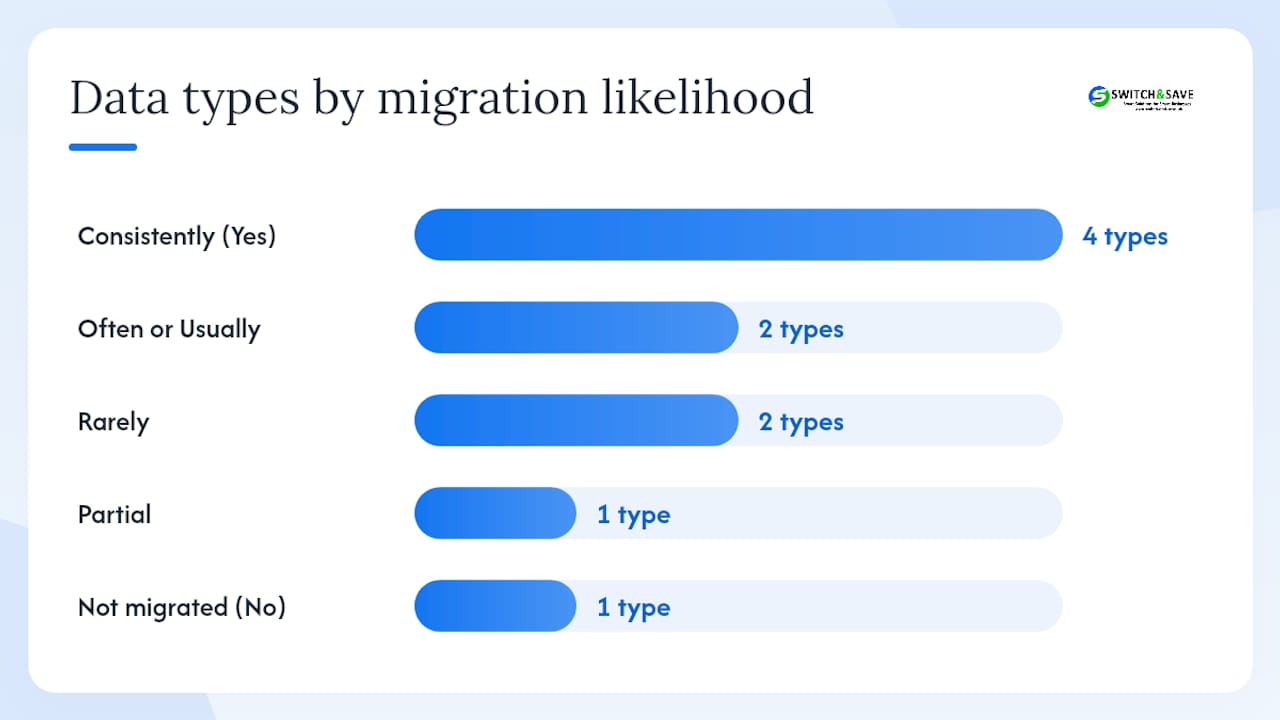
| Data type | Typically migrates? | Notes |
|---|---|---|
| Products and SKUs | Yes | Check variant structures match the new schema |
| Prices and tax rates | Yes | Validate manually after import |
| Inventory levels | Yes | Take a stocktake snapshot on freeze day |
| Customer records | Yes | Requires UK GDPR lawful basis review |
| Loyalty points balances | Often | Legacy formats may need manual conversion |
| Sales history (summary) | Usually | Line-level detail depends on export format |
| Supplier records | Partial | Often needs manual re-entry |
| Custom fields and notes | Rarely | Usually requires manual recreation |
| Embedded images | Rarely | Re-upload separately |
| Staff PIN/access settings | No | Recreate in the new system |
A simple field-mapping row looks like this: old system “Product_Code” → new system “SKU_ID”, validated by operations manager. Build one row per field and get sign-off before the final import.
Concerns about losing historical data during a provider change are common. Always request your full export in writing before your contract exit date.
For hospitality operators, loyalty and CRM data often carries the most complexity. A restaurant CRM stores guest preferences, visit frequency, and spend history that may not export cleanly from a legacy till system, so map those fields early.
Which migration method suits your business?
Data migrations broadly fall into four types: storage, database, application, and cloud. For most UK retail and hospitality businesses, the practical choice sits between three approaches.
Manual CSV import
You export data as spreadsheet files and import them into the new system yourself.
- Pros: low cost, full control, no third-party access to your data
- Cons: slow, error-prone with large catalogues, no automated validation
Vendor-native connector or iPaaS tool
A connector app (or an integration platform such as Zapier or Make) maps and transfers data automatically between the two systems.
- Pros: faster, reduces manual errors, handles schema differences
- Cons: connector availability varies by platform, ongoing subscription cost
Fully managed migration
Your new vendor handles extraction, mapping, testing, and import end to end.
- Pros: least internal effort, professional validation, clear accountability
- Cons: higher upfront cost, requires trust in the vendor’s process
CSV works well for catalogues under a few hundred products with no complex variants. Once you have thousands of SKUs, active loyalty accounts, or live integrations across accounting, CRM, and payment flows, a managed migration pays for itself in avoided errors.
Pro Tip: Ask any vendor to run a test import with a sample of your real data before you sign. If they cannot do that, treat it as a red flag.
How long does a point of sale data transfer realistically take?
Planning 4–6 weeks before go-live is realistic for most UK businesses. The full process, including training and stabilisation, runs 8–10 weeks.
- Planning and discovery: 3–6 weeks
- Data extraction and cleaning: 1–3 weeks
- Test import cycles: 1–2 weeks
- Go-live day: a short cutover window, ideally 2–4 hours
- Stabilisation and reconciliation: 2–3 weeks
Throughput slows when you have large product catalogues with many variants, custom fields that need manual recreation, or legacy formats that do not export cleanly. A café with 80 menu items migrates in days. A multi-site retailer with 4,000 SKUs, tiered pricing, and a loyalty scheme needs the full timeline.
Go-live planning checklist:
- Confirm the quietest trading day of your week
- Notify your accountant and bookkeeper in advance
- Brief all staff the day before, not the morning of
- Have your vendor or Switch-and-save on call for the first two hours
What do PCI DSS and UK GDPR require during migration?
Compliance is where migrations most often go wrong quietly. Adding a new POS or integrations can expand your PCI DSS scope, which changes your obligations around card-data handling without anyone necessarily noticing.
PCI DSS checklist:
- Review your payment processor contract before migration begins
- Confirm which party (you or the vendor) holds PCI responsibility post-migration
- Check that new integrations do not route card data through systems outside your current scope
- Update incident notification clauses if your processor or gateway changes
UK GDPR checklist:
- Confirm your lawful basis for transferring customer records to a new processor
- Pseudonymise customer data used in test imports (replace real names and emails with dummy values)
- Update your privacy notice if your data processors change
- Document the data processing agreement with your new vendor before go-live
For payment integration specifics, the integrated payments setup guide covers gateway and processor considerations relevant to UK operators.
Pro Tip: Align your migration security controls with your existing incident response plan. Confirm processor responsibilities in writing before the final import, not after.
How should you test imports and validate results before go-live?
A test cycle is not optional. It is the only way to catch mapping errors before they affect real transactions.
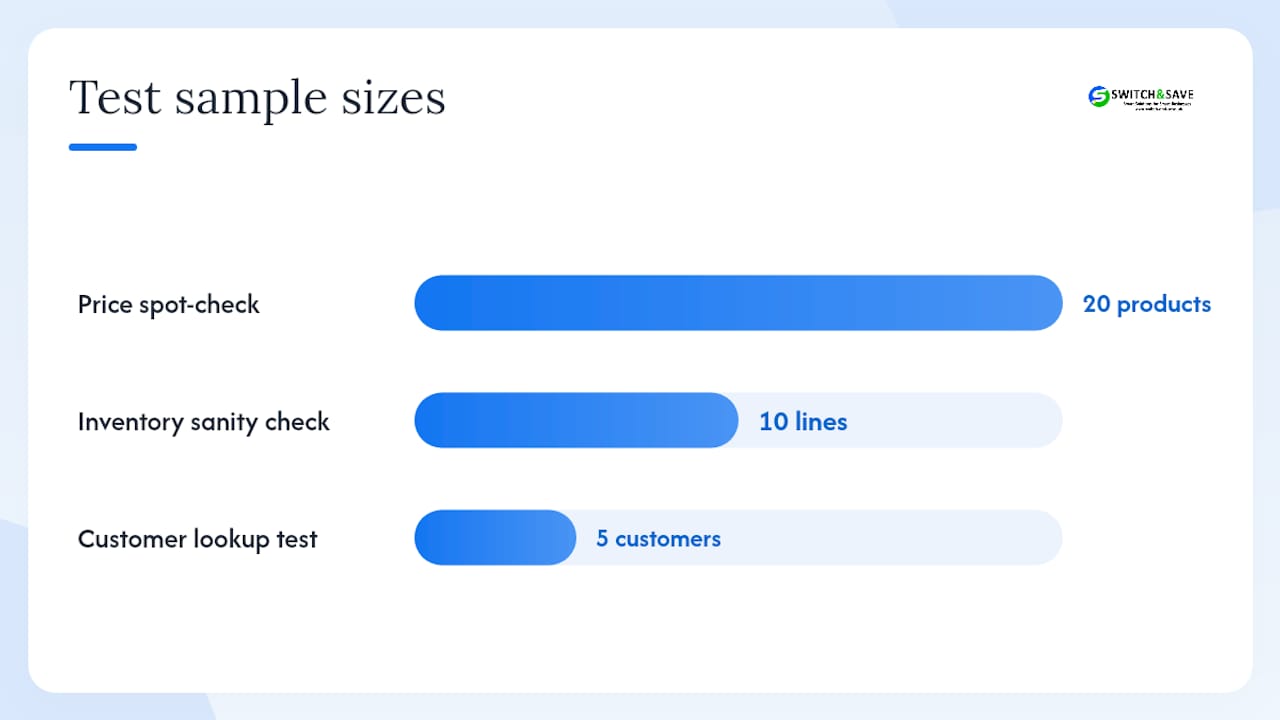
Run your test import, then work through this sequence:
- Item count check: total products in old system vs. new system. Tolerance of zero is the target.
- Price spot-check: pick 20 random products and verify prices match the source data exactly.
- Inventory sanity check: compare stock levels for your top 10 selling lines.
- Customer lookup test: search for five known customer records and confirm names, emails, and loyalty balances.
- Payment reconciliation: run a sample transaction and confirm it posts correctly to your accounting integration.
Acceptance criteria to require from your vendor: item counts match within a 0% tolerance, prices are correct on all spot-checked lines, payments reconcile to your accounting P&L, and loyalty points map correctly for all active accounts. Do not approve go-live until every criterion is met.
Reconciliation on day one means comparing your till tape or end-of-day report against your accounting system. Assign one person as the reconciliation owner. Small discrepancies found on day one are fixable; the same discrepancies found at month-end are a problem.
What backups and rollback plans do you need?
Before any import runs, take these backups:
- Full database export from the old system (store offline and in cloud)
- Sales history snapshot covering at least the last 12 months
- Stock level report taken on freeze day
- Staff records and access permissions
Rollback triggers. If any of the following occur within 48 hours of go-live, revert to the old system immediately:
- Critical payments failing to reconcile
- Inventory errors affecting more than a small number of lines
- Loyalty account data missing or corrupted for active customers
Keep read-only access to your old system for 30–90 days after go-live. You will need it for accounting queries, VAT returns, and any customer disputes about historical transactions.
Pro Tip: Export a PDF or CSV of your last three months of sales reports before you lose access. Your accountant will thank you at year-end.
How Switch-and-save supports UK businesses with managed POS migrations
Switch-and-save works with UK retail and hospitality businesses through every stage of an EPOS migration: discovery, data extraction, test imports, final import, and 30-day stabilisation support. A dedicated project manager handles the technical handover, and UK-based support is available throughout.
The Switch-and-save step-by-step workflow covers extraction, test imports, and reconciliation in detail. Businesses that benefit most are those with complex product catalogues, active loyalty schemes, or multi-site setups where a single mapping error has wide consequences.
👉 Request a free migration review or browse Switch-and-save EPOS systems to understand the scope and cost for your site.
What experienced migration managers know that most guides skip
The biggest mistakes in POS migrations are not technical. They are organisational.
Rushed testing is the most common. A manager approves go-live after a single test import that checked prices but not loyalty balances. Three days later, customers are complaining their points have vanished. The fix is simple: write down your acceptance criteria before the test, not after.
Not freezing pricing is the second. Someone updates a promotion in the old system two days before cutover. That change never makes it into the final import. Now your tills are running last week’s prices.
Poor staff briefings cause the most visible disruption. Staff who have not seen the new interface before go-live day slow every queue. A 20-minute walkthrough the evening before is worth more than any technical preparation.
Quick fixes you can apply today: freeze all non-essential changes to your current system now, assign one person as reconciliation owner, and prepare a one-page quick-reference card for staff covering the five most common transactions on the new system.
Ready to move forward with your EPOS migration?
Switching EPOS systems is one of the most impactful operational changes a UK retail or hospitality business can make, and the difference between a smooth cutover and a chaotic one usually comes down to preparation time and vendor support.
Switch-and-save offers a free migration review: a short discovery call, a scope estimate, and a live demo showing real data migration examples. You will leave knowing exactly what moves, what needs manual work, and how long your migration will take.

👉 Browse Switch-and-save EPOS packages or explore the hospitality EPOS bundle to book your free demo and get a migration scope estimate today.
Sources
- Smartpubtools
- Retail POS system migration guide: 5 key steps for a smooth transition | Posify
- Data migration: strategy, best practices & tools | Couchbase
This article is general information, not a substitute for advice from a qualified lawyer. Consult a qualified legal professional about your own circumstances before acting on anything here.
FAQ
What is a POS migration?
A POS migration is the process of moving your business data from one point-of-sale system to another. Core steps include cleaning your data, taking a full backup, mapping old fields to new ones, and running test imports before go-live.
What does POS data include?
POS data covers products, SKUs, prices, inventory levels, customer records, loyalty balances, sales history, and tax settings. Not all of these migrate automatically; custom fields and embedded notes often require manual work.
What are the four types of data migration?
The four commonly referenced types are storage migration, database migration, application migration, and cloud migration. For most UK retail and hospitality businesses, a POS move involves a combination of database and application migration.
What is POS data integration?
POS data integration connects your till system to other business tools such as accounting software, inventory management, CRM, and payment gateways. Integration complexity is often the largest hidden cost in a migration, so audit all live connections before you begin.



