Food waste in a restaurant can be reduced by using sales data to understand what sells, when it sells, how much stock you really need, and which menu items create the most waste. A good restaurant EPOS system helps you turn everyday orders into useful information, so you can prep smarter, order better, adjust your menu and avoid throwing away food that never needed to be bought in the first place.
For many UK restaurants, cafés and takeaways, waste doesn’t happen because staff don’t care. It usually happens because the business is guessing.
You might guess how many portions of chicken to prep for Friday night. You might guess how many desserts to keep ready. You might guess whether last week was just quiet or whether a menu item is slowly losing popularity.
Sales data helps replace those guesses with patterns.
If your EPOS shows that lasagne sells well on Thursdays but barely moves on Mondays, that changes how much you prep. If lunchtime meal deals are strongest between 12 pm and 2 pm, that changes staffing and stock. If one dish looks profitable but keeps coming back as waste, you can spot it earlier.
Here’s how to use your sales data to reduce food waste without making your menu feel restricted or your kitchen harder to run.
Key Takeaways
| Point | What it means for your restaurant |
|---|---|
| Sales data shows demand patterns | You can see what sells, when it sells and what customers avoid |
| Better prep reduces waste | Kitchen teams can prepare closer to actual demand |
| Slow sellers need attention | You can change, remove or promote dishes before stock is wasted |
| Stock tracking improves ordering | You avoid overbuying ingredients that don’t move fast enough |
| EPOS reports support better decisions | A restaurant EPOS system gives you clear data without relying on memory |
| Small changes add up | Better ordering, prep and menu planning can reduce daily waste over time |
What Is Restaurant Food Waste?
Restaurant food waste is any food your business buys, prepares or cooks but doesn’t sell or use properly.
It can include:
- Ingredients that go out of date
- Prepped food that isn’t used
- Dishes sent back by customers
- Portion sizes that are too large
- Menu items that rarely sell
- Overstocked specials
- Spoiled stock from poor rotation
Some waste is hard to avoid. A restaurant can’t run with empty shelves and no backup stock. But a lot of waste comes from weak information.
For example, if you order the same amount of fresh produce every Monday, even though Mondays are usually quieter than Fridays, you may already be creating waste before the week begins.
That’s where sales data becomes useful.
Why Sales Data Matters for Reducing Waste
Sales data shows what actually happened in your business.
Not what you thought happened. Not what one busy shift felt like. Not what a team member remembers from last month.
It shows what customers bought, how many portions sold, when they sold and which items didn’t move.
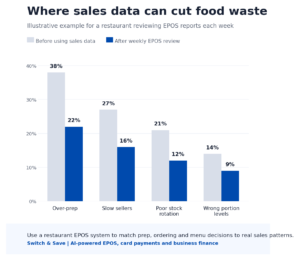
For a restaurant, this matters because food has a short shelf life. Fresh meat, dairy, seafood, salads, bread and prepared sauces can’t sit around forever. If you over-order or over-prep, your profit can end up in the bin.
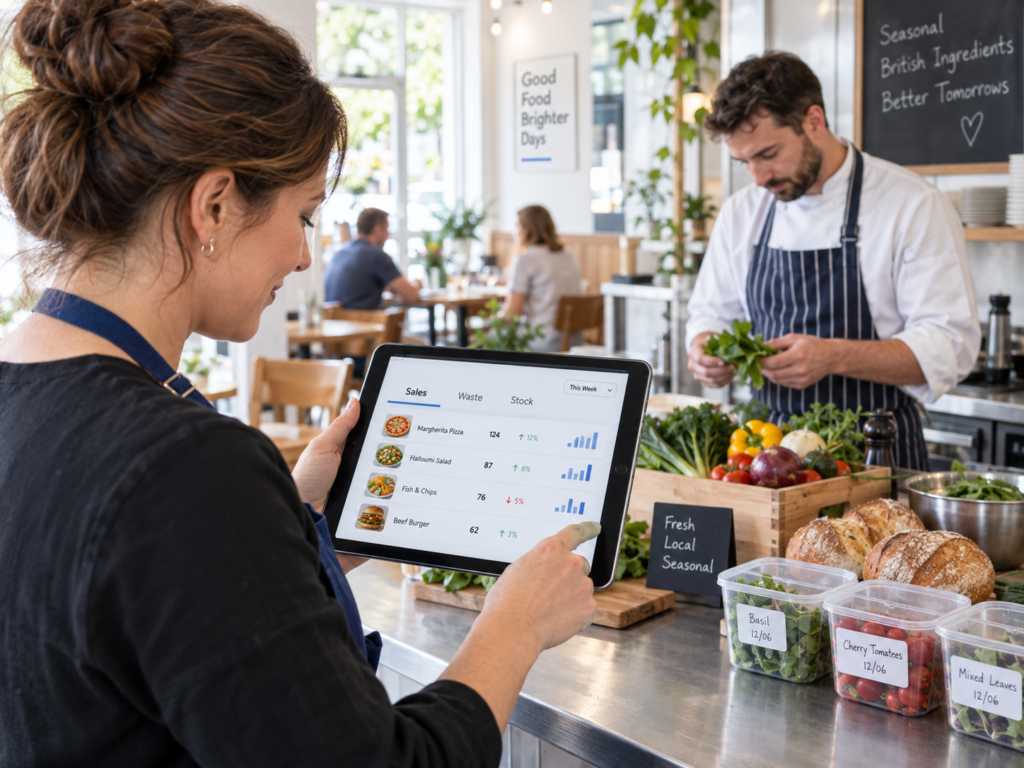
The good news is that you don’t need complicated spreadsheets to start. A modern restaurant EPOS system can show these patterns in simple reports.
In practice, your sales data can help you answer questions like:
- Which dishes sell most on weekdays?
- Which items only sell well at weekends?
- Which meals are popular at lunch but not dinner?
- Which ingredients are used across multiple dishes?
- Which menu items create high stock usage but low sales?
- Which seasonal items should be ordered in smaller amounts?
Once you know this, you can make better decisions.
How a Restaurant EPOS System Tracks Useful Sales Data
A restaurant EPOS system records each sale at the till, table, bar, counter or takeaway point. Every time an order is entered, the system stores useful details.
This can include:
- Menu item sold
- Quantity sold
- Time and date of sale
- Staff member
- Payment type
- Discounts used
- Refunds or voids
- Table or order type
- Takeaway, delivery or dine-in orders
If your EPOS also links with stock control, it can go further. It can reduce stock when items are sold and show how ingredients are being used.
For example, when a customer orders a chicken burger, your EPOS may reduce chicken fillet, bun, lettuce, sauce and packaging from stock. This depends on how your stock recipes are set up.
That sounds technical, but the plain-English version is simple: your till can help you understand what food is leaving your kitchen and what stock should be left.
Use Item-Level Sales Reports to Plan Prep
One of the easiest ways to reduce food waste is to look at item-level sales.
This means checking sales for each menu item, not just total revenue.
Total sales might tell you that Saturday was strong. But item-level sales tell you what actually sold.
For example, a café may find that:
- Full English breakfasts sell heavily on Saturday mornings
- Jacket potatoes sell mainly on weekdays
- Smoothies sell well in summer but drop in winter
- One vegan cake sells out while another barely moves
That’s useful because prep decisions happen at item level.
If you sell 40 portions of soup every weekday lunchtime, you can prep around that level. If you only sell six portions on a Monday, you don’t need the same batch size as Friday.
This doesn’t mean cutting everything to the bone. You still need room for walk-ins, weather changes and events. But sales data gives you a better starting point.
Compare Sales by Day, Time and Season
Restaurant demand changes throughout the week.
A takeaway may be busy on Friday and Saturday evenings. A café may be strongest during weekday mornings. A pub kitchen may sell more roasts on Sundays and more burgers during football nights.
Your EPOS reports can help you see these patterns.
Look at sales by:
- Day of the week
- Time of day
- Month or season
- Menu category
- Dine-in, takeaway and delivery
- Promotions or meal deals
For example, a restaurant in Birmingham may notice that pasta dishes sell well midweek, but steaks and sharing platters perform better at weekends. A seaside café may see ice cream and cold drinks rise during warm weather. A city-centre takeaway may sell more lunch boxes during office hours and more family meals in the evening.
Once you know this, you can adjust prep and ordering.
You’re not just asking, “What did we sell?”
You’re asking, “When do customers actually want this?”
That’s the difference.
Spot Slow-Moving Menu Items Before They Become Waste
Every restaurant has menu items that look fine on paper but don’t sell enough in real life.
The problem is that slow sellers can quietly increase waste.
Maybe they need special ingredients that aren’t used elsewhere. Maybe they take up fridge space. Maybe staff prep them daily, but customers rarely order them.
Sales data helps you find these items.
Start by looking for dishes that:
- Sell very few portions each week
- Need ingredients with a short shelf life
- Have regular discounts or refunds
- Are often removed from the specials board
- Use stock that isn’t shared with other dishes
You don’t always need to remove a slow seller straight away. Sometimes the fix is simple.
You could rename it, move it on the menu, train staff to recommend it, reduce prep levels or use the ingredient in another dish.
But if a dish keeps creating waste and doesn’t bring enough value, your data gives you a clear reason to change it.
Use Stock Alerts and Ingredient Tracking
Sales reports tell you what customers bought. Stock reports help show what ingredients you used, wasted or still have available.
When both work together, you get a clearer view of food waste.
A restaurant EPOS system with stock control can help you:
- Track stock levels
- Set low-stock alerts
- Monitor high-use ingredients
- Reduce over-ordering
- Check stock movement after sales
- Compare expected stock with actual stock
For example, if your system shows you should have 20 portions of chicken left but the kitchen only has 12, something needs checking.
It could be waste, over-portioning, incorrect prep, staff meals, missed orders or stock count errors.
This is where data becomes a management tool, not just a sales report.
You can also use stock alerts to avoid panic buying. If you know what’s running low and what’s moving slowly, you can order with more control.
Train Staff to Record Waste Properly
Sales data is powerful, but it becomes even more useful when waste is recorded properly.
If staff throw food away without recording it, you’ll only see part of the picture.
Keep waste tracking simple. Staff are busy, especially during service. If the process is too slow, it won’t happen.
You may want to record:
- Item wasted
- Quantity
- Reason for waste
- Date and time
- Staff member or shift
- Whether it was prep waste, spoilage or customer return
Reasons could include “expired”, “over-prepped”, “burnt”, “wrong order”, “customer return” or “damaged stock”.
This doesn’t need to become a blame exercise. In fact, it works better when it’s treated as a business improvement habit.
Let’s say, for example, if chips are being thrown away every evening, the answer may not be “staff are careless”. It may be that batches are cooked too early or portion estimates are too high after 9 pm.
A small UK takeaway notices that donner meat sales are strong on Fridays and Saturdays but lower on Mondays and Tuesdays.
Before using sales data, the team prepped similar amounts every day. This meant quieter days often ended with waste.
After checking EPOS reports, they reduce early-week prep and increase weekend prep slightly.
The menu stays the same. Customers still get served. But the kitchen stops preparing the same level of stock for very different days.
Or a restaurant runs weekly specials but doesn’t always check performance afterwards.
One fish special seems popular because staff remember a few strong nights. But the EPOS data shows total sales were low and the ingredient had a short shelf life.
Next time, the owner tests specials in smaller batches first. If the dish sells, they can prep more. If it doesn’t, they haven’t tied up too much stock.
That’s a practical way to make specials less risky.
How Menu Engineering Helps Reduce Waste
Menu engineering means reviewing menu items based on sales and profitability.
Plain English? It’s checking which dishes deserve more attention and which ones need changing.
When you combine sales data with food cost, you can group menu items into useful categories:
| Menu item type | What it means | What you can do |
|---|---|---|
| High sales, good margin | Strong performer | Keep visible and stocked properly |
| High sales, low margin | Popular but less profitable | Review portion size or supplier cost |
| Low sales, good margin | Hidden opportunity | Promote it or improve menu placement |
| Low sales, low margin | Weak performer | Change, simplify or remove it |
This helps reduce waste because poor performers often create hidden stock problems.
A dish may not look expensive until you count the unused ingredients, prep time and spoilage.
Don’t Forget Portion Control
Sales data can also show when portion sizes may be too large.
If customers often leave sides, sauces or garnishes, that may not appear directly in your EPOS report. But you may spot it through stock usage and waste logs.
For example, if rice usage is much higher than expected for the number of dishes sold, your portions may be inconsistent. If salad garnish is regularly thrown away, the garnish may not be valued by customers.
Reducing waste doesn’t always mean reducing value. Sometimes it means serving the right amount more consistently.
Kitchen scales, serving spoons, recipe cards and staff training can all help.
Review Promotions Carefully
Promotions can increase sales, but they can also create waste if they’re planned badly.
For example, a “two meals for one price” offer may increase orders, but it may also put pressure on prep, stock and kitchen timing. If the promotion uses fresh ingredients that don’t sell afterwards, waste can rise.
Use your EPOS reports to check:
- Did the promotion increase total sales?
- Which items sold more?
- Was stock left over?
- Did discounts reduce margins too much?
- Did certain days perform better than others?
This helps you run better offers next time.
Switch & Save supports hospitality businesses with EPOS tools that make it easier to track sales, card payments and business performance in one place. That means you can promote with more confidence instead of hoping the numbers work out.
How Switch & Save Helps Restaurants Reduce Costs
Switch & Save helps UK small businesses reduce costs with AI-powered EPOS systems, card payment solutions and business finance.
For restaurants, cafés, bars and takeaways, that means you can see more than just the final till total. You can look at what sold, when it sold, how customers paid and where your business may be losing money.
A good EPOS setup can help you:
- Understand your best-selling dishes
- Track menu performance
- Review busy and quiet periods
- Manage stock more clearly
- Reduce waste from over-ordering
- Improve reporting for owners and managers
- Connect payments with day-to-day sales
It’s not about drowning you in reports. It’s about giving you clear information you can use.
If you’re still relying on memory, paper notes or end-of-week guesses, you may be missing patterns that could save money.
Reducing restaurant food waste doesn’t need to start with a huge project.
Start with your sales data.
Look at what sells by item, day and time. Compare prep levels with real demand. Watch slow-moving dishes. Record waste properly. Review your stock before ordering again.
Small changes can make a real difference, especially when they happen every week.
A restaurant EPOS system gives you the information to make those decisions with more confidence. You’ll still use your experience, but you won’t have to rely on guesswork alone.
Switch & Save helps UK businesses reduce costs with AI-powered EPOS systems, card payment solutions and business finance.
FAQs
How can sales data reduce restaurant food waste?
Sales data helps you see what customers actually buy, when they buy it and which dishes sell slowly. This helps you prepare the right amount of food, order stock more carefully and avoid wasting ingredients on items that don’t move.
What reports should a restaurant check first?
Start with item sales, sales by day, sales by time, menu category performance and stock usage. These reports show your busiest periods, bestsellers and slow-moving dishes.
Can a restaurant EPOS system track ingredients?
Some restaurant EPOS systems can support ingredient or recipe-based stock tracking. This means stock can reduce when a dish is sold, giving you a clearer view of ingredient usage.
How often should restaurants review sales data?
A weekly review is a good starting point. Busy restaurants may also check daily reports, especially for fresh ingredients, specials and high-waste items.
Does reducing food waste mean cutting menu choice?
Not always. It usually means using better information. You may keep the same menu but prep different quantities, change ordering patterns or improve how ingredients are shared across dishes.
What causes most restaurant food waste?
Common causes include over-ordering, over-prepping, poor stock rotation, large portion sizes, slow-selling dishes and lack of waste tracking.
Is EPOS data useful for small cafés and takeaways?
Yes. Even small businesses can use EPOS data to spot bestsellers, quiet periods, waste patterns and stock issues. You don’t need a large chain to benefit from better information.