
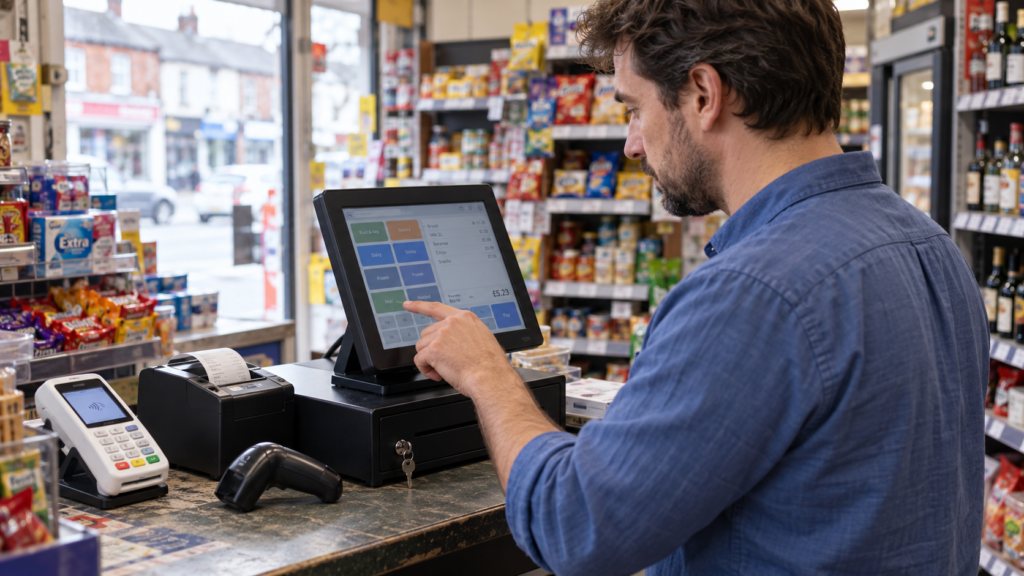
An EPOS system is an electronic till that uses software and hardware to record sales, calculate totals and manage everyday trading. Depending on the setup, it can also track stock, send orders to the kitchen, connect with your card machine and show how your business is performing.
For a UK shop, café, takeaway or restaurant, the right system brings useful information together. You can see what’s selling, check transactions and spend less time moving figures between separate records.
The best choice starts with how your business actually works. A grocery shop needs different tools from a busy bar, even if both take payments at the counter.
Key takeaways
| Area | What you need to know |
|---|---|
| Meaning | EPOS stands for electronic point of sale. |
| Main purpose | It records sales and can connect payments, stock, orders and reporting. |
| Retail priorities | Look for barcode scanning, product variations, promotions and stock control. |
| Hospitality priorities | Check order options, table management and kitchen communication. |
| Costs | Compare hardware, software, payments, installation, support and contract terms. |
| Buying decision | Ask for a demonstration using transactions from your own business. |
What is an EPOS system?
An EPOS system combines a device, such as a touchscreen terminal or tablet, with software that manages sales.
You might also connect a receipt printer, cash drawer, barcode scanner or card terminal. Restaurants may need kitchen printers or kitchen display screens, which show orders to the team preparing food.
The hardware is only part of the setup. EPOS software holds your products, prices, sales records and settings. It determines what staff can do at the till and what you can review afterwards.
POS means point of sale. EPOS means electronic point of sale. Providers often use these terms interchangeably, so check the actual features rather than relying on the label.
How does an EPOS system work?
A typical transaction follows a straightforward process:
- A member of staff scans a product or selects an item.
- The software calculates the total using your prices and configured tax settings.
- The customer pays by cash, card or another supported method.
- The sale is recorded, and a receipt can be issued.
- Connected stock records and reports update according to the system’s settings.
So, what actually happens when a customer taps their card?
With integrated payments, the EPOS sends the amount to a compatible card terminal. The payment result returns to the till, helping staff record the transaction without entering the total twice.
That connection can reduce typing mistakes. However, you still need to investigate failed payments, refunds and differences in daily totals. Our guide to reconciling card payments with daily sales explains the checks involved.
Which features does your business need?
Start with the jobs that currently take too long or cause mistakes. Those problems should guide your shortlist.
Stock control you can maintain
A stock-enabled EPOS system can reduce the recorded quantity when an item sells. It may also support deliveries, returns, adjustments and low-stock alerts.
For example, a grocery shop owner could check which soft drinks need reordering before placing a supplier order.
The figures still depend on accurate records. Damaged goods, missing items and unrecorded deliveries won’t correct themselves. Choose a system that makes adjustments and stock counts manageable.
Reports that answer useful questions
Sales reports should help you make decisions. Can you see your busiest hours? Which products sell regularly? How much has been refunded?
A café owner might compare breakfast sales across several weeks before changing opening hours. A mobile phone shop could review accessory sales separately from handsets.
Revenue alone doesn’t tell you profit. Margin reports also need reliable cost information, so ask how purchase costs are entered and updated.
Staff access and transaction records
Individual staff logins help you understand who processed a transaction. Permissions can restrict actions such as refunds, price changes and discounts.
For a bar with several people sharing a till, that creates a clearer record when something needs checking. Ask how quickly staff can sign in during a busy shift.
Integrations that fit your existing tools
An integration is a connection between systems that allows them to exchange information.
You might need links to accounting software, online ordering or an ecommerce shop. Check exactly what transfers, how often it updates and whether there’s an extra charge.
A connection that sends daily sales totals may work very differently from one that synchronises individual products and stock.
AI features with a clear purpose
AI-powered EPOS tools may help identify sales patterns or suggest actions based on business data. Their usefulness depends on what the software actually does and the quality of the information available.
Switch & Save offers AI-powered EPOS systems alongside integrated payment options. Ask for a demonstration of the insights available in your proposed package. Switch&Save
A useful demonstration should show what you’ll learn and how you could act on it.
Choosing EPOS for retail and hospitality
A good EPOS system for small business should suit the way your team serves customers.
Retail, grocery and mobile phone shops
A retail EPOS system should make finding and selling products straightforward. Barcode scanning, clear product searches and reliable pricing are sensible starting points.
A clothing shop may need separate stock quantities for sizes and colours. A convenience store might need multibuy promotions. A mobile phone shop may require serial-number tracking, but that’s a specialist feature you should confirm before buying.
Test real examples. Scan several products, apply a promotion and process a return.
Cafés, restaurants, takeaways and bars
A hospitality EPOS system needs to carry order details clearly from the customer to the people preparing them.
Imagine a café order for two coffees: one decaf and one with oat milk. Staff should be able to record those options clearly, with the correct prices.
Restaurants may need table transfers and split bills. Takeaways may need collection times and delivery details. Bars may need tabs.
For a closer look at these workflows, read our guide to what a hospitality point of sale system should include.
What does an EPOS system cost?
The total cost depends on the equipment, software, services and payment arrangement you choose. A headline hardware price rarely tells you everything.
Ask for an itemised quote covering:
- Hardware purchase or rental.
- Software subscriptions and additional devices.
- Installation, data import and staff training.
- Card processing charges and terminal costs.
- Support, optional features and cancellation terms.
Check whether prices include VAT and whether any discount depends on taking a particular payment contract.
Compare costs over the same period. A cheaper upfront package could cost more over its full term once subscriptions and extras are included.
You should also ask what happens if your needs change. Adding another till, opening a second shop or leaving the provider may involve further costs.
Our guide to choosing an EPOS system for a small business provides more questions to use when comparing options.
How to switch without disrupting trade
A successful change starts before the equipment arrives.
Prepare your product information
Check product names, prices, barcodes and categories. If you use stock control, arrange an opening stock count.
Hospitality businesses should review menu options, extras and kitchen routing. Confirm tax settings with your accountant where needed.
Test ordinary and awkward transactions
Run a normal sale, then test a refund, discount and cancelled order. Check receipts, cash drawer operation and card payments.
Also ask what happens when the internet drops. Some systems support limited offline trading, but card acceptance and synchronisation may have separate restrictions.
Train the team and plan the changeover
Give staff time to practise the actions they’ll use most. Include correcting mistakes, finding products and calling for help.
Choose a quieter changeover period where possible. Confirm support arrangements and how you’ll access your old records.
After launch, review the first few daily totals carefully. It’s easier to correct a setup issue early than untangle weeks of confusing reports.
Find the right setup with Switch & Save
The right EPOS system should solve clear problems in your working day. That could mean easier stock checks, clearer kitchen orders or fewer manual steps at checkout.
Tell Switch & Save how you trade, what equipment you already use and where your current setup slows you down. Ask to see those tasks demonstrated before choosing a package.
Switch & Save helps UK businesses reduce costs with AI-powered EPOS systems, card payment solutions and business finance.
Call 0333 0389707 to discuss your requirements.
Frequently asked questions
What does EPOS stand for?
EPOS stands for electronic point of sale. It describes an electronic till setup that uses software to record sales and, depending on its features, manage other business tasks.
Do I need an EPOS system if I already have a card machine?
A card machine accepts payments. An EPOS system records what you sell and can manage products, orders and reports. Whether you need both depends on how much information and control your business requires.
Can an EPOS system work without the internet?
Some systems allow certain functions offline. Others depend more heavily on an internet connection. Confirm which sales, payment and reporting functions remain available during an outage.
Can EPOS track stock automatically?
Stock-enabled software can update quantities as recorded sales happen. You’ll still need to record deliveries, waste, returns and adjustments, and carry out physical stock checks.
What’s the best EPOS system for a small business?
The best fit depends on your workflow, budget and support needs. Compare systems using your own products and transactions, then check the full costs and contract terms before deciding.



