Cloud POS gives you remote, real-time dashboards, easier control across multiple sites, lower upfront costs and stronger customer-facing tools like loyalty and click-and-collect, with offline buffering as the one operational trade-off to check carefully. Vendors such as Epos Now point to inventory accuracy and flexible pricing as the recurring wins for small businesses, and Switch-and-save builds its own systems around that same real-time, cloud-first model.
TL;DR:
- Most cloud POS systems improve inventory management through centralized, real-time stock visibility across multiple locations, reducing manual reconciliation.
- The main operational benefit is faster rollouts for new sites, which typically require only a terminal, network connection, and login, without extensive setup time.
- Cloud POS enhances customer experience with quicker transactions, integrated loyalty programs, and seamless omnichannel support, increasing average order value.
- Offline resilience relies on local caching to keep operations running during broadband outages, but card authorisation may still need a live internet connection.
- Cost savings mainly come from lower upfront hardware expenses, fewer IT support calls, and improved stock control, making the subscription model financially advantageous.
Table of Contents
- Cloud POS benefits at a glance
- Operational benefits: inventory, reporting and multi-site management
- Customer-facing benefits: faster checkout, loyalty and joined-up sales
- Technical, security and resilience considerations
- Cost and ROI: how cloud POS changes the numbers
- How to choose a cloud POS: a procurement checklist
- Why we back cloud-first for most UK retailers and hospitality venues
- Start with a Switch-and-save demo
- Sources
- FAQ
Cloud POS benefits at a glance
Before digging into the detail, it helps to see where the gains actually land. A cloud-based POS system moves your sales, stock and reporting off a single in-store box and onto a platform you can reach from anywhere, which changes almost every part of daily operations.
The main benefit categories look like this:
- Real-time data — sales, stock and staff performance visible the moment they happen, from any device.
- Inventory accuracy — centralised stock counts across every till and location.
- Faster checkout — quicker card authorisation and simpler queue management.
- Lower upfront cost — subscription pricing instead of expensive on-site servers.
- Scalability — new tills or sites added without a fresh hardware build.
- Integrations — direct links to ecommerce, accounting and delivery platforms.
- Security — vendor-managed updates and backups instead of DIY maintenance.
- Offline resilience — local caching that keeps registers running through a broadband drop.
Each of these gets its own detailed look in the sections below, starting with the operational side, because that’s usually where the biggest day-to-day time savings show up first.
Operational benefits: inventory, reporting and multi-site management
Centralised inventory is where cloud POS earns its keep fastest. Instead of counting stock shop by shop, you see live levels across every till from one screen, which cuts the manual reconciliation that eats into a manager’s evening. POSZEO’s guide to multi-site operators notes that real-time, multi-location dashboards let owners check sales and stock from any device, whether that’s a laptop at home or a phone on the shop floor.
That visibility changes how quickly you can act. A price change or a weekend promotion pushed from head office reaches every till within minutes rather than being emailed round and typed in by hand at each site. Stock transfers between branches become a few clicks instead of a phone call and a spreadsheet. End-of-day reconciliation, traditionally a slow manual job, happens automatically as sales sync to the cloud, and Business points to exactly this kind of reduced admin as one of the clearest time savings owners report.
Rolling out a new site is faster too. A cloud system typically needs a terminal, a network connection and a login, not a server install and a week of configuration. If you run more than one location, ask any vendor to show you a live example of adding a branch and pulling combined reporting across sites during your demo. It’s also worth checking exactly how your sales and stock data can be exported, and who owns it once your contract ends, because not every provider makes that as simple as it should be. Our own guide on the role of POS in inventory management goes deeper into how automated reordering reduces stockouts specifically.
Customer-facing benefits: faster checkout, loyalty and joined-up sales
Operational gains matter, but customers only notice one thing: whether the queue moves and whether the experience feels joined up. Cloud POS improves both.
- Quicker card flows — mobile and softPOS terminals cut queue times, particularly during peak service.
- Loyalty built in — points, personalised offers and digital receipts encourage repeat visits without a separate system.
- Omnichannel support — click-and-collect, order-ahead and a unified customer history across in-store and online.
- Higher average order value — personalised prompts at checkout (a suggested add-on, a loyalty reminder) tend to lift spend per visit.
POSZEO’s research highlights how cloud platforms simplify integrations with ecommerce and delivery systems through APIs, which is what makes order-ahead and click-and-collect workable without a second, separate till system running in parallel. A customer who books online, collects in-store and earns loyalty points on both should see one seamless record, not three disconnected transactions. That consistency is a large part of why Epos Now lists faster checkouts among the recurring benefits small businesses report after switching. Our article on how a POS system increases sales in retail covers specific promotion and loyalty examples in more depth.
Technical, security and resilience considerations
The honest caveat with any cloud POS is connectivity, so it deserves a straight answer rather than marketing gloss. Modern platforms handle this with local-resilience caching: the till keeps working during a broadband outage, storing transactions locally and syncing them once the connection returns, as Lifelong POS explains in its decision framework. That covers most short outages without a hitch.
What it does not always guarantee is uninterrupted card authorisation, since some card processing still needs a live connection. Ask any vendor specifically whether their terminals support 4G failover for payments, not just for the till software, because that’s the gap that actually stops a sale.
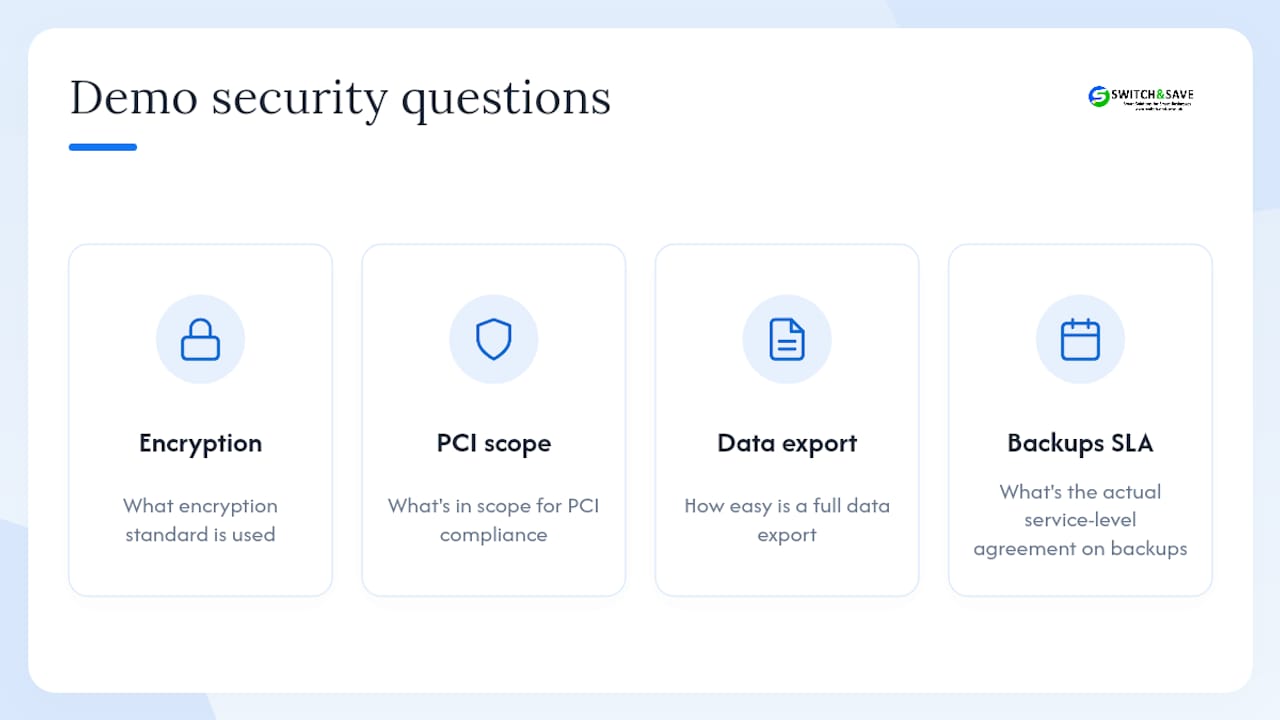
On security, the picture generally favours cloud over a small on-premise server. Automatic software updates and vendor-managed backups typically deliver stronger protection and faster disaster recovery than a single in-store machine that relies on someone remembering to back it up, according to the same Lifelong POS analysis. During any demo, ask direct questions: what encryption standard is used, what’s in scope for PCI compliance, how easy is a full data export, and what’s the actual service-level agreement on backups. A partner worth choosing should answer all four without hesitation. If your platform also touches marketplace selling, it’s worth understanding the compliance requirements around Amazon seller accounts as a separate but related consideration.
Cost and ROI: how cloud POS changes the numbers
The financial shift is straightforward: cloud POS trades a large upfront hardware and server cost for a smaller, predictable subscription. The US Chamber of Commerce’s CO explainer confirms this is one of the most consistent advantages cited across the sector, because there’s no server to buy, house or maintain.
Savings tend to show up in three places once you’re running:
- Fewer IT call-outs — updates happen automatically in the cloud rather than requiring an engineer visit.
- Fewer till errors — automated pricing and stock sync reduce the manual mistakes that cost money at the till.
- Better stock turn — accurate inventory means less overstocking and fewer missed sales from empty shelves.
To estimate payback, add up reduced stockout losses, hours saved on admin and any extra sales from faster checkout, then compare that total against the monthly subscription. Watch for the details that change the maths: subscription tiers, per-transaction fees on card processing, and paid add-ons that aren’t obvious until you’re mid-contract.
How to choose a cloud POS: a procurement checklist
Picking the right system comes down to matching features to how your business actually runs, not chasing the longest feature list. Use this checklist during demos:
- Operational fit — does it handle your inventory depth, multi-site workflows, or kitchen and queue management if you’re in hospitality?
- Resilience — what exactly happens during a broadband outage, and is cellular failover available for card payments?
- Integrations — does it connect cleanly to your ecommerce platform, accounting software and delivery aggregators?
- Cost transparency — what’s included in the bundle, and what sits behind a subscription tier or a per-transaction fee?
- Support and migration — is support UK-based, and what tools and training come with switching over?
Pro Tip: Ask the vendor for a live migration example from a business similar to yours, and a real data-export test during the demo. If they can’t show you both without prep time, that tells you something about how the switch will actually go.
Our guide to EPOS integration examples is a useful companion if you want to see specific integration setups before your demo.
Why we back cloud-first for most UK retailers and hospitality venues
Working with retail shops, cafés and restaurants across the UK, the pattern is consistent: cloud POS solves more real problems than it creates for the vast majority of businesses. The exceptions are genuinely rare, mainly sites with very poor or unreliable connectivity, or businesses bound by unusual on-premise data rules. For everyone else, the shift to real-time, remote control is worth the change. If you’re weighing it up, a proper demo and a straight conversation with UK-based support will tell you more than any spec sheet.
— Amir
Start with a Switch-and-save demo
Some EPOS providers build systems around a cloud dashboard for real-time sales and stock across every till, local-resilience buffering to maintain trading during broadband drops, integrated card payments, and integrations suited to ecommerce and accounting workflows. Support may be UK-based, with pricing clearly set out rather than buried in add-ons.

A demo will walk through your current setup, show what a migration actually looks like for a business your size, and give you a clear pricing outline before you commit to anything. If you run a retail shop, browse the retail EPOS system options, and if you’re in hospitality, the hospitality EPOS system bundle is built around table and kitchen workflows specifically. Either way, book a demo and ask the questions from the checklist above. It’s the fastest way to see whether the switch pays for itself in your business.
Sources
- Cloud POS vs On-Premise: A 2026 Decision Framework | Lifelong POS
- POS on the Cloud: Guide for retail, hospitality & multi-site operators | POSZEO
FAQ
What are the main benefits of cloud computing for a POS system?
The core gains are remote access to real-time data, automatic software updates, lower upfront hardware costs, easier scaling across sites, and vendor-managed security and backups instead of in-house IT maintenance.
What’s the difference between a cloud POS system and a traditional POS system?
A traditional, on-premise POS runs on a local server that you own and maintain on-site, while a cloud POS stores data remotely and can be accessed from any device, with updates and backups handled by the provider.
Does cloud POS work if the internet goes down?
Most modern cloud POS platforms use local-resilience caching that lets the till keep operating and buffering transactions during an outage, syncing everything once the connection is back, though it’s worth checking card authorisation failover separately.
Is cloud POS suitable for a small business?
Yes. Lower upfront costs, flexible subscription pricing and simpler inventory management make cloud POS a practical fit for small retail and hospitality businesses, which is a large part of why Switch-and-save builds its systems around the same model.
How do I choose the best cloud POS for my business?
Match the system to your operational needs first (inventory depth, multi-site or kitchen workflows), then check offline resilience, integration options, cost transparency and the quality of UK-based support before signing anything.