
Upgrading your payments process is defined as replacing or enhancing your existing transaction infrastructure with modern payment technologies and optimised workflows to reduce costs and improve approval rates. For UK retail and hospitality businesses, this means moving beyond legacy card terminals and fragmented systems towards integrated payment solutions that connect your point of sale, payment gateway, and back-office reporting. Platforms like Stripe, Gr4vy, and Solidgate have made it clear that payment system integration is no longer a back-office concern. It is a direct driver of revenue. A structured payment optimisation roadmap can reduce processing costs by 1–2% within 60–90 days without major infrastructure changes. That saving compounds quickly across thousands of weekly transactions.
What do you need before upgrading payments process?
Getting your foundations right before you start saves significant time and money later. Most failed upgrades trace back to poor preparation, not poor technology.
Baseline data first
You need a clear picture of your current payment performance before changing anything. Pull three to six months of transaction data and identify your average approval rate, your decline rate, and your total processing fees. Without this baseline, you cannot measure whether the upgrade has worked.
Technical requirements to check
Your new payment gateway will need to connect to your existing systems. Before you begin, confirm the following are in place:
- A merchant account with your acquiring bank
- API access or a compatible integration layer for your EPOS or POS system
- PCI DSS compliance status for your current setup
- A list of all payment methods you currently accept, including contactless, chip and PIN, and any digital wallets
Pro Tip: Ask your current processor for a full data export before you sign anything with a new provider. You will need this for token migration and for tax records.
Team and stakeholder alignment

Payment upgrades touch more people than most business owners expect. Your finance manager, IT contact, and front-of-house team all need to be briefed. Assign one person to own the project and set a clear timeline. In hospitality especially, a poorly timed upgrade during a busy service period can cause real disruption.
How to upgrade your payment systems step by step
A phased approach is the industry standard for payment process enhancement. Rushing a full cutover in one go is the single most common cause of downtime and lost revenue.
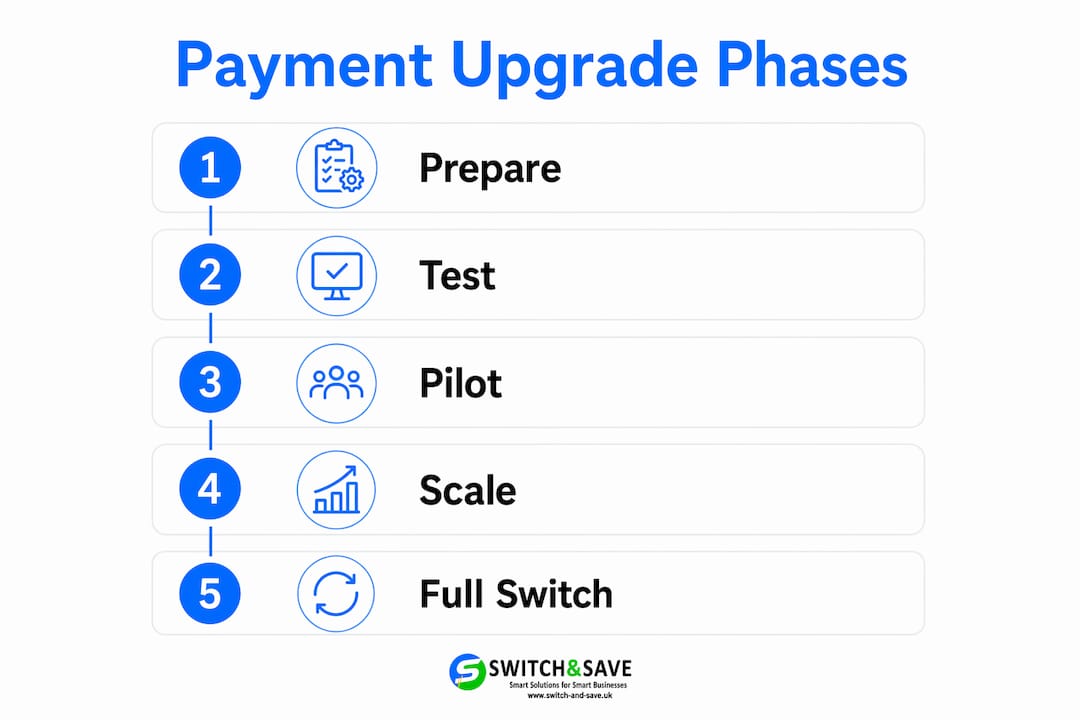
The six phases of a payment upgrade
-
Assessment. Audit your current system. Document every payment method, every integration, and every fee. Map where transactions fail and why.
-
Planning. Choose your new payment gateway or processor. Confirm integration timelines. Technical integration of new payment gateways typically takes 1–7 days depending on complexity. Build a project plan with clear go/no-go criteria.
-
Integration. Connect your new gateway to your EPOS or POS system. Test API calls in a sandbox environment before touching live data. This is where payment system integration either succeeds or creates problems downstream.
-
Data migration. Move stored card tokens carefully. Card-on-file token migration requires PCI-compliant key exchange, and many brand-specific tokens are not portable between providers. Plan for customers to re-enter card details if token transfer is not possible.
-
Testing and going live. Run parallel processing for a defined period. Send a small percentage of live traffic to the new processor while keeping your existing system active. This is the phased zero-downtime approach that Stripe identifies as best practice for switching processors.
-
Post-upgrade monitoring. Track approval rates, decline codes, and processing fees daily for the first 30 days. Set alerts for any unusual spike in failed transactions.
Pro Tip: Do not send 100% of traffic to your new processor on day one. Start at 10–20% and increase gradually as you confirm performance matches expectations.
Comparing upgrade approaches
| Approach | Best for | Risk level | Timeframe |
|---|---|---|---|
| Full cutover | Simple setups with no stored tokens | High | 1–3 days |
| Phased parallel run | Most retail and hospitality businesses | Low | 2–4 weeks |
| Payment orchestration | Multi-site or high-volume businesses | Low | 4–8 weeks |
| Gateway-only swap | Businesses keeping existing acquirer | Medium | 3–7 days |
Payment orchestration, as offered by platforms like Gr4vy, centralises control across multiple providers and enables continuous testing and iterative improvements. For multi-site retail or hospitality groups, this approach pays for itself quickly.
What are the common challenges when upgrading payment systems?
Every payment upgrade carries risk. Knowing where things go wrong puts you in a far stronger position to prevent it.
Downtime and lost sales
Service interruption during a payment upgrade is the most damaging outcome for any retail or hospitality business. A full cutover with no fallback means that if the new system fails, you cannot take payments at all. Phased transitions prevent this entirely. The industry treats phased traffic shifts as the gold standard precisely because the financial and reputational cost of downtime is so high.
Handling refunds and chargebacks after transition
Keeping your old payment processing account active for 30–60 days after transition is not optional. It is the only way to handle refunds, chargebacks, and late-settling transactions correctly.
Closing your old account on the day you go live with a new processor is a mistake that creates real financial and compliance problems. Transactions that settled before the switch may generate chargebacks weeks later. Your old processor needs to remain active to handle these properly.
Token migration complexity
Stored card data does not transfer automatically. If your business holds card-on-file details for repeat customers, such as hotel guests or loyalty scheme members, you face a genuine technical challenge. Many tokens are proprietary to the issuing processor and cannot be ported without a secure key exchange. Work with both your old and new processors to agree a migration plan before you give notice.
Common pitfalls to avoid:
- Giving termination notice to your old processor before completing data export
- Failing to test decline handling and refund flows in the new system
- Underestimating staff training time for new terminal or software interfaces
- Ignoring PCI compliance requirements during the transition window
- Not documenting the upgrade process for future audits
How does improving payment processing affect your bottom line?
The financial case for payment process enhancement is direct and measurable. Better payment systems do not just reduce friction at the till. They recover revenue that was previously lost silently.
Businesses that adopt payment optimisation tactics such as smart routing, local acquiring, and network tokenisation achieve double-digit percentage revenue recovery. That figure reflects transactions that previously declined and were never retried. For a busy restaurant or retail shop processing hundreds of transactions daily, even a modest improvement in approval rates adds up to a meaningful sum by year end.
Smart routing directs each transaction to the best-performing processor at that moment, balancing cost against approval likelihood. This is not a set-and-forget configuration. It requires ongoing monitoring and adjustment as issuer behaviour and processor performance shift.
Payment optimisation also improves approval rates, reduces fees, and enhances fraud management. These three outcomes work together. Higher approval rates mean more completed sales. Lower fees mean more margin retained per transaction. Better fraud controls mean fewer chargebacks eating into revenue.
Payment performance: before and after upgrade
| Metric | Before upgrade | After optimisation |
|---|---|---|
| Transaction approval rate | Baseline | Measurably higher |
| Processing fees | Standard rate | Reduced through routing |
| Failed transaction retries | Manual or none | Automated smart retry |
| Fraud chargeback rate | Unmanaged | Actively monitored |
| Multi-processor coverage | Single provider | Redundant failover active |
For practical guidance on reducing card machine fees in UK retail specifically, the cost savings from routing and fee negotiation alone often justify the upgrade project within the first quarter.
Key takeaways
A structured, phased approach to upgrading your payments process delivers measurable cost reductions, higher approval rates, and lower fraud exposure within 60–90 days.
| Point | Details |
|---|---|
| Prepare before you start | Gather baseline transaction data and confirm API readiness before contacting new providers. |
| Use a phased transition | Run old and new processors in parallel to eliminate downtime risk during the switch. |
| Keep old accounts active | Maintain your previous processor for 30–60 days to cover refunds and chargebacks. |
| Token migration needs planning | Card-on-file data requires PCI-compliant key exchange and may not transfer automatically. |
| Optimisation delivers real savings | Smart routing and multi-processor strategies recover lost revenue and reduce processing fees. |
Why I think most UK retailers underestimate this upgrade
Payment upgrades tend to get treated as IT projects. In my experience, that framing is the root cause of most failures. The businesses that get the most from modernising their transaction processes are the ones that treat it as a commercial decision first and a technical one second.
The retailers and hospitality operators I have seen handle this well all share one habit. They start with the numbers. They know their current approval rate, their average processing fee, and their monthly chargeback volume before they speak to a single new provider. That baseline gives them negotiating power and a clear benchmark to measure against post-upgrade.
The ones who struggle tend to chase the newest technology without a structured roadmap. A multi-provider payment strategy with smart routing is genuinely powerful, but only if you have the monitoring in place to act on what it tells you. Platforms like Gr4vy and Solidgate make orchestration accessible, but the discipline of ongoing review is what turns a good setup into a great one.
My honest advice: do not rush the transition. A phased parallel run feels slower, but it protects your revenue and your customer relationships during the most vulnerable window of the upgrade. The switching POS systems workflow matters as much as the technology you choose. Get the process right, and the results follow.
— Amir
How Switch-and-save supports your payment upgrade
If you are ready to move forward with improving your payment processing, Switch-and-save offers EPOS systems built specifically for UK retail and hospitality businesses. The systems combine integrated payment processing, real-time sales reporting, and cloud-based management in one package.

Switch-and-save’s retail EPOS solutions are designed to work with your existing setup and scale as your business grows. Whether you run a single shop or a multi-site hospitality group, the team offers free demos and UK-based support to guide you through every stage of the upgrade. Get in touch with Switch-and-save to find the right package for your business and take the next step with confidence.
FAQ
How long does a payment system upgrade take?
Technical integration of a new payment gateway typically takes 1–7 days. A full phased transition including testing and parallel running usually takes 2–4 weeks for most retail and hospitality businesses.
What is smart routing in payment processing?
Smart routing directs each transaction to the best-performing processor at that moment, balancing approval likelihood against processing cost. It increases transaction success rates and reduces fees over time.
Do I need to keep my old payment processor after switching?
Yes. Keep your old account active for 30–60 days after going live with a new processor. This covers refunds, chargebacks, and any late-settling transactions from before the switch.
What is payment orchestration and do I need it?
Payment orchestration centralises control across multiple payment providers and methods through a single platform. It suits multi-site businesses or high-volume operators who need redundancy, continuous testing, and detailed routing control.
How much can I save by upgrading my payments process?
A structured payment optimisation roadmap can reduce processing costs by 1–2% within 60–90 days. Businesses using smart routing and local acquiring tactics also report double-digit percentage revenue recovery from previously declined transactions.