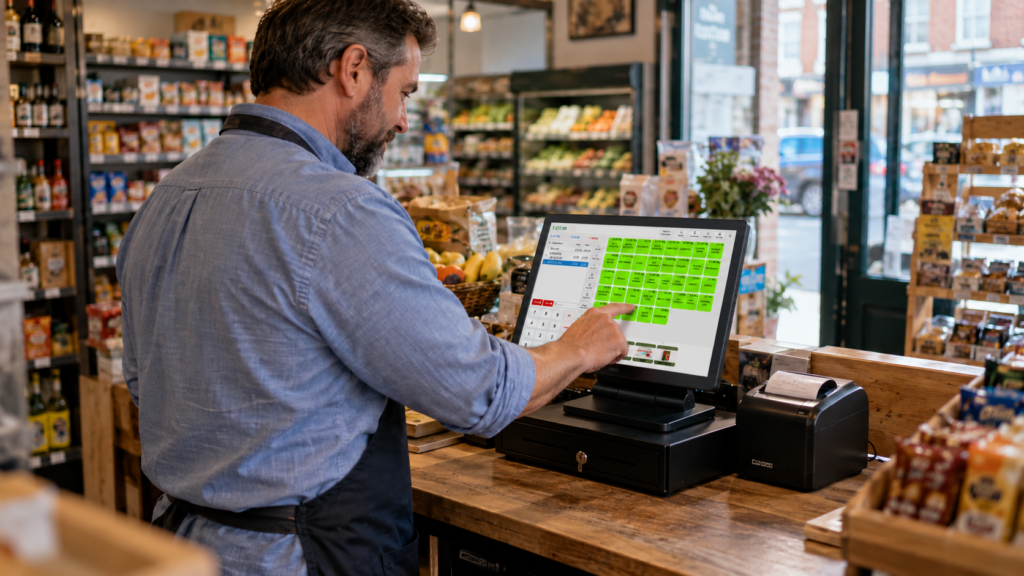
Switch & Save provides EPOS systems for UK retail and hospitality businesses, and its company profile on Trustpilot displayed a 4.7/5 TrustScore. Customer feedback includes experiences with EPOS usability, installation and support. The score covers the company’s services overall, rather than being a separate rating for its EPOS software. uk.trustpilot.com
For your business, that rating is a useful starting point. You’ll still want to see how the system handles your products, payments and busiest trading periods.
This guide explains what the feedback tells you, how Switch & Save EPOS could fit your working day, and what to check before choosing a package.
Key takeaways
| What to know | What it means for your business |
|---|---|
| Switch & Save’s company TrustScore was 4.7/5 | You have public customer feedback to consider alongside a demonstration |
| The rating covers the business overall | It shouldn’t be presented as a standalone EPOS product score |
| Reviews discuss usability, installation and support | Look for experiences that relate to your own business needs |
| Retail and hospitality need different workflows | Test your actual sales, orders and reporting requirements |
| The purchase price is only part of the cost | Check subscriptions, payment charges, extras and contract terms |
| A tailored demonstration helps you assess suitability | Bring real products or menu items and work through everyday tasks |
What does the 4.7/5 rating mean?
The 4.7/5 figure is the TrustScore shown on the Trustpilot profile for SWITCH&SAVE BUSINESS SERVICES LTD. It gives you an overview of customer feedback about the company.
That distinction matters because choosing EPOS involves more than software. Your experience can also depend on installation, training, payment setup and the help you receive afterwards.
A company rating can provide context across those areas. It doesn’t guarantee that every feature will suit your shop or that every customer will have the same experience.
Read individual reviews as well as the headline score. Check their dates, the services discussed and whether the reviewer describes a business similar to yours. Ratings and review counts can change, so visit the Switch & Save Trustpilot profile for the latest position.
What customers say about Switch & Save EPOS
Several public reviews describe experiences directly connected with EPOS. They provide useful questions to bring into your own buying process.
Everyday ease of use
Reviewers including Sunita and Starbelly describe the system as easy to use. Kowou Teteh’s review also mentions the interface and integrated payments. These are individual customer experiences, rather than independent performance tests.
For a small business, usability has practical value. Your team needs to find products, correct mistakes and complete a sale while customers are waiting.
During a demonstration, ask someone who’ll actually use the till to try it. Can they find a product without prompting? Can they remove an accidentally added item? Those small actions tell you more than watching a prepared sales presentation.
Installation and staff guidance
In a March 2026 review, Adam describes a positive installation experience and patient, step-by-step guidance on using the till.
That’s relevant if you’re replacing a familiar system. Even a straightforward till needs the right product list, prices and staff permissions before it’s ready for trading.
Ask what your installation includes. You’ll want to know who prepares the system, who checks the information and when staff training takes place.
Help when something goes wrong
Marian Basil’s review describes receiving an on-site visit after a wiring problem affected the EPOS system. This is one reported experience; it shouldn’t be treated as a promised response time for every business.
Use it as a reason to discuss support in detail. Confirm the available contact channels, support hours and arrangements for hardware faults before you order.
How EPOS can help your business
EPOS means electronic point of sale: a digital till system that records transactions and can connect sales with other business information.
Switch & Save advertises retail features including barcode scanning, stock management, sales reporting and a cloud dashboard, alongside integrated card payment options. Check which features and hardware are included in your chosen package.
Here’s how those capabilities could apply in ordinary UK businesses. The examples below are illustrative, rather than customer case studies.
Imagine you run a convenience shop selling drinks, snacks and household essentials. Staff need to scan products quickly, apply the right prices and find items with damaged barcodes.
A well-prepared product catalogue makes those tasks easier. Useful categories and clear descriptions also help when you review what’s selling.
Stock records need care, though. If a delivery arrives and nobody records it, the system’s figures won’t reflect what’s on your shelves. Agree a routine for deliveries, damaged goods and stock checks from the start.
A café order might include a large coffee, an extra shot and a sandwich with an ingredient removed. Each detail needs to reach the right person.
Switch & Save’s hospitality EPOS system lists options such as order modifiers, kitchen printing, kitchen displays and split payments. Ask which are included in your proposed setup. Restaurant & Takeaway POS UK
During your demonstration, enter a realistic order with changes. Check the kitchen ticket or screen afterwards. Is the information clear enough for your team to act on?
At a busy bar, customers may add another drink just before paying or ask to divide a bill.
Test those situations before buying. You’ll want to see how staff amend an order, split payment and correct an error without losing track of the transaction.
Also check permissions. Decide which actions staff can complete themselves and which should require a supervisor.
A mobile accessories shop may carry several cases that look almost identical but fit different phones.
Clear names, categories and product codes can help staff select the right item. Ask to see how your own catalogue would appear on screen.
If your business also offers repairs, demonstrate that workflow separately. A retail sale and a repair job can require different information, so confirm your requirements explicitly.
Integrated payments: reduce repeated entry
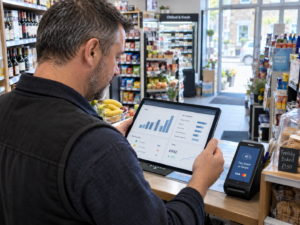
Integrated payments connect a compatible card terminal with the till, allowing transaction information to pass between them.
For example, when the basket totals £18.50, a supported integration can send that amount to the terminal instead of requiring staff to type it again. The precise process depends on the terminal, payment provider and configuration.
Explore Switch & Save’s card payment solutions, then ask to see a completed payment, a declined transaction and a refund using the proposed equipment.
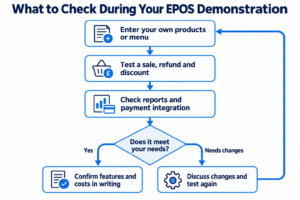
What to check during your demonstration
Bring a short list of things your current till makes difficult. That gives the demonstration a clear purpose.
Use your own products or menu
Choose five representative items. Include something straightforward, something with options and something that needs a discount.
For a takeaway, that might be a meal deal with a drink choice. For a grocery shop, it could be a barcode item and a manually selected bakery product.
Work through the complete sale. Check what appears on the receipt and where the transaction shows in reporting.
Test mistakes as well as successful sales
Every business needs to correct orders occasionally. Ask to see how the system handles:
- Removing an item before payment.
- Refunding a completed sale.
- Applying an authorised discount.
- Finding an earlier transaction.
- Responding to an internet interruption.
Ask which functions remain available offline. Card payment availability may have separate requirements, so confirm that too.
Make AI features concrete
Switch & Save describes its EPOS offering as AI-powered. Ask the team to demonstrate the specific AI functions available in your package.
What information does each feature use? What does it produce? How would you use the result when ordering stock or reviewing sales?
You should leave with a clear example of how the feature helps you make a decision.
Understanding the full cost
A useful EPOS quote should let you understand both the initial purchase and the ongoing commitment.
Start with the hardware. Confirm the terminal, printer, scanner, cash drawer and any additional screens you need. Then check software subscriptions, installation, training and optional services.
Payment processing deserves its own review. Ask about transaction charges, terminal fees, settlement arrangements and any minimum charges.
Compare the available EPOS bundles against a written quote for your business. Check whether prices include VAT and whether fees apply per device, location or account.
A simple comparison is:
First-year cost = setup and hardware + 12 months of recurring fees + estimated payment charges + agreed extras.
Use your actual trading figures when estimating payment costs. A café processing many small payments may have different requirements from a shop handling fewer, higher-value purchases.
Choosing your next step
Switch & Save’s 4.7/5 company rating gives you customer feedback to investigate. Your next step is to connect that feedback with your own requirements.
Write down three outcomes you want from a new till. Perhaps you need clearer kitchen orders, better stock visibility or less manual payment entry.
Then ask the team to demonstrate each one and confirm the proposed setup in writing. That gives you a practical basis for deciding whether the package fits your business.
Switch & Save helps UK businesses reduce costs with AI-powered EPOS systems, card payment solutions and business finance. Check your savings today.
Contact Switch & Save to discuss your requirements or arrange a demonstration. You can also call 0333 0389707.
Frequently asked questions
Is Switch & Save rated 4.7/5?
Switch & Save’s company Trustpilot profile displayed a 4.7/5 TrustScore. Check the live profile for updates.
Is 4.7/5 a separate rating for the EPOS system?
The verified figure applies to SWITCH&SAVE BUSINESS SERVICES LTD overall. Some reviews discuss EPOS, but the TrustScore isn’t a separate software product rating.
Can I use Switch & Save EPOS in a café or takeaway?
Switch & Save offers a hospitality EPOS option. Demonstrate your menu, order changes and kitchen workflow, then confirm the features included in your package.
Does Switch & Save EPOS support card payments?
Switch & Save offers integrated card payment options. Compatibility depends on your proposed terminal and payment arrangement, so confirm the exact setup before ordering.
What should I ask before switching EPOS?
Ask about data transfer, hardware compatibility, staff training, support, recurring fees and contract terms. Agree who checks the setup and how the changeover will work.