
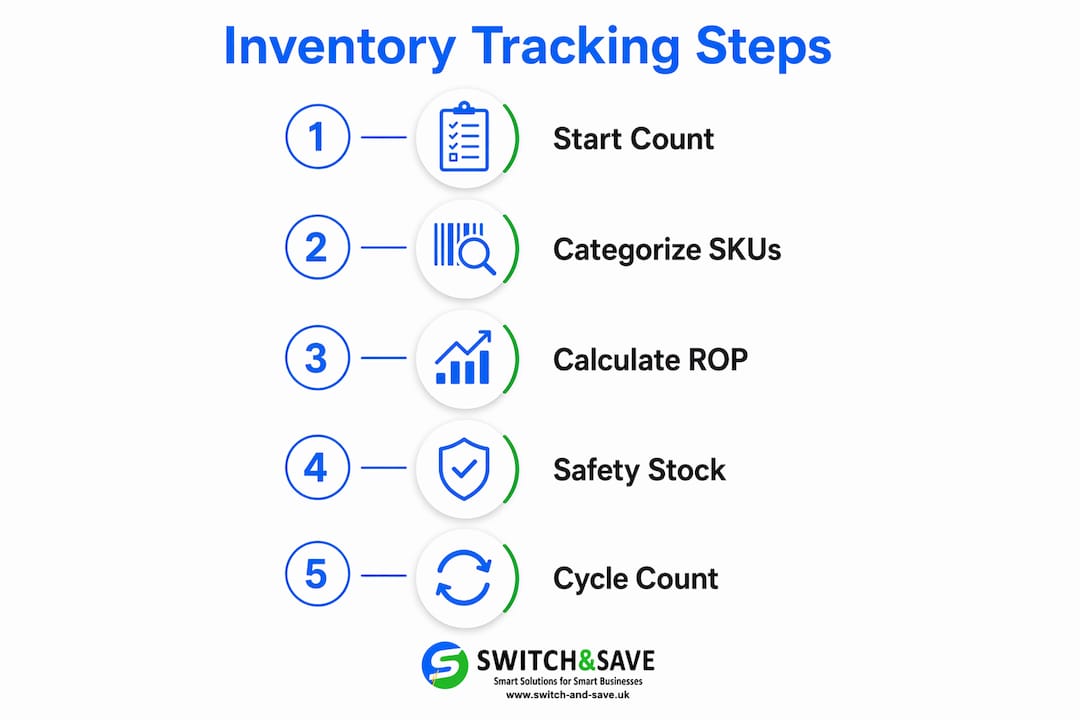
Step by step inventory tracking is the systematic process of recording and monitoring stock from receipt to sale or usage by following clear, repeatable procedures tailored for small retail and hospitality businesses. The industry term for this discipline is inventory management, and combining both terms gives you the full picture: structured control methods applied in a logical sequence. Done correctly, this approach prevents stockouts, reduces shrinkage, and gives you the real-time visibility you need to make confident buying decisions. This guide covers every stage, from your first physical count through ABC categorisation, reorder point formulas, cycle counting, and audit trail maintenance.
What do you need before starting step by step inventory tracking?
Before you track a single item, you need an accurate baseline. A complete physical count is the non-negotiable starting point. Manual counts typically take 1–2 days for inventories under 500 SKUs, or up to a week when counted in sections for larger catalogues. Every reorder point, report, and forecast you build later depends on this number being correct.
Once your baseline is confirmed, choose your tracking method:
- Spreadsheets work well for businesses with fewer than 200–300 SKUs and limited transaction volume.
- Dedicated inventory software or an EPOS system suits businesses with higher SKU counts, multiple locations, or hospitality operations with rapid stock turnover.
For spreadsheet users, three linked sheets are the minimum viable structure: an inventory list, a sales orders sheet, and a purchase orders sheet. Use SUMIF formulas to update the master inventory list automatically when sales or purchases are logged. This keeps your records clean and creates a natural audit trail from day one.
| Tracking Method | Best For | Key Limitation |
|---|---|---|
| Excel / Google Sheets | Under 300 SKUs, low transaction volume | Manual entry errors, no real-time sync |
| Standalone inventory software | Mid-size retail, single location | May lack POS integration |
| EPOS with inventory module | Retail and hospitality, multi-location | Higher upfront cost |
Pro Tip: Before buying any software, map your counting, reordering, and reporting processes on paper first. Choosing technology before defining your process is the most common reason small business inventory projects fail.
For hardware, a barcode scanner speeds up both receiving and counting significantly. Food retailers and meat shops benefit from EPOS-integrated weighing scales that log weight-based sales directly into stock records.

How do you set up skus and ABC categorisation?
A well-designed SKU structure is the backbone of any inventory management guide. Each SKU should encode meaningful information: product type, variant, and supplier code. For example, a hospitality business might use a format like BEER-LAGER-330ML-SUP01. This makes filtering, sorting, and reporting far faster than using supplier codes or random numbers.
Once SKUs are in place, apply ABC analysis to prioritise your counting and reordering effort:
- A items represent the top 10%–20% of SKUs by value and account for 70%–80% of total inventory value. Count these most frequently and set tighter reorder controls.
- B items cover the next 30% of SKUs and represent roughly 15%–25% of value. These need regular attention but not daily scrutiny.
- C items make up the remaining 50% of SKUs and contribute only around 5% of total value. Count these least often and keep simpler reorder rules.
This tiered approach means you spend 80% of your effort on the 20% of stock that actually drives your business.
| Category | SKU Share | Value Share | Count Frequency |
|---|---|---|---|
| A | 10%–20% | 70%–80% | Monthly |
| B | 30% | 15%–25% | Quarterly |
| C | 50% | ~5% | Semi-annually |
Pro Tip: Run your ABC analysis on sales velocity as well as value. A low-cost item that sells 200 units a day can cause just as much disruption as a high-value item if it runs out.
Retail analytics tools can deepen this analysis. Data-driven merchandising approaches show how categorising stock by performance data leads to measurably better purchasing decisions and reduced dead stock.
How do you calculate reorder points and safety stock?
The reorder point (ROP) formula is the engine of any stepwise inventory control system. The calculation is straightforward:
ROP = (Average Daily Demand × Lead Time) + Safety Stock
Here is a practical walkthrough for a pub stocking a popular lager:
- Calculate average daily demand: you sell 24 cases per day on average.
- Identify supplier lead time: your supplier delivers in 3 days.
- Multiply: 24 × 3 = 72 cases needed during the lead time.
- Add safety stock (see below): assume 12 cases as a buffer.
- ROP = 72 + 12 = 84 cases. Place a new order when stock falls to 84 cases.
Safety stock is the buffer that protects you when demand spikes or a delivery runs late. The reorder point formula separates expected demand from this safety buffer deliberately, so you can adjust each independently. A simple starting rule is to hold 20%–30% of your lead time demand as safety stock. For businesses with highly variable demand, a statistically calculated safety stock using a Z-score for your target service level gives a more accurate buffer.
| Input | Example Value |
|---|---|
| Average daily demand | 24 cases |
| Supplier lead time | 3 days |
| Lead time demand | 72 cases |
| Safety stock | 12 cases |
| Reorder point | 84 cases |
Common pitfalls to avoid:
- Using peak-season demand figures as your year-round average. This leads to chronic overstock in quieter periods.
- Forgetting to update lead times when you change supplier or delivery terms.
- Setting the same safety stock percentage for A, B, and C items. A items warrant a larger buffer.
Pro Tip: Set a calendar reminder to review your reorder points every quarter. Demand patterns shift, and an ROP that was accurate in January may leave you short in December.
Why cycle counting beats the annual stocktake
Cycle counting replaces the disruptive annual physical inventory with scheduled, smaller counts spread across the year. Rather than closing your shop for a full day, you count a defined subset of SKUs on a rolling basis. A items are counted monthly, B items quarterly, and C items semi-annually. This keeps accuracy high without grinding operations to a halt.
A mid-size retail catalogue might generate around 80 line counts per day under this model. That is a manageable task for one member of staff during a quiet period, with slack built in for busy days or unexpected disruptions.
Here is how to run a cycle count properly:
- Use blind counts. The counter should not see the system quantity before counting. This prevents unconscious anchoring to the recorded figure.
- Set a variance threshold. Any count that differs from the system by more than your threshold (for example, 2% for A items) triggers a recount by a different staff member.
- Tag reason codes. Variances exceeding thresholds should be documented with a reason code before any adjustment is posted. Common codes include “receiving error,” “theft,” or “damaged and not recorded.”
- Manage cut-off timing carefully. Transaction cut-off during a count is one of the most overlooked sources of variance. Freeze stock movements for the items being counted, or clearly record any movements that occur mid-count.
Pro Tip: Rotate who performs each count. When the same person always counts the same section, errors and even deliberate manipulation become harder to detect.
For businesses using EPOS systems, the role of EPOS in reducing human errors during counts is significant. Systems that support mobile device scanning allow staff to count directly into the software, eliminating the transcription step where most manual errors occur.
How do audit trails and governance controls protect your business?
An audit trail is not just a compliance requirement. It is your first line of defence against shrinkage, supplier disputes, and accounting errors. Every inventory transaction should be logged with the following fields:
- Date and time of the transaction
- Transaction type (receipt, sale, adjustment, write-off)
- Quantity and resulting balance
- Reference document (purchase order number, sales receipt ID)
- User ID of the person who made the entry
- Reason code for adjustments
Inventory logs with immutable IDs, timestamps, and user identifiers enable you to investigate discrepancies and shrink incidents with confidence. Even a spreadsheet can meet this standard if you maintain structural discipline and never overwrite historical rows.
Governance controls matter just as much as the log itself. Segregation of duties, reconciliation, and exception reporting are the three pillars of credible inventory control, according to Deloitte. In practice for a small business, this means the person who receives stock should not also be the person who approves adjustments, and someone outside the daily counting process should review the exception report each week.
Automating inventory controls shifts risk from manual entry errors to configuration and process risks. This means your EPOS or software settings need the same level of care as your manual procedures.
Key takeaways
Effective inventory tracking requires a correct baseline, a structured categorisation system, and disciplined ongoing processes rather than technology alone.
| Point | Details |
|---|---|
| Start with a physical count | An accurate baseline is the foundation; every reorder point and report depends on it. |
| Apply ABC categorisation | Focus your tightest controls on the 10%–20% of SKUs that drive 70%–80% of your stock value. |
| Use the ROP formula | Calculate reorder points using average daily demand, lead time, and a safety stock buffer. |
| Replace stocktakes with cycle counts | Spread counting across the year by category to maintain accuracy without disrupting trade. |
| Maintain a full audit trail | Log every transaction with timestamps, user IDs, and reason codes to protect against shrinkage and errors. |
The uncomfortable truth about inventory tracking in small businesses
Most small business owners I speak with assume their inventory problem is a technology problem. They think a new system will fix everything. In my experience, that belief is the single biggest reason inventory projects stall or fail.
The real issue is almost always process design. I have seen businesses spend thousands on EPOS software only to discover that their receiving process has no cut-off procedure, their staff are overwriting historical records, and nobody owns the weekly exception report. The software captures the chaos perfectly. It just does not fix it.
My honest advice: spend a week mapping your current process before you look at a single product demo. Write down who counts what, when, and what happens when a variance appears. You will find gaps you did not know existed. Those gaps are what you are actually solving for.
The other thing I would push back on is the idea that you need to get everything right from day one. Start with your A items only. Get your counting cadence and audit trail working for those 20% of SKUs. Once that is solid, extend to B items. Trying to implement a perfect system across your entire catalogue in one go is how you end up with a half-finished project that nobody trusts.
Small errors do add up over time, but so does small, consistent progress. A business that counts its top 50 SKUs accurately every month is in a far stronger position than one that attempts a full annual stocktake and gets it wrong.
— Amir
How Switch-and-save helps you put this into practice
If you have worked through this guide and you are ready to move beyond spreadsheets, Switch-and-save has EPOS solutions built specifically for UK retail and hospitality businesses.

Switch-and-save EPOS systems include real-time inventory tracking, automatic reorder alerts, and cloud-based reporting you can access from anywhere. The SSPOS software supports barcode scanning, ABC-style stock categorisation, and full transaction logs with user IDs, so your audit trail is built in from the start. For food retailers, EPOS-integrated weighing scales connect weight-based sales directly to your stock records. Explore the full range and request a free demo today.
FAQ
What is step by step inventory tracking?
Step by step inventory tracking is the process of managing stock through a defined sequence of stages: physical count, SKU setup, categorisation, reorder point calculation, cycle counting, and audit trail maintenance. The goal is accurate, continuous stock visibility without relying on guesswork.
How often should i count my inventory?
Count frequency depends on item category. A items (your highest-value stock) should be counted monthly, B items quarterly, and C items semi-annually. This cycle counting approach, as used in retail inventory management, spreads workload evenly and keeps accuracy high year-round.
What is the reorder point formula?
The reorder point formula is: ROP = (Average Daily Demand × Lead Time) + Safety Stock. It tells you the exact stock level at which you should place a new order to avoid running out before the next delivery arrives.
Do i need software to track inventory accurately?
No. A well-structured spreadsheet with three linked sheets (inventory list, sales orders, and purchase orders) using SUMIF formulas can maintain accurate records for businesses under 300 SKUs. Software becomes necessary as transaction volume, SKU count, or location complexity grows.
What should an inventory log always include?
Every inventory log entry should include the date and time, transaction type, quantity, resulting balance, a reference document number, the user ID of the person making the entry, and a reason code for any adjustment. These fields make discrepancies traceable and support any investigation into shrinkage or errors.