
POS offline mode lets your till keep recording sales when the internet goes down, then sends everything to the cloud once the connection returns. Card payments are the catch. Whether they work offline depends on your payment provider, not just your EPOS, and any card sale taken offline is a sale you carry the risk on. This guide explains what keeps working, what doesn’t, how to set limits, and how to write a downtime plan your team can follow on a busy Saturday in Birmingham or Coventry.
TL;DR
- Offline mode usually means your till keeps working locally (ringing up items, printing receipts, sending orders to the kitchen) and syncs later. It is not the same as an approved card payment.
- Offline card payments are normally “store and forward”: the terminal saves the sale and submits it when it reconnects. If the bank declines it at that point, you have already handed over the goods or the meal.
- Offline card acceptance has to be supported and switched on by your acquirer or terminal provider. It is not a universal setting.
- Set your own limits, write a one-page outage procedure and run a five-minute staff drill. The setting alone won’t protect you.
- Ask any EPOS supplier, including us, exactly what runs offline before you sign.
Table of Contents
- What POS offline mode actually means
- What usually keeps working, and what usually doesn’t
- How offline card payments work, and where the risk sits
- How to switch it on (and why you may not find a button)
- The part most guides skip: your staff
- What this looks like for a Birmingham or Coventry business
- Our view on offline mode
- Questions to ask any EPOS supplier before you buy
- Where our EPOS bundles fit
- FAQ
- Sources
What POS offline mode actually means
People use the phrase for two different things, and mixing them up causes most of the surprises.
1. The EPOS software working offline. The till keeps a local copy of your menu, products and prices. Staff can still add items, take cash, print receipts and close the day. Sales are saved on the device and uploaded when the connection is back. Reports on your cloud dashboard will lag until that sync happens.
2. The card terminal taking payments offline. This is a separate question. A card payment normally needs a live conversation with the card issuer. When the terminal can’t reach it, it can either refuse the payment or, if it is set up to, accept it and store it for later.
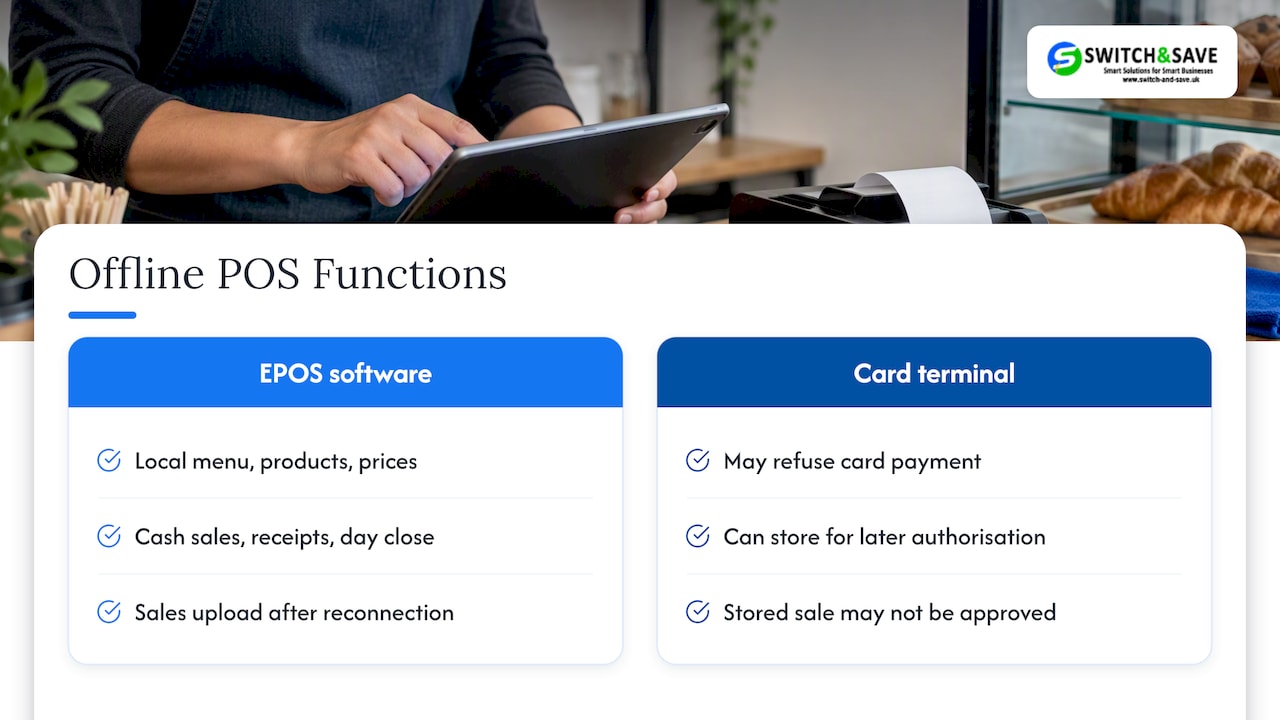
Worldpay’s UK documentation describes this second case as an offline transaction accepted while the terminal cannot reach the online gateway, then stored for later authorisation. It goes by several names: deferred authorisation, store-and-forward, or offline stand-in. Same idea, different labels on different brochures.
The key point from that documentation is that an offline sale is not proof the issuer has approved the payment. That is why the rest of this guide spends so long on risk.
What usually keeps working, and what usually doesn’t
The exact list changes between systems, so treat this as a checklist of questions rather than a promise.
| Task | Typically works offline? | What to check |
|---|---|---|
| Ringing up sales and taking cash | Usually yes | Does the till keep a local copy of products and prices? |
| Printing receipts | Usually yes | Is the printer connected locally, not via the cloud? |
| Sending orders to kitchen printers or screens | Often yes, on the same local network | Does it rely on your router being up, or on the internet? |
| Card payments | Only if your provider supports and enables it | Limits, rules and who carries the risk |
| Online orders and delivery apps | No | These need the internet by definition |
| Live stock across several shops | Delayed | Counts update after the sync |
| Remote dashboard and reports | Delayed | Figures catch up on reconnection |
| Gift cards, loyalty, refunds to card | Often limited | Ask for the specific list |
A useful test: unplug your router during a quiet hour and ring up a cash sale, a card sale and a refund. You will learn more in ten minutes than from any spec sheet.
How offline card payments work, and where the risk sits
When a terminal takes a card payment offline, it checks what it can locally: whether the card chip looks valid, whether the amount is under the limits you’ve chosen. It then stores the transaction. When the connection returns, it submits the stored payments for authorisation.
That gap is the problem. The payment can fail on upload because:
- the issuer declines it
- the card has expired
- the cardholder has no funds
- the transaction is later disputed
Worldpay’s guidance is that offline transactions are accepted at the merchant’s own risk. The Bank of England reaches a similar conclusion in its October 2025 design note on offline payments. It says that without a specific risk-sharing arrangement, the merchant bears the risk of a failed deferred payment, and that safe use needs clear rules, retry processes, transaction limits and fraud controls. That note is about a possible digital pound, but the principle applies to any deferred payment: you need to choose to accept the risk, with limits.
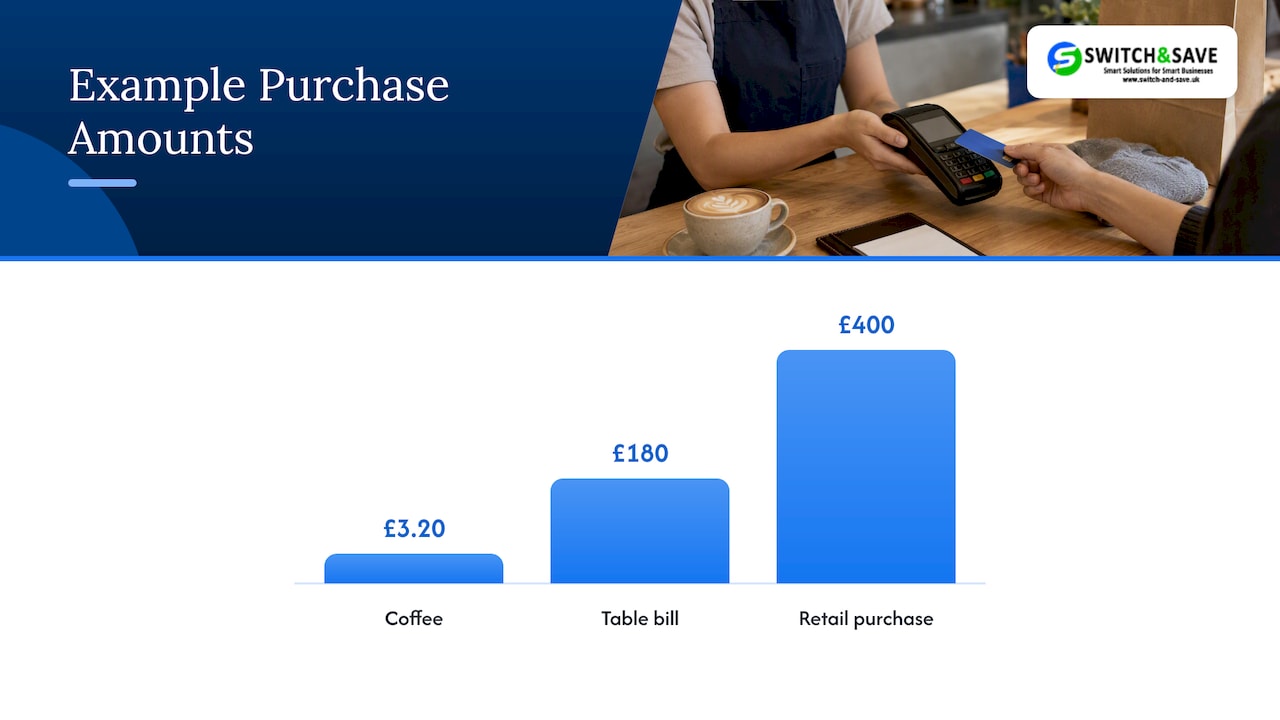
For a coffee at £3.20 the exposure is trivial. For a £180 table bill or a £400 retail purchase it is not. Think of it this way: small errors add up, and offline mode is where they hide.
Provider limits differ
There is no single UK rule that sets the limits. Worldpay, for instance, documents a configurable stored-transaction limit from 5 to 1,500 transactions, with a default of 20 for the implementation it describes. Your own provider may use entirely different controls. So don’t assume the numbers you read online apply to your terminal. Ask your provider for:
- the maximum value of a single offline sale
- the maximum number or total value of stored sales
- how long the terminal can stay offline before it stops accepting
- whether contactless and chip-and-PIN are treated differently
- what happens to a stored sale that fails on upload
How to switch it on (and why you may not find a button)
Many owners search for how to enable offline mode and find nothing in their EPOS settings. That is normal. Offline card acceptance has to be supported and activated by your payment acquirer or terminal provider. It is not a feature every EPOS can simply toggle.
Here is the order to work in:
- Ask your card provider whether deferred authorisation or store-and-forward is available on your terminals, and whether it is off by default.
- Choose your limits based on what you could afford to lose in a bad hour, not on the highest setting offered. Worldpay’s guidance tells merchants to pick risk-based floor limits for contact and contactless, decide whether voice authorisation is allowed, set stored-transaction limits and monitor the queue.
- Decide on voice authorisation. This is when staff phone the authorisation centre to approve a card sale. It adds safety, but it only works if people follow the procedure properly, which is why the next sections matter.
- Test it. Disconnect, take a test sale, reconnect, and watch the sale clear.
- Write down who checks the queue after an outage, and when.
If you are comparing systems, our payment terminal guide for UK retail and hospitality covers the terminal side in more depth, and our piece on offline credit card processing goes further on the card mechanics.
The part most guides skip: your staff
Worldpay’s implementation guidance flags a human factor that basic explanations miss: staff may not follow voice-authorisation steps correctly. In a busy restaurant, takeaway or shop, that’s easy to believe. The queue is long, the screen says “offline”, and someone presses through.
So the terminal setting is only half the job. The other half is a written procedure and a short drill.
A one-page outage procedure
Print this, laminate it and put it by the till. Adjust it to your limits.
- Check the basics first. Router lights, cable, power. Many “outages” are a loose lead. Restart the router once.
- Tell the shift lead. One person owns the decision, so staff don’t improvise.
- Keep trading on the local till. Ring sales as normal. Don’t switch to paper unless the till itself has failed.
- Card sales under your limit: accept, but only chip and PIN or contactless within the agreed value. Over the limit: ask for cash, or another payment method, or follow the voice authorisation steps if your provider allows it.
- Never re-run a failed card sale without checking the terminal’s queue first. Double charges are a quick way to lose a customer.
- Note the time the outage started and ended. You will need it when reconciling.
- After reconnection, check that the stored sales cleared. Chase any that failed the same day, while the customer is still easy to find.
A five-minute drill
Once a month, at a quiet time, run through it. Unplug the router. Have a team member take a test sale and tell you what they would do for a £15 sale and a £150 sale. If they hesitate, the sheet needs to be clearer. If you use agency or seasonal staff, our guide on training temporary staff on a POS system helps you get them up to speed quickly.
What this looks like for a Birmingham or Coventry business
The risk is different for each kind of outlet, so the settings should be too.
- A busy Birmingham café or takeaway: lots of low-value sales, queues that build fast. A modest per-sale limit, a clear “cash or card under the limit” rule and a quick sync check at close suit this well.
- A Coventry restaurant: larger bills and table service. Kitchen orders must keep flowing during an outage, so ask whether your order printers work over the local network. Keep a lower offline limit for big bills and have the voice authorisation steps to hand.
- A retail shop with higher-value items: a failed £300 sale hurts. Consider a tight limit and a habit of asking for another payment method on larger baskets during an outage.
- Multi-store owners: each shop has its own connection and its own offline risk. Standardise the procedure across sites, and don’t rely on the dashboard to tell you what happened until everything has synced.
Whatever you run, a second connection is cheap insurance. A mobile data backup for the router, or a portable card terminal with its own mobile signal, covers many outages without needing offline acceptance at all. See how to take card payments without a card machine for other fallback options, and how to stop POS downtime for a ten-step prevention routine.
Our view on offline mode
We talk to shop and restaurant owners about this a lot, and the same mistake comes up: they treat offline mode as a safety net that will always catch them. It is a controlled continuity feature. It keeps the till moving, and it hands you a bit of risk in return.
Our advice is simple. Decide in advance how much risk you are happy to carry. Set the limits low to start and raise them only if your upload failures stay near zero. Put the procedure on paper. And don’t buy any EPOS or card terminal until the supplier tells you in plain words what runs offline and what doesn’t. That includes us. If an answer is vague, press for the specifics.
We also think the cheapest fix is often the boring one: a decent router, a backup connection and a team that knows what to do. The software features come after that.
— Amir
Questions to ask any EPOS supplier before you buy
Use these as a shortlist. A good supplier answers each in a sentence.
- Which parts of the till run with no internet, and which stop?
- Does the card terminal support store-and-forward, and is it off by default?
- Who sets the limits, you or the provider, and can I change them?
- What happens to the sales saved on the till if the device itself fails?
- How do multiple tills in one shop talk to each other during an outage?
- Is there UK-based support I can phone during an outage?
- Are there any monthly fees tied to offline features?
Also ask how data on the device is protected. Sales records and card-related data stored on a till should be handled under the PCI Security Standards Council’s rules, and your provider should be able to tell you how their terminals meet them.
Where our EPOS bundles fit
If you’re replacing a till or setting one up from scratch, we sell EPOS systems and card payment solutions for UK retail and hospitality, with UK-based support. Our Hospitality EPOS Bundle is £549 one-off, with AI-powered cloud software at £20 per month. The Integrated Payments Bundle, an all-in-one EPOS and card terminal, has an EPOS software subscription at £30 per month. For shops, see our retail EPOS bundles or browse our card machines.
👉 Not sure which fits? Tell us about your set-up and your worst outage story, and we’ll talk through what to ask your provider about offline settings.
FAQ
What does “offline POS transaction” mean?
It is a card sale accepted while the terminal cannot reach the payment gateway. The terminal stores it and submits it for authorisation once it reconnects, which is why it is also called store-and-forward or deferred authorisation. Until it clears, the payment is not confirmed as approved by the card issuer.
Can my EPOS take card payments with no internet?
Sometimes. The till can usually keep recording sales, but card acceptance offline depends on your acquirer or terminal provider supporting and enabling it. Ask them directly, and ask for the limits in writing.
What are the main disadvantages of offline mode?
Financial risk is the big one. A stored sale can fail on upload, leaving you without payment after the customer has gone. Other drawbacks are delayed stock and sales figures, and the chance that staff skip the right steps when it is busy.
What should a POS downtime plan include?
A named person in charge, clear card limits for an outage, a cash and alternative payment fallback, a note of start and end times and a post-outage check that every stored sale cleared. Put it on one page by the till and practise it monthly.
Sources
- Deferred Authorisation, Worldpay Developer Hub
- Design note: Offline payments, Bank of England
- PCI Security Standards Council: Standards