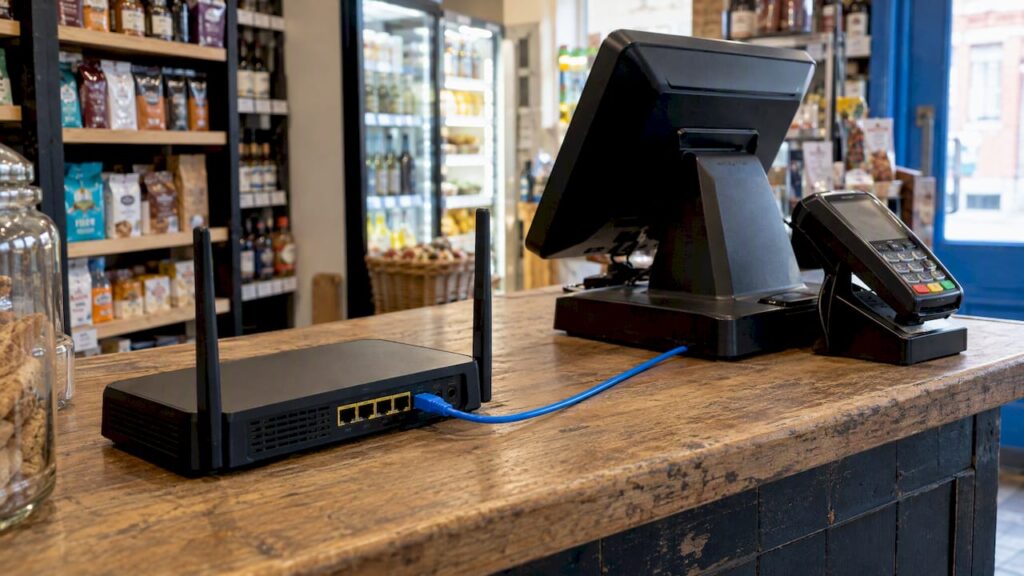
Your EPOS does not need a fast connection. It needs a stable one. A reliable broadband line, a router you control, a payment network kept apart from guest Wi-Fi, and a 4G or 5G backup will cover most UK shops, cafés and restaurants. Get those four things right and the till keeps taking money when the rest of the building is struggling.
This guide covers what to put in place, in what order, and how to test it before opening day. It is written for owners and managers in places like Birmingham and Coventry who are fitting out a new site or replacing an older system.
TL;DR
- Stability beats speed: a steady wired or well-covered Wi-Fi connection matters more than a big headline Mbps figure.
- Keep your payment devices on their own network, separate from customer Wi-Fi, and password-protect it with modern WPA encryption.
- Plug fixed devices in with Ethernet cable where you can, and use Wi-Fi only for devices that move.
- Add a 4G or 5G backup so card payments survive a broadband outage.
- Walk the whole shop floor with a device before you open, including the furthest corner.
Table of Contents
- Does an EPOS system need the internet?
- What internet connection does a POS need?
- Wired or Wi-Fi: how to connect each device
- Wi-Fi coverage and reliability for your tills
- Separating the POS network from guest Wi-Fi
- Backup connection: keeping card payments alive
- Where our EPOS fits
- Our view: plan the network before the till
- Test your network before opening
- A short setup checklist
- FAQ
- Sources
Does an EPOS system need the internet?
Most modern systems do. A cloud EPOS keeps sales, stock and reports online, so you can see them from your phone or from another branch. Card payments also need a route to your payment provider every time a customer taps.
What each system does when the line drops is not the same. Some keep recording sales on the till and sync later. Others stop at certain steps. Card authorisation is the awkward one, because the bank has to say yes, and that needs a connection. Before you buy, ask the supplier three plain questions:
- Can I keep ringing up sales if the internet goes down?
- Can I still take card payments, and how?
- What happens to the sales data when the connection comes back?
A good supplier answers these without hedging. If yours cannot, treat that as a warning about the system, not the network.
What internet connection does a POS need?
An EPOS sends small pieces of data: a sale, a stock change, a card authorisation. It is not streaming video. That is why we tell customers to stop chasing the biggest package and look at three other things first.
- Reliability. A line that drops twice a day is worse than a slower line that never drops.
- Latency. Card payments feel slow when each message takes a long time to travel, even if the line is fast on paper.
- Competition for bandwidth. Staff streaming music, CCTV uploading footage, delivery tablets and guest Wi-Fi all share the same line. The till should not have to queue behind them.
A typical shop with a few terminals is rarely limited by raw speed. A busy restaurant with delivery apps, music, CCTV and public Wi-Fi can be. The fix is usually to separate and prioritise traffic, not to pay for more speed. A UK business-broadband guide for restaurants makes the same point: it recommends prioritising POS traffic and keeping POS and guest networks separate.
Business broadband or home broadband?
Home broadband is fine for a pop-up trial. For a trading shop, business broadband is worth it for faster fault repair and a static address if you need one. Read the repair commitment in the contract, because a long wait for an engineer is what hurts on a Saturday.
Wired or Wi-Fi: how to connect each device
A simple rule works well: if it does not move, cable it.
| Device | Best connection | Why |
|---|---|---|
| Main till or touchscreen terminal | Ethernet | Fixed in place, no radio interference |
| Receipt and kitchen printers | Ethernet | Printers that drop off the network cause missed orders |
| Card terminal on the counter | Ethernet or reliable Wi-Fi | Depends on the model, see below |
| Handheld order tablets | Wi-Fi | They need to move around the floor |
| Portable card machines | Wi-Fi or mobile data | Used at tables, queues or outdoors |
| Back-office PC | Ethernet | Reports and stock uploads can be heavy |
Wired connections remove a whole class of problems. The UK telecoms guide above recommends wired POS connections where possible, with Wi-Fi saved for what has to roam.
If you are not sure which hardware talks to which system, our POS hardware compatibility guide and POS hardware setup guide walk through printers, scanners, cash drawers and terminals.
Wi-Fi coverage and reliability for your tills
Wi-Fi is where most POS network trouble starts. Thick walls, kitchens full of metal, cold rooms and mirrors all weaken the signal. A router in the back office may look fine on your phone and still leave the front corner of the restaurant with nothing.
What to aim for:
- Coverage everywhere you take payments. That includes the terrace, the upstairs room, the queue at the door and the stockroom if you scan stock there.
- More than one access point in larger sites. One router rarely covers a long narrow shop or a two-floor restaurant. Connect extra access points by cable, not by wireless repeaters.
- A fixed Wi-Fi channel and a sensible position. Place access points high and central, away from microwaves and metal shelving.
- Strong signal at the weakest spot. Signal strength is often shown as RSSI. Your provider will quote the level it needs for its devices.
The payments provider Stripe publishes the network rules for its card readers. They are a useful benchmark even if you use another provider, because they show what a payment network needs. For its smart readers, the network must support IPv4, IPv6-only networks are unsupported, and each reader must receive a private IP address. The same page explains that mobile readers use the connection of the POS device they are paired with, while smart readers join the local network directly and both the reader and the POS device must be able to reach the provider.
In plain English: check how your card terminal connects before you plan the router. A terminal that joins your network needs different set-up from one that borrows a tablet’s connection.
Separating the POS network from guest Wi-Fi
This is the one requirement we would never skip. If customers can join the same network as your tills and card terminals, a stranger’s infected phone sits beside your payment system.
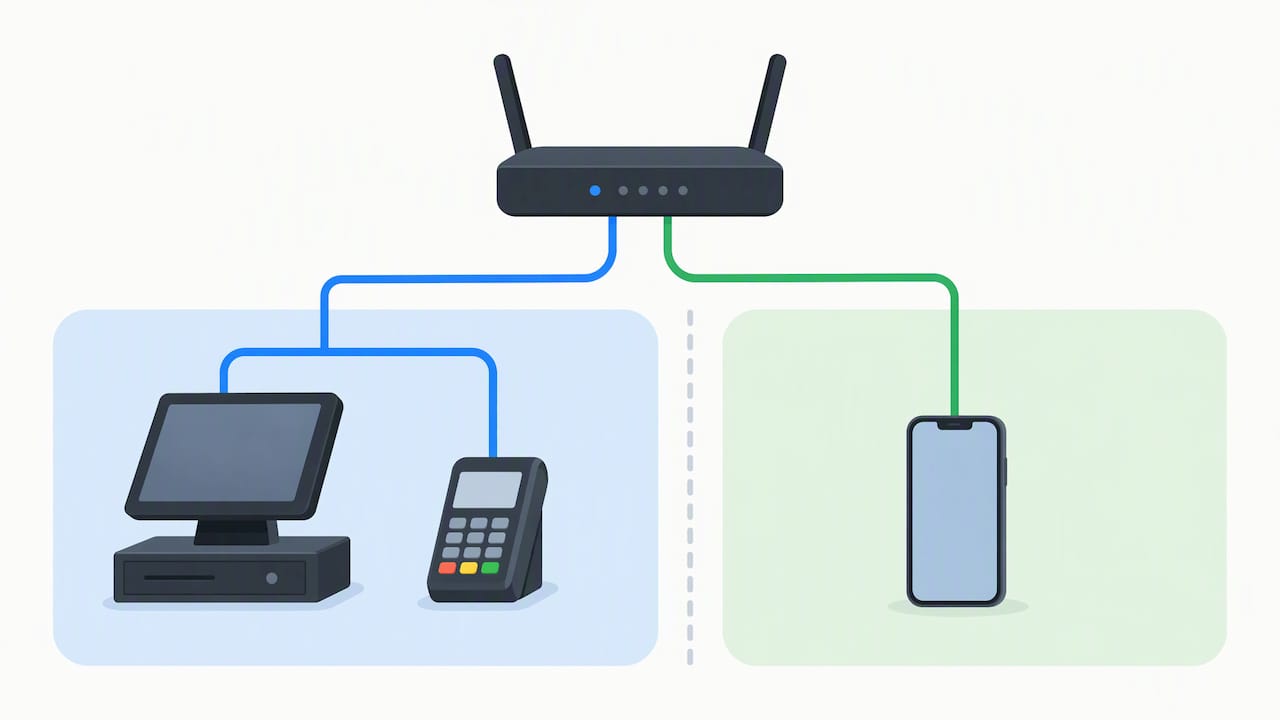
The PCI Security Standards Council, which sets card security rules, gives small merchants direct advice: if you offer free Wi-Fi, use a separate network for your payment system. It calls this network segmentation and suggests asking your network installer to help configure it safely.
How to do it in practice:
- Buy or ask for a router that can create at least two separate networks (often called VLANs or a guest network feature).
- Put tills, printers, card terminals and the back-office PC on the private one.
- Put customers, and ideally personal staff phones, on the guest one.
- Turn off any setting that lets guest devices see other devices.
- Change the router’s default admin password and keep the router’s software updated.
Encrypting the private network
Use a long, unique password. Stripe requires the Wi-Fi used by its readers to be password-protected and use WPA, WPA2 or WPA3 Personal, or WPA2/WPA3 Enterprise encryption. As a general habit, pick the newest standard your devices support, and never leave the payment network open.
Do not hand out the private password to staff for their own phones. Every extra device on that network is one more thing to keep safe.
Backup connection: keeping card payments alive
Broadband will fail at some point. The question is whether you lose a quiet hour or a Friday night. A backup connection turns a crisis into a minor annoyance.
The options, in order of how often we see them work well:
- 4G or 5G backup router. It sits beside your main router and switches to a mobile network when broadband drops. The UK telecoms guide recommends 4G/5G backup for POS and card machines.
- Card terminals with their own mobile data. These keep working even if your router fails, which suits portable machines. See our wireless card machine guide for the trade-offs.
- Phone hotspot. Fine as a last resort for one device, but it is not a plan. Signal, data allowance and battery all let you down.
Whichever you choose, test it. A backup that has never been switched on is a guess. Our guide to 4G backup for UK shops with monthly tests explains a simple monthly routine.
If you want a quick checklist for when things do go wrong on shift, this guide to fixing POS network issues quickly covers the first checks a manager can run before calling anyone.
Where our EPOS fits
If you are choosing a new system, network fit is part of the decision. Our Hospitality EPOS Bundle costs £549 one-off, with AI-powered cloud software at £20 per month. The Integrated Payments Bundle combines EPOS and card terminal in one package, with the EPOS software subscription at £30 per month. For shops, see our EPOS bundles, and for stand-alone payments, our card machines.
Because the software is cloud-based, you can see sales and stock from anywhere, which is exactly why a stable connection matters. We will talk through your layout and connection before you order, so you know what to ask your broadband provider for.
Our view: plan the network before the till
We see the same pattern in new installs. The owner picks a system, orders hardware and only then asks about the router. By then the counter is built, the cable runs are hard to add and the Wi-Fi is guesswork.
Our advice is the other way round. Sketch your floor plan first. Mark where each till, printer, kitchen screen and card terminal will sit. Mark where staff will roam with handhelds. Then decide what needs a cable, where the access points go and where the backup router lives.
Three opinions we hold firmly:
- Cable the fixed kit. Cabling costs a little more on day one and saves the most arguments later.
- Never share a network with customers. Guest Wi-Fi is a nice extra. It is not worth putting card payments at risk.
- Budget for a backup. The cost is small next to one lost Saturday of sales.
Small errors add up. A weak signal in one corner, a printer on Wi-Fi, a guest network that is not truly separate: none looks serious alone, and together they make a shift miserable. A short planning session prevents most of them.
— Amir
Test your network before opening
A proper test takes under an hour and finds nearly every problem.
- Walk the floor with a live device. Take a tablet or handheld to every spot where you will take payments, including the farthest corner of each service area. Stripe’s documentation says to test connectivity against its requirements before installation, and the same habit works for any provider.
- Run a test sale in each place. Process a small card payment or a test transaction wherever you plan to use a terminal.
- Load the network. Ask staff to stream music, run the printers and connect the guest network at the same time, as it will be on a busy day.
- Pull the plug on broadband. Switch off the main router and watch the backup take over. Check the card terminal reconnects.
- Print an order to the kitchen during all of the above.
- Write down what you find. Note router location, passwords held by the owner, the broadband provider’s fault number and the backup SIM details.
Repeat a short version after any change: new router, moved furniture, extra device.
A short setup checklist
- Business broadband with a clear fault-repair commitment
- Router that supports separate private and guest networks
- Ethernet to every fixed device
- Access points cabled back to the router if one is not enough
- WPA2 or WPA3 encryption and a strong private password
- 4G or 5G backup, tested monthly
- Written network notes kept by the owner
- Supplier confirmation of how the EPOS and card terminal behave offline
If you also want a view on features beyond connectivity, our guide to what a modern POS system should have is a good next step.
FAQ
Do I need Wi-Fi for an EPOS system?
Not always. Fixed tills, printers and card terminals can run on Ethernet, which is usually more reliable. Wi-Fi is needed for handheld tablets and portable card machines. Many businesses use both, with cable for the counter and Wi-Fi for roaming staff.
Can I use my customer Wi-Fi for my POS?
We advise against it. Card security guidance for small merchants says to use a separate network for payments if you offer free Wi-Fi. Create a private network for tills and terminals and keep customers on the guest one.
What happens to card payments if my broadband goes down?
That depends on your terminal. Terminals with their own mobile data can keep working, and a 4G or 5G backup router keeps the rest of your network online. Ask your provider how each device behaves before you go live, then test it.
Do I need a fast connection for my EPOS?
Usually not. EPOS traffic is light, so stability, low delay and separating other traffic from the till matter more than raw speed. A busy site with CCTV, music, delivery tablets and guest Wi-Fi may need more capacity, but prioritising the POS often helps more than upgrading.
Sources
- Terminal network requirements, Stripe Documentation
- Small Merchant Guide to Safe Payments, PCI Security Standards Council
- Restaurants: Business Broadband, POS and Guest Wi-Fi, Telecoms4Business
- Fix POS network issues quickly