From 6 April 2026, sole traders with total qualifying income above £50,000 must use Making Tax Digital for Income Tax. This means keeping digital records, using compatible software, sending income and expense summaries to HMRC every three months, and submitting the year-end tax return through that software.
The £50,000 test is based on gross income before expenses from self-employment and property combined. For the first mandatory group, HMRC uses qualifying income reported on the 2024/25 Self Assessment tax return. (gov.uk)
For shopkeepers, café owners, takeaway operators and other sole traders, the biggest change is how regularly financial records must be maintained. You’ll still pay tax through Self Assessment, but leaving all your bookkeeping until January will no longer be a practical option.
Key takeaways
| Question | Direct answer |
|---|---|
| When did MTD for Income Tax begin? | 6 April 2026 for the first mandatory group |
| Who is included in 2026? | Sole traders and landlords with qualifying income above £50,000 |
| Is the threshold based on profit? | No. It’s based on gross self-employment and property income before expenses |
| What must you do? | Keep digital records, submit quarterly updates and complete your tax return through compatible software |
| Do quarterly updates replace the tax return? | No. You must still submit a final tax return |
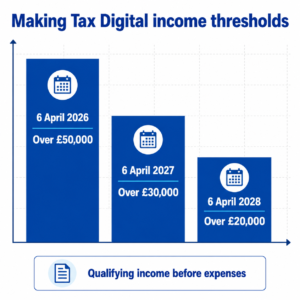
| When does the threshold fall? | Above £30,000 from April 2027 and above £20,000 from April 2028 |
| Do limited companies follow these particular rules? | No. These MTD for Income Tax rules apply to qualifying individuals, including sole traders and landlords |
What is Making Tax Digital for Income Tax?
Making Tax Digital for Income Tax, often shortened to MTD for Income Tax, changes how certain sole traders and landlords manage Self Assessment.
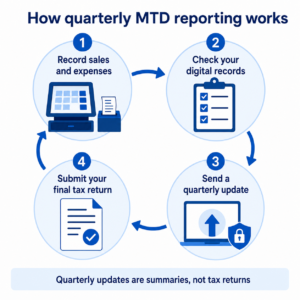
Instead of gathering receipts and reconstructing an entire year shortly before the January deadline, you must maintain your business records digitally throughout the year. Compatible software then uses those records to create and send updates to HMRC.
Under the system, you or your accountant will use compatible software to:
- Create, store and correct digital income and expense records
- Send quarterly summaries to HMRC
- Make any necessary accounting and tax adjustments
- Complete and submit your tax return
- Pay the tax due by the usual deadline
HMRC doesn’t provide the bookkeeping software itself, so you need to select a compatible product or confirm that your accountant’s system can handle the requirements. (GOV.UK)
Who must use Making Tax Digital in 2026?
You’re required to use Making Tax Digital for Income Tax from 6 April 2026 if you:
- Are an individual registered for Self Assessment
- Receive income from self-employment, property or both
- Had qualifying income above £50,000 in the 2024/25 tax year
- Don’t qualify for an exemption
The rule can apply whether you operate one business or several. If you run a convenience store and also receive rental income, for example, both sources can count towards your qualifying income.
The programme is being introduced gradually:
| Qualifying income shown by | Income threshold | MTD start date |
|---|---|---|
| 2024/25 tax return | Above £50,000 | 6 April 2026 |
| 2025/26 tax return | Above £30,000 | 6 April 2027 |
| 2026/27 tax return | Above £20,000 | 6 April 2028 |
These are “above” thresholds. An income of exactly £50,000, for instance, doesn’t cross the 2026 threshold.
Even if you aren’t included yet, it’s sensible to check your records. A growing business that falls below £50,000 could still enter MTD in 2027 or 2028.
What counts as qualifying income?
Qualifying income is the gross amount you receive from self-employment and property before deducting business expenses or tax. In everyday terms, this normally means turnover rather than profit.
Suppose your takeaway produced £47,000 in annual sales and you received £6,000 in rental income. Your combined qualifying income would be £53,000, even if ingredients, rent, wages and other costs reduced your eventual taxable profit.
That distinction matters. Don’t look only at the profit figure near the bottom of your accounts when deciding whether the rules apply.
Income from every relevant self-employed business must be considered. However, employment income taxed through PAYE and an individual partner’s share of partnership profit aren’t included in the qualifying-income calculation.
If you’re unsure which income sources count, check your submitted tax return with an accountant or tax adviser.
What changes for sole traders in practice?
You must maintain digital records
You need to create and keep digital records of business income and expenses. These records should include details such as the amount, date and category of each transaction.
Digital record-keeping doesn’t necessarily mean photographing every paper document. You should retain supporting documents where required, but the transaction information itself must be entered into an appropriate digital system.
This could involve bookkeeping software, an approved spreadsheet setup with bridging software, or another HMRC-compatible arrangement. What matters is maintaining an effective digital link when information is transferred between systems.
You must send quarterly updates
Every three months, your software adds together the income and expense records for each business. It then sends category totals to HMRC.
These updates are summaries, not complete tax returns. You don’t normally need to make year-end accounting or tax adjustments before sending them.
If you own a grocery shop and a separate mobile phone business as a sole trader, you may need a quarterly update for each business. That makes accurate separation of sales and expenses particularly important.
For most businesses using standard tax-year periods, the quarterly deadlines are:
| Reporting period | Submission deadline |
|---|---|
| 6 April to 5 July | 7 August |
| 6 April to 5 October | 7 November |
| 6 April to 5 January | 7 February |
| 6 April to 5 April | 7 May |
The reports are cumulative. For example, the second update covers records from the beginning of the tax year through to the end of the second update period.
You still submit a final tax return
Quarterly updates don’t replace your annual tax return. After the tax year ends, you’ll review the records, make necessary adjustments, include other relevant income and submit the completed return through compatible software.
The usual 31 January deadline for submitting the return and paying the tax due remains in place.
Does MTD mean paying tax four times a year?
No. Sending quarterly updates doesn’t automatically mean paying Income Tax every quarter.
The updates give HMRC a summary of your business income and expenses. Your normal Self Assessment payment deadlines continue to apply, including payments on account where relevant.
The distinction is simple: quarterly reporting is about sharing records, while tax payment follows the existing Self Assessment timetable.
Making Tax Digital 2026 deadlines to know
For sole traders who joined the first mandatory phase, the key dates in the 2026/27 reporting cycle are:
- 6 April 2026: Digital record-keeping begins
- 7 August 2026: First quarterly update deadline
- 7 November 2026: Second quarterly update deadline
- 31 January 2027: Deadline for the separate 2025/26 Self Assessment return
- 7 February 2027: Third quarterly update deadline
- 7 May 2027: Fourth quarterly update deadline
- 31 January 2028: Deadline for the completed 2026/27 tax return and associated payment
The overlap can initially feel confusing. During the first MTD year, you may be reporting current-year quarterly figures while also completing the previous year’s Self Assessment return.
HMRC has said that penalty points won’t be issued for late quarterly updates during 2026/27. Existing penalties can still apply to late annual tax returns and late tax payments, while points-based quarterly penalties are due to apply from April 2027.
How to prepare your business
1. Confirm whether you’re included
Check the gross self-employment and property income reported on your relevant tax return. Don’t deduct rent, stock, wages, utilities or card-processing charges when testing the threshold.
If you didn’t receive a letter from HMRC, you’re still responsible for checking whether the rules apply to you.
2. Speak to your accountant
Ask who will maintain the digital records and send the updates. Some accountants expect clients to enter daily transactions, while others offer a managed bookkeeping service.
Agreeing on responsibilities early helps prevent gaps, duplicated work and missed deadlines.
3. Choose compatible software
Check whether your existing bookkeeping software supports MTD for Income Tax. Compatibility with MTD for VAT doesn’t automatically guarantee that it supports the Income Tax service.
You’ll need to authorise the selected software so it can connect to HMRC.
4. Organise your sales records
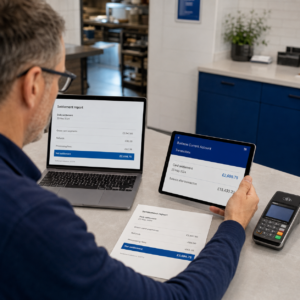
Daily sales should reconcile with card settlements, cash takings, refunds and other payment methods.
For example, a café’s till might show £1,200 in daily sales. Its records should explain how much was received by card, how much was taken in cash and whether any refunds or discounts changed the final figures.
Read our guide to reconciling card payments with daily sales for a practical process you can follow.
5. Separate business and personal spending
Using a dedicated business bank account makes transaction matching much easier. It reduces the time spent working out whether a payment was for stock, household shopping or another personal expense.
You should also create clear categories for stock purchases, rent, utilities, card fees and other normal business costs.
6. Test the process before the next deadline
Don’t wait until the evening before a quarterly update is due. Enter a sample month, reconcile it against your bank and card statements, and confirm that your accountant can access what they need.
A short test can expose missing information while it’s still easy to correct.
How can an EPOS system help with MTD preparation?
An EPOS system isn’t automatically a substitute for MTD-compatible accounting software. However, it can provide more reliable source records for your bookkeeping.
A well-configured EPOS system can record:
- Daily gross sales
- Cash and card payment totals
- Refunds and voids
- Discounts
- VAT information
- Product and category sales
- Sales from different locations
Imagine a busy convenience store with hundreds of transactions per day. Manually recreating each day’s takings from paper notes would take time and increase the chance of errors.
With digital EPOS reports, the owner can compare till totals with card settlements and bank deposits before passing accurate figures into compatible accounting software. Integrated card payment solutions can make that reconciliation more straightforward by keeping sales and payment information organised.
The goal isn’t simply to collect more data. It’s to create a dependable trail from the original sale to the figures used in your digital tax records.
Common MTD mistakes to avoid
One common mistake is testing the threshold using profit instead of gross income. A business can make a modest profit and still have turnover above £50,000.
Another is assuming quarterly updates replace the annual return. You’ll still need to check the year’s figures, make relevant adjustments and submit the completed return.
Other problems include mixing personal and business spending, failing to reconcile card settlements, keeping incomplete cash records, and assuming an accountant can reconstruct everything from bank statements.
The good news is that you don’t need an elaborate finance department. Consistent daily records, suitable software and a clear process with your accountant can make the requirements manageable.
Is anyone exempt from Making Tax Digital?
Some people may be exempt, including those HMRC accepts as digitally excluded. This could apply where age, disability, location, religion or another relevant circumstance makes it unreasonable to use digital tools.
Certain people are automatically exempt, including individuals without a National Insurance number before the start of the relevant tax year. An exemption shouldn’t be assumed simply because digital bookkeeping is inconvenient or unfamiliar.
Check the official HMRC criteria and apply where necessary.
Get your sales records ready for digital reporting
Making Tax Digital 2026 means more regular reporting for sole traders above the qualifying-income threshold. The strongest preparation is to keep accurate records throughout the year, reconcile every payment method and make sure your software works with your accountant’s process.
Switch & Save helps UK businesses reduce costs with AI-powered EPOS systems, card payment solutions and business finance.
Frequently asked questions
What is Making Tax Digital 2026?
Making Tax Digital 2026 refers to the introduction of mandatory digital Income Tax records and quarterly updates for eligible sole traders and landlords from 6 April 2026.
What is the MTD threshold for sole traders in 2026?
The threshold is qualifying income above £50,000. This is gross income before expenses from self-employment and property combined.
Is MTD based on turnover or profit?
It’s based on qualifying gross income, which broadly means turnover before business expenses. It isn’t based on net profit.
Do I need MTD if my turnover is below £50,000?
You weren’t included in the first mandatory phase if your relevant qualifying income was £50,000 or less. However, the threshold falls to above £30,000 from April 2027 and above £20,000 from April 2028.
Do I need to submit four tax returns every year?
No. Quarterly updates are summaries of digital records, not full tax returns. You’ll still complete one final tax return after the end of the tax year.
Can my accountant handle MTD for me?
Yes. An authorised accountant or tax agent can manage parts of the process, but you still need to provide complete and timely records.
Is an EPOS system MTD-compatible?
An EPOS system records sales and payment information, but it may not itself be MTD for Income Tax software. Ask your EPOS, accounting software and bookkeeping providers how data will move between their systems.
Do limited companies join MTD for Income Tax in 2026?
No. The 2026 MTD for Income Tax requirements concern qualifying individuals receiving self-employment or property income. Companies have different reporting obligations.