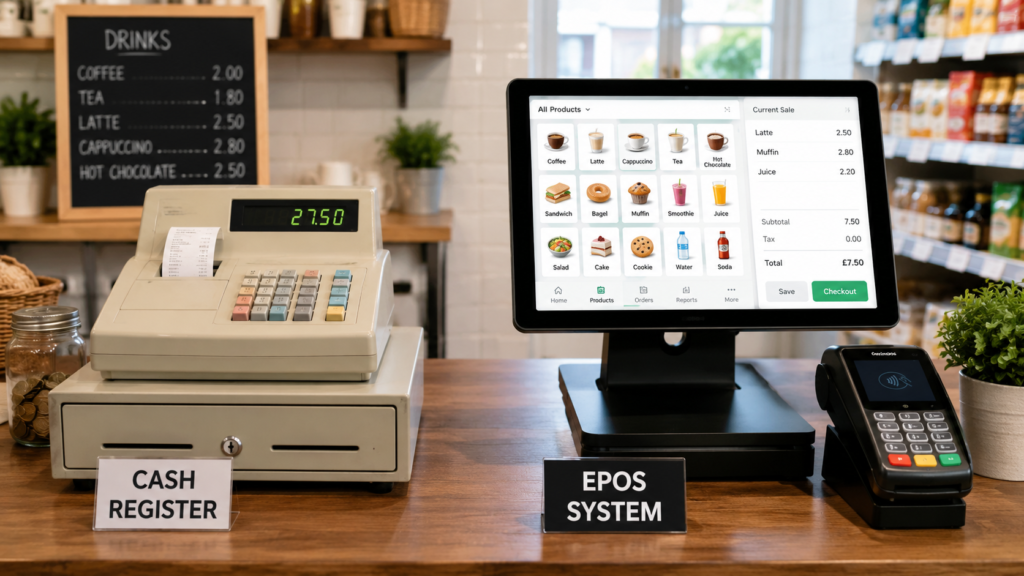
For most new UK businesses, an EPOS system is a better long-term choice than a traditional cash register. A cash register can record basic sales and hold cash, but an EPOS system can also manage stock, process payments, track staff activity, produce reports and help business owners make better decisions.
A traditional cash register may still be suitable for a very small business with a limited product range and simple sales. However, cafés, takeaways, restaurants, convenience stores, mobile shops and growing retailers will usually benefit more from an EPOS system.
The right choice depends on your budget, business model, expected transaction volume and how much control you need over daily operations.
Key Takeaways
| Question | Direct answer |
|---|---|
| Which is better for most new businesses? | An EPOS system offers more control, reporting and growth potential. |
| Is a cash register cheaper? | It may cost less initially, but it provides fewer management features. |
| Can an EPOS system manage stock? | Yes. Most modern systems can track stock levels, sales and product performance. |
| Can EPOS connect to card machines? | Yes. Integrated card payments can reduce manual entry and payment mistakes. |
| Is EPOS suitable for small businesses? | Yes. It can be configured for small retailers, cafés, takeaways and service businesses. |
| When is a cash register enough? | For businesses with very few products, low sales volume and no need for detailed reporting. |
What Is a Cash Register?
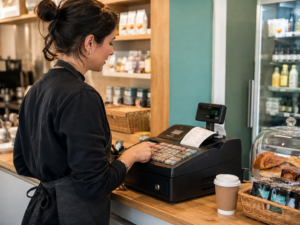
A cash register is a basic till used to record sales, calculate transaction totals and store cash securely.
Traditional cash registers usually include:
- A keypad
- A small display
- A receipt printer
- A cash drawer
- Basic sales-total functions
Some newer electronic cash registers can store product buttons or produce simple end-of-day totals. However, they normally provide limited information compared with an EPOS system.
For example, a small market stall selling five or six products may only need to enter prices, accept cash and print receipts. In that situation, a traditional register could be sufficient.
The limitations become more noticeable when the business has hundreds of products, multiple staff members, changing prices or stock that must be monitored closely.
What Is an EPOS System?
EPOS stands for Electronic Point of Sale. It combines hardware and software to process sales while collecting useful business information.
A typical EPOS setup may include:
- A touchscreen terminal or tablet
- EPOS software
- A receipt printer
- A cash drawer
- A barcode scanner
- A card machine
- Stock-management tools
- Sales and staff reports
Unlike a basic cash register, an EPOS system does more than complete transactions. It can show what was sold, when it was sold, who processed the sale and how the customer paid.
Modern AI-powered EPOS systems can also help owners identify sales patterns, monitor stock movement and manage different parts of the business from one platform.
Cash Register vs EPOS System: Main Differences
| Feature | Traditional cash register | EPOS system |
|---|---|---|
| Records basic sales | Yes | Yes |
| Accepts cash | Yes | Yes |
| Prints receipts | Usually | Yes |
| Product database | Limited | Yes |
| Barcode scanning | Sometimes | Yes |
| Stock tracking | Limited or unavailable | Yes |
| Detailed sales reports | Basic | Yes |
| Staff activity tracking | Limited | Yes |
| Card machine integration | Usually separate | Available |
| Customer loyalty features | Rarely | Available |
| Multi-branch management | No | Available |
| Menu or product updates | Manual | Managed through software |
| Suitable for growth | Limited | More scalable |
The most important difference is the amount of business information each system provides.
A cash register tells you that a sale happened. An EPOS system can tell you which product was sold, its price, the payment method, the staff member involved and the effect on available stock.
Which Option Costs Less?
A traditional cash register will often have a lower initial purchase cost because it contains fewer features. There may be no software subscription, cloud access or advanced hardware to pay for.
However, the cheapest system to buy is not always the cheapest system to operate.
A business using a basic register may still need to:
- Count stock manually
- Enter card payment amounts separately
- Calculate staff performance manually
- Update prices one product at a time
- Prepare sales figures using spreadsheets
- Investigate cash and stock differences without detailed records
These tasks take time and may increase the risk of errors.
An EPOS system may require a larger initial investment or an ongoing software fee, but it can replace several manual processes. New business owners should therefore compare the total value and operational savings, not only the purchase price.
For businesses that need help funding equipment, stock or expansion, Switch & Save also provides access to suitable business finance solutions
Which System Is Easier to Use?
A simple cash register may be easier to learn initially. Staff can enter a price, select a department and complete the sale.
However, simplicity can become a disadvantage when the business grows.
Imagine a convenience store with hundreds of products. Without a proper product database and barcode scanner, staff may need to remember prices or search through manually programmed buttons. Updating prices can also become time-consuming.
An EPOS system normally presents products through clearly organised categories, touchscreen buttons or barcode scanning. Once the software has been configured correctly, daily sales can be processed quickly.
For a café, employees can select drinks, sizes, extras and food items from a structured menu. For a takeaway, the system may support collection, delivery and dine-in orders.
The setup process is more detailed, but the day-to-day workflow can be easier and more consistent.
Stock Management: Where EPOS Has a Clear Advantage
Stock control is one of the strongest reasons to choose an EPOS system.
A cash register records the value of a sale but may not automatically reduce the product’s stock quantity. This means the business owner must count products manually or maintain a separate spreadsheet.
An EPOS system can update stock whenever an item is sold.
Depending on the software, it may help a business:
- View current stock levels
- Identify low-stock products
- Monitor damaged or expired items
- Record stock adjustments
- Track purchase deliveries
- Compare expected and actual stock
- Identify fast-selling and slow-selling products
- Reduce the risk of running out of popular items
Reporting and Business Decisions
New businesses need accurate information to understand whether they are making progress.
A traditional cash register may provide a daily sales total or a basic department report. That can show how much money was taken, but it may not explain why sales increased or decreased.
An EPOS system can provide reports such as:
- Daily, weekly and monthly sales
- Sales by product
- Sales by category
- Sales by payment method
- Staff sales activity
- Refund and discount reports
- Busy trading periods
- Best-selling products
- Low-performing products
- Stock movement
- Profit or margin estimates, where configured
These reports help owners make practical decisions.
For example, a takeaway may discover that most orders arrive between 6 pm and 9 pm. The owner can then schedule more staff during those hours.
A mobile phone shop may find that accessories generate more transactions than certain device categories. It can use that information to adjust displays, promotions and stock orders.
Card Payment Integration
Both cash registers and EPOS systems can be used alongside a card machine. The difference is how the payment amount reaches the terminal.
With a non-integrated setup, a staff member enters the transaction into the till and then manually types the amount into the card machine. This creates an opportunity for mistakes.
For example, a £27.50 sale could accidentally be entered into the terminal as £25.70.
With integrated card payment solutions, the EPOS system can send the amount directly to the card machine. Once the payment is approved, the transaction can be recorded automatically.
This can help:
- Reduce manual entry
- Minimise payment discrepancies
- Speed up checkout
- Simplify end-of-day reconciliation
- Create a clearer transaction record
Integration is particularly valuable for busy shops, restaurants, bars and takeaways where staff process many payments during peak periods.
Which Businesses Benefit Most from an EPOS System?
An EPOS system is generally the stronger option for businesses with products, stock, staff or repeat customers.
Retail and grocery shops
Retailers benefit from barcode scanning, product databases, stock alerts, price management and sales reporting.
Cafés and restaurants
Hospitality businesses can organise menus, add modifiers, send orders to preparation areas and analyse sales by item or trading period.
Takeaways
An EPOS system can help manage collection, delivery and counter orders while keeping payment and sales information together.
Bars and pubs
Staff can find products quickly, process orders efficiently and monitor sales across different categories.
Mobile phone and electronics shops
These businesses often need accurate product records, accessory stock control, serial information and staff accountability.
Multi-branch businesses
A cloud-based EPOS platform can make it easier to review activity across more than one location. A traditional register normally operates as an isolated device.
When Might a Cash Register Be Enough?
A cash register may still be suitable when the business:
- Has a very small product range
- Processes relatively few transactions
- Accepts mainly cash payments
- Does not hold much stock
- Has only one or two users
- Does not need detailed reports
- Has no immediate plans to expand
For example, a temporary stall selling a small number of fixed-price products may not need advanced software.
However, new business owners should consider what they may need in 12 or 24 months. Replacing a basic register, transferring product data and retraining staff later can create additional work.
Choosing a scalable system at the beginning may make future growth easier.
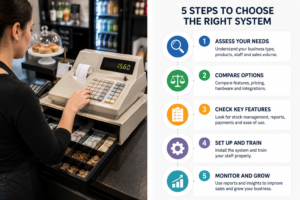
How to Choose Between a Cash Register and an EPOS System
Before choosing your till, answer the following questions.
How many products or menu items will you sell?
A small number of fixed-price items may be manageable on a cash register. A large or changing range is easier to manage through EPOS software.
Do you need to track stock?
Businesses that purchase, store and resell products should strongly consider an EPOS system.
Will you accept card payments?
Integrated card payments can improve accuracy and speed, especially when a high percentage of customers pay by card.
Do you employ staff?
EPOS user accounts and activity reports can provide better accountability than a shared cash register.
Do you need sales reports?
An EPOS system is usually more suitable when you need product-level, category-level or staff-level reporting.
Could the business expand?
Consider future branches, additional tills, online ordering, loyalty programmes and a larger product range.
What support is included?
Ask about installation, training, technical support, software updates, data backups and hardware replacement arrangements.
Cash Register or EPOS: Final Verdict
For most new UK retailers and hospitality businesses, an EPOS system is the better investment.
A traditional cash register can complete simple cash transactions at a lower initial cost. However, it offers limited support for stock management, reporting, integrated payments and future growth.
An EPOS system provides a clearer view of what is happening across the business. It can bring transactions, products, stock, staff activity and payments into one system.
The best system is not necessarily the one with the most features. It is the one that matches your current requirements while giving you enough flexibility to grow.
How Switch & Save Can Help
Switch & Save helps UK businesses reduce costs with AI-powered EPOS systems, card payment solutions and business finance.
Our solutions are designed for retailers, cafés, restaurants, takeaways, bars, grocery stores, mobile shops and other small businesses that want better control over daily operations.
Whether you are opening your first location or replacing an outdated till, we can help you compare your current setup with a more connected solution.
Frequently Asked Questions
Is an EPOS system the same as a cash register?
No. A cash register mainly records transactions and stores cash. An EPOS system processes sales while also providing tools for product management, stock control, reporting, staff access and payment integration.
Does a new business need an EPOS system?
Not every new business needs one, but it is generally beneficial for businesses with several products, stock, employees or a high number of transactions.
Can an EPOS system accept cash?
Yes. An EPOS system can record cash, card and other supported payment methods. It can also connect to a cash drawer.
Can I connect a card machine to a traditional cash register?
A card machine can be used alongside a cash register, but the amount may need to be entered manually. Integration is more commonly available with EPOS systems.
Is an EPOS system suitable for a small café?
Yes. A café can use EPOS software to organise its menu, add product options, record different payment methods and monitor its best-selling items.
Can an EPOS system work without the internet?
This depends on the provider and software. Some systems include offline functionality that allows transactions to continue temporarily, while others depend more heavily on an internet connection. Ask the provider how offline sales, card payments and data synchronisation are handled.
Can I upgrade from a cash register to EPOS later?
Yes. However, you may need to create or import your product list, configure hardware and train employees. Starting with an appropriate system may reduce the need for a disruptive change later.
What should I ask an EPOS provider before buying?
Ask about contract terms, installation, training, technical support, hardware warranties, payment integration, offline operation, software updates, data ownership and any ongoing fees.