The best way to get more Google reviews is to ask customers consistently, make reviewing easy with a direct link or QR code, and welcome honest feedback. Don’t offer rewards or ask only customers you expect to leave five stars. When a negative review appears, check what happened, respond calmly and offer a clear next step.
For a busy UK café, takeaway or shop, this doesn’t need to become another complicated job. A simple request, a visible review link and a regular check of your feedback are a practical starting point.
This guide explains how to get more Google reviews, what to avoid and how to handle criticism without turning it into a public argument.
Key takeaways
| What to do | How it helps |
|---|---|
| Ask for honest feedback consistently | Makes review requests part of everyday service |
| Share a direct review link or QR code | Reduces the effort needed to find your business |
| Keep requests voluntary and neutral | Gives customers room to share their actual experience |
| Investigate negative feedback before replying | Helps you give an accurate, useful response |
| Report policy violations | Gives Google a basis to assess removal |
| Fix recurring service problems | Addresses the experience behind the review |
Why Google reviews matter
Reviews give people something useful to read before choosing where to spend their money. Someone looking for a local restaurant might want to know about service and portion sizes. A customer choosing a mobile phone shop might care more about repair updates and clear pricing.
Specific feedback helps answer those questions. Your replies also show how you deal with people when something goes wrong.
Think of your Google Business Profile as another customer-facing part of your business. It deserves attention alongside your shop window, menu and website.
How to get more Google reviews

1. Create a direct Google review link
Don’t make customers search for your business and work out where to leave feedback. Google supports sharing a review link or QR code. Customers need to be signed into a Google Account to post a review.
Use the review-sharing option in your Business Profile, then test the link on your phone before printing or sharing it.
For businesses with several locations, check that each branch uses the correct link. A review intended for your Birmingham café shouldn’t accidentally land on your Coventry listing.
2. Ask after customers have experienced your service
Choose a point when customers can give meaningful feedback. For a restaurant, that might be after the meal. For a repair shop, it could be after collection, once the customer has checked their device.
Keep the invitation brief:
“Thanks for visiting. If you’d like to share your experience, you’ll find our Google review link on your receipt.”
Use the same neutral approach across customers. Don’t reserve invitations for people who compliment you, and don’t ask for a particular star rating.
3. Put a QR code somewhere useful
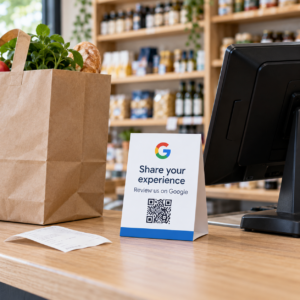
A small review card can sit beside the till, inside a takeaway bag or near the exit. Keep it easy to notice without crowding your counter.
Use straightforward wording, such as “Share your experience on Google”. Include your business name so customers know which listing will open.
Test the printed code at its actual size. A code that works on your laptop screen may be difficult to scan on a small, faded receipt.
4. Make review requests part of your receipt process
Where your receipt setup supports it, add the review link or a QR code to the footer. This gives customers something they can use later, without holding up the queue.
For example, a grocery shop could include a short invitation beneath its opening hours. A takeaway could place the same message on an order insert.
If you’re reviewing your till setup, our guide to what an EPOS system is explains the basics. Ask about receipt customisation before choosing a system, because available features vary.
5. Give your team a simple approach
Staff shouldn’t need a sales script to mention reviews. Explain where the review link appears and how to offer a brief, optional invitation.
Avoid turning reviews into a competition between employees. Google’s policy prohibits pressuring customers, requesting specific review content and asking staff to solicit a set number of reviews. Google Business Profile Help
Your team’s main job is still serving customers well.
Review tactics to avoid
Offering a free coffee for a review might sound harmless, but Google prohibits incentives for posting, changing or removing reviews. Buying reviews and arranging feedback that doesn’t reflect a genuine experience also breach its rules.
Another problem is review gating. This means screening customers first, directing satisfied people to Google while steering unhappy people into a private feedback form. Google prohibits selectively requesting positive reviews or discouraging negative ones.
You can offer a private complaints channel. Just don’t use it to decide who gets invited to review publicly.
Keep the request open, optional and free from instructions about what customers should write.
How to respond to bad Google reviews
A one-star review can feel personal, especially when you’ve worked hard all week. Give yourself enough time to write a measured response.
A useful structure is: acknowledge the issue, explain what you know and offer a next step.
Check the facts first
Look at the relevant order, receipt or booking, and speak to the team involved. Separate what you can confirm from what still needs investigating.
Not recognising the reviewer’s name doesn’t prove the review is fake. A booking might be under someone else’s name, or the person may have paid cash.
Keep the reply specific and respectful
Google recommends timely, personalised replies that protect customer privacy and acknowledge mistakes where appropriate. Move detailed discussions to a private channel.
Here’s an illustrative response to a delayed takeaway order:
“Hi Aisha, I’m sorry your order arrived later than expected. We’d like to check what happened with the delivery. Please contact the shop manager using the details on our website and share your order reference privately. — Sam”
It recognises the complaint and gives the customer something practical to do.
Avoid empty phrases such as “Sorry you feel that way”. They can sound dismissive because they focus on the customer’s reaction rather than the problem.
Explain disputed details without arguing
Sometimes the review leaves out relevant information. You can clarify your process without publishing a long defence.
For a mobile phone shop, an illustrative reply might be:
“Hi Daniel, I’m sorry there’s been confusion about the repair quote. We’d like to review the estimate and what was agreed before work began. Please contact the manager through our website so we can investigate.”
Don’t claim you’ve investigated or changed a process unless you actually have.
Keep refunds separate from review changes
Resolve complaints on their merits. Don’t make a refund, replacement or other remedy conditional on deleting criticism.
The customer may choose to update their review afterwards. That decision should remain theirs.
When can you report a Google review?
You can report reviews that appear to breach Google’s policies, such as spam or prohibited content. A low rating or an account you disagree with isn’t enough on its own. Google assesses policy violations rather than settling ordinary customer disputes.
To report a review:
- Open your Google Business Profile and select Read reviews.
- Find the review and choose the report option.
- Select the relevant reason and submit it.
- Check progress through Google’s Reviews Management Tool.
If Google finds no violation, an eligible decision can be appealed once through that tool. Removal isn’t guaranteed. Keep any supporting evidence factual and relevant.
Build a manageable review routine
Choose one person to oversee reviews and provide cover when they’re away. A short daily check can help you spot complaints that need investigation.
Once a week, look for repeated themes. Are restaurant customers mentioning unclear collection times? Are shoppers finding a price different at the till? Those patterns give you a specific place to start.
Technology may help address some underlying problems. Depending on the system and configuration, EPOS tools can support stock visibility, order handling and connected payments. Explore Switch & Save’s EPOS systems when assessing what your business needs.
Better systems still need clear processes and a well-supported team. Asking for feedback works best when you also act on it.
Frequently asked questions
Can I ask customers for Google reviews?
Yes. You can invite customers to describe genuine experiences. Keep requests voluntary, avoid incentives and don’t select customers based on the rating you expect.
How many Google reviews should my business aim for?
Start with a consistent process rather than an arbitrary total. Monitor new feedback and recurring issues, but avoid setting staff review-solicitation quotas.
Should I reply to positive reviews too?
A short, personal response can acknowledge useful feedback. Mention a relevant detail rather than repeating the same message underneath every review.
Can I delete a bad Google review?
You can’t directly delete someone else’s review. You can report a policy violation for Google to assess. Genuine criticism may remain, even after you resolve the complaint.
What if I don’t know how to answer a complaint?
Investigate first. If you need more information, acknowledge the concern and invite the customer to contact an appropriate person privately. Don’t guess at what happened.
Give customers an experience worth sharing
Start with one practical step: test your Google review link and add a neutral invitation to your customer journey. Then make time to read the feedback and fix what keeps coming up.
Switch & Save helps UK businesses reduce costs with AI-powered EPOS systems, card payment solutions and business finance.