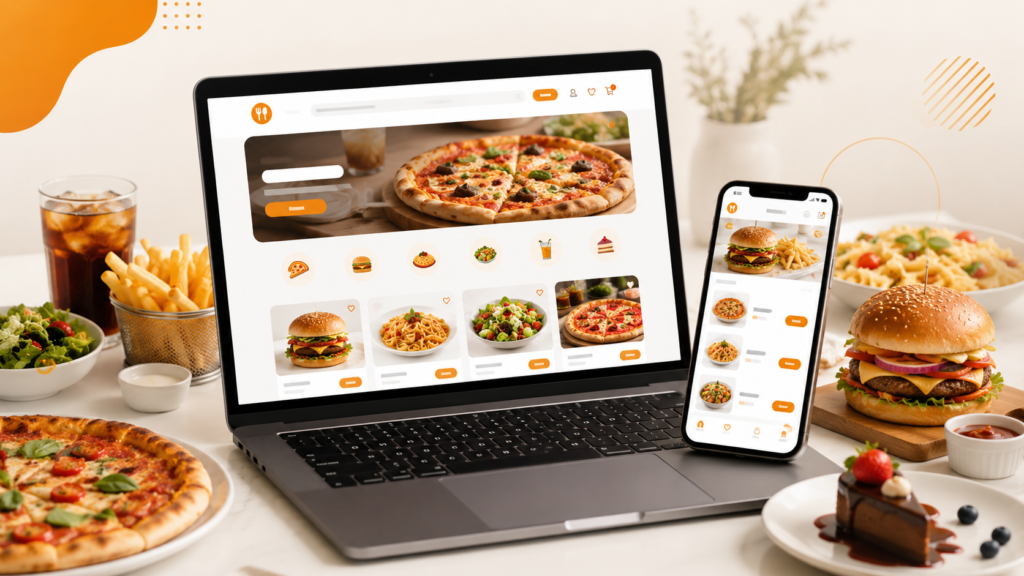
A branded ordering website for restaurants is your own online ordering platform where customers can view your menu, place orders, pay online, and choose delivery, collection, or table ordering without relying only on third-party apps. To set one up properly, you need a clear menu, secure payments, EPOS integration, order notifications, delivery settings, branding, and a simple customer journey.
For UK restaurants, takeaways, cafés, and food businesses, the best setup is one that connects directly with your EPOS system. This helps reduce manual order entry, improves accuracy, keeps your brand visible, and gives you more control over customer relationships.
Switch & Save supports UK hospitality businesses with AI-powered EPOS systems, card payment solutions, and business finance options to help reduce costs and improve day-to-day efficiency.
Key Takeaways
| Point | What it means for your restaurant |
|---|---|
| A branded ordering website gives you control | Customers order directly from your own website instead of only using third-party platforms. |
| EPOS integration is important | Orders can flow into your restaurant EPOS system, reducing manual errors. |
| Branding builds trust | Your logo, colours, menu, offers, and customer experience stay consistent. |
| Online payments improve convenience | Customers can pay before collection, delivery, or table service. |
| Customer data is valuable | Direct ordering helps you understand repeat customers, popular dishes, and sales trends. |
| Switch & Save supports UK businesses | Switch & Save offers hospitality EPOS, payment solutions, business finance, and cost-saving support. |
What Is a Branded Ordering Website for Restaurants?
A branded ordering website for restaurants is an online platform designed around your own business name, logo, menu, colours, and ordering process. Instead of sending customers only to marketplace apps, your restaurant can take orders directly through its own website.
For example, a pizza shop in Birmingham could have a website where customers select pizzas, choose toppings, pay online, and pick delivery or collection. A café in Manchester could let customers pre-order lunch before arriving. A takeaway in London could accept direct orders from local customers without making them search through multiple competing restaurants.
A branded restaurant ordering system usually includes:
- Online menu
- Item modifiers and meal deals
- Delivery and collection options
- Secure card payments
- Order confirmation
- EPOS connection
- Customer database
- Promotional offers
- Reporting tools
The goal is simple: make it easy for customers to order from you directly.
Why Your Restaurant Needs Its Own Ordering Website
Third-party delivery platforms can be useful for visibility, especially when a business is new. However, relying only on those platforms can limit your control over branding, customer communication, and repeat orders.
Your own branded ordering website helps you build a direct relationship with customers. When customers order from your website, they see your brand first. They are not comparing you against dozens of competitors on the same screen.
For UK restaurants and takeaways, this can be especially useful in competitive local areas. A fish and chips shop, dessert shop, peri-peri takeaway, burger restaurant, or curry house can use its website to promote direct ordering, loyalty offers, meal deals, and local delivery.
A branded website also supports better marketing. You can use QR codes, Google Business Profile links, social media posts, leaflets, SMS marketing, and in-store posters to send people directly to your own ordering page.
What Features Should Your Restaurant Ordering System Include?
A good restaurant ordering system should be fast, simple, and connected to your daily operations. Customers should not struggle to place an order, and your staff should not need to retype online orders into the till.
1. Branded Design
Your website should use your restaurant name, logo, colours, food photos, and contact details. This makes the ordering journey feel trusted and familiar.
For example, if your restaurant already uses blue and white branding on menus and signage, your ordering website should follow the same look.
2. Mobile-Friendly Ordering
Most customers order food from their phone. Your website must work smoothly on mobile devices. Buttons should be easy to tap, the basket should be visible, and checkout should be quick.
3. Clear Online Menu
Your menu should be organised into categories such as starters, mains, pizzas, burgers, drinks, desserts, kids’ meals, and sides. Each item should include the price, description, options, and allergen notes where relevant.
4. Product Modifiers
Restaurant orders often need customisation. A strong restaurant ordering system should allow modifiers such as:
- Extra cheese
- No onions
- Spice level
- Sauce choice
- Drink selection
- Meal upgrade
- Size selection
- Add toppings
This is especially important for pizza shops, burger shops, cafés, dessert shops, and takeaways.
5. Collection, Delivery, and Table Ordering
Your website should support the ordering methods your business needs. A takeaway may need delivery and collection. A café may need pre-order collection. A restaurant may want table QR ordering.
6. Secure Payments
Customers should be able to pay online using a secure card payment system. This can reduce cash handling, speed up collection, and help avoid missed orders.
7. EPOS Integration
EPOS integration is one of the most important parts. When your online ordering website connects with your hospitality EPOS system, orders can be processed more efficiently.
This helps your kitchen, counter staff, and management team stay aligned.
8. Reporting and Customer Insights
Your restaurant ordering system should show useful data, such as:
- Best-selling items
- Peak ordering times
- Average order value
- Repeat customers
- Collection vs delivery orders
- Popular promotions
This helps you make better business decisions.
Step-by-Step Guide: How to Set Up a Branded Ordering Website for Your Restaurant
Step 1: Choose Your Main Ordering Goal
Before building the website, decide what you want it to do.
Do you want more direct takeaway orders? Do you want customers to pre-order lunch? Do you want table QR ordering? Do you want to reduce phone orders? Do you want to promote meal deals?
Your goal affects the setup.
For example, a busy kebab shop may focus on delivery and collection. A city-centre café may focus on pre-ordering. A restaurant may focus on dine-in table ordering and digital menus.
Step 2: Prepare Your Menu
Your online menu should be simple, accurate, and easy to understand. Avoid adding too many confusing options.
Group your menu properly. Use clear names and prices. Include descriptions for popular dishes. Add modifiers only where needed.
For example:
- Chicken Burger Meal: includes chips and drink
- Margherita Pizza: choose 9”, 12”, or 15”
- Chicken Tikka Wrap: choose mild, medium, or hot
- Breakfast Bap: add egg, hash brown, or cheese
A clean menu improves conversion because customers can order without needing to call for clarification.
Step 3: Add Your Branding
Your branded ordering website should look like your restaurant, not a generic ordering page.
Use:
- Your logo
- Restaurant name
- Brand colours
- Food photos
- Address
- Contact number
- Opening hours
- Delivery areas
- Collection instructions
This builds confidence and makes customers feel they are ordering from the right business.
Step 4: Set Up Delivery and Collection Rules
Delivery settings are important for UK restaurants and takeaways. You may need to define:
- Delivery radius
- Delivery postcode areas
- Minimum order value
- Delivery charges
- Estimated delivery time
- Free delivery threshold
- Collection preparation time
For example, a restaurant in Leeds may deliver within three miles, charge based on postcode, and offer free delivery over a certain basket value.
Collection rules are also useful. You can set preparation times so customers know when to arrive.
Step 5: Connect Online Payments
Online payment makes ordering easier for customers and helps your team manage orders more confidently.
Card payments are especially useful for:
- Pre-paid collections
- Delivery orders
- Large group orders
- Office lunch orders
- Table ordering
- Event catering
Switch & Save provides card payment solutions alongside EPOS support, helping UK businesses review their setup and reduce unnecessary costs where possible.
Step 6: Connect the Website to Your EPOS
If your online orders do not connect to your EPOS, staff may need to manually re-enter every order. This can cause delays, missed items, and mistakes during busy periods.
A connected restaurant ordering system can help send orders to your till or kitchen workflow. This is useful for restaurants, takeaways, cafés, bars, and dessert shops.
Switch & Save’s hospitality EPOS is built for hospitality businesses that need smoother ordering, payment, reporting, and operational control.
Step 7: Test the Full Customer Journey
Before going live, place test orders as if you are a customer.
Check:
- Does the menu load quickly?
- Are prices correct?
- Do modifiers work?
- Can customers pay online?
- Does the order reach the restaurant?
- Does the receipt show correct details?
- Are delivery charges correct?
- Does the confirmation message make sense?
- Does it work on mobile?
Testing prevents problems when real customers start ordering.
Step 8: Promote Your Branded Ordering Website
Once your website is live, promote it everywhere.
Use:
- Google Business Profile
- Instagram bio
- Facebook page
- TikTok posts
- Menu leaflets
- Receipt footer
- Window posters
- Table cards
- QR codes
- SMS campaigns
- Email offers
A simple message such as “Order direct from our website for collection and delivery” can help shift customers towards direct ordering.
Common Mistakes to Avoid
Making the Menu Too Complicated
Too many options can confuse customers. Keep your categories simple and use modifiers only where they help.
Not Testing Mobile Checkout
A restaurant ordering website must be easy on mobile. If checkout is slow or confusing, customers may leave before paying.
Forgetting Delivery Rules
Incorrect delivery charges or unclear postcodes can create customer complaints. Set clear delivery areas and minimum order values.
Not Connecting to EPOS
Manual order entry creates extra work. EPOS integration helps reduce errors and improves speed.
Not Promoting Direct Ordering
A branded ordering website only works if customers know about it. Add your ordering link to your social media, Google profile, receipts, posters, and menus.
How Switch & Save Can Help
Switch & Save helps UK businesses reduce costs with AI-powered EPOS systems, card payment solutions, business finance, and utility switching services.
For restaurants, cafés, takeaways, bars, dessert shops, and food businesses, Switch & Save can support your ordering setup with hospitality EPOS features designed for daily service operations.
Whether you need a restaurant ordering system, EPOS bundle, payment review, or support with growth funding, Switch & Save can help you review your current setup and find practical ways to improve efficiency.
You can explore EPOS bundles or learn more about business finance options if you need support investing in your restaurant’s digital setup.
A branded ordering website for restaurants is more than just an online menu. It is a direct sales channel, a customer experience tool, and an operational system that can support your restaurant’s growth.
The best setup is simple for customers, clear for staff, and connected to your EPOS. When online ordering, payments, menu management, and reporting work together, your restaurant can reduce manual work and serve customers more efficiently.
Switch & Save helps UK businesses reduce costs with AI-powered EPOS systems, card payment solutions and business finance. Check your savings today.
FAQs
What is a branded ordering website for restaurants?
A branded ordering website for restaurants is your own online ordering platform where customers can view your menu, place orders, pay online, and choose delivery, collection, or table ordering.
Is a branded ordering website better than using delivery apps?
It depends on your goal. Delivery apps can help with visibility, but your own ordering website gives you more control over branding, customer relationships, promotions, and direct orders.
Do I need an EPOS system for online ordering?
You can take online orders without EPOS integration, but connecting your website to your EPOS makes the process smoother. It reduces manual entry and helps your team manage orders more efficiently.
Can a restaurant ordering system support delivery and collection?
Yes. A good restaurant ordering system should support delivery, collection, scheduled orders, online payments, delivery charges, and preparation times.
Can cafés and takeaways use a branded ordering website?
Yes. Branded ordering websites are useful for cafés, takeaways, restaurants, dessert shops, pizza shops, burger shops, bars, and other hospitality businesses.
How do I promote my restaurant ordering website?
Promote it through Google Business Profile, social media, QR codes, menus, posters, receipts, SMS campaigns, and staff recommendations. Make sure customers know they can order directly from you.
Can Switch & Save help with restaurant EPOS and payments?
Yes. Switch & Save supports UK businesses with AI-powered EPOS systems, card payment solutions, business finance, and cost-saving services.